The Wiert Corner – irregular stream of stuff

Jeroen W. Pluimers on .NET, C#, Delphi, databases, and personal interests

  • My badges

  • Twitter Updates

  • My Flickr Stream

  • Pages

  • All categories

  • Enter your email address to subscribe to this blog and receive notifications of new posts by email.

    Join 1,860 other subscribers

Archive for the ‘Hardware’ Category

Connectors/cables for Serial Attached SCSI and SATA – Wikipedia

Posted by jpluimers on 2021/05/10

Since I always get confused with SAS and SATA connectors, some tables from Wikipedia:

  • Serial Attached SCSI Connectors- Wikipedia
    Codename Other names Ext./int. Pins No of devices / lanes Comment Image
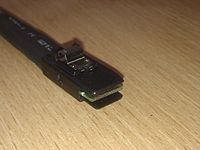
    SFF-8086 Internal mini-SAS, internal mSAS Internal 26 4 This is a less common implementation of SFF-8087 than the 36-circuit version. The fewer positions is enabled by it not supporting sidebands. SFF 8086.jpg
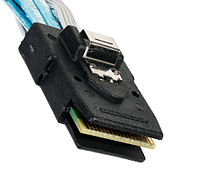
    SFF-8087 Internal mini-SAS, internal mSAS, internal iSAS, internal iPass Internal 36 4 Unshielded 36-circuit implementation of SFF-8086. Molex iPass reduced width internal 4× connector, 12 Gbit/s capability. SFF-8087 SMC.jpg
    SFF-8088 External mini-SAS, external mSAS, external iSAS, external iPass External 26 4 Shielded 26-circuit implementation of SFF-8086. Molex iPass reduced width external 4× connector, 12 Gbit/s capability. SFF 8088.jpg
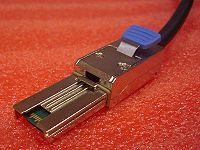
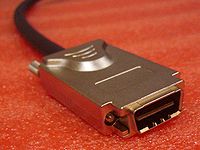
    SFF-8470 InfiniBandCX4 connector, Molex LaneLink External 34 4 High-density external connector (also used as an internal connector). SFF 8470.jpg
    SFF-8482 Internal 29 2 lanes This form factor is designed for compatibility with SATA but can drive a SAS device. A SAS controller can control SATA drives, but a SATA controller cannot control SAS drives. SFF-8482 SAS Plug - Bokeh at f22.jpg
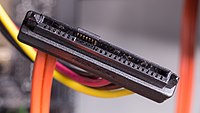
    SFF-8484 Internal 32 or 19 4 or 2 High-density internal connector, 2 and 4 lane versions are defined by the SFF standard. SFF-8484 straight connector.jpg
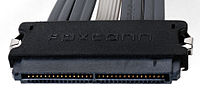
    SFF-8485 Defines SGPIO (extension of SFF 8484), a serial link protocol used usually for LED indicators.
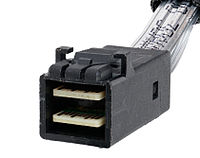
    SFF-8613 (SFF-8643) Internal 36 4 or 8 with dual connector Mini-SAS HD (introduced with SAS 12 Gbit/s) SFF-8643 SMC.jpg
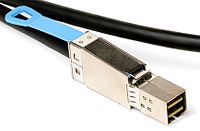
    SFF-8614 (SFF-8644) External 4 or 8 with dual connector Mini-SAS HD (introduced with SAS 12 Gbit/s) SFF-8644 cable.jpg
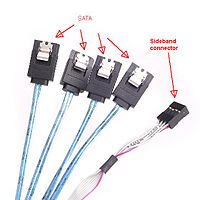
    Sideband connector Internal Often seen with 1× SFF-8643 or 1× SFF-8087 on the other end – internal fan-out for 4× SATA drives. Connects the controller to drives without backplane or to the (SATA) backplane and optionally, to the status LEDs. Sideband.jpg
    SFF-8680 Internal
    • 1
    • (2 ports)
    SAS 12 Gbit/s backplane connector
    SFF-8639 Internal 68
    • 1
    • (2 ports)
    • SAS 12 Gbit/s backplane connector;
    • revision of the SFF-8680.
    • Also known as “U.2”.[17]
    SFF-8639.jpg
    SFF-8638
    • Four 1x ports at up to 24 Gb/s each;
    • two 2x ports at up to 48 Gb/s each;
    • one 4x port at up to 96 Gb/s.
    SFF-8640
    • Four 1x ports at up to 24 Gb/s each;
    • two 2x ports at up to 48 Gb/s each;
    • one 4x port at up to 96 Gb/s.[18]
    SFF-8681
    • Two 1x ports at up to 24 Gb/s each;
    • one 2x ports at up to 48 Gb/s each.
  • Serial ATA: Cables, connectors, and ports – Wikipedia

    Data

    Standard connector, data segment[42]
    Pin # Mating Function
    1 1st Ground
    2 2nd A+ (transmit)
    3 2nd A− (transmit)
    4 1st Ground
    5 2nd B− (receive)
    6 2nd B+ (receive)
    7 1st Ground
     — Coding notch


    • A seven-pin SATA data cable (left-angled version of the connector)

    • SATA connector on a 3.5-inch hard drive, with data pins on the left and power pins on the right. The two different pin lengths ensure a specific mating order; the longer lengths are ground pins and make contact first.

    Power

    Standard

    Standard connector, power segment
    Pin # Mating Function
     — Coding notch
    1 3rd 3.3 V Power
    2 3rd
    3 2nd Enter/exit Power Disable (PWDIS) mode
    (3.3 V Power, Pre-charge prior to SATA 3.3)
    4 1st Ground
    5 2nd
    6 2nd
    7 2nd 5 V Power, Pre-charge
    8 3rd 5 V Power
    9 3rd
    10 2nd Ground
    11 3rd Staggered spinup/activity
    12 1st Ground
    13 2nd 12 V Power, Pre-charge
    14 3rd 12 V Power
    15 3rd

    A fifteen-pin SATA power connector (this particular connector is missing the orange 3.3 V wire)

    Slimline

    Slimline connector, power segment
    Pin # Mating Function
     — Coding notch
    1 3rd Device presence
    2 2nd 5 V Power
    3 2nd
    4 2nd Manufacturing diagnostic
    5 1st Ground
    6 1st

    Micro

    Micro connector, power segment
    Pin # Mating Function
    1 3rd 3.3 V Power
    2 2nd
    3 1st Ground
    4 1st
    5 2nd 5 V Power
    6 3rd
    7 3rd Reserved
     — Coding notch
    8 3rd Vendor specific
    9 2nd

    A 1.8-inch (46 mm) micro SATA hard drive with numbered data and power pins on the connector.

–jeroen

Posted in Hardware, Power User, SAS/SATA, SFF-8087 | Leave a Comment »

SC732D4-500B | Mid-tower | Chassis | Products | Super Micro Computer, Inc.

Posted by jpluimers on 2021/05/10

The [WayBack] SC732D4-500B | Mid-tower | Chassis | Products | Super Micro Computer, Inc. is a nice tower case, but remember that it has 2 USB 3.0 ports on the outside.

If you have a motherboard without onboard USB 3.0 pin headers, or one with incompatible pin headers, then you cannot use these ports with this standard cable that comes with the case:

Cable(S) CBL-0453L 1 USB 3.0,INT,19 PIN/F TO 19PIN/F,60CM,CONNECT TO CBL-0454L

Most of the X9 motherboards have no compatible pin headers.

These boards are an exception:

Too bad my boards are X9SRI-F and X9SRI-3F (do NOT get the bare X9SRI: it has no iPMI) with C6xx Dual processor Sandy Bridge-based Xeon chipsets (List of Intel Xeon chipsets) – Wikipedia:

This cable might fix this, though there is very little documentation on either of these cables:

Adapter Cable CBL-0454L USB3.0 to 2.0 adapter cable – 30cm(19pin male to 9pin female)

I could find no site with a picture of the first cable, and only newegg had pictures of the last one.

[WayBack] Supermicro CBL-0454L Supermicro CBL-0454L USB 3.0 to USB 2.0 Adapter Cable – Newegg.com

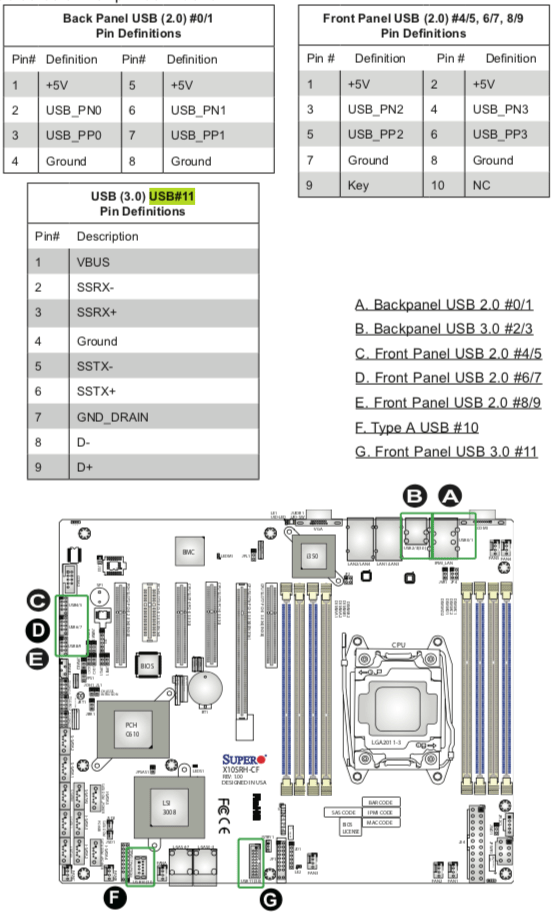
Luckily I had an X10 manual at hand, so here you can see the various pin-outs.

One end of the CBL-0454L has the same pin out as “USB (3.0) USB#11 Pin Definitions” (actually you need to double the rows) so CBL-0453L fits into it.

The other end of CBL-0454L fits into “Front Panel USB (2.0) #4/5, 6/7, 8/9” headers.

Fitting 2.5 inch drives in it

Another interesting aspect is part:

2.5″ HDD Bracket MCP-220-73201-0N HDD Cage (4x Internal 2.5″ fixed HDD bays)

Again hard to find pictures. There is only one at the whole supermicro site:

[WayBack] Supermicro | Products | SuperWorkstation | Mid-Tower | 5039C-T with Part List

[WayBack] 5039C-T_side.jpg

The part is [WayBack] Supermicro MCP-220-73201-0N Accessories with 0091016_2-5in-hdd-cage-4x-internal-2-5in-hdd.jpg (500×500)

–jeroen

Posted in Hardware, Mainboards, Power User, SuperMicro, X9SRi-3F, X9SRi-F | Leave a Comment »

Supermicro X9SRi-F Mainboard with SCU – Motherboards and CPUs – Unraid

Posted by jpluimers on 2021/05/10

Passthrough should work with these: [WayBack] Supermicro X9SRi-F Mainboard with SCU – Motherboards and CPUs – Unraid

Both unRaid and eESXi success in that thread.

–jeroen
Posted in Hardware, Mainboards, Power User, SuperMicro, X9SRi-F | Leave a Comment »

MacOS IPMIView and Supermicro X9SRi-F web interface cannot mount ISOs; on Windows, the web started Java iKVM console can

Posted by jpluimers on 2021/05/07

Screenshots so I do not forget.

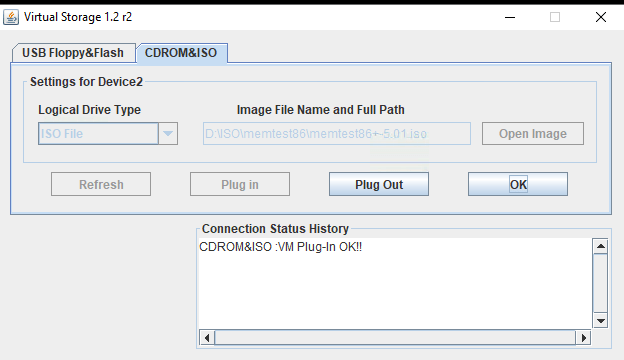
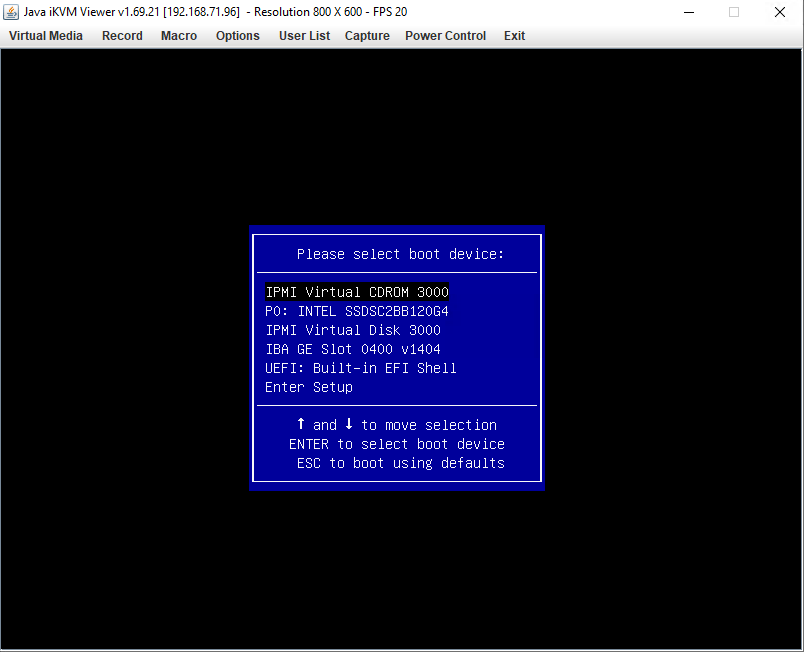
Works from Windows Java iKVM Viewer v1.69.21 started via the web interface:

C:\Users\jeroenp>java -version
java version "1.8.0_211"
Java(TM) SE Runtime Environment (build 1.8.0_211-b12)
Java HotSpot(TM) 64-Bit Server VM (build 25.211-b12, mixed mode)

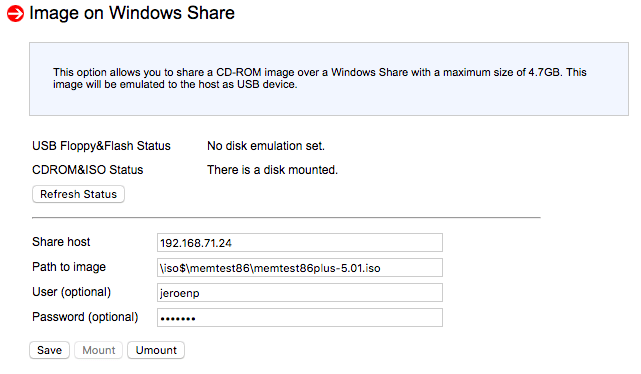
Fails from web interface:

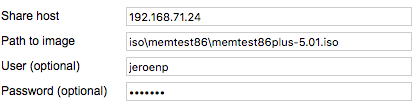
It does not matter if the share is iso$ or iso: both fail in the same way.

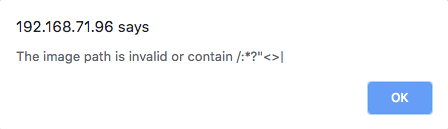
Note this was after working around this very confusion error message from the web interface:

The image path is invalid or contain /:*?"<>|

The error message is just telling that the path should start with a back-slash:

[WayBack] Supermicro IPMI and Windows Share – Server Fault

With HTML5 iKVM this seems to work fine, but that requires more recent motherboards:

[WayBack] How to map a network share to boot from ISO, moving Supermicro Java iKVM to browser-only HTML5 iKVM | TinkerTry IT @ Home

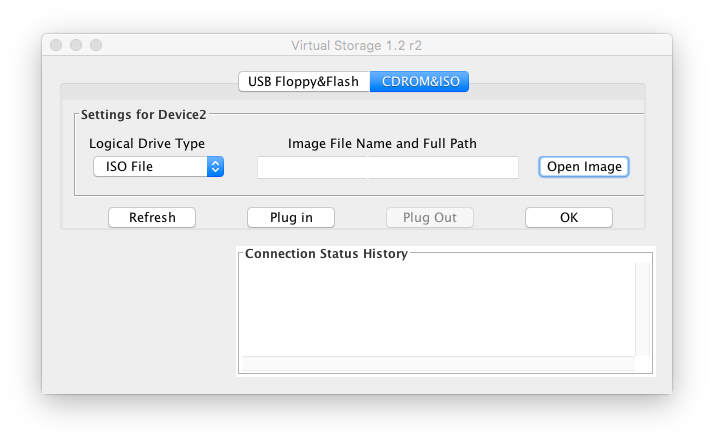
Fails on MacOs with Java iKVM Viewer v1.69 r14.

# java -version
java version "1.8.0_74"
Java(TM) SE Runtime Environment (build 1.8.0_74-b02)
Java HotSpot(TM) 64-Bit Server VM (build 25.74-b02, mixed mode)

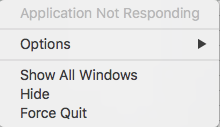
Gets you the rainbow circle of death and an “application not responding”

The success and failure are the same no matter the firmware; the same results were obtained both before and after upgrading the IPMI firmware:

–jeroen


PS: from Twitter


Posted in Hardware, IPMI, Mainboards, Power User, SuperMicro, X9SRi-F | Leave a Comment »

Need to research alternative IPMI tooling

Posted by jpluimers on 2021/05/07

Since IPMIView cannot mount ISOs and some tasks are not that convenient in GUI tools, I want to look more deeply in console based IPMI tooling.

Though my machine to remotely manage stuff is a MacOS based machine, most of my sites have Raspberry Pi devices, so some compatibility there would be nice. imputil seems to work there given IPMI firmware is recent:

Here are some names for future research:

  • impmiutil
    • [WayBack] ipmiutil – IPMI Management Utilities

      IPMI Management Utilities Project provides a series of common utilities for IPMI server management locally or via LAN. The utilities provide source and scriptable command binaries for automating server management functions.

      IPMIUTIL performs a series of common IPMI server management functions to allow administrators to perform management functions without a learning curve. It can gather FRU inventory data, SEL firmware log, sensors, watchdog, power control, health, monitoring, and has an SOL console. It can write sensor thresholds, FRU asset tags, and supports a full IPMI configuration save/restore. Ease-of-use examples with IPMIUTIL:

      • Native builds on many OSs: Linux, Windows, BSD, Solaris, MacOSX, HPUX
      • The only IPMI project natively supporting Windows drivers
      • IPMIUTIL supports any IPMI-compliant vendor firmware
      • IPMIUTIL detects and handles OEM-specific IPMI firmware variants
      • IPMIUTIL interprets various vendor OEM-specific sensor values automatically.
      • Any IPMI values not yet recognized at least return the values, rather than just ‘na’ or Unknown.
      • Shared library for custom applications, sample source included
      • IPMIUTIL BSD license is compatible with open-source or commercial use
      • Linux driverless support is ideal for boot media or embedded
      • Configuring the IPMI LAN requires just a single command
      • The decoding of IPMI SEL events includes a severity.
      • A soft-reboot can be easily performed instead of a hard reboot by using ipmiutil_asy, even if the platform does not support ACPI.
      • IPMI SEL management is automated via checksel.
      • Watchdog management is automated via ipmiutil_wdt.
    • [WayBack] homebrew-core/ipmiutil.rb at master · Homebrew/homebrew-core · GitHub
    • [WayBack] ipmiutil — Homebrew Formulae
    • [WayBack] Install ipmiutil on Mac with Brew | BrewInstall
  • ipmitool
  • freeipmi
    • [WayBack] FreeIPMI – Home

      FreeIPMI provides in-band and out-of-band IPMI software based on the IPMI v1.5/2.0 specification. The IPMI specification defines a set of interfaces for platform management and is implemented by a number vendors for system management. The features of IPMI that most users will be interested in are sensor monitoring, system event monitoring, power control, and serial-over-LAN (SOL). The FreeIPMI tools and libraries listed below should provide users with the ability to access and utilize these and many other features. A number of useful features for large HPC or cluster environments have also been implemented into FreeIPMI. See the README or FAQ for more info.


    • [WayBack] homebrew-core/freeipmi.rb at master · Homebrew/homebrew-core · GitHub
    • [WayBack] freeipmi — Homebrew Formulae

Things I am interested in:

  • discovering IPMI capable devices in a network
  • reading sensors
  • setting power state
  • mounting/unmounting ISO images

–jeroen

Posted in Hardware, IPMI, Mainboards, Power User, SuperMicro | 3 Comments »

Supermicro: 5 BIOS beeps might just mean internal VGA is disabled

Posted by jpluimers on 2021/05/03

A while ago, I got a second hand Supermicro workstation and wondered why the IPMI KVM would not show anything.

The video card in it worked fine, so I used it as a desktop machine setup for a while, happily running VMS.

I finally decided to move into a closet, so I removed the video card, and rebooted.

Then it beeped 5 times, which was odd: I expected it to switch from the video card to the internal video. It didn’t.

Older BIOS codes: [WayBack] AMI BIOS Beep Codes – Thomas-Krenn-Wiki

From PDF [WayBack] BIOS POST Codes for C7/X9/X10/X11/B9/B10/B1/A1 Motherboards

PEI Beep Codes

# of Beeps Description
1 Memory not Installed
1 Memory was installed twice (InstallPeiMemory routine in PEI Core called twice)
2 Recovery started
3 DXEIPL was not found
3 DXE Core Firmware Volume was not found
4 Recovery failed
4 S3 Resume failed
7 Reset PPI is not available

DXE Beep Codes

# of Beeps Description
1 Invalid password
4 Some of the Architectural Protocols are not available
5 No Console Output Devices are found
5 No Console Input Devices are found
6 Flash update is failed
7 Reset protocol is not available
8 Platform PCI resource requirements cannot be met

So I did a bit of reading in the manual, then found about a jumper which had happily been living out of view, under the video card:

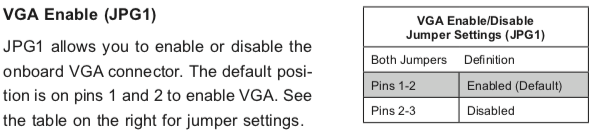
VGA Enable (JPG1)

JPG1 allows you to enable or disable the onboard VGA connector. The default position is on pins 1 and 2 to enable VGA.

Setting the jumper to pins 1&2 made internal VGA available again, it happily booted and showed in the IPMI KVM.

Later I understood why the jumper was set to VGA disabled: when having two video cards, by default Windows will extend your desktop to an invisible monitor.

The easiest workaround for that is just to disable VGA. However, you can also change Windows

Older versus newer boards

It appears that most older SuperMicro systems have a hardware switch, but for newer chipsets supporting Intel Quick Sync Video a there is a BIOS setting: [WayBack] Enable internal graphics in SUPERMICRO servers | Any IT here? Help Me!

Windows 10 fixing video cards and ACPI_BIOS_ERROR

The reboot did not work fine: Windows 10 would not initialise properly, but hung when detecting video cards.

Read the rest of this entry »

Posted in Hardware, IPMI, Mainboards, Power User, SuperMicro, X10SRH-CF, X9SRi-3F, X9SRi-F | Leave a Comment »

Thoughts on ix500; should I get an ix1500?

Posted by jpluimers on 2021/04/30

Some of my thoughts on [WayBack] AW: Netzwerkfähiger Dokumentenscanner?:

I use a Fujitsu ScanSnap ix500 scanner for this plus a Windows VM that automatically logs on.

It is out of production now, but I think most of the below holds as the successor ix1500 is very similar (ix500 announcement https://www.fujitsu.com/sg/about/res…-20181002.html)

Before the ix500, I used a Fujitsu ScanSnap S510 which had similar capabilities as the ix500 but was a lot slower.

Cool things:

  • included software can do OCR and scan to a path the Windows user has access to
  • the scanner is fast, and does a stack of A4 full duplex automatically at a few seconds per page scanning on the scanner and 5-10 seconds per page OCR on a 1.2 Ghz dual core VM
  • no fiddling from within the scanner to get network stuff working, or to keep it up-to-date on protocol changes

Drawbacks:

  • the software pops up a dialog after each scan, so I wrote this: https://bitbucket.org/jeroenp/wiert….onsoleProject/
  • you need a Windows PC that is logged on (so the software does work), which means I configured a VM to auto-logon
  • WiFi 2.4 Ghz only (no ethernet interface, no 5 Ghz WiFi)
  • you need USB on the same VM connected to the scanner once to configure WiFI
  • like any hardware/software combination, sometimes the scanner or Windows VM need a reboot, for instance when it looses network or USB connection

The ix1500 has a touch screen instead of 2 buttons, so it might be that it has more standalone functionalities than the ix500.

Since I need a second scanner in a second place, I might get an ix1500 after the summer.

–jeroen

–jeroen
Posted in Fujitsu ScanSnap, Hardware, ix500, LifeHacker, Power User, Scanners | Leave a Comment »

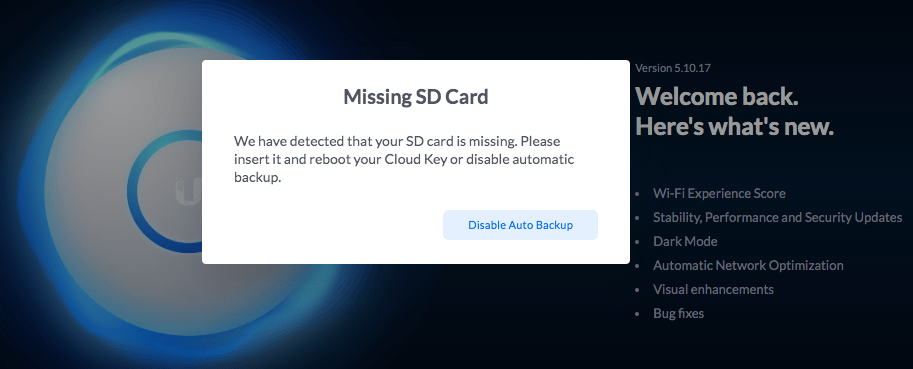
Unifi Cloud Key: “We have detected that your SD card is missing. Please insert it and reboot your Cloud Key or disable automatic backup.”

Posted by jpluimers on 2021/04/23

Got this a while ago with 5.10.17:

“Missing SD card”

“We have detected that your SD card is missing. Please insert it and reboot your Cloud Key or disable automatic backup.”

This might be a hardware issue with [Archive.is] Ubiquiti UniFi Cloud Key, UC-CK: AmazonSmile: Computer & Zubehör

Reading the 1-star reviews, SD-card problems seem paramount: [Archive.is] Amazon.de:Kundenrezensionen: Ubiquiti UniFi Cloud Key, UC-CK.

For me, most of the times this solved the problem:

  1. Power down the Cloud Key
  2. Remove the SD card
  3. Insert the SD card
  4. Power up the Cloud Key

Read the rest of this entry »

Posted in Cloud Key, Hardware, Network-and-equipment, Power User, Unifi-Ubiquiti | Leave a Comment »

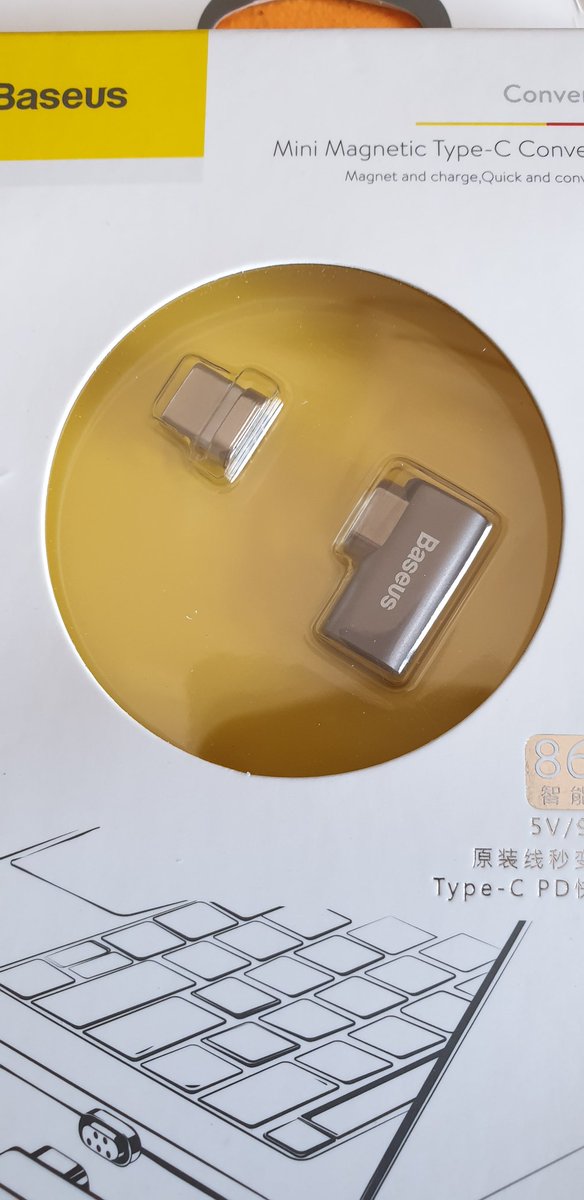
A USB-C magnetic charge contact that when tripping does not make your computer hit the ground (via Hadi Hariri on Twitter)

Posted by jpluimers on 2021/04/19

Want: [WayBack] Hadi Hariri on Twitter: “You know @Apple I actually liked that feature of not pulling the computer off the desk when tripping over the cable. You removed it, I’m getting an add-on. And thanks @bashorov for the recommendation.… https://t.co/Ju036sqRW4”

–jeroen

Posted in Hardware, Power User, USB, USB-C | Leave a Comment »

Stop FortiClient from auto-starting (as it uses a truckload of Windows resources, often including 2 gigabyte of memory for their logger)

Posted by jpluimers on 2021/04/16

I see lot’s of negative reactions on FortiClient, as it is very closed source, many intermittent issues, and is a product that tries to be a jack of all trades (over a couple of versions, in addition of being a proprietary VPN client, they started doing vulnerability scanning, interfering with anti-virus products, they blocked saving of passwords and allowing password managers to paste them, and I could go on).

Sometimes you have to use it in order to access a FortiGate based VPN server, so the best is to defer starting it until as late as possible.

Here are some links to get that configured correctly:

–jeroen

Posted in FortiGate/FortiClient, Network-and-equipment, Power User, VPN | Leave a Comment »