The Wiert Corner – irregular stream of stuff

Jeroen W. Pluimers on .NET, C#, Delphi, databases, and personal interests

  • My badges

  • Twitter Updates

  • My Flickr Stream

  • Pages

  • All categories

  • Enter your email address to subscribe to this blog and receive notifications of new posts by email.

    Join 1,839 other subscribers

Archive for the ‘Internet’ Category

How to configure pfSense as multi wan (DUAL WAN) load balance failover router – nixCraft

Posted by jpluimers on 2018/12/03

This will come in useful one day:

Notes for monitoring at [WayBackMulti-WAN – PFSenseDocs: Gateway Groups

  • monitoring packet loss on ADSL is cumbersome depending on the ADSL distance
  • member down is the easiest to monitor, but on fiber can fail to detect packet loss (the connection seems online, but in fact doesn’t provide traffic)

–jeroen

Posted in Internet, pfSense, Power User, routers | Leave a Comment »

Not all Fritz!Box devices can be upgraded to the most recent firmware

Posted by jpluimers on 2018/11/30

I forgot to document this earlier.

Many Fritz!Box devices cannot be upgraded to recent firmwares. The behaviour differs on hardware revisions of the same model. I’ve seen it happen on Fritz!Box 7360 devices, but others are could be affected too.

You can get the firmware revision using the trick here: FRITZ!Box call http://fritz.box/cgi-bin/system_status.

If your hardware revision is affected, do not expose it to the outside world.

You could still turn it into a local switch though: [WayBackConvert FRITZ!Box 7360 to Managed Switch (or even Access Point) having it’s own IP address: Setting up the FRITZ!Box as an IP client.

I did this before even discovering about the hardware revision limits as I wanted to keep the full phone history when migrating from ADSL to fiber (which came with a brand new Fritz!Box 7490) and could use the extra LAN ports.

Fritz!Box 7360 hardware revision v1: limited to firmware 06.3x

Read the rest of this entry »

Posted in Fritz!, Fritz!Box, Internet, Power User | Leave a Comment »

Parsing simple html in Python

Posted by jpluimers on 2018/11/29

Was working to get fritzcap to emit a list of interfaces so I could specify which one to capture.

For that I needed to parse the output of http://fritz.box/capture.lua which consists of HTML fragments like below.

What I needed was for each consecutive entries of [WayBack] th and first [WayBackbutton tags:

  • content of the th tag
  • content of the value attribute of the button tag having a type="submit" attribute and name=start attribute

So before starting to work on it, I created [WayBackIn order to fix #5, print a list of available interfaces to potentially capture from · Issue #6 · jpluimers/fritzcap

The goal was to get a series of key/value pairs:

4-138 = AP2 (2.4 + 5 GHz, ath1) - Interface 1
4-137 = AP2 (2.4 + 5 GHz, ath1) - Interface 0
4-132 = AP (2.4 GHz, ath0) - Interface 1
4-131 = AP (2.4 GHz, ath0) - Interface 0
4-129 = HW (2.4 GHz, wifi0) - Interface 0
4-128 = WLAN Management Traffic - Interface 0a

So I built a class descending from [WayBackHTMLParser — Simple HTML and XHTML parser that ships with the [WayBackPython standard libraries.

If in the future I need more complex HTML parsing, then these links will help me choosing more feature rich parsers:

Back to the HTMLParser descendant in interfaces_dumper.py which can basically be condensed down to the code below.

  • handle_data is called for both start tags and end tags. The th value in data is only present in the start tag (at the time of end tag the data is empty), so you need to keep track of both last_start_tag and last_end_tag.
  • handle_endtag maintains last_end_tag to help handle_data.
  • handle_starttag maintains last_start_tag to help handle_data and also handles the button behaviour.
    • The buttonis only relevant if it has type="submit" and name="start" and a value attribute in that order.
    • Output is in data which is an array of key/value pairs.

Read the rest of this entry »

Posted in Development, Fritz!, Fritz!Box, fritzcap, Internet, Power User, Python, Scripting, Software Development | Leave a Comment »

Fritz!Box LUA links on my research list

Posted by jpluimers on 2018/11/27

I’m not sure around which firmware versions Fritz!Box started to implement LUA links, but they are now on my research list.

Below a reference and where I found them.

A few notes first:

  • There are many duplicates, which in due time I need to de-duplicate.
  • The .lua links seem to override the old cgi-bin links (that are partially reverse engineered at [WayBackCategory:Befehle in /usr/www/cgi-bin – Fritz!Box).
  • Usually, .lua links require a SID. In the web-ui, a Fritz!Box very much tries to hide that SID from URLs in the browser address bar (especially for firmware versions 06.50 and up) so the easiest to get them is this:
    1. Login to your Fritz!Box
    2. Manually copy any of the URLs in the left side
    3. Take the SID from there.
  • More recent firmware versions hide the .lua links too, but you can see them when monitoring your network traffic in the developer mode of your web browser

Logging in programmatically needs a challenge response mechanism. It used to be at [Wayback] http://www.avm.de/de/Extern/Technical_Note_Session_ID.pdf but now has moved to [Wayback/Archive.ishttps://avm.de/fileadmin/user_upload/Global/Service/Schnittstellen/AVM_Technical_Note_-_Session_ID.pdf

Here is the list:

Read the rest of this entry »

Posted in Development, Fritz!, Fritz!Box, Hardware Development, Hardware Interfacing, Internet, Power User | Leave a Comment »

FRITZ!Box call http://fritz.box/cgi-bin/system_status

Posted by jpluimers on 2018/11/22

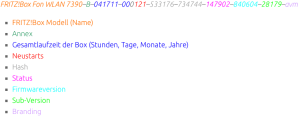
While researching what the cgi-bin of Fritz!Box devices expose, I found this post on http://fritz.box/cgi-bin/system_status:

[WayBack] FRITZ!Box „Service Code“ auslesen und dekodieren – Antary

FRITZ!Box Fon WLAN 7390–B–041711–000121–533176–734744–147902–840604–28179–avm

  • FRITZ!Box Modell (Name)
  • Annex
  • Gesamtlaufzeit der Box (Stunden, Tage, Monate, Jahre)
  • Neustarts
  • Hash
  • Status
  • Firmwareversion
  • Sub-Version
  • Branding

The site has the entries colour coded, but WordPress doesn’t allow for that.

I found out that on a Fritz!Box 7490 you do not need to logon, but on a Fritz!Box 7360 you have to.

The site has a few other interesting Fritz!Box posts as well:

–jeroen

Read the rest of this entry »

Posted in Fritz!, Fritz!Box, Internet, Power User | Leave a Comment »

dig: getting the list of root servers

Posted by jpluimers on 2018/11/15

For many dig queries, it helps to get the current list of root DNS servers.

Though the list is pretty static, occasionally it changes. While writing there were 13 of them and the most recent history report was in “RSSAC023: History of the Root Server System” at [WayBackwww.icann.org/en/system/files/files/rssac-023-04nov16-en.pdf.

So below are the steps to get an accurate list based on

First find out what the root servers are:

$  dig +noall +answer . ns | sort
.           106156  IN  NS  a.root-servers.net.
.           106156  IN  NS  b.root-servers.net.
.           106156  IN  NS  c.root-servers.net.
.           106156  IN  NS  d.root-servers.net.
.           106156  IN  NS  e.root-servers.net.
.           106156  IN  NS  f.root-servers.net.
.           106156  IN  NS  g.root-servers.net.
.           106156  IN  NS  h.root-servers.net.
.           106156  IN  NS  i.root-servers.net.
.           106156  IN  NS  j.root-servers.net.
.           106156  IN  NS  k.root-servers.net.
.           106156  IN  NS  l.root-servers.net.
.           106156  IN  NS  m.root-servers.net.

You should shorten this to $ dig +noall +answer . ns but that will not give you the TTL (how long the information will be cached before your DNS server refreshes it).

Now query at least 3 of these to get the actual list of root servers (I list only one statement, the rest is similar):

$ dig +noall +answer . ns @j.root-servers.net. | sort
.           518400  IN  NS  a.root-servers.net.
.           518400  IN  NS  b.root-servers.net.
.           518400  IN  NS  c.root-servers.net.
.           518400  IN  NS  d.root-servers.net.
.           518400  IN  NS  e.root-servers.net.
.           518400  IN  NS  f.root-servers.net.
.           518400  IN  NS  g.root-servers.net.
.           518400  IN  NS  h.root-servers.net.
.           518400  IN  NS  i.root-servers.net.
.           518400  IN  NS  j.root-servers.net.
.           518400  IN  NS  k.root-servers.net.
.           518400  IN  NS  l.root-servers.net.
.           518400  IN  NS  m.root-servers.net.

Compare the lists. If they are equal, then you’re done.

If not, then the internet is in trouble (:

When you want the A and AAAA records with IP addresses in addition to the NS records with names, then add +additional to your query:

dig +noall +answer +additional @j.root-servers.net. | sort
.           518400  IN  NS  a.root-servers.net.
.           518400  IN  NS  b.root-servers.net.
.           518400  IN  NS  c.root-servers.net.
.           518400  IN  NS  d.root-servers.net.
.           518400  IN  NS  e.root-servers.net.
.           518400  IN  NS  f.root-servers.net.
.           518400  IN  NS  g.root-servers.net.
.           518400  IN  NS  h.root-servers.net.
.           518400  IN  NS  i.root-servers.net.
.           518400  IN  NS  j.root-servers.net.
.           518400  IN  NS  k.root-servers.net.
.           518400  IN  NS  l.root-servers.net.
.           518400  IN  NS  m.root-servers.net.
a.root-servers.net. 518400  IN  A   198.41.0.4
a.root-servers.net. 518400  IN  AAAA    2001:503:ba3e::2:30
b.root-servers.net. 518400  IN  A   192.228.79.201
b.root-servers.net. 518400  IN  AAAA    2001:500:200::b
c.root-servers.net. 518400  IN  A   192.33.4.12
d.root-servers.net. 518400  IN  A   199.7.91.13
e.root-servers.net. 518400  IN  A   192.203.230.10
f.root-servers.net. 518400  IN  A   192.5.5.241
g.root-servers.net. 518400  IN  A   192.112.36.4
h.root-servers.net. 518400  IN  A   198.97.190.53
i.root-servers.net. 518400  IN  A   192.36.148.17
j.root-servers.net. 518400  IN  A   192.58.128.30
k.root-servers.net. 518400  IN  A   193.0.14.129
l.root-servers.net. 518400  IN  A   199.7.83.42
m.root-servers.net. 518400  IN  A   202.12.27.33

–jeroen

Posted in DNS, Internet, Power User | 1 Comment »

Find the TTL for a domain and subdomain by getting to the authoritative nameserver first

Posted by jpluimers on 2018/11/15

Lets find the authoritative name server and TTL (time to live) for the example.org domain and www.example.org subdomain.

Notes:

1a: get parents of name servers

First start with a root server (dig: getting the list of root servers) to get parents of the name servers for example.org (don’t you love indirection!):

$ dig +norecurse +noall +authority @f.root-servers.net. example.org.
org.            172800  IN  NS  a0.org.afilias-nst.info.
org.            172800  IN  NS  a2.org.afilias-nst.info.
org.            172800  IN  NS  b0.org.afilias-nst.org.
org.            172800  IN  NS  b2.org.afilias-nst.org.
org.            172800  IN  NS  c0.org.afilias-nst.info.
org.            172800  IN  NS  d0.org.afilias-nst.org.

You can repeat this query for 2 more root servers to ensure they are in sync.

1b: get authoritative name servers from the parents

Now repeat with at least 3 of these to ensure they give matching results for the name servers for example.org:

$ dig +norecurse +noall +authority @b0.org.afilias-nst.info. example.org.
example.org.        86400   IN  NS  b.iana-servers.net.
example.org.        86400   IN  NS  a.iana-servers.net.
$ dig +norecurse +noall +authority @c0.org.afilias-nst.info. example.org.
example.org.        86400   IN  NS  a.iana-servers.net.
example.org.        86400   IN  NS  b.iana-servers.net.
$ dig +norecurse +noall +authority @a0.org.afilias-nst.info. example.org.
example.org.        86400   IN  NS  a.iana-servers.net.
example.org.        86400   IN  NS  b.iana-servers.net.

2a: getting the domain name servers from a public name server

A query to a public DNS server will also return a name server list, but then you would need to know that name server first. In addition, you can not ask for +authority; you have to ask for +answer NS in stead:

$ dig +norecurse +noall +answer NS @8.8.8.8 example.org.
example.org.        55312   IN  NS  a.iana-servers.net.
example.org.        55312   IN  NS  b.iana-servers.net.

The name servers on the list are not guaranteed to be authoritative, as this query returns an empty result:

$ dig +norecurse +noall +authority @8.8.8.8 example.org.

2b. ensuring the name servers are authoritative name servers

From the name servers returned, you can now check if the servers themselves return the same name servers. If so, then you are sure they are authoritative:

$ dig +norecurse +noall +authority @a.iana-servers.net. example.org.
example.org.        86400   IN  NS  a.iana-servers.net.
example.org.        86400   IN  NS  b.iana-servers.net.
$ dig +norecurse +noall +authority @b.iana-servers.net. example.org.
example.org.        86400   IN  NS  b.iana-servers.net.
example.org.        86400   IN  NS  a.iana-servers.net.

3: get the actual TTL

With the authoritative name servers, you can get the actual TTL:

$ dig +norecurse +noall +answer SOA @a.iana-servers.net. example.org.
example.org.        3600    IN  SOA sns.dns.icann.org. noc.dns.icann.org. 2017042729 7200 3600 1209600 3600
$ dig +norecurse +noall +multiline +answer SOA @a.iana-servers.net. example.org.
example.org.        3600 IN SOA sns.dns.icann.org. noc.dns.icann.org. (
                2017042729 ; serial
                7200       ; refresh (2 hours)
                3600       ; retry (1 hour)
                1209600    ; expire (2 weeks)
                3600       ; minimum (1 hour)
                )

I got the +multiline trick from [WayBackHOWTO: Using dig(1) to Find DNS Time to Live (TTL) Values – A-Team Systems.

4: get the count down TTL from a local name server

You can repeat the above process with a non-authoritative name server a few times to see the TTL decrease:

$ dig +norecurse +noall +answer SOA example.org.
example.org.        322 IN  SOA sns.dns.icann.org. noc.dns.icann.org. 2017042729 7200 3600 1209600 3600
$ dig +norecurse +noall +answer SOA example.org.
example.org.        321 IN  SOA sns.dns.icann.org. noc.dns.icann.org. 2017042729 7200 3600 1209600 3600

This is for instance what is returned by [WayBackexample.org DNS information – who.is example.org DNS information. DNS records such SOA, TTL, MX, TXT and more.

Public DNS servers having multiple servers per IP can even run disperse TTL numbers, for instance Google DNS at 8.8.8.8 does this:

$ dig +norecurse +noall +answer SOA @8.8.8.8 example.org.
example.org.        13  IN  SOA sns.dns.icann.org. noc.dns.icann.org. 2017042729 7200 3600 1209600 3600
$ dig +norecurse +noall +answer SOA @8.8.8.8 example.org.
example.org.        1388    IN  SOA sns.dns.icann.org. noc.dns.icann.org. 2017042729 7200 3600 1209600 3600
$ dig +norecurse +noall +answer SOA @8.8.8.8 example.org.
example.org.        10  IN  SOA sns.dns.icann.org. noc.dns.icann.org. 2017042729 7200 3600 1209600 3600

Note that +nssearch does not work for me

Using +nssearch as per [WayBackHow to find what Authoritative Name Server provided the answer using dig? – Server Fault fails for me:

$ dig +nssearch example.org
SOA sns.dns.icann.org. noc.dns.icann.org. 2017042729 7200 3600 1209600 3600 from server 199.43.135.53 in 83 ms.
SOA sns.dns.icann.org. noc.dns.icann.org. 2017042729 7200 3600 1209600 3600 from server 199.43.133.53 in 144 ms.
;; connection timed out; no servers could be reached

This reveals this in the bold values:

  • The authoritative nameserver sns.dns.icann.org is not publicly accessible.
  • TTL 7200 (7200 seconds is 2 hours).

Future research

Authoritative answers might not be present in dig queries on some platforms. I need to dig deeper into [WayBackterminal – Dig not returning authority section? – Ask Different to see why.

Glue records are always tricky to get right: [WayBackHow to check domain NS glue records using dig « Admins eHow

–jeroen

Posted in *nix, *nix-tools, bash, Development, dig, DNS, Internet, Power User, Scripting, Software Development | Leave a Comment »

Stratix BreedbandAtlas | Bekijk de consumentenbreedband dekking op uw locatie

Posted by jpluimers on 2018/11/09

[WayBack] BreedbandAtlas | Bekijk de consumentenbreedband dekking op uw locatie:

De BreedbandAtlas toont u actuele informatie over de dekking van consumentenbreedband in Nederland – zowel het type verbinding als de snelheid.

This is for consumer broadband connections, but for many businesses that is good enough (especially since players like xs4all and HeldenVanNu offer business plans like subnets, PIN-payment-over-IP).

Via: [WayBack] ‘Aanleg glasvezel groeit weer door lokale projecten en aanleg in buitengebieden’ – IT Pro – Nieuws – Tweakers

The site is by Stratix which also has published this fiber penetration chart over time:

Read the rest of this entry »

Posted in ADSL, fiber, Internet, Power User | Leave a Comment »

Wieso eigentlich PPPoE, Deutschland? Ganz früher, als Ihr noch ein Joghurt im Regal war…

Posted by jpluimers on 2018/11/05

An historic view on PPPoE usage: [WayBack] Wieso eigentlich PPPoE, Deutschland? Ganz früher, als Ihr noch ein Joghurt im Regal wart und die Telekom von ISDN mit Kanalbündelung (128kBit/s) auf DSL… – Kristian Köhntopp – Google+

Note that in The Netherlands:

Actually, xs4all DSL and Fiber use PPPoE too, in large part because it makes it easer for them to do IPv6. From https://www.xs4all.nl/service/diensten/internet/installeren/modem-instellen/hoe-kan-ik-een-ander-modem-dan-fritzbox-instellen.htm

<<<
ADSL
PPPoA (vpi/vci 8/48, vc-mux). Via de PPPoA verbinding loopt zowel IPv4 als IPv6 verkeer.
PPP authenticatie: PAP
• PPP credentials moeten ingevuld zijn (de waarden zijn niet belangrijk, maar er moet er wel iets ingevuld zijn)

VDSL en FTTH
PPPoE via VLAN6 (802.1Q). Via de PPPoE verbinding loopt zowel IPv4 als IPv6 verkeer.
• PPP authenticatie: PAP
• PPP credentials moeten ingevuld zijn (de waarden zijn niet belangrijk, maar er moet er wel iets ingevuld zijn)
RFC4638 wordt ondersteund op ons netwerk. Dit betekent dat u als klant een MTU van 1500 kunt gebruiken als uw router RFC4638 ondersteunt.
>>>

–jeroen

Posted in ADSL, fiber, Internet, Power User | Leave a Comment »

IPv4 to IPv6 conversion on a load balancer causing rare packet loss

Posted by jpluimers on 2018/11/02

Nice find on not so nice packet conversion: [WayBack] Fun with IPv6 We were investigating packet loss. The loss rate was very low (smaller than 1 of 1000) but as UDP was used, it caused rare but noticeab… – Martin Seeger – Google+

Basically the load balancer could not cope well converting empty IPv4 UDP checksums to IPv6 and back.

Or like Kris mentioned it: [WayBack] Null. In Zahlen: -1., causing a nice set of comments to be posted on short term solutions versus long time forgotten problems.

–jeroen

Posted in Internet, IPv4, IPv6, Network-and-equipment, Power User, routers | Leave a Comment »