


Quick way to get the current ISO-8601 based week number: What’s the Current Week Number?.
–jeroen
Posted by jpluimers on 2012/08/16
Quick way to get the current ISO-8601 based week number: What’s the Current Week Number?.
–jeroen

Posted in Internet, ISO 8601, Power User | 5 Comments »
Posted by jpluimers on 2012/08/06
Cool: sites that allow you to do track prices, get history charts, get alerts for price drops, etc. Got there through SSD prices in steady, substantial decline – The Tech Report.
Your account works at all of our price tracking sites:
- camelbuy (Best Buy)
- camelcamelcamel (Amazon.com)
- camelcamper (Backcountry.com)
- camelegg (Newegg.com)
- camelsounds (Zzounds.com)
And your account will work at any new sites we launch!
The SSD price drop together with the HDD Prices Not Expected to Decline Until 2014 makes me think: if/when I should finally ditch my RAID 5 storage server and build an ZFS server with server hybrid storage (which is totally different from desktop hybrid storage).
Many of the great references at Understanding how to use SSD as Hybrid Storage Pools for ZFS point to the old sun.com site, and suffer from link rot. A few I found back: Read the rest of this entry »
Posted in Hardware, Internet, LifeHacker, Power User, SSD | Leave a Comment »
Posted by jpluimers on 2012/07/27
Below are some steps to get the Tomato Backup Settings & Log to USB Drive Script – TomatoUSB by Austin Saint Aubin working on an Asus RT N66U router.
I presume you are using a Windows system (hence the FAT/FAT32 formatting of the USB stick) for doing the edits and copying of files to an USB stick. Read the rest of this entry »
Posted in *nix, ASUS RT-N66U, Internet, Network-and-equipment, Power User, TomatoUSB | Leave a Comment »
Posted by jpluimers on 2012/07/23
I had a bit different experience getting the Tomato Shibby firmware loaded on one of my Asus RT-N66U routers than the description from Guide to Install Tomato firmware on Asus RT-N66U nor this Video of the Asus Routers Rescue Mode Tutorial.
Somehow, the Asus Firmware Restoration Utility kept indicating “The wireless router is not in rescue mode”, no matter what I did.
This might be due to that I run VMware Workstation with some virtual LAN adapters on most of my machines.
Or not: the web-interface on the Asus RT N66U would not get into the firmware restoration mode either.
This worked though:
–jeroen
Posted in *nix, ASUS RT-N66U, Internet, Network-and-equipment, Power User, TomatoUSB | 2 Comments »
Posted by jpluimers on 2012/07/20
To make WPA2 as secure as possible in PSK mode aka personal mode, make sure you don’t trap into the major WPA2 weaknesses:
So this is what I did on my TomatoUSB flashed Asus RT N66U router:
Easy to setup: follow the WiKi here, using the basic link from the link list.
–jeroen
via:
Posted in *nix, Internet, Power User, TomatoUSB | Leave a Comment »
Posted by jpluimers on 2012/06/25
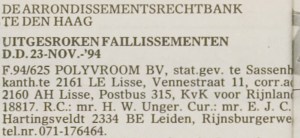
19941123 – Polyvroom – Failissement
Historically I have an interest in digital typography: in the early 90s, I used to freelance for Polyvroom in Lisse (that went belly up on 19941123, the remains bought by Trip Productions) that digitized (together with the still existing Visualogik) many of the TrueType and PDF fonts for Mecanorma and Monotype (now acquired by Agfa and – after Agfa acquired ITC as well – renamed into Monotype Imaging).
I even have the whole set of Lucida Fonts that beta testers got for testing a Windows version (I think it is Windows 95, but it might be earlier as TrueType was introduced in Windows 3.1). (sidenote: most of the Lucida fonts got designed by Kris Holmes, the rest by Charles Bigelow, so now you know where Bigelow and Holmes stems from; they don’t run their own site any more).
There are many good articles on screen fonts, but that’s not the point of this post, maybe in a future post.
Historically, I kept an eye on the Microsoft Typography website (I have backups from early this century) because of the information quality and cross platform information.
Back in the default.asp era, they had a few pages with fonts for certain platforms:
Since then, they redesigned the site, and now their http://www.microsoft.com/typography/fonts fonts page is aspx based, and contains lists with links for:
All individual fonts referred on those links (like Vladimir Script) have a sample as well.
The fonts page also contains a few bonus links:
The really cool thing is that they kept the old links, thereby preventing link rot. Well done!
Another cool thing is that the vast majority of Ubuntu users have the mscorefonts installed. I learned something new there too!
Now they should include some more information on the Metro design language, that is heavily based on the use of typography.
One of the fonts that has Metro like look and is available in many Microsoft products is Century Gothic. I love the geometric design of it!
–jeroen

Posted in Font, Internet, link rot, Power User, Typography, WWW - the World Wide Web of information | 1 Comment »
Posted by jpluimers on 2012/06/08
Just came accross an interesting ethernet router: The Asus RT-N66U (N900) dual-band WiFi router.
It has quite a bit of horsepower, is passively cooled, might handle dual-WAN from the stock firmware, and it it doesn’t: it is supposed to run custom firmwares like Tomato, DD-WRT, OpenWRT, etc.
Interesting…
–jeroen
Dual / Triple WAN How To – InfoDepot Wiki.
Posted in ASUS RT-N66U, Internet, Network-and-equipment, Power User, TomatoUSB | 2 Comments »
Posted by jpluimers on 2012/01/15
Today it is the 15th anniversary of my xs4all membership.
Even though (see some history below) xs4all was not my first provider, it has been the provider of choice ever since:
Back in December 1998, when xs4all was sold sold to the Dutch Telcom (KPN), lots of people were afraid that xs4all would start scoring less points one ore more of the above points.
They didn’t, and that is the main reason I’m still client with them.
This despite the fact that I can get faster internet where I live.
My ADSL connection is quite a long distance from the telco DSLAM, so I can’t get a very high ADSL speed.
As some of the ADSL versus distance speed graphs show, your ADSL connection needs to be close to the telco’s DSLAM.
I’m not, so my maximum ADSL1 speed is slightly less than 8 megabit, and my current ADSL2+ speed is less than 16 megabit, so xs4all light is the best I can get.
BTW: If you live in The Netherlands, here you can calculate that distance (which is called “afstand tot de centrale” in Dutch).
I wish they ran the telco cables under the canal to the neighboring village: I’m about 500 meter away from their DSLAM, in stead of the 2700 meters I’m from my own DSLAM.
Oh well :-)
For high speed things, I now also have a cable connection.
Even though they are deregulating that part of the broadband market, currently cable internet is bound to your cable TV provider.
In my case, that is UPC, and their high speed internet is marketed as Fiber Power.
I started with a 60 over 6 megabit service, that they increased to 120 over 10 megabit about a year ago while reducing the price (because they were merging their packages and wanted to increase their competetiveness).
While writing this, I’m still searching for a good dual gigabit WAN router to combine the two connections in one.
Over time, xs4all increased the ADSL bandwidth from a meager 1 megabit over 256 kilobit to 8 megabit over 1 megabit.
They increased mailbox and storage sizes too.
And finally, they were among the first to support IPv6.
So all in all, I’m still very happy for staying with xs4all.
xs4all was not where the internet started for me. Read the rest of this entry »
Posted in About, BBS, FidoNet, History, Internet, ISP, Personal, Power User, SpeedTest, xs4all, Ziggo/UPC/A2000 | 18 Comments »
Posted by jpluimers on 2011/09/19
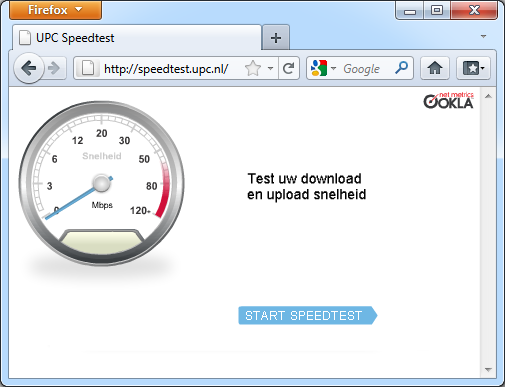 The direct UPC Speedtest link does not load all the fuzz the normal UCP speedtest page has.
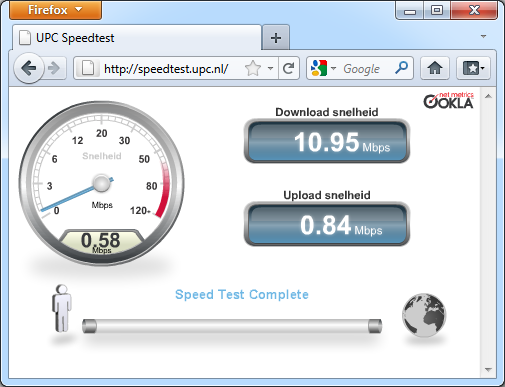 At a client.
 My Cable connection.
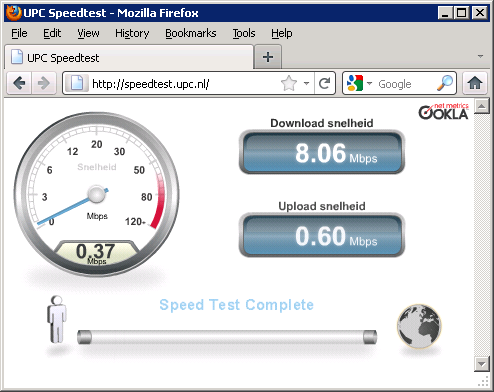 My ADSL connection.
Note the Cable connection is early in the morning. In the afternoon/evening it is much slower.
The ADSL connection is slower, but more reliable, has IPv6, and XS4ALL is way better at security and privacy than UPC.
–jeroen

Posted in Internet, ISP, Power User, SpeedTest, Ziggo/UPC/A2000 | Leave a Comment »
Posted by jpluimers on 2011/09/10
Highspeed internet at KOMED is quite a different experience from Swisscom hotel internet at the NH Köln hotel yesterday:
When trying to find my way towards the KOMED conference rooms, I had a weird experience: rooms 1..5 (called RAUM EINZ, ZWEI, DREI, VIER und FÜNF in German), you could see room 1, 2, 4 and 5 from the ground floor as they were marked with large friendly letters on the same wall as their doors, very well visible from the ground floor.
Not so with room 3 (where I had to be): that marking was on the wall 90 degrees off the door, not visible from the floor. Actually, it was only visible when you were actually standing next to the door. From the ground floor, the door looks like a fire door continuing the curved corridor in front of rooms 1 and 2.
Someone should put “RAUM DREI” above the door to Room 3 there.
Back to the internet at KOMED: the speed is a pleasant experience compared to what Swisscom provided yesterday.This was the attained speed:

–jeroen
Via: [Wayback] UPC Speedtest.

Posted in Internet, ISP, Power User, SpeedTest, Ziggo/UPC/A2000 | 1 Comment »
 The Wiert Corner - irregular stream of stuff