The Wiert Corner – irregular stream of stuff

Jeroen W. Pluimers on .NET, C#, Delphi, databases, and personal interests

  • My badges

  • Twitter Updates

  • My Flickr Stream

  • Pages

  • All categories

  • Enter your email address to subscribe to this blog and receive notifications of new posts by email.

    Join 1,860 other subscribers

Archive for the ‘LifeHacker’ Category

Streaming Setup, Iterated (reminder to self, as it might hold for other retro-hardware)

Posted by jpluimers on 2022/01/17

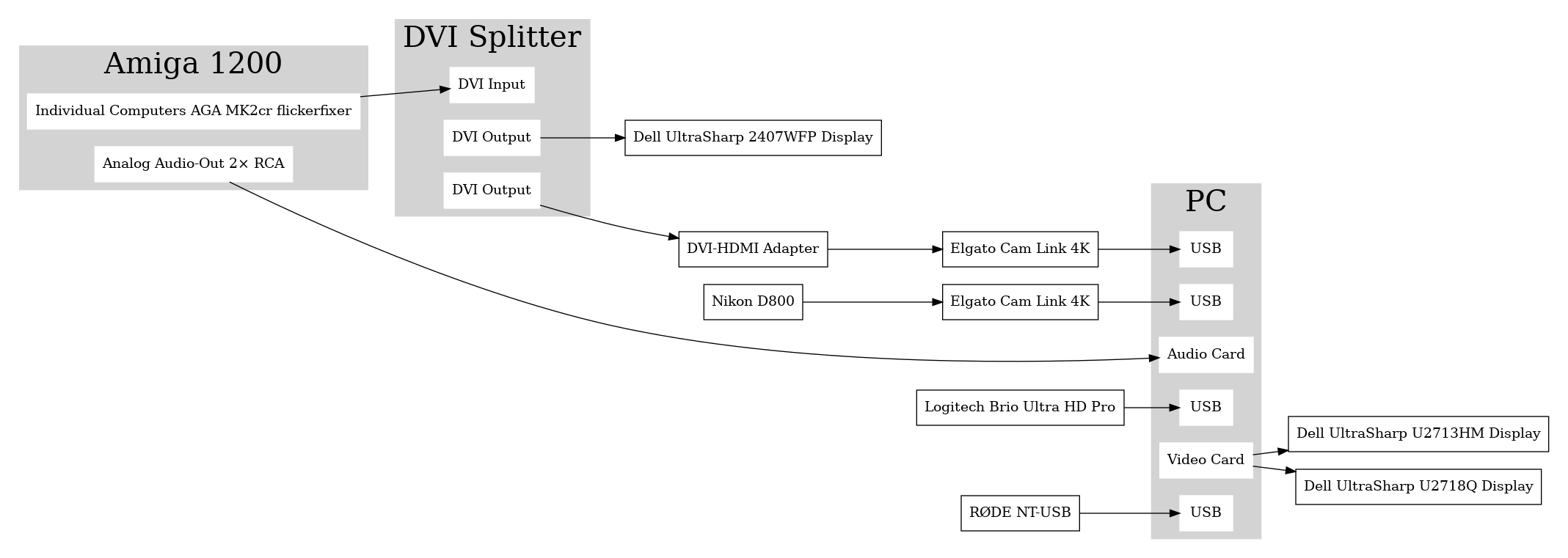
Sebastian Bergmann documented his Twitch streaming setup using digital output from his Amiga 1200 retrocomputing machine: [Wayback] Streaming Setup, Iterated

This might hold for other retro-hardware too, so here is the schema he uses:

[Wayback image]

–jeroen

Read the rest of this entry »

Posted in LifeHacker, Power User | Leave a Comment »

Some notes on OKI memory modules and toner cartridges for MC342 / C332, as toner cartridges physically seem compatible, but are not

Posted by jpluimers on 2022/01/14

I thought the C332 had the same engine as the MC342, as internally the printing part looks identical.

Boy, I was wrong. Toner cartridges, though fitting physically, are not compatible, despite having the same image drum part 44968301.

So the MC342 and C332 have different toners that are physically so similar that they fit, but electronically different.

While searching, I found the C332 by default has 1 gigabyte of memory and no upgrade option, but the MC342 only has 256 megabyte of memory and can be upgraded with one 512 megabyte module to 768 megabyte. This improves printing performance considerably.

The memory module part number is 01182908, which is horrendously expensive despite it being a PC4200 DDR2 SO-DIMM, which means PC5300 and higher should also work.

Historically between EUR 100 and EUR 350 ([Wayback] Oki 01182908 – Prijzen – Tweakers) or GBP 250 ([WayBack] OKI 512MB RAM Memory Upgrade for B721, B731, B840, C321, C330, C530, C531, C610, C612, C711, C712, C822, C823, C831, C833, C841, C843, MC332, MC342, MC351, MC352, MC361, MC362, MC561, MC562 printers)

So via [Archive.is] 512mb ddr2 sodimm – veilingkijker – nieuw en tweedehands I found [Wayback] ≥ Apple 512mb DDR2 667MHz SODIMM – Geheugens – Marktplaats.nl and tried it.

[Wayback/Archive.is] 512MB DDR2 144PIN for OKI Color Printers MC332dn, MC342 N MC332dn, MC342dn, MC342dnw, MC352dn MC352dn L: Amazon.de: Computers & Accessories

[Wayback] MC561 & C330 C711 C530 C610 512MB DDR2 SODIMM MEMORY RAM FOR OKI MC361 C831 C841 SERIES PRINTERS 70061901, 01182908 news9world.com

Installing the memory module is described at page 135 of [Wayback] 45002102EE7_MC562_UG_EN_29888.pdf

The models

[Wayback] MC342dn | DISCONTINUED PRODUCTS | Products | OKI Europe Ltd | Printers and Solutions

Default administrator credentials user admin, password aaaaaa.

[Wayback] Specification | C332 | C300 Series | OKI Europe Ltd

Default administrator credentials: user admin, password 999999.

The toners / accessories

[Wayback] MC342dn | Colour Multifunction Printers | Consumables, Accessories & Part Numbers | Printers, Printing Solutions and Managed Print Services

Options

Item Type Price Notes
20151216003033853-01182907_ram.png/01182907_ram.png256 MB RAM 01182907
20151214104557617-MEM256G_512D.png/MEM256G_512D.png512 MB RAM 01182908

Consumables

Item Type Price Notes
20151216000117113-44973536_toner_k.png/44973536_toner_k.pngBlack Small capacity toner cartridge 44973536 2,200 pages *1
Black Small capacity toner cartridge 44973544 2,200 pages *1
20151216000116917-44973533_toner_y.png/44973533_toner_y.pngYellow Small capacity toner cartridge 44973533 1,500 pages *1
Yellow Small capacity toner cartridge 44973541 1,500 pages *1
20151216000116982-44973534_toner_m.png/44973534_toner_m.pngMagenta Small capacity toner cartridge 44973534 1,500 pages *1
Magenta Small capacity toner cartridge 44973542 1,500 pages *1
20151216000117047-44973535_toner_c.png/44973535_toner_c.pngCyan Small capacity toner cartridge 44973535 1,500 pages *1
Cyan Small capacity toner cartridge 44973543 1,500 pages *1
20151216000109020-44968301_id.png/44968301_id.pngRainbow Image Drum 44968301 30,000 pages *2 *3

*1 Number of A4 pages yield compliant with ISO/IEC 19798.

*2 Average A4 life based on a typical office environment.

*3 30,000 K 20,000 CMY

[Wayback] C332 | Colour Printers | Consumables, Accessories & Part Numbers | OKI Europe Ltd

Options

Item Type Price Notes
20151216003933012-44472102_tray.gif/44472102_tray.gifAdditional Paper Tray 44472102 Capacity of 530 sheets of 80gsm.
20151216003933074-01314101_cabinet.gif/01314101_cabinet.gifCabinet 01314101
20170110060326773/WLAN_34.jpgWLAN Interface 45830202

Consumables

Item Type Price Notes
Black Toner cartridge 46508712 3,500 pages *1
Black Toner cartridge 46508716 1,500 pages *1
C332_HIGH_CAP_YELLOW_TONER_46508709_FRONTYellow Toner cartridge 46508709 3,000 pages *1
C332_STD_CAP_YELLOW_TONER_46508713_FRONTYellow Toner cartridge 46508713 1,500 pages *1
C332_HIGH_CAP_MAGENTA_TONER_46508710_FRONTMagenta Toner cartridge 46508710 3,000 pages *1
C332_HIGH_CAP_CYAN_TONER_46508711_FRONTCyan Toner cartridge 46508711 3,000 pages *1
C332_STD_CAP_CYAN_TONER_46508715_FRONTCyan Toner cartridge 46508715 1,500 pages *1
20151216000109020-44968301_id.png/44968301_id.pngCMYK Image Drum 44968301 30,000 pages *2 *3
20151216000101457-44472603_fuser.png/FUS-C4J.pngFuser unit 44472603 60,000 pages
20160928025643903-750_belt.png/BLT-C4H.pngTransfer Belt 44472202 60,000 pages

*1 Number of A4 pages yield compliant with ISO/IEC 19798.

*2 Average A4 life based on a typical office environment.

*3 30,000 K 20,000 CMY


MC342 toner in C332 printer

As soon as you put a black MC342 toner in a C332 toner, you will get this error in the display: SERVICE CALL 231:ERROR 08 (see picture and [Wayback/Archive.is] oki service call 231 error 08 – Google Search)

This error only goes away when:

  1. you re-insert the original toner cartridge
  2. then power-down and power-up the printer

I could not find C332 specific information for this error, but similar models do have it (partially) listed (note the 08 error for the C332 means the black toner cartridge, not the cyan one):

Toner sensors


Read the rest of this entry »

Posted in Hardware, LifeHacker, MC342 printer/scanner, OKI C332, OKI Printers, Power User, Printers | Leave a Comment »

Covid-19/Coronavirus – Mondneusmaskers en andere PBE: Instructie beschermingsmiddelen en zelftests mantelzorgers en pgb | Publicatie | Rijksoverheid.nl

Posted by jpluimers on 2022/01/12

[Wayback/Archive Instructie beschermingsmiddelen en zelftests mantelzorgers en pgb | Publicatie | Rijksoverheid.nl

Instructie beschermingsmiddelen en zelftests mantelzorgers en pgb

Mantelzorgers en pgb-gefinancierde zorgverleners kunnen bij hun werk gebruikmaken van persoonlijke beschermingsmiddelen of mondneuskapjes. Cliënten kunnen onder voorwaarden gebruik maken van gratis zelftests. In deze instructie staat wanneer zorgverleners persoonlijke beschermingsmiddelen kunnen aanvragen. En wanneer cliënten zelftests kunnen aanvragen.

Download ‘Instructie beschermingsmiddelen en zelftests mantelzorgers en pgb (staand, A3)’1/2

[Wayback] PDF document | 1 pagina | 95 kB

Publicatie | 08-10-2021

Download ‘Instructie beschermingsmiddelen en zelftests mantelzorgers en pgb (liggend, A4)’2/2

[Wayback] PDF document | 2 pagina’s | 130 kB

Publicatie | 08-10-2021

Via:

–jeroen

Posted in LifeHacker, Power User | Leave a Comment »

Security questions are evil because of social media “games” phishing for them

Posted by jpluimers on 2022/01/11

Via [Archive.is] Jilles Groenendijk on Twitter: “what @AppSecBloke said… “, from:

I don’t normally do this but here goes:

First job STOP
Current job SENDING
Dream Job YOUR
Favorite food POTENTIAL
Favorite dog PASSWORDS
Favorite footwear OR
Favorite Chocolate bar MEMORABLE
Favorite Ice Cream DATA
Your Vehicle color TO
Favorite Holiday PEOPLE
Night owl or earlybird WHO
Favorite day of the week COLLECT
Tattoos THIS
Favourite colour INFORMATION
Do you like vegetables FOR
Do you wear glasses SOCIAL
Favourite season ENGINEERING

Read the rest of this entry »

Posted in Facebook, Instagram, LifeHacker, Pen Testing, Power User, Security, SocialMedia | Leave a Comment »

Since I always have trouble with German word-gender (Geschlecht) and grammatic case (Falle): “Er wohnt in DER Schweiz” (Wo?) “Ich fahre in DIE Schweiz” (Wohin?)

Posted by jpluimers on 2022/01/10

Thanks for this example: [Archive.is] Grote Lange Dikke Trien on Twitter: “In der Schweiz. “Er wohnt in DER Schweiz” Wo? “Ich fahre in DIE Schweiz” Wohin?… “

–jeroen

Posted in LifeHacker, Natural Languages, Power User | Leave a Comment »

Topotijdreis: 200 jaar topografische kaarten

Posted by jpluimers on 2022/01/10

200 year old topography of The Netherlands:

Hoe zag jouw omgeving er vroeger uit? Kijk nu zelf op Topotijdreis.nl. De website van het Kadaster met kaarten tot 200 jaar oud.

[WayBack/Archive.is] Topotijdreis: 200 jaar topografische kaarten

Via:

–jeroen

Read the rest of this entry »

Posted in LifeHacker, Power User | Leave a Comment »

Covid-19 herstelbewijs geldig van 12-180 dagen na je positieve PCR test verwerkt door GGD (Corona, SARS-CoV-2)

Posted by jpluimers on 2022/01/07

Ik had dus gemist dat in oktober 2021 de spelregels rondom een corona herstelbewijs.

De reden is dat de communicatie rondom corona in Nederland niet echt top is.

Het laatste voorbeeld: terwijl boosters voor iedereen van 18 jaar en ouder beschikbaar zijn en sommige vaccinatielocaties inmiddels weer vrije inloop hebben, hebben velen dat in mijn omgeving nog niet aangevraagd, want “ik heb nog geen uitnodiging ontvangen”, en/of “ik wist niet dat het al kon”. Anderen ervaren hetzelfde, dus dit soort berichten zijn belangrijk:

Terug naar herstelbewijs: de meeste linkjes hieronder zijn namelijk niet van GGDGHOR, RIVM of Rijksoverheid.

De enige GGD website die de communicatie rondom herstelbewijs qua volledigheid en duidelijkheid op orde heeft is GGD zhz (Zuid-Holland Zuid). Complimenten!

Hier de linkjes (via [Wayback/Archive] herstelbewijs corona aanvragen – Google Search):

–jeroen

Posted in Covid-19/SARS-CoV-2/Coronavirus, Health, Power User, Vaccinations | Leave a Comment »

LIDL Radio Controlled Wall Clock IAN 100489 English manual

Posted by jpluimers on 2022/01/06

Model 100489-14-01 wall clock

Model 100489-14-01 wall clock

Just in case I need it again.

The signal quality fluctuates during the day (it is a lot better at night when there is less inionisation in the atmosphere), and is worsened by concrete walls (like our home).

Best way to get prolonged reception is at night, on the top floor behind a window or outside.

The clock usually needs between 3 and 10 minutes to pick up the DCF77 signal from the transmitter.

Wall clock manual: [Wayback] 100489_EN.pdf of which this abstract:

DCF77 HD-1688 clock mechanism

DCF77 HD-1688 clock mechanism

Numbers:

  1. M.SET button
    • Press and keep pressed the M.SET button 1 at least 3 seconds. The wall clock switches into manual mode.
    • Press and keep pressed the M.SET button again until the hands reach the correct position for you to set the time.
    • Briefly pressing the M.SET button moves the hands forward in one minute steps to enable you to set the current time manually.
      Note: After 8 seconds without pressing the M.SET button, the wall clock switches out of manual mode and keeps the time as normal. The manually set value is overwritten as soon as reception of the DCF radio time signal is successful.
  2. RESET button
    • Press the RESET button 2 to reset the radio clock settings. Alternatively, remove the batteries from the device and insert them again.
    • The product now automatically starts to search for the DCF radio time signal.
  3. REC button
    • Press and keep pressed the REC button 3 at least 5 seconds. The wall clock attempts to receive the DCF radio time signal. This process takes a few minutes to complete.
  4. Battery compartment
    • Battery type: 1 x 1.5 V ⎓ AA, LR6


More on the signal, transmitter and encoding: DCF77 – Wikipedia, where the below images are from:

DCF77 reception area from Mainflingen

DCF77 signal strength over a 24-hour period measured in Nerja, on the south coast of Spain 1,801 km (1,119 mi) from the transmitter. Around 1 AM it peaks at ≈ 100 µV/m signal strength. During the day, the signal is weakened by ionization of the ionosphere due to solar activity.

Another DCF77 clock I have: CSL Bearware 302658 DCF clock manual

–jeroen

Posted in Development, Encoding, Hardware Development, LifeHacker, Power User, Software Development | 2 Comments »

Google calendar: add a yearly repeating event on the last/#th/first weekday of a month

Posted by jpluimers on 2022/01/05

TL;DR: recurrence in Google Calendar can be tough.

Adding a yearly repeating event on a last weekday (where weekday is any day of the week: sunday, monday, etc) of a month in Google Calendar was a lot less obvious than I hoped for.

The easiest path “Custom Event” by default does not show last/#th/first, only a fixed date when selecting yearly or monthly repeating events, which is contrary to the suggested answer at [Wayback/Archive.is] Google calendar question: How to set an event to repeat on the first Monday of a specific Month : google:

Create an event on September 3rd. Choose custom recurrence. Repeat every 12 months monthly on the first Monday. I just tested that out on the browser version of Google calendar

The trick is to first select a normally repeating monthly event on the last#th/first weekday day of a month.

Note that for the 5th week, you cannot do this in the Google Calendar UI as per [Wayback] google calendar – Schedule an event for last Sunday (or another day of week) of each month – Web Applications Stack Exchange:

If you actually want a day on the 5th week of every month (versus the last week), the Google Calendar UI does not support this, but you can do it by importing an .ics file

Below is an example while writing this: adding a yearly recurring event on the last Sunday of May (which in 2021 was Sunday the 30th of May).

These are the steps:

Read the rest of this entry »

Posted in Google, GoogleCalendar, LifeHacker, Power User | Leave a Comment »

Work Chronicles | Comics about Work on Twitter: “Fast-paced Environment… “

Posted by jpluimers on 2022/01/05

Even when young, this transcript should raise all the red flags:

  1. Recruiter: At this job, you will get to work at a fast paced environment.
  2. Recruiter: You will get to thrive under pressure.
  3. Recruiter: And you will be part of a dynamic team.
  4. Applicant: Great, new that you’ve outlined the cons, what are the pros?

[Archive.is] Work Chronicles | Comics about Work on Twitter: “Fast-paced Environment… “ and [Wayback] Fast-paced Environment | Work Chronicles:

–jeroen

Read the rest of this entry »

Posted in About, Development, LifeHacker, Personal, Power User, Software Development | Leave a Comment »