Archive for the ‘Network-and-equipment’ Category
Posted by jpluimers on 2017/01/23
This was a tad difficult to find as I searched for “Convert Fritz!Box to Switch” instead of “Convert Fritz!Box to Access Point”.
Since I had an old Fritz!Box 7360 lying around (from my ADSL era) and wanted to extend the cabled LAN for my brothers Fritz!Box 7490 with some low-bandwidth devices (max 100 megabit/second) I searched for Switch. My bad.
Oh I had to factory reset it as well as I forgot the management credentials. The AVM help on this is cumbersome: Loading the FRITZ!Box factory settings | FRITZ!Box 7360 | AVM International but the xs4all help includes a web-reset procedure as part of Internet: Reset procedures van mijn FRITZ!Box 7360 which translates to:
- Switch off the Fritz!Box (as this procedure needs to be done within 10 minutes of switching it on)
- Connect LAN2 to your computer
- Switch on the Fritz!Box
- Wait for a DHCP IP or (if you know the IP addresses) configure IP manually
- Go to the web-interface URL
- Indicate you forgot your password:

Forgot your password?
- Indicate you want a factory reset:

Restore Factory Settings
Anyway: with the above steps it becomes a Managed Switch (and if you don’t disable WiFi: Access Point too) that uses the primary internet connection as DHCP server (so it gets an IP address itself as well which means you can manage it).
Read the rest of this entry »
Posted in ADSL, Fritz!, Fritz!Box, Internet, Power User | Leave a Comment »
Posted by jpluimers on 2017/01/20
For my Link Archive via linux port forwarding to external ip – Google Search:
Need to look at this more closely, but it looks like you need PREROUTING, FORWARD and POSTROUTING and two NATs (DNAT and SNAT), as this graph from Port Forwarding Using iptables – SysTutorials shows:
PACKET IN
    |
PREROUTING--[routing]-->--FORWARD-->--POSTROUTING-->--OUT
 - nat (dst)   |           - filter      - nat (src)
               |                            |
               |                            |
              INPUT                       OUTPUT
              - filter                    - nat (dst)
               |                          - filter
               |                            |
               `----->-----[app]----->------'
–jeroen
Posted in *nix, *nix-tools, Internet, Internet protocol suite, iptables, Linux, openSuSE, Power User, routers, SuSE Linux, TCP | Leave a Comment »
Posted by jpluimers on 2017/01/13
In this tutorial you will learn how to configure pfSense to load balance and fail over traffic from a LAN to multiple Internet connections (WANs) i.e.… – Joe C. Hecht – Google+
Source: In this tutorial you will learn how to configure pfSense to load balance and…
Posted in Internet, pfSense, Power User, routers | Leave a Comment »
Posted by jpluimers on 2016/12/05
Time after time issues pop up related to MAC addresses that start with a4 or a 6.
[WayBack] nanog: Forwarding issues related to MACs starting with a 4 or a 6 (Was: [c-nsp] Wierd MPLS/VPLS issue)
The underlying issue has to do with switches interpreting too much information of (un)encrypted traffic and dropping them because they wrongly think it’s plain ethernet traffic they need to handle.
MAC addresses starting with a 4 or 6 have have a common bit pattern (likekly that fails with 12 and 14 as well) that cause failure in certain network equipment that’s hard to trace as there is limited.
[WayBack] Christian Vogel – Google+ (Physics, Electronics, Software) explains this way better at [WayBack] When your MAC address starts with 4 or 6, weird things can happen and it’s not always fixable… – Kristian Köhntopp – Google+:
Read the rest of this entry »
Posted in Internet, Network-and-equipment, Power User, routers, VPN | Leave a Comment »
Posted by jpluimers on 2016/12/02
I had a few friends ask if they could buy a cheap travel router that protects their internet activity as they travel around the globe. So my criteria:
- Cheap (< USD 20)
- Portable (pocket size)
Source: [WayBack] Make a cheap TOR anonymizer — BYTESEC Labs Inc
via: [WayBack] hmmm – Joe C. Hecht – Google+
–jeroen
Posted in Network-and-equipment, Power User | Leave a Comment »
Posted by jpluimers on 2016/11/29
Just in case you got scared by the TR-064 hack and likely causality to the German Telekom ISP outage yesterday as some modems expose TR-064 via the TR-069 WAN access, here is how to disable TR-069 in your Fritz!Box: [WayBack] TR-069 auf Fritzbox ausschalten und Ergebnis prüfen — Hartmut Goebel · CISSP, CSSLP · Berater für Information-Security-Management
Note that for Fritz!Box the TR-069 implementation is not as bad as some Speedport devices used by Telekom, but you might want to consider turning TR-069 off:
If you trust yourself to keep the Fritz!Box firmware *and* settings up-to-date better than your ISP does, below are the translated steps.
Steps to disable TR-069 on a Fritz!Box router
- Activate
telnetd on your Fritz!Box via a connected phone by dialing #96*7*
- Connect to your Fritz!Box over telnet at using
telnet fritz.box or instead of fritz.box., use the IP-address of your Fritz!Box device
- the password is the same as the password in the Fritz!Box web interface
- Disable TR-069 by typing this command:
ctlmgr_ctl w tr069 settings/enabled 0
- Verify the TR-069 is off by looking at configuration file with this command:
cat /var/flash/tr069.cfg
- Check that at the start there is a line with
enabled = no
- Disable
telnetd on your Fritz!Box via a connected by by dialing #96*8*
Note that even without a phone you can enable/disable
telnetd as described by [
WayBack]
FRITZ!Box VoIP password extraction
–jeroen
References:
Posted in Fritz!, Fritz!Box, Network-and-equipment, Power User | 2 Comments »
Posted by jpluimers on 2016/11/20
I translated the heading and one quote; if you want to read further in English: Google translate does a good job on the text.
HVAC thermostats, bread baskets, coffee machines: The net is full of things, which make no sense at all and nobody needs. The Internet of Things is a huge pile of shit, says Clemens Gleich.
…
There are no error-free systems, there are maximum undetected errors.
German original:
Heizungsthermostate, Brotkörbe, Kaffeemaschinen: Das Netz ist voll mit Dingen, die da nur Quatsch machen. Braucht kein Mensch. Das Internet of Things ist ein riesiger Haufen Scheiße, meint Clemens Gleich.
…
Es gibt keine fehlerfreien Systeme, es gibt maximal unentdeckte Fehler.
[WayBack] Kommentar: The Internet of Shitty Things | heise online
Posted in IoT Internet of Things, Network-and-equipment, Power User | Leave a Comment »
Posted by jpluimers on 2016/11/20
Conclusions:
- Always put your IoT devices behind a firewall
- Isolate each IoT device into it’s own “world” that can communicate as little with the rest of your networks as possible
- Preferably isolate each set of IoT devices that do need to communicate in their LoT (Lan of Things)
- Use Ad-Blockers
“1/x: So I bought a surveillance camera”: [WayBack] Rob Graham 🦃 on Twitter: “1/x: So I bought a surveillance camera https://t.co/HbmPzrZgFK”
Interesting: [WayBack] Errata Security: Configuring Raspberry Pi as a router
Via: [WayBack] Plugging in a new IP webcam. 98 seconds. infected. Wow. https://twitter.com/E… – G+ Jan Wildeboer
Interesting: [WayBack] Errata Security: Configuring Raspberry Pi as a router
Of course Rob tried many webcams to find a vulnerable one. And putting telnet port 23 to the open is not the best idea, but people do that or get an indirect infection by some piece of JavaScript from an Ad-Network that searches for local vulnerable devices. That’s how the internet works!
Since Twitter and other social media ten to show the non-interesting part of a stream, here is the full one (no time to edit out the superfluous stuff):
Read the rest of this entry »
Posted in IoT Internet of Things, Network-and-equipment, Power User, Security | Leave a Comment »
Posted by jpluimers on 2016/11/18
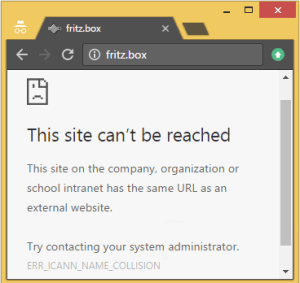 [WayBack] Schlechte Nachrichten für Fritz!box User: http://nic.box/ Euer http://fritz.box ist nicht mehr das, was es sein sollte. EDIT: Muahahaha … – Kristian Köhntopp – Google+
Now there is http://nic.box/ for the new [WayBack] box top level domain and AVM does not yet have the pre-registered fritz.box there effectuated (because .box is not in final registration state yet).
Kristian:
Schlechte Nachrichten für Fritz!box User: http://nic.box/ Euer http://fritz.box ist nicht mehr das, was es sein sollte.
EDIT: Muahahaha
kris@h1755802:~> host fritz.box

fritz.box has address 127.0.53.53

fritz.box mail is handled by 10 your-dns-needs-immediate-attention.box.
The joke is in the cryptic “your-dns-needs-immediate-attention” and usage of 127.0.53.53. to indicate a gTLD name collision.
Chrome knows about ICANN though and explains it in a slightly more readable form when browsing to http://fritz.box (:
Read the rest of this entry »
Posted in Chrome, Fritz!, Fritz!Box, Internet, Power User, Web Browsers | Leave a Comment »
Posted by jpluimers on 2016/11/18
In networks, often you want to know which manufacturer or vendor is behind a MAC address.
An easy way to look this up on-line is by using the
Wireshark · OUI Lookup Tool which should have had MAC or MAC address in the title.
It uses both the extensive /etc/manuf Wireshark Ethernet vendor codes and well-known MAC address prefixes (which is a long text file generated from several sources). Some of the prefixes are just the 24-bit (6-hex digit) OUIs, but others are much more fine grained.
What’s really cool is that the tool accepts a very lenient formatting of inputs: full, partial, various hex separators (including none), case insensitive, and vendor names/abbreviations. So entries like these magically work.
0000.0c

08:00:20

01-00-0C-CC-CC-CC

missouri
–jeroen
Posted in Ethernet, Network-and-equipment, Power User | Leave a Comment »


 The Wiert Corner - irregular stream of stuff