The Wiert Corner – irregular stream of stuff

Jeroen W. Pluimers on .NET, C#, Delphi, databases, and personal interests

  • My badges

  • Twitter Updates

  • My Flickr Stream

  • Pages

  • All categories

  • Enter your email address to subscribe to this blog and receive notifications of new posts by email.

    Join 1,860 other subscribers

Archive for the ‘Tumbleweed’ Category

Some initial steps solving the Raspberry Pi (3 and 4) issue where OpenSuSE LEAP does reach Graphical Target but Tumbleweed does not

Posted by jpluimers on 2024/12/13

This is from years ago, but I forgot to schedule it, so here it is:

Problem on an E20 (enlightenment using lightdm) image:

  • LEAP 15.2 did reach Graphical Target
    • Image [Wayback] openSUSE-Leap-15.2-ARM-E20-raspberrypi3.aarch64-2020.07.08-Build1.34.raw.xz [Wayback] .packages [Wayback] .raw.xz.sha256 [Wayback]  [Wayback] .raw.xz.sha256.asc
  • Tumbleweed did not.

Parts of the chat transcript:

Read the rest of this entry »

Posted in *nix, *nix-tools, LEAP, Linux, openSuSE, Power User, SuSE Linux, Tumbleweed | Leave a Comment »

Good Reddit thread regarding updating Tumbleweed: difference between zypper up (zypper update) and zypper dup (zypper dist-upgrade) repository priorities and more

Posted by jpluimers on 2024/12/02

Sometimes the best information is outside vendor forums. I think it is the case for this Reddit thread: [Wayback/Archive] Regarding updating Tumbleweed; what is the best way to do it? Appper, zypper dup, zypper up. Which one am i supposed to use? Should i be worried about the vendor changes? And why do i get a message when using ‘zypper up’ saying “The following 35 package updates will NOT be installed”? : openSUSE

Note that specific to openSuSE Tumbleweed you should prefer zypper distr-upgrade over zypper update as per [Wayback/Archive] TUMBLEWEED zypper dup default behavior changed: what is the difference to zypper up?

Be aware this thread is about Tumbleweed, the method to update is byusing dup since it’s a new snapshot. At this point it’s your choice toupdate or not depending on your requirements. If your running out ofkernel modules supplied by third parties, then your tied to theirschedule…. Using zypper up will in the long term create more issuesas well as not supported.

This is especially true as --no-allow-vendor-change has been the default for zypper dist-upgrade for almost a decade now: [Wayback/Archive] PSA: Tumbleweed: –no-allow-vendor-change now default zypper dup behaviour : openSUSE

Read the rest of this entry »

Posted in *nix, *nix-tools, Linux, openSuSE, Power User, SuSE Linux, Tumbleweed | Leave a Comment »

How to change system hostname in SUSE

Posted by jpluimers on 2022/01/21

The proper way is not manually changing /etc/hostname, but running this::

hostnamectl set-hostname host

[Wayback] How to change system hostname in SUSE

Background information in [Wayback] linux – What’s the point of the hostnamectl command? – Unix & Linux Stack Exchange (with a great answer by [Wayback] slm, edited by me for Wayback machine links):

Read the rest of this entry »

Posted in *nix, *nix-tools, Linux, openSuSE, Power User, SuSE Linux, Tumbleweed | Leave a Comment »

How do I restart sshd on my Unix system | StarNet Knowledge Database – PC X, X Windows, X 11 & More – StarNet

Posted by jpluimers on 2021/11/17

[Wayback] How do I restart sshd on my Unix system | StarNet Knowledge Database – PC X, X Windows, X 11 & More – StarNet

RedHat and Fedora Core Linux

/sbin/service sshd restart

Suse linux

/etc/rc.d/sshd restart

Debian/Ubuntu

/etc/init.d/sshd restart

Solaris 9 and below

/etc/init.d/sshd stop
/etc/init.d/sshd start

Solaris 10

svcadm disable ssh
svcadm enable ssh

AIX

stopsrc -s sshd
startsrc -s sshd

HP-UX

/sbin/init.d/secsh stop
/sbin/init.d/secsh start

Note that for opensuse, by now you need this to restart sshd:

/usr/sbin/rcsshd restart

Edit 20211118: some tweets in reaction to this post

–jeroen

Posted in *nix, *nix-tools, Debian, Development, Linux, openSuSE, Power User, RedHat, Scripting, Software Development, SuSE Linux, systemd, Tumbleweed | Leave a Comment »

OpenSuSE tumbleweed switched to using /etc/sudoers.d which broke yast module sudo somewhere mid 2020

Posted by jpluimers on 2021/11/09

Mid 2020, I re-installed a Raspberry Pi 2 box based on OpenSuSE Tumbleweed.

To my susprise the yast2 module sudo could not write the configuration.

It appeared that /etc/sudoers had become readonly and a new /etc/sudoers.d was created.

You can use visudo to edit files in that directory without potentially losing changes in /etc/sudoers during upgrades. I think that is a good move.

To bad the yast module failed because of it.

More on visudo and the /etc/sudoers.d directory:

–jeroen

Posted in *nix, Development, DevOps, Infrastructure, Linux, openSuSE, Power User, SuSE Linux, Tumbleweed | Leave a Comment »

Install pihole-eberkund on openSUSE using the Snap Store | Snapcraft

Posted by jpluimers on 2021/10/25

I wonder what this provides compared to a pihole virtual appliance: [WayBack] Install pihole-eberkund on openSUSE using the Snap Store | Snapcraft with these repositories:

Related:

–jeroen

Posted in *nix, *nix-tools, Linux, openSuSE, Power User, SuSE Linux, Tumbleweed | Leave a Comment »

opensuse – How to install patterns and packages at the same time? – Unix & Linux Stack Exchange

Posted by jpluimers on 2021/09/27

appending : to the resolvable allows you to match different types in one command it seems.

zypper install java-1_6_0-openjdk-devel mercurial +pattern:devel_C_C++ +pattern:devel_java

The italic are packages; the bold are patterns.

Via: [WayBack] opensuse – How to install patterns and packages at the same time? – Unix & Linux Stack Exchange; thanks [WayBack] User llua – Unix & Linux Stack Exchange

–jeroen

Posted in *nix, *nix-tools, Linux, openSuSE, Power User, SuSE Linux, Tumbleweed | Leave a Comment »

firewalld: show interfaces with their zone details and show zones in use

Posted by jpluimers on 2021/08/26

A while ago openSUSE switched to firewalld as a fronte-end for iptables. Tumbleweed was first in 2018, so I wrote a reminder: On my research list: migrate from OpenSuSE SuSEfirewall2 to firewalld « The Wiert Corner – irregular stream of stuff.

The core concept of firewalld is zones, which some people find hard to understand: [Archive.is/WayBack] Firewalld on Leap 15 – why is it so complicated ? : openSUSE.

Another concept is interfaces and how they bind to zones. [Wayback] Masquerading and Firewalls | Security Guide | openSUSE Leap 15.2 shows more of that.

The final concept is services that bind one or more aspects (like ports or addresses) to a service name [Wayback] Documentation – Manual Pages – firewalld.service | firewalld.

Other interesting bits of information:

Below are some examples on what I learned, especially finding details about active interfaces and the zones they are bound to.

All of them are based on:

  • the xargs shell trick (I known you can do some of them without the trick, but I try to use common patterns in my solution so I do not have to remember which boundary case fails
  • the echo -n trick to skip the newline output
  • the [WayBack] firewall-cmd options (which kind of care commands)
    • --get-active-zones:

      Print currently active zones altogether with interfaces and sources used in these zones. Active zones are zones, that have a binding to an interface or source. The output format is:

      zone1
        interfaces: interface1 interface2 ..
        sources: source1 ..
      zone2
        interfaces: interface3 ..
      zone3
        sources: source2 ..

      If there are no interfaces or sources bound to the zone, the corresponding line will be omitted.

    • --list-interfaces:

      List interfaces that are bound to zone zone as a space separated list. If zone is omitted, default zone will be used.

    • --get-zone-of-interface=<zone>:

      Print the name of the zone the interface is bound to or no zone.

    • --info-zone=<zone> (which shows far more information than the manual indicates):

      Print information about the zone zone. The output format is:

      zone
        interfaces: interface1 ..
        sources: source1 ..
        services: service1 ..
        ports: port1 ..
        protocols: protocol1 ..
        forward-ports: forward-port1 ..
        source-ports: source-port1 ..
        icmp-blocks: icmp-type1 ..
        rich rules: rich-rule1 ..

Two more notes before the examples:

  1. My first hunch was to use --list-all-zones, but that shows details of all un-used zones as well.
  2. I am not fully sure about the --list-interfaces to list *all* interfaces. I might replace this later with ls /sys/class/net (see [WayBack] linux – List only the device names of all available network interfaces – Super User).

Other useful commands

Besides lising zones and interfaces, you might be interested in services and ports:

# firewall-cmd --list-services
dhcpv6-client ssh
# firewall-cmd --list-ports

List used zones

The first only shows the zone names

# firewall-cmd --list-interfaces | xargs -I {} sh -c 'firewall-cmd --get-zone-of-interface={}'
public

The second both zones and interfaces:

# firewall-cmd --get-active-zones 
public
  interfaces: ens192

When there are no bound interfaces

OpenSuSE by default does not bind interfaces to zones; it means any interface uses the default zone. That means the --list-interfaces commands in this blog post fail.

You can check this behaviour by running this command:

# ls /sys/class/net | xargs -I {} sh -c 'echo -n "interface {} has zone " ; firewall-cmd --get-zone-of-interface={} | xargs -I [] sh -c "echo [] ; firewall-cmd --info-zone=[]"'
interface eth0 has zone no zone
interface lo has zone no zone
interface wlan0 has zone no zone

Alternatives:

  1. Finding the default zone
    # firewall-cmd --get-default-zone
    public
    
  2. Details of the default zone
    # firewall-cmd --info-zone=$(firewall-cmd --get-default-zone)
    public
      target: default
      icmp-block-inversion: no
      interfaces: 
      sources: 
      services: dhcpv6-client ssh
      ports: 
      protocols: 
      masquerade: no
      forward-ports: 
      source-ports: 
      icmp-blocks: 
      rich rules: 

You can see that here the public zone is marked default which means it binds to any interface that is not bound to a specific zone.

List used zone details

# firewall-cmd --list-interfaces | xargs -I {} sh -c 'firewall-cmd --get-zone-of-interface={} | xargs -I [] sh -c "firewall-cmd --info-zone=[]"'
public (active)
  target: default
  icmp-block-inversion: no
  interfaces: ens192
  sources: 
  services: dhcpv6-client ssh
  ports: 
  protocols: 
  masquerade: no
  forward-ports: 
  source-ports: 
  icmp-blocks: 
  rich rules: 

List interfaces and their zones:

# firewall-cmd --list-interfaces | xargs -I {} sh -c 'echo -n "interface {} has zone " ; firewall-cmd --get-zone-of-interface={}'
interface ens192 has zone public

List interfaces and their zone details:

# firewall-cmd --list-interfaces | xargs -I {} sh -c 'echo -n "interface {} has zone " ; firewall-cmd --get-zone-of-interface={} | xargs -I [] sh -c "echo [] ; firewall-cmd --info-zone=[]"'
interface ens192 has zone public
public (active)
  target: default
  icmp-block-inversion: no
  interfaces: ens192
  sources: 
  services: dhcpv6-client ssh
  ports: 
  protocols: 
  masquerade: no
  forward-ports: 
  source-ports: 
  icmp-blocks: 
  rich rules: 

Verifying if dns service is available, then allow it on public

Verify if a DNS is in the enabled services:

# firewall-cmd --list-services
dhcpv6-client ssh

Here no DNS service is enabled, so I need to figure out if any DNS service is available to be enabled.

This lists all the services that can be enabled in a zone:

# firewall-cmd --get-services

On my system, this returned the following list:

RH-Satellite-6 amanda-client amanda-k5-client amqp amqps apcupsd audit bacula bacula-client bb bgp bitcoin bitcoin-rpc bitcoin-testnet bitcoin-testnet-rpc bittorrent-lsd ceph ceph-mon cfengine cockpit condor-collector ctdb dhcp dhcpv6 dhcpv6-client distcc dns dns-over-tls docker-registry docker-swarm dropbox-lansync elasticsearch etcd-client etcd-server finger freeipa-4 freeipa-ldap freeipa-ldaps freeipa-replication freeipa-trust ftp ganglia-client ganglia-master git grafana gre http https imap imaps ipp ipp-client ipsec irc ircs iscsi-target isns jenkins kadmin kdeconnect kerberos kibana klogin kpasswd kprop kshell ldap ldaps libvirt libvirt-tls lightning-network llmnr managesieve matrix mdns memcache minidlna mongodb mosh mountd mqtt mqtt-tls ms-wbt mssql murmur mysql nfs nfs3 nmea-0183 nrpe ntp nut openvpn ovirt-imageio ovirt-storageconsole ovirt-vmconsole plex pmcd pmproxy pmwebapi pmwebapis pop3 pop3s postgresql privoxy prometheus proxy-dhcp ptp pulseaudio puppetmaster quassel radius rdp redis redis-sentinel rpc-bind rsh rsyncd rtsp salt-master samba samba-client samba-dc sane sip sips slp smtp smtp-submission smtps snmp snmptrap spideroak-lansync spotify-sync squid ssdp ssh steam-streaming svdrp svn syncthing syncthing-gui synergy syslog syslog-tls telnet tentacle tftp tftp-client tile38 tinc tor-socks transmission-client upnp-client vdsm vnc-server wbem-http wbem-https wsman wsmans xdmcp xmpp-bosh xmpp-client xmpp-local xmpp-server zabbix-agent zabbix-server

I was searching to see if dns was available, so I split the string with tr, then searced with grep:

# firewall-cmd --get-services | tr " " "\n" | grep dns
dns
dns-over-tls
mdns

To get details, use the firewall-cmd --info-service=servicename like this:

# firewall-cmd --get-services | tr " " "\n" | grep dns | xargs -I [] sh -c "firewall-cmd --info-service=[]"
dns
  ports: 53/tcp 53/udp
  protocols: 
  source-ports: 
  modules: 
  destination: 
  includes: 
dns-over-tls
  ports: 853/tcp
  protocols: 
  source-ports: 
  modules: 
  destination: 
  includes: 
mdns
  ports: 5353/udp
  protocols: 
  source-ports: 
  modules: 
  destination: ipv4:224.0.0.251 ipv6:ff02::fb
  includes: 

So for named (bind), I need the dns service to be enabled:

# firewall-cmd --zone=public --add-service=dns --permanent
success

Now a –list-services will not show dns as we changed the --permanent configuration, not the current configuration:

# firewall-cmd --list-services
dhcpv6-client ssh

So you need to --reload the --permanent settings:

# firewall-cmd --list-services --permanent
dhcpv6-client dns ssh
# firewall-cmd --reload
success
# firewall-cmd --list-services
dhcpv6-client dns ssh

–jeroen

Posted in *nix, *nix-tools, bash, bash, Development, iptables, Linux, openSuSE, Power User, Scripting, Software Development, SuSE Linux, Tumbleweed, xargs | Leave a Comment »

Wondering about the flavours of Tumbleweed ISO images

Posted by jpluimers on 2021/05/28

The Tumbleweed ISO images have many flavours, none yet covered in a comprehensive list.

I found [WayBack] Get openSUSE , which only explains part of the puzzle:

  • Installation: x86_64, i586, aarch64, ppc64le (for DVD/NET)
  • Kubic x86_64 aarch64 (for DVD)
  • Live x86_64 i686 (for )

I do get the processor/architectures:

README files:

These all have the same content:

These ISO files are published automatically once a new snapshot finished.
They haven't seen any kind of testing before publishing, so download on your
own risk and cost.

Most of the time they work, but there are times when they are broken.

So visit (and edit if you reported a bug severe enough)
http://en.opensuse.org/Portal:Tumbleweed

But I could not find a single page explaining the difference between all these (and why some of them are not prefixed with Tumbleweed):

flavour media name architectures: x86 architectures: ARM architectures: PowerPC architectures: Z Systems
openSUSE-Kubic DVD x86_64 aarch64
openSUSE-MicroOS DVD x86_64
openSUSE-Tumbleweed DVD i586, x86_64 aarch64 ppc64, ppc64le s390x
openSUSE-Tumbleweed-GNOME Live i686, x86_64
openSUSE-Tumbleweed-KDE Live i686, x86_64
openSUSE-Tumbleweed NET i586, x86_64 aarch64 ppc64, ppc64le s390x
openSUSE-Tumbleweed-Rescue CD i686, x86_64
openSUSE-Tumbleweed-XFCE Live i686, x86_64

I do not get why:

  • some have a media name (especially not DVD: all of them are iso files, right?)
  • the architecture lists is so different for most of them
  • the rescue image is not i586

I know there are also non-ISO images for instance for Raspberry Pi or pure ARM at

  • [WayBack] Index of /ports/armv6hl/tumbleweed/images/:
    • openSUSE-Tumbleweed-ARM-JeOS-raspberrypi.armv6l-Current.raw.xz
    • openSUSE-Tumbleweed-ARM-JeOS.armv6-rootfs.armv6l-Current.tar.xz
  • [WayBack] Index of /ports/armv7hl/tumbleweed/images/
    • Too long a list to fully categorise right now; limited categorisation:
    • Flavours seem to be E20/GNOME/JeOS/KDE/LXQT/X11/XFCE
    • Architectures seem to be a13olinuxino/a20olinuxinolime/a20olinuxinomicro/arndale/beagle/beaglebone/chromebook/cubieboard/cubietruck/cuboxi/efi/loco/midway/nanopineo/olinuxinolime/olinuxinolime2/panda/paz00/raspberry2/sabrelite/sinovoipbpimplus/socfpgade0nanosoc/udooneo/wga//              all armv7zl flavoured

Then there is

I have questions on these too (:

The JeOS question got answered

When originally writing this in 2019, I could not figure out what JeOS was.

Now I know it is supposed to be pronounced as juice and is meant to have “Just enough Operating System” to get a base system working:

For Raspberry Pi 2, this was the image to use mid 2020 via [Wayback] HCL:Raspberry Pi2 – openSUSE Wiki and [Wayback] http://download.opensuse.org/ports/armv7hl/tumbleweed/images/:

The OpenQA shows the global build state, but not specific to Raspberry Pi models: [Wayback] https://openqa.opensuse.org/group_overview/3

–jeroen

Read the rest of this entry »

Posted in *nix, *nix-tools, Linux, openSuSE, Power User, SuSE Linux, Tumbleweed | Leave a Comment »

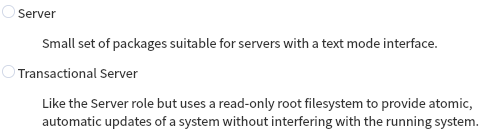
Need to do some catch up on “Transactional Server” from Open Suse

Posted by jpluimers on 2021/05/28

Transactional Server to me smells like Microsoft data warehouse era, so seeing it in an OpenSuSE Tumbleweed install made me wonder: huh, DBMS?

So I likely need some catch up to do do on this:

Apparently “Transactional Server” is an installation type similar to “Server”, which can upgrade without touching a running system.

So how can the system then run with the updates applied?

The answer seems to be “reboot”.

This is contrary to a lot of update changes in the past (that seems to be towards “update the running system, even allow for live kernel patching” with optional before/after snapshots.

It immediately associates with “immutability”, and likely containers.

Hopefully I’m right, but I still have questions, like:

Until I have more time, these are on my reading list:

--jeroen

Read the rest of this entry »

Posted in *nix, Linux, openSuSE, Power User, SuSE Linux, Tumbleweed | Leave a Comment »