Archive for the ‘Tumbleweed’ Category
Posted by jpluimers on 2017/11/30
SuSEconfig has been dead for a while, but still indexed at quite a few of the official sites stressing the importance to use it.
It used to apply the configuration in /etc/sysconfig to the system.
The rationale for removal was simple:
Let’s remove all SuSEconfig scripts since only YaST calls SuSEconfig but other tools like rpm and zypper do not call it.
If scripts are needed, they need to be invoked as part of the postinstall.
Now most services either know to directly handle the configuration data there (and apply it during reload/restart/start of the service), or have a tool (like postfix now has /usr/sbin/config.postfix) to apply the settings.
–jeroen
References:
Posted in *nix, Linux, openSuSE, Power User, SuSE Linux, Tumbleweed | Leave a Comment »
Posted by jpluimers on 2017/11/09
Interesting as it has steps for both OpenSuSE and Debian each well suited for running on a Raspberry Pi.
[WayBack] MX Backup – Postfix Email Server | samhobbs.co.uk
It seems postfix is a lot easier to configure than sendmail so I already like it.
First I need to read a bit more in Postfix greylisting.
I’ll need to catch up on Sam’s other parts with the postfix tag as well:
–jeroen
Posted in *nix, *nix-tools, Debian, Development, Hardware Development, Linux, openSuSE, Power User, Raspberry Pi, Raspbian, sendmail, SuSE Linux, Tumbleweed | Leave a Comment »
Posted by jpluimers on 2017/09/28
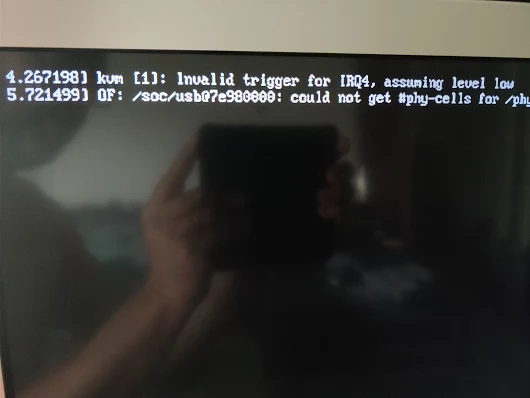
kvm [1]: Invalid trigger for IRQ4, assuming level low

OF: /soc/usb at 7e980000: could not get #phy-cells for /phy
Via [WayBack] Oops. – Jeroen Wiert Pluimers – Google+
This was after updating my Raspberry Pi 3 with Tumbleweed to 20170920.
Not sure what do do now. Some searches didn’t reveal much:
–jeroen
Posted in *nix, Development, Hardware Development, Linux, openSuSE, Power User, Raspberry Pi, SuSE Linux, Tumbleweed | Leave a Comment »
Posted by jpluimers on 2017/09/15
I totally missed this announcement 2 months ago:
after this update, zypper dup will default to –no-allow-vendor-change, whichhas been the recommended way for Tumbleweed for a long time now.
Source: Re: [opensuse-factory] dup –no-allow-vendor-change is now default
So Dominique was glad to “rub the salt” a bit (:
[WayBack/Archive.is] Dominique / DimStar @DimStar Replying to @sysrich @jpluimers: for the record: –no-allow-vendor-change has become the default in Tumbleweed, see also http://dominique.leuenberger.net/blog/2017/06/review-of-the-week-201726/
It was documented at least on these places:
- [Archive.is] Review of the week 2017/26 – Dominique a.k.a. DimStar (Dim*):
libzypp: change of default setting for ‘allow vendor change to false’ during zypper dup (just a change in the default shipped zypp.conf file)
- [WayBack] openSUSE News: Tumbleweed Snapshots Update AppStream, Mesa, Frameworks – July 13th, 2017 by Douglas DeMaioThe 20170708 snapshot had a big change to
libzypp 16.13.0. The new version update hides the switch of the default for zypper dup; after this update, zypper dup will default to --no-allow-vendor-change, which has been the recommended way for Tumbleweed for a long time now, according to an email post on the openSUSE Factory Mailing List from Dominique Leuenberger. That is if the user did not change /etc/zypp/zypp.conf -.
- [WayBack] [opensuse-factory] New Tumbleweed snapshot 20170708 released!
– Adjust zypp.conf for openSUSE Tumbleweed (bsc#1031756)
- [WayBack] Re: [opensuse-factory] dup –no-allow-vendor-change is now default
– Adjust zypp.conf for openSUSE Tumbleweed (bsc#1031756)
^^^^ This change hides the switch of the default for zypper dup: after
this update, zypper dup will default to –no-allow-vendor-change, which
has been the recommended way for Tumbleweed for a long time now.
NOTE: This will ONLY update your default configuration if you did not
touch /etc/zypp/zypp.conf – If you had local modifications, rpm will
have put a file NEXT to it (zypp.conf.rpmnew), in which case you have
to adjust the settings manually (or you likely already did)
Hope this will eliminate a good part of the issues people kept on
reporting about updates – bringing Tumbleweed one step closer to what
you expect it to do in all situations.
–jeroen
Read the rest of this entry »
Posted in *nix, Linux, openSuSE, Power User, SuSE Linux, Tumbleweed | Leave a Comment »
Posted by jpluimers on 2017/09/13
If you see error message like below when performing zypper refresh or zypper dist-upgrade, then please inform the opensuse team (for instance Twitter or the #openSUSE-factory IRC channel) as this is part of the aftermath of the download.opensuse.org trouble that started last week.
Permission to access 'http://download.opensuse.org/ports/aarch64/tumbleweed/repo/oss/suse/setup/descr/appdata-icons.tar.gz' denied.
What happened to me with Raspberry Pi 3 and Tumbleweed is below and fixed because after I got in touch: the data restore had worked out OK, but the permissions didn’t.
I got there as the search for “Permission to access ‘http://download.opensuse.org/ports/aarch64/” got me to [WayBack] TUMBLEWEED Zypper Permission to access:
Unfortunately there was a catastrophic issue last week with the openSUSE download system (read: stuff is still broken and not all mirrors are fully functional).
–jeroen
Read the rest of this entry »
Posted in *nix, Linux, openSuSE, Power User, SuSE Linux, Tumbleweed | Leave a Comment »
Posted by jpluimers on 2017/08/17
Reproduction of A start job is running for dev-disk-by... – Google Photos / Oops. Let’s see if I can reproduce it, as I think this is related: https://…
Reproducible steps below.
Related:
Tried tips from last link: fails as well
These are the modifications of the steps further on based on the last link above.
- After first boot, verify the WiFi drivers are there:
# rpm -qa | grep bcm43xx

bcm43xx-firmware-20170410-2.1.noarch
- After editing
/etc/dracut.conf.d/raspberrypi_modules.conf, perform sudo mkinitrd without any -f
- After reboot, same error
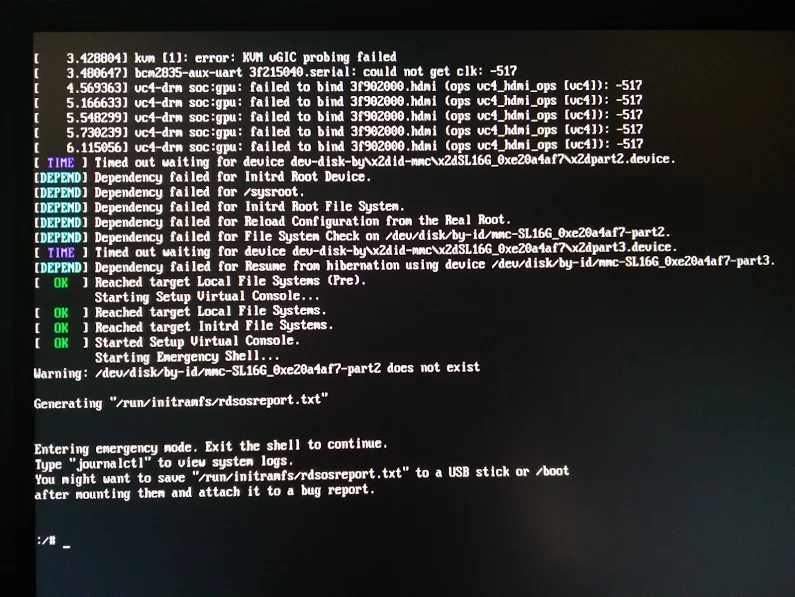
Error result
At boot time:
 A start job is running for dev-disk-by\…
After waiting:
Reproducible steps
- download (or a more recent one) from http://download.opensuse.org/repositories/devel:/ARM:/Factory:/Contrib:/RaspberryPi3/images/ :
- Install them on a MicroSD card
- Put in Raspberry Pi 3 and boot
- Get the IP address of the machine, then SSH into it (
ssh root@ip-address, password linux)
- Follow the steps from [WayBack] openSUSE on Raspberry Pi 3: From Zero to Functional System in a Few Easy Steps – SUSE Blog | SUSE Communities to get WiFi working:
- Edit
/etc/dracut.conf.d/raspberrypi_modules.conf and remove the sdhci-iproc from the first and # on the last line:From :
add_drivers+=" sdhci-iproc bcm2835-sdhost bcm2835_dma mmc_block dwc2 "
# Workaround for Wifi
#omit_drivers+=" sdhci-iproc"
To :
add_drivers+=" bcm2835-sdhost bcm2835_dma mmc_block dwc2 "
# Workaround for Wifi
omit_drivers+=" sdhci-iproc"
- Run these commands:
mkinitrd -f
reboot
- Check in
Yast if wlan0 exists in System -> Network Settings, then assign an SSIS plus credentials to it
- Verify the list contains
BCM43430 WLAN card
- Select it
- Click the
Edit button
- Put the check mark next to
Dynamic Address then select DHCP and the kind of DHCP (in my caseboth version 4 and 6)
- Click the
Next button
- Keep
Operating Mode as Managed
- Click the
Scan Network button
- Select
Network Name (ESSID) from the list
- Select
Authentication Mode from the list
- Put the check mark for
Key Input Type as Passphrase
- Enter the
Encryption Key
- Click the
Next button
- Click the
OK button
- Quit
Yast
- Wait a few moments, then very with
ip a that wlan0 got an IP address
- Update the system:
zypper refresh
zypper dist-upgrade
- Reboot
- Wait for the error to occur on the HDMI screen (USB keyboard does not work there, so I cannot copy logs)
Gist log until 7. is below.
IRC chat transcript opensuse-factory
[10:40am] <wiert> TL;DR: Tumbleweed on Rpi3; enable WiFi according to site and forum instructions; zypper dist-upgrade; boot failure.
[10:41am] <wiert> without enabling WiFi everything is fine.
[10:41am] <wiert> spare RPi3s get in next week, so I’ll configure this one for my brother without WiFi for now.
[10:43am] <fvogt> Hm, that guide can’t actually work that way (unless something changed significantly)
[10:43am] <wiert> it worked in the sense that it got WiFi working. it failed in the sense that you cannot upgrade any more (:
[10:43am] <fvogt> The omit_drivers line removed the driver for the sd card controller, so it’s no surprise that it doesn’t boot anymore. It needs a different device tree
[10:44am] <fvogt> I guess you upgraded the kernel + DT? You must not do that
[10:44am] <wiert> funny as after the mkinitrd, a reboot went fine.
[10:44am] <wiert> it’s only that after a zypper dup it fails.
[10:44am] <mnowak__> DimStar, I wan’t $$ only on Windows, I should not have to re-define $prompt_sign. I guess I need to move the second $prompt_sign to the if-clause below
[10:45am] <fvogt> wiert: Ah, so it ships with a WiFi enabled DT + Kernel with the TW image
[10:45am] <fvogt> If you zypper dup then, it’ll switch to the DT + Kernel from plain TW, breaking everything
[10:46am] <wiert> What’s DT?
[10:46am] <wiert> driver-tree?
[10:46am] <fvogt> Close, device-tree
[10:46am] <wiert> (that gist has all the steps I performed)
[10:46am] <fvogt> It contains the assignment of memory and other HW resources to each other and drivers
[10:47am] <fvogt> That’s most likely the issue
[10:48am] <fvogt> You can recover from that by downloading the right .dtb file and putting it on the sd card manually
[10:48am] <fvogt> Alternatively, the u-boot embedded one should still work, so you can delete the DT on the SD and it should boot again (with some missing peripherals though)
[10:51am] <wiert> I’ve already put a fresh disk image on it and I’m in the midst of configuring it for my brother (he’s mentally retarded and I’m putting it behind his TV so he can view his agenda electronically to see if that gives him more stability in organising his life; I need to be at his place in 2 hours)
[11:27am] <wiert> @fvogt: I will add this part of the IRC chat to that blog post and try to get your suggestions done when the spare RPI3s get in.
–jeroen
Read the rest of this entry »
Posted in *nix, Development, Hardware Development, Linux, openSuSE, Power User, Raspberry Pi, SuSE Linux, Tumbleweed | Leave a Comment »
Posted by jpluimers on 2017/07/31
I could not find many potential anti-virus and -malware tools for OpenSuSE Tumbleweed despite they would be useful not only for non-Linux clients like Windows and Mac OS X.
These I found:
–jeroen
Posted in *nix, Linux, openSuSE, Power User, SuSE Linux, Tumbleweed | Leave a Comment »
Posted by jpluimers on 2017/06/12
You know the drill: site that limits incoming traffic and has painful VPN. Luckily this time outgoing ssh traffic on port 22 was allowed (because they do SFTP which is SSH File Transfer).
Since I’ve outside Linux boxes and could run a Linux VM there (all Tumbleweed based), this allowed me to do a reverse SSH tunnel. Those are always a bit confusing, but this set of drawings really helps: What’s ssh port forwarding and what’s the difference between ssh local and remote port forwarding – Unix & Linux Stack Exchange [WayBack].
Which brings me to a statement like this:
ssh -o "ExitOnForwardFailure yes" -R :3389:192.168.199.114:3389 -p 33322 93.184.216.34
That didn’t work: a remote machine could not RDP to port 3389, but a local telnet localhost 3389 would. The reason is that by default sshd binds a remote port to the local address only and not the wildcard addres.
So you have to open up the remote config a bit: at least /etc/sshd_config and most likely also your firewall.
Read the rest of this entry »
Posted in *nix, Communications Development, Development, Internet protocol suite, Linux, openSuSE, Power User, SSH, SuSE Linux, TCP, Tumbleweed | Leave a Comment »
Posted by jpluimers on 2017/05/24
I was not too happy that this just happened after updating one of the DNS secondaries:
May 24 21:29:48 laurel systemd[1]: Starting LSB: Domain Name System (DNS) server, named...
-- Subject: Unit named.service has begun start-up
-- Defined-By: systemd
-- Support: http://lists.freedesktop.org/mailman/listinfo/systemd-devel
--
-- Unit named.service has begun starting up.
May 24 21:29:49 laurel named[3173]: Starting name server BIND cp: cannot stat '/lib/engines': No such file or directory
May 24 21:29:51 laurel named[3235]: starting BIND 9.10.4-P5  -t /var/lib/named -u named
May 24 21:29:51 laurel named[3235]: running on Linux armv6l 4.3.3-6-raspberrypi #1 Wed Dec 16 08:03:35 UTC 2015 (db72752)
May 24 21:29:51 laurel named[3235]: built with '--prefix=/usr' '--bindir=/usr/bin' '--sbindir=/usr/sbin' '--sysconfdir=/etc' '--localstatedir=/var' '--libdir=/usr/lib' '--enable-exportlib' '--with-export-libdir=/usr/lib' '--with-export-includedir=/usr/i
May 24 21:29:51 laurel named[3235]: ----------------------------------------------------
May 24 21:29:51 laurel named[3235]: BIND 9 is maintained by Internet Systems Consortium,
May 24 21:29:51 laurel named[3235]: Inc. (ISC), a non-profit 501(c)(3) public-benefit
May 24 21:29:51 laurel named[3235]: corporation.  Support and training for BIND 9 are
May 24 21:29:51 laurel named[3235]: available at https://www.isc.org/support
May 24 21:29:51 laurel named[3235]: ----------------------------------------------------
May 24 21:29:51 laurel named[3235]: adjusted limit on open files from 4096 to 1048576
May 24 21:29:51 laurel named[3235]: found 1 CPU, using 1 worker thread
May 24 21:29:51 laurel named[3235]: using 1 UDP listener per interface
May 24 21:29:51 laurel named[3235]: using up to 4096 sockets
May 24 21:29:51 laurel named[3235]: ENGINE_by_id failed (crypto failure)
May 24 21:29:51 laurel named[3235]: error:25070067:DSO support routines:DSO_load:could not load the shared library:dso_lib.c:233:
May 24 21:29:51 laurel named[3235]: error:260B6084:engine routines:DYNAMIC_LOAD:dso not found:eng_dyn.c:467:
May 24 21:29:51 laurel named[3235]: error:2606A074:engine routines:ENGINE_by_id:no such engine:eng_list.c:390:id=gost
May 24 21:29:51 laurel named[3235]: initializing DST: crypto failure
May 24 21:29:51 laurel named[3235]: exiting (due to fatal error)
May 24 21:29:51 laurel named[3173]: ..failed
May 24 21:29:51 laurel systemd[1]: named.service: Control process exited, code=exited status=1
May 24 21:29:51 laurel systemd[1]: Failed to start LSB: Domain Name System (DNS) server, named.
-- Subject: Unit named.service has failed
-- Defined-By: systemd
-- Support: http://lists.freedesktop.org/mailman/listinfo/systemd-devel
--
-- Unit named.service has failed.
--
-- The result is failed.
May 24 21:29:51 laurel systemd[1]: named.service: Unit entered failed state.
May 24 21:29:51 laurel systemd[1]: named.service: Failed with result 'exit-code'.
It’s in fact a manifestation of [Archive.is] Bug 1040027 – bind (named): fails to start since the introduction of namespaced openSSL packages
A fix is in the pipeline at [Archice.is] Request 496968 – openSUSE Build Service
However, that fix never made it to Raspberry Pi B (the original Rasberry Pi 1B) because that is armv6l and the bind build for that has failed early April 2017.
That’s now in [Archive.is] Bug 1040697 – bind fails building for armv6l since 20170401 causing bugfixes not to make it to the wild.
–jeroen
Read the rest of this entry »
Posted in *nix, bind-named, etckeeper, Linux, openSuSE, Power User, SuSE Linux, Tumbleweed | Leave a Comment »
Posted by jpluimers on 2017/04/26

When halt is not a real halt but a “disabling” of the CPU.
TL;DR:
Don’t use halt, use poweroff instead.
A while ago I wrote about OpenSuSE 12.x not halting after a halt:
The same holds for more recent OpenSuSE systems, but ESXi would never tell what was going on.
Recently I installed an OpenSuSE Tumbleweed system under VMware Fusion (running on Mac OS X) which indicated “The CPU has been disabled by the guest operating system.”

Log indicates a “Shutdown” which in fact is a CPU not powered down.
Which — Understanding the message: The CPU has been disabled by the guest operating system (2000542) | VMware KB [WayBack] — means that halt will not power down the VM but perform a CLI + HLT on the CPU. This effectively hangs the CPU even though the console log on the right tells does a real Shutdown.
In the past – even under ESXi – a halt would just power down the system, so based on the above I did more digging and fount this very interesting answer in rhel – What is the difference between these commands for bringing down a Linux server? – Unix & Linux Stack Exchange [WayBack] which comes down to:
- on a systemd [WayBack] based system commands like
halt, reboot, shutdown all invoke systemctl [WayBack] calling for a specific target [WayBack].
- mapping of targets and commands is as follows (quoted from the answer):
systemctl isolate halt.target has the shorthands:
shutdown -H nowsystemctl halt- plain unadorned
halt
systemctl isolate reboot.target has the shorthands:
shutdown -r nowtelinit 6systemctl reboot- plain unadorned
reboot
systemctl isolate poweroff.target has the shorthands:
shutdown -P nowtelinit 0shutdown nowsystemctl poweroff- plain unadorned
poweroff
systemctl isolate rescue.target has the shorthands:
telinit 1systemctl rescue
systemctl isolate multi-user.target has the shorthands:
telinit 2telinit 3telinit 4
systemctl isolate graphical.target has the shorthand:
For a SysV [WayBack] init runlevels versus systemd targets see:
The systemd parameters making things a bit confusing, for instance you can do reboot --halt and more of those shown in linux – Are there any good reasons for halting system without cutting power? – Super User [WayBack].
That also explains that halt without a powerdown can be useful: it for instance gives the end-user the opportunity to click the reset button instead of the power button after a halt.
–jeroen
Posted in *nix, Linux, openSuSE, Power User, SuSE Linux, systemd, SysVinit, Tumbleweed | Leave a Comment »


 The Wiert Corner - irregular stream of stuff