For my link archive because of the tips: [WayBack] How To Use Journalctl to View and Manipulate Systemd Logs | DigitalOcean
–jeroen
Posted by jpluimers on 2020/11/05
For my link archive because of the tips: [WayBack] How To Use Journalctl to View and Manipulate Systemd Logs | DigitalOcean
–jeroen
Posted in *nix, *nix-tools, journalctl and journald, Linux, Power User | Leave a Comment »
Posted by jpluimers on 2020/09/21
[WayBack] Rebooting a Linux server unattended – twm’s blog:
/sbin/shutdown -r now
Simple, but I keep forgetting where Linux has short/long command options and short/long verbs.
–jeroen
Posted in *nix, *nix-tools, Debian, Linux, OpenShift, openSuSE, Power User, Raspbian, RedHat, SuSE Linux, Tumbleweed, Ubuntu | Leave a Comment »
Posted by jpluimers on 2020/09/07
It looks like I need to learn about IPP and driverless based on [WayBack] TIL that your Linux desktop can probably use your somewhat recently made printer, efficiently, with all major features exposed, without needing to download a ton of vendor shitware, without needing to find a PPD file in the depths of hell, without needing to pay extra for explicit PostScript 3 support, and without needing to accept that it will do 0.2 instead of 20 pages per minute because the in-printer PostScript rasterizer runs on a Z80…. – Maik Zumstrull – Google+.
So here are some links:
Via: [WayBack] TIL that your Linux desktop can probably use your somewhat recently made prin… – Kristian Köhntopp – G+
When adding my printer in the Chrome tool, it can properly detect it:
OKI MC342 OKI MC342
http://192.168.71.52:631Printer informationPrinter make/model: OKI-MC342-36855D
Printer state: idle
Accepting jobs: true
IPP server version: 1.1
Supports PDF natively: true
Supports PWG raster: false
Supports Postscript: true
Supports Unirast: true
Supports application/octet-stream: true
CUPS server: No
Compatability report: PASS Printer should be compatible – try printing
–jeroen
Posted in *nix, *nix-tools, Hardware, OKI C332, OKI Printers, Power User, Printers | 2 Comments »
Posted by jpluimers on 2020/09/07
For a simple comma separated list (no quotes), I was expecting a sed script (and indeed it is possible), but tr is more elegant:
Use
trto change , into newlines:
tr , "\n" < list.txt
Source: [WayBack] bash – convert comma separated values into a list of values using shell script – Stack Overflow.
–jeroen
Posted in *nix, *nix-tools, bash, bash, Development, Power User, Scripting, Software Development | Leave a Comment »
Posted by jpluimers on 2020/08/21
find . -type f -name '\.*' -printMust work if you want list every hidden file down in the directory hierarchy.
This sort of works on Linux, but fails on VMware ESXi (on Linux it only works when applying -maxdepth 1, deeper levels fails because they list all files where the top directory starts with a .):
If you want hidden files and hidden directories, without . and .. :find -regex '\./\..+' -print
This works on both Linux and VMware ESXi:
If you want hidden files and hidden directories, without . and .. :
find . \( -type f -o -type d \) -name '\.*' -print
Based on:
–jeroen
Posted in *nix, *nix-tools, bash, bash, Development, Power User, Scripting, Software Development | Leave a Comment »
Posted by jpluimers on 2020/08/17
I think it was Thomas Mueller pointing to this, but I’m not sure as I found it in a browser tab from long ago: [WayBack] Welcome to Dirvish
Dirvish is a fast, disk based, rotating network backup system.
With dirvish you can maintain a set of complete images of your filesystems with unattended creation and expiration. A dirvish backup vault is like a time machine for your data.
Dirvish was originally created by jw schultz .
Before starting, I want to read these:
–jeroen
Posted in *nix, *nix-tools, Power User, rsync | Leave a Comment »
Posted by jpluimers on 2020/08/12
For a project I’m going to be in need to compare version numbers.
I’m not sure yet if I need wildcards, or can leave them out (but for partial semantic versioning, I might need them).
Below a bunch of links that should get me started.
From a quick glance: versioning is hard, comparing even harder.
On versioning in general
Numeric versioning (usually without wildcards):
On semantic versioning (SemVer for short):
in versus CharInSet versus IsDigit versus IsInArrayOn the C# Version class (which handles most of semantic versioning except: leading zero’s, very large numbers, non-numeric release specifiers)
// A Version object contains four hierarchical numeric components: major, minor, // build and revision. Build and revision may be unspecified, which is represented // internally as a -1. By definition, an unspecified component matches anything // (both unspecified and specified), and an unspecified component is "less than" any // specified component.
Interesting idea, but not sustainable: using floating point values to compare versions:
On wildcards:
Via: [WayBack] Anyone tips for a TVersion structure that supports at max quad digits or wildcards and comparison? Like 3.2 matching 3.2.5.7, but not matching 3.3.4.28 ? – Jeroen Wiert Pluimers – Google+
–jeroen
Posted in *nix, *nix-tools, Development, Power User, rpm, Software Development, Versioning | Leave a Comment »
Posted by jpluimers on 2020/08/10
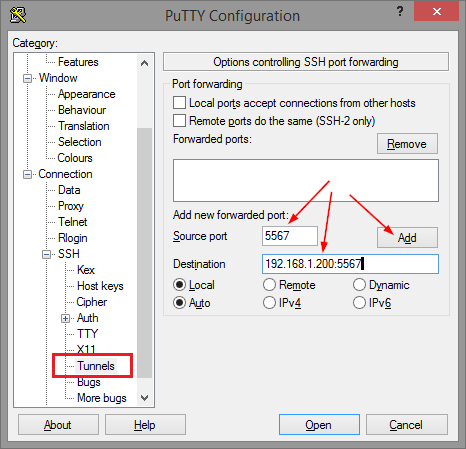
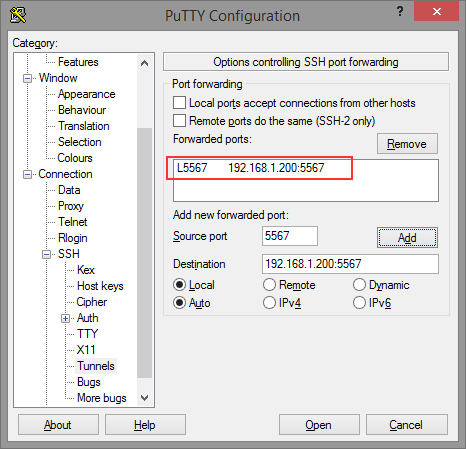
Thomas basically did all the research on the forwarding needed for ELC (formerly Belise/Elise), then showed the PuTTY equivalent to ssh user@remote -L5567:192.168.1.200:5567:
[WayBack] Remote access to the Embarcadero License Center via SSH tunnel – twm’s blog
Via: [WayBack] Once you have set up an Embarcadero License Center (ELC) for your company (with network named user or concurrent licenses) you will need network access … – Thomas Mueller (dummzeuch) – Google+
Related: [WayBack] Introducing the Embarcadero License Center – ELC
–jeroen
Posted in *nix, Communications Development, Delphi, Development, Internet protocol suite, Licensing, Power User, Software Development, SSH, ssh/sshd | Leave a Comment »
Posted by jpluimers on 2020/07/31
… even though you can open and read it fine in an editor: You should check its Linux access permissions. If it is not marked as executable, this might be the cause. Change it with chmod like …
Source for my link archive: [WayBack] If your Samba logon script does not get executed – twm’s blog.
Via: [WayBack] … even though you can open and read it fine in an editor: You should check its Linux access permissions. If it is not marked as executable, this might b… – Thomas Mueller (dummzeuch) – Google+
–jeroen
Posted in *nix, *nix-tools, Power User, samba SMB/CIFS/NMB | Leave a Comment »
Posted by jpluimers on 2020/07/24
A few tips:
cd /sourceDirectory
find -type f \( -not -name "md5sum.txt" \) -exec md5sum '{}' \; > md5sum.txt
.
cd /targetDirectory
md5sum -c /sourceDirectory/md5sum.txt
.
On some systems (this was an ESXi system which can’t run stuff from the console in parallel), you could optimise this using xargs for the generation and GNU parallel for the generation and checking. Both should be very similar:
GNU parallel is written to have the same options as xargs. If you write loops in shell, you will find GNU parallel may be able to replace most of the loops and make them run faster by running several jobs in parallel.
Via:
–jeroen
Posted in *nix, *nix-tools, bash, Power User | Leave a Comment »