The Wiert Corner – irregular stream of stuff

Jeroen W. Pluimers on .NET, C#, Delphi, databases, and personal interests

  • My badges

  • Twitter Updates

  • My Flickr Stream

  • Pages

  • All categories

  • Enter your email address to subscribe to this blog and receive notifications of new posts by email.

    Join 1,854 other subscribers

Archive for the ‘Power User’ Category

Keeping your ESXi infrastructure up-to-date: Subscribe to VMware ESXi Patch Tracker RSS Feed

Posted by jpluimers on 2021/06/29

[WayBack] Subscribe to VMware ESXi Patch Tracker RSS Feed has all the post-feedburner (see below) RSS links in a nice table:

Subscribe to VMware ESXi Patch Tracker RSS Feed

For popular web based readers:
Feedly [All] [6.7] [6.5] [6.0] [5.5] [5.1] [5.0]
My Yahoo! [All] [6.7] [6.5] [6.0] [5.5] [5.1] [5.0]
netvibes [All] [6.7] [6.5] [6.0] [5.5] [5.1] [5.0]
For manual subriptions with other web based or offline readers copy-and-paste these links:
manual [All] [6.7] [6.5] [6.0] [5.5] [5.1] [5.0]

Post-feedburner

Parts of feedburner have been deprecated since 2012: FeedBurner – Wikipedia.

There are all sorts of reports of feedburner being unstable, for instance:

–jeroen

Posted in ESXi5, ESXi5.1, ESXi5.5, ESXi6, ESXi6.5, ESXi6.7, Power User, Virtualization, VMware, VMware ESXi | Leave a Comment »

Nieuwe tenaamstellingscode aanvragen | RDW

Posted by jpluimers on 2021/06/28

Voor mijn link archief, want het kan al een tijdje ook met DigiD: [Archive.is] Nieuwe tenaamstellingscode aanvragen | RDW.

Via: [WayBack] RDW on Twitter: “Wil je je voertuig verkopen, maar ben je je tenaamstellingscode kwijt? Vanaf nu krijg je een nieuwe code niet meer per post, maar direct per e-mail toegestuurd. In plaats van 5 dagen, ben je nu 5 minuten kwijt. Lees meer op …”

–jeroen

Read the rest of this entry »

Posted in LifeHacker, Power User | Leave a Comment »

Criminals are mailing altered Ledger devices to steal cryptocurrency: looks added USB flash card is from Intenso

Posted by jpluimers on 2021/06/28

Last week, Bleeping Computer write about [Wayback] Criminals are mailing altered Ledger devices to steal cryptocurrency:

Scammers are sending fake replacement devices to Ledger customers exposed in a recent data breach that are used to steal cryptocurrency wallets.

The fake Ledger hardware wallet has a piggy back USB flash device on it (image from Mike):

[Archive.is] _MG_ on Twitter: “Malicious hardware implant in the wild! I helped @LawrenceAbrams dig into this. It’s a hardware wallet with a malicious implant added. It’s being mailed to targets. Read about it here: “

This week, Jilles opened up a bunch of USB flash devices to compare them with the pictures of the fake Ledger hardware wallet, where Mike noted that likely an Intenso device. It all started with a compliment

I reacted that earlier this year, I had an Intenso device die that was the boot stick for an ESXi server which after booting (once in months at most) only does read-only access to it. If I find it back (I might have ditched it), I will open it up and post pictures.

[Wayback] Jeroen Wiert Pluimers on Twitter: “Note I had one of these Intenso sticks die in an ESXi server: it was just the boot stick, so no writes at all. “

Anyway, this was the one that died (maybe because it was very cheap):

According to [Wayback] USB Sticks | Intenso, these devices are manufactured by or for this German company:

Intenso International GmbH
Gutenbergstraße 2
49377 Vechta, Germany

Indeed the conclusion of Jilles and Mike, while figuring out the type of USB PCB, was already that opening up the device could give an indication in what geographic region or what era these fakes might originate from:

Meta-information is information too, and especially important in forensics.

Fake Ledger hardware wallet video

Mike also created a video. It is below the signature.

This was the tweet about it: [Archive.is] _MG_ on Twitter: “I sat down and walked through the Ledger Wallet implant. From phish, to Amazon poisoning attack, to implant, and what’s next. “

Attribution

As Jilles mentioned, attribution is important, though both Mike and Jilles hardly sees that with red teams. So thanks Mike and Jilles for doing the grunt work.

[Archive.is] Jilles on Twitter: “Thanks @_MG_! One of the hard things about creating cool stuff for red teams is that you usually cannot share what epic stuff you did, apart from your team and the client. Unless… You see one of your methods in the wild. And really love the tiny USB modules being used here.… https://t.co/Cs4rzvuNrT”

[Archive.is] Jilles on Twitter: “I have actually been working on assignments where attribution, purpose and forensics of discovered implants had to take place. Not a red team exercise.… “

–jeroen

Read the rest of this entry »

Posted in Power User, Security | Leave a Comment »

How to rename a VM through SSH on ESXi ? |VMware Communities

Posted by jpluimers on 2021/06/28

From [WayBack] How to rename a VM through SSH on ESXi ? |VMware Communities (numbering and code highlighting mine):

Kindly find the below:

  1. Backup the virtual machine
  2. Power down the virtual machine
  3. Remove the virtual machine from the vSphere host inventory
  4. Open an SSH console session to the vSphere host
  5. Navigate to the storage directory containing the virtual machine: For example: cd /vmfs/volumes/<datastore_name>/<original_vmname>
  6. Rename the primary .vmdk configuration files: vmkfstools -E "<original_vmname>.vmdk" "<new_vmname>.vmdk"
  7. Rename the .vmx configuration file: mv "original_vmname.vmx" "new_vmname.vmx"
  8. Edit the virtual machine .vmx configuration file (Be sure to properly update the directory and file name of the .vswp swap file reference): vi "new_vmname.vmx"
  9. Rename any remaining files in the virtual machine’s folder as needed:
    1. Rename the .vmxf configuration file: mv "original_vmname.vmxf" "new_vmname.vmxf"
    2. Rename the .nvram configuration file: mv "original_vmname.nvram" "new_vmname.nvram"
    3. Rename the .vsd configuration file: mv "original_vmname.vsd" "new_vmname.vmsd"
  10. Rename the virtual machine folder: Move up one directory level to the parent folder ( cd .. ) then rename the virtual machine directory: mv "original_directory" "new_directory"
  11. Add the newly-named virtual machine to the host’s inventory (the newly renamed .vmx configuration file)
  12. Power on the newly renamed virtual machine
  13. Answer “I moved it” to the virtual machine question prompt (not “I copied it”)
  14. Review the virtual machine and all files/folders to make sure it is named as desired and functioning properly

Note: There are other methods to allow for renaming, but this method is fairly quick and easy. It should work on all editions of vSphere from free to Enterprise Plus.

The “Answer question” prompt where you should selected “I moved it”:

->

Prompt with symlink names in the path

On a site note, I need to figure uit how to set the ESXi shell prompt to show the current path like pwd does (with symlink names in it instead of the followed symlink targets):

[root@ESXi-X9SRI-3F:~] cd /vmfs/volumes/EVO860_250GB/
[root@ESXi-X9SRI-3F:/vmfs/volumes/5c9bd516-ef1f6d4c-f1b1-0025907d9d5c] pwd
/vmfs/volumes/EVO860_250GB

The ESXi shell is based on busybox, in fact it uses the ash variety:

[root@ESXi-X9SRI-3F:/vmfs/volumes/5c9bd516-ef1f6d4c-f1b1-0025907d9d5c] `readlink -f \`which readlink\`` | grep ^BusyBox
BusyBox v1.29.3 (2018-11-02 15:37:50 PDT) multi-call binary.
BusyBox is copyrighted by many authors between 1998-2015.
[root@ESXi-X9SRI-3F:/vmfs/volumes/5c9bd516-ef1f6d4c-f1b1-0025907d9d5c] type chdir
chdir is a shell builtin

This seemed to work fine:

[root@ESXi-X9SRI-3F:/vmfs/volumes/5c9bd516-ef1f6d4c-f1b1-0025907d9d5c] PS1="[\u@\h:`pwd`] "
[root@ESXi-X9SRI-3F:/vmfs/volumes/EVO860_250GB] 

But in faxt fails, as it only takes a pwd value once, and not every time the prompt is evaluated:

[root@ESXi-X9SRI-3F:/vmfs/volumes/EVO860_250GB] cd ..
[root@ESXi-X9SRI-3F:/vmfs/volumes/EVO860_250GB] pwd
/vmfs/volumes
[root@ESXi-X9SRI-3F:/vmfs/volumes/EVO860_250GB] 

So I need to re-visit these links:

–jeroen

Posted in *nix, *nix-tools, BusyBox, ESXi6, ESXi6.5, ESXi6.7, Power User, Virtualization, VMware, VMware ESXi | Leave a Comment »

Hopefully datendomina (@sys_adm_ama) has followed up with some cool vi tips…

Posted by jpluimers on 2021/06/28

I hope that datendomina (@sys_adm_ama) has followed up with some cool vi/vim tips.

Though I can do basic editing (far more than quit-without-saving) and know about he various mode, I still feel not proficient.

[WayBack] Jeroen Pluimers on Twitter: “LOL! Boy was I glad that after finding my way in Ed and sed on SunOS in the 1980s, I discovered vi. Still not proficient in it (and I probably never will). However, knowing some of the basics allowed me to visually edit any file on any Unix like system. That’s still gold to me.…”

It also made me discover [WayBack] ed(1) Conference (@ed1conf) | Twitter.

One important tip:

[WayBack] Kristian Köhntopp on Twitter: “vi movement Kommandos haben System. Erkenne und lerne das System. hjkl + prefix+hjkl, Marken, prefix+jump to mark und so weiter. Und bleibe von den verblödeten Plugins weg. Die braucht kein Mensch und machen vim nur langsam im Start und kompliziert.”

The original thread, which I hoped would get longer: [WayBack] Thread by @sys_adm_ama: “Ich lerne jetzt vi(m). Klingt beknackt, oder?se […]”

Ich lerne jetzt vi(m).

Klingt beknackt, oder? Aber ich hab überlegt: ich möchte effizienter werden, meinen Kram stressfreier bewältigen. Und ich finde, es bietet sich an da an Baustellen anzusetzen, die täglich relevant sind. Und vi(m) nutze ich in der Tat täglich.

1/

Aber auch wenn ich ihn nutze und über den »Hilfe, wie komm ich aus dem Editor wieder raus?!«-Witz nur sehr müde die Augen rolle gehe ich davon aus, dass ich nicht mal einen Bruchteil der Möglichkeiten ausschöpfe, die er bietet (1. Release 1976, älter als ich!). Das ist spannend.
Das ist jetzt meine Mini-Challenge, auf die ich jeden Tag eine Viertelstunde verwenden will: wenn ich eine Funktion brauche mich nicht mehr drum herum zu hacken, sondern recherchieren wie es richtig geht und das dann gefälligst auch verinnerlichen. Mal sehen, ob das so klappt

3/

In dem Zuge will ich auch wieder verstärkt (neo)mutt in Verbindung mit vim nutzen – das wäre ein wunderbares tägliches Training 😎 Mails schreiben muss man irgendwie immer.

neomutt bietet leider auch einen Eimer voll Funktionen, die ich noch nicht ordentlich nutze. Gnah.

4/

An euren Replies erkenne ich, dass das mit dem »sich die Kürzel merken« echt heikel zu sein scheint 🤔 Wie handhabt ihr das im Alltag? Einfach ein paar Basics wie :u und CTRL+r und gut ist? Ich bin neugierig. Oder nutzt ihr alle nano? (Ich glaub, dann muss ich entfolgen) 😂
Nur als kleinen Zwischenstand: nach dem Lesen eurer Antworten schließe ich, dass ich mich mit meinem Kenntnisstand nicht verstecken muss 😂 Da hat mir der virtuelle Schulterblick schon weiter geholfen.

/5
vi(m), weil ich Admin bin und dieses Tool auf jedem System und ohne X-Geraffels üblicherweise vorfinde (wenn auch bei neueren Installationen dieser absurde „visual mode“ der Default ist 😳). Auch unter (Open)Solaris, IRIX, was weiß ich.

/6

Eben hab ich das Buch von @MasteringVim aus der Packstation gezogen (extrem vielversprechend!) – und klar, ich werde berichten 😎 Ich bin sehr gespannt.

/7ed

–jeroen

Read the rest of this entry »

Posted in *nix, *nix-tools, Development, ed, Power User, Scripting, sed, sed script, Software Development, vi/vim | Leave a Comment »

Hangouts is being replaced by Google Chat: how long will Hangouts last?

Posted by jpluimers on 2021/06/25

Hangouts is being replaced by Google Chat

Hangouts is being replaced by Google Chat

Oh boy, this is probably a prelude to Google Hangouts, as it originates from Google+, following the Google+ feat: death for personal users.

[Wayback] Learn about the switch from classic Hangouts to Google Chat – Computer – Hangouts Help started with

Google Chat launched to Google Workspace accounts in 2017 and is now available for free on personal accounts. When you switch from classic Hangouts to Google Chat on your personal account, you

but then came this in the list of limitations:

  • Video call ringing isn’t available on Google Chat. If you use classic Hangouts for direct video calls that ring, don’t switch to Google Chat. To start a video call in Google Chat, you can drop a Google Meet chip into the conversation and dial in.

Now looking for an integrated chat and video call option that my mentally retarded brother understands, as the non-straightforward integration of Google Chat and Google Meet features won’t cut it for his mental abilities.

Via: [Archive.is] Jeroen Wiert Pluimers on Twitter: “Oh dang: how long will Google Hangouts last? It is the easiest (and currently only well known) way for my mentally retarded brother to have video calls with his caretakers and us.”

–jeroen

PS: Blocks also do not transfer to Google Chats. At myaccount.google.com/blocklist you can find who you blocked.

Posted in Google, GoogleHangouts, Power User | Leave a Comment »

Mathematics (topology): getting a plug loose from a tight spot – GIF on Imgur

Posted by jpluimers on 2021/06/25

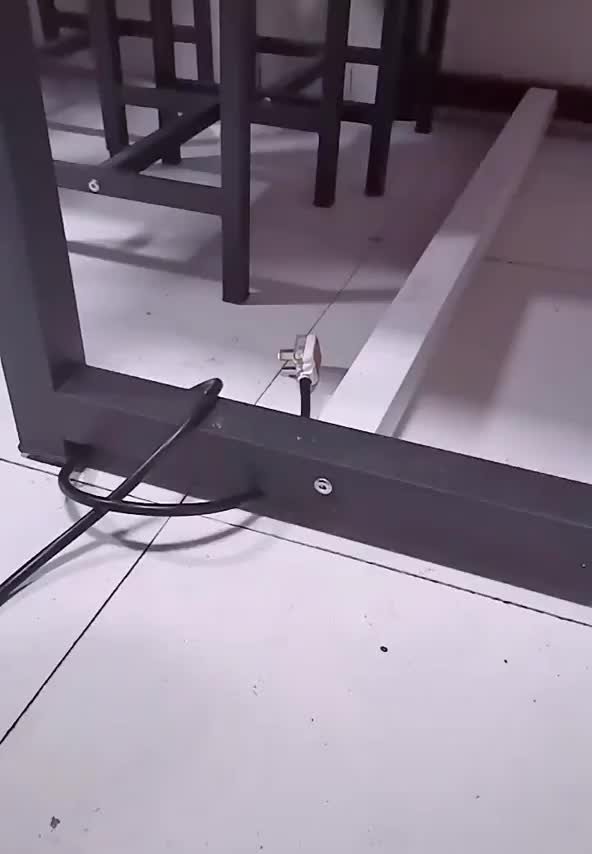
[WayBack] Getting a plug loose from a tight spot – GIF on Imgur via [WayBack] Cliff Pickover on Twitter: “Mathematics, geometry, witchcraft, and the structure of reality. (A plug gets caught under a table.) … “:

The trick is to get the middle part of the cable (which goes over the table beam), to get in front of the horizontal part of the cable.

You can do this by making the loop bigger, then getting it around the plug.

The below ImgUr video shows that (via this [WayBack] Reddit: When a plug gets caught under a table : Unexpected)

Related:

–jeroen

Read the rest of this entry »

Posted in LifeHacker, Power User, science | Leave a Comment »

esxi what is my ip – Google Search

Posted by jpluimers on 2021/06/25

[Archive.is] esxi what is my ip – Google Search:

esxcli network Commands
Command Description
network ip dns server remove Remove a DNS server from the list of DNS servers to use for this ESXi host.
network ip get Get global IP settings
network ip interface add Add a new VMkernel network interface.
network ip interface ipv4 get Get IPv4 settings for VMkernel network interfaces.

60 more rows

More columns and rows of that table in

[WayBack] vSphere Documentation Center: vSphere 5 Command Line Documentation > vSphere Command-Line Interface Documentation > vSphere Command-Line Interface Reference: esxcli network Commands

Not much has changed since, so this still works:

[root@ESXi-X9SRI-3F:/] esxcli network ip interface ipv4 get
Name  IPv4 Address   IPv4 Netmask   IPv4 Broadcast  Address Type  Gateway       DHCP DNS
----  -------------  -------------  --------------  ------------  ------------  --------
vmk0  192.168.71.94  255.255.255.0  192.168.71.255  DHCP          192.168.71.1      true
[root@ESXi-X9SRI-3F:/] network ip interface ipv6 get
Name  IPv6 Enabled  DHCPv6 Enabled  Router Adv Enabled  DHCP DNS  Gateway
----  ------------  --------------  ------------------  --------  -------
vmk0          true           false                true     false  ::

If the box has IPv6 configured, the last command would have shown the IPv6 vmdk information as well.

–jeroen

Posted in ESXi5, ESXi5.1, ESXi5.5, ESXi6, ESXi6.5, ESXi6.7, Power User, Virtualization, VMware, VMware ESXi | Leave a Comment »

Some notes on dumping IceCast ICY streams to get meta-data

Posted by jpluimers on 2021/06/23

Some links I want to investigate further.

This is difference in the header meta data of an icecast URL, than in the stream data.

The header meta-data you get from this cURL command (via [WayBack] linux – Catch Metadata from Icecast-audio-stream – Super User):

# curl -H "Icy-MetaData: 1" -v "http://icecast.omroep.nl:80/radio2-bb-mp3" > /dev/null
  % Total    % Received % Xferd  Average Speed   Time    Time     Time  Current
                                 Dload  Upload   Total   Spent    Left  Speed
  0     0    0     0    0     0      0      0 --:--:-- --:--:-- --:--:--     0*   Trying 145.58.53.154...
* TCP_NODELAY set
* Connected to icecast.omroep.nl (145.58.53.154) port 80 (#0)
> GET /radio2-bb-mp3 HTTP/1.1
> Host: icecast.omroep.nl
> User-Agent: curl/7.54.0
> Accept: */*
> Icy-MetaData: 1
> 
* HTTP 1.0, assume close after body
< HTTP/1.0 200 OK
< Content-Type: audio/mpeg
< Date: Mon, 01 Jul 2019 06:46:33 GMT
< icy-br:192
< ice-audio-info: samplerate=48000;channels=2;bitrate=192
< icy-br:192
< icy-genre:Mixed
< icy-metadata:1
< icy-name:NPO Radio2
< icy-pub:0
< icy-url:http://www.radio2.nl
< Server: Icecast 2.4.0-kh10
< Cache-Control: no-cache, no-store
< Access-Control-Allow-Origin: *
< Access-Control-Allow-Headers: Origin, Accept, X-Requested-With, Content-Type
< Access-Control-Allow-Methods: GET, OPTIONS, HEAD
< Connection: Close
< Expires: Mon, 26 Jul 1997 05:00:00 GMT
< icy-metaint:16000
< 

The content meta-data you can for instance get with node.js in a call like [WayBack] https://colon.roderickgadellaa.com:8001/get/id3/?url=http%3A%2F%2Ficecast.omroep.nl%3A80%2Fradio2-bb-mp3:

{"ok":true,"code":200,"error":false,"data":{"headers":{"content-type":"audio/mpeg","date":"Sat, 29 Jun 2019 17:07:03 GMT","icy-br":"192, 192","ice-audio-info":"samplerate=48000;channels=2;bitrate=192","icy-genre":"Mixed","icy-metadata":"1","icy-name":"NPO Radio2","icy-pub":"0","icy-url":"http://www.radio2.nl","server":"Icecast 2.4.0-kh10","cache-control":"no-cache, no-store","access-control-allow-origin":"*","access-control-allow-headers":"Origin, Accept, X-Requested-With, Content-Type","access-control-allow-methods":"GET, OPTIONS, HEAD","connection":"Close","expires":"Mon, 26 Jul 1997 05:00:00 GMT","icy-metaint":"16000"},"metadata":{"StreamTitle":"AUDIOLINK-AUDIO-FTP-SERVER - +EJ+  Ons Uuropener"},"timestamp":1561828023103,"cacheValidUntil":1561828038103},"request":{"protocol":null,"slashes":null,"auth":null,"host":null,"port":null,"hostname":null,"hash":null,"search":"?url=http%3A%2F%2Ficecast.omroep.nl%3A80%2Fradio2-bb-mp3","query":{"url":"http://icecast.omroep.nl:80/radio2-bb-mp3"},"pathname":"/get/id3/","path":"/get/id3/?url=http%3A%2F%2Ficecast.omroep.nl%3A80%2Fradio2-bb-mp3","href":"/get/id3/?url=http%3A%2F%2Ficecast.omroep.nl%3A80%2Fradio2-bb-mp3"}}

This was at a time where the Dutch NPO Radio 2 had trouble with their ID3 service as the first part stopped refreshing for days: "metadata":{"StreamTitle":"AUDIOLINK-AUDIO-FTP-SERVER - +EJ+ Ons Uuropener"}

Some links that will help me eventually dump this from the command-line:

–jeroen

Posted in Development, IceCast, Media Streaming, Software Development | Leave a Comment »

Disable Filtered Gap – Scooter Forums

Posted by jpluimers on 2021/06/23

There is a short thread mentioning [WayBack] Disable Filtered Gap – Scooter Forums (Issues concerning Text Compare sessions.)

It is the feature that when you select “Diffs” or “Same” on the toolbar on menu in a “Text Compare” (or similar, like XML compare), you see only the differences (or equalities when you selected “Same”).

There also will be small plus signs (+) in the gutter with the hover text “Expand Filtered Gap” on it to expand that gap and show the equalities (or differences when you selected “Same”).

There are two problems that basically make this feature very hard to use, which both stem from the need to view context around a difference in order to understand the proper meaning of that difference:

  • you cannot expand or collaps the “Filtered Gap” by keyboard
  • the “Number of context lines” in the “Text editing” part of the “Options” is not adhered to

Too bad as this could have been such a useful feature.

–jeroen

Posted in Beyond Compare, Development, Power User, Software Development | Leave a Comment »