The Wiert Corner – irregular stream of stuff

Jeroen W. Pluimers on .NET, C#, Delphi, databases, and personal interests

  • My badges

  • Twitter Updates

  • Pages

  • All categories

  • Enter your email address to subscribe to this blog and receive notifications of new posts by email.

    Join 1,854 other subscribers

Archive for the ‘Power User’ Category

ÜberPDF printing using a Delphi like canvas

Posted by jpluimers on 2019/11/15

For my link archive, as it has a lot of goodies in the comments, especially on how to avoid bitmaps in PDF emission: [WayBack] We took PDF to a whole new level today Load create, or editing a PDF in 2 lines of code using a simple Delphi (like) Canvas! We added a PDFPrinter and… – Joe C. Hecht – Google+

–jeroen

Posted in Delphi, Development, EPS/PostScript, PDF, Software Development | Leave a Comment »

4 Ways to Jazz-up Product Descriptions (without Hype) | Practical Ecommerce

Posted by jpluimers on 2019/11/15

Probably by now everyone uses these 4 Ways to Jazz-up Product Descriptions (without Hype) | Practical Ecommerce [WayBack]:

According to Karon Thackston, author of Amazon Advantage: Product Listing Strategies to Boost Your Sales, successful ecommerce merchants avoid hype.

  • Sensory language.
  • Imaginative scenarios.
  • Unexpected vocabulary.
  • Conversational tone.

Provide Solid Info

At a minimum, keep your marketing copy free of over-promising, exaggeration, and pointless bragging. Make sure you’re providing solid information for potential buyers. Then, if you want, jazz-up your wording to heighten rapport.

–jeroen

via: [WayBack] Nice article on no hype product descriptions  – Michael Riley – Google+

Posted in LifeHacker, Power User | Leave a Comment »

Fixing bind named messages like `lame-servers: network unreachable resolving ‘c.gtld-servers.net/AAAA/IN’: 2001:500:127::30#53`

Posted by jpluimers on 2019/11/15

When you see messages like below in your bind named.d logs then you’ve a Jekyll and Hyde network config: part of it says it supports IPv6, but in reality doesn’t as “2001:500:127::30” is the IPv6 of the generic TLD servers.

In my case a brain-dead TP-Link switch.

04-Dec-2016 13:05:48.008 lame-servers: network unreachable resolving 'c.gtld-servers.net/AAAA/IN': 2001:500:127::30#53
04-Dec-2016 13:05:48.008 lame-servers: network unreachable resolving 'd.gtld-servers.net/AAAA/IN': 2001:500:127::30#53
04-Dec-2016 13:05:48.008 lame-servers: network unreachable resolving 'e.gtld-servers.net/AAAA/IN': 2001:500:127::30#53
04-Dec-2016 13:05:48.008 lame-servers: network unreachable resolving 'f.gtld-servers.net/AAAA/IN': 2001:500:127::30#53
04-Dec-2016 13:05:48.008 lame-servers: network unreachable resolving 'g.gtld-servers.net/AAAA/IN': 2001:500:127::30#53
04-Dec-2016 13:05:48.009 lame-servers: network unreachable resolving 'h.gtld-servers.net/AAAA/IN': 2001:500:127::30#53
04-Dec-2016 13:05:48.009 lame-servers: network unreachable resolving 'i.gtld-servers.net/AAAA/IN': 2001:500:127::30#53
04-Dec-2016 13:05:48.009 lame-servers: network unreachable resolving 'j.gtld-servers.net/AAAA/IN': 2001:500:127::30#53
04-Dec-2016 13:05:48.009 lame-servers: network unreachable resolving 'k.gtld-servers.net/AAAA/IN': 2001:500:127::30#53
04-Dec-2016 13:05:48.009 lame-servers: network unreachable resolving 'l.gtld-servers.net/AAAA/IN': 2001:500:127::30#53
04-Dec-2016 13:05:48.009 lame-servers: network unreachable resolving 'm.gtld-servers.net/AAAA/IN': 2001:500:127::30#53
...
04-Dec-2016 13:24:13.500 lame-servers: network unreachable resolving './NS/IN': 2001:500:2f::f#53

A temporary solution is to run bind named.d in -4 mode (see examples for RHEL, CENTOS and OpenSuSE in the links below), but the actual solution is to get IPv6 working properly.

–jeroen

Posted in *nix, bind-named, Linux, Power User | Leave a Comment »

Aansprakelijkheid – AG Connect

Posted by jpluimers on 2019/11/11

Interessante stukjes over aansprakelijkheid:

–jeroen

Posted in LifeHacker, Power User | Leave a Comment »

How to Extract a Number or Text from Excel with this Function

Posted by jpluimers on 2019/11/11

Lots of fuzz, but the formula towards the end worked:

=SUMPRODUCT(MID(0&A1,LARGE(INDEX(ISNUMBER(--MID(A1,ROW($1:$25),1))*
ROW($1:$25),0),ROW($1:$25))+1,1)*10^ROW($1:$25)/10)

Source: [Archive.isHow to Extract a Number or Text from Excel with this Function

More of those at [WayBack] Extract Only Numbers From Text String

–jeroen

Posted in Excel, Office, Office 2011 for Mac, Power User | Leave a Comment »

Resize a table in Word or PowerPoint for Mac – Office Support

Posted by jpluimers on 2019/11/08

Why does it take forever for Microsoft Office suite programs to function the same across their various components and over operating systems. It has been like 2 decades and still sizing columns/rows in tables is a nightmare.

[WayBack] Resize a table in Word or PowerPoint for Mac – Office Support.

In my case PowerPoint: it is so different from Excel, and even different from Word, that it gives me headaches.

This is what PowerPoint 2011 could do; more recent versions are only marginally better:

PowerPoint

You can resize a whole table to improve readability or to improve the visual effect of your document. You can also resize one or more rows, columns, or individual cells in a table.

Do any of the following:

Resize a table

  1. Click the table.
  2. Rest the pointer on any corner of the table until Table Resize Cursor appears, and then drag the table boundary until the table is the size that you want.

Change the row height in a table

  1. Rest the pointer on the row boundary that you want to move until Horizontal split arrow appears, and then drag the boundary until the row is the height that you want.

    If you have text in a table cell, the row must be the same height or taller than the text.

Change the column width in a table

  1. Rest the pointer on the column boundary that you want to move until Vertical split arrow appears, and then drag the boundary until the column is as wide as you want.

    If you have text in a table cell, the column must be as wide as or wider than the text.

Change the row or column to fit the text

  • Rest the pointer on the column boundary until Vertical split arrow appears or the row boundary until Horizontal split arrow appears, and then double-click it.

Make multiple rows or columns the same size

  1. Select the columns or rows that you want to make the same size, and then click the Table Layout tab.
  2. Under Cells, click Distribute Rows or Distribute Columns.
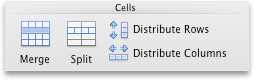
    Tables Layout tab, Cells group

–jeroen

Posted in Office, Office 2011 for Mac, Power Point, Power User, Word | Leave a Comment »

20 Cool Command Line Tricks for Windows and macOS

Posted by jpluimers on 2019/11/08

After all these years in the field, I still learned new tricks from [WayBack20 Cool Command Line Tricks for Windows and macOS which I have rephrased:

Windows

1) View installed drivers: [WayBack] driverquery

2) Watch Star Wars in ASCII: [WayBacktelnet towel.blinkenlights.nl

3) Save folder trees to disk: tree (I had totally forgotten about this, probably because it leaves out a lot of directories and files)

5) Show your Wi-Fi password [WayBacknetsh wlan show profile SSID key=clear (replace SSID with your network name; use nets wlan show profile to view the network names)

7) Check your laptop’s battery health: [WayBack] powercfg /batteryreport which will be in ” and hit Enter to generate the report, then %HOMEPATH%\battery-report.html

8) View your Windows license key: wmic path softwarelicensingservice get OA3xOriginalProductKey [WayBack]

Mac OS X / macOS / however it is called now

1) Change the default screenshot type: [WayBackdefaults write com.apple.screencapture type JPG (you can also use JP2 (for JPEG2000), PDF, PNG, TIFF and others)

2) Get your Mac to speak to you: use say

3) Add a message to the login screen: sudo defaults write /Library/Preferences/com.apple.loginwindow LoginwindowText "your new text on the logon window" [WayBack]

4) Play Tetris and other classics: start emacs, then press Esc followed by X, type in tetris, pong, snake or solitaire (to exit emacs, press CtrlX followed by CtrlC). There are [WayBack] more emacs games.

5) Get a dictionary definition: run curl dict://dict.org/d:word (where word is what you are after) which uses the [WayBack] dict protocol

6) Keep macOS awake: [WayBack] caffeinate optionally followed by a -t## parameter where ## is the number of seconds to not sleep.

7) Show hidden files: defaults write com.apple.finder AppleShowAllFiles -bool TRUE; killall Finder or use this AppleShowAllFiles script which I had forgotten about writing in the first place.

10) Add Spaces to the Dock: defaults write com.apple.dock persistent-apps -array-add ‘{”tile-type”=”spacer-tile”;}’; killall Dock running the command as many times as you want spaces. To get rid of a space you’ve added, just drag them to the Trash.

–jeroen

via: [WayBack] 20 Cool Command Line Tricks for Windows and macOS http://flip.it/SvcQlu – Joe C. Hecht – Google+

Posted in *nix, *nix-tools, Apple, cURL, Power User | Leave a Comment »

55 Questions to Break the Ice Better than typical conversation openers like, “What do you do?”

Posted by jpluimers on 2019/11/08

via [WayBack] 55 Questions to Break the Ice Better than typical conversation openers like, “What do you do?” – Kevin Powick – Google+:

[Archive.is]WorkdayVoice: Jamil Qureshi: ‘Act Differently, Think Differently’ if You Want to Maximize Potential

Many are so obvious you hardly think about them when you could have used them.

–jeroen

Posted in LifeHacker, Power User | Leave a Comment »

Next up: TPDFPrinter and TPDFCanvas Expect a high paced (and easy) update cy…

Posted by jpluimers on 2019/11/05

For my link archive: [WayBack] Next up: TPDFPrinter and TPDFCanvas Expect a high paced (and easy) update cycle for Ultra, with a constant stream of new goodies! Zero hassles – it … – Joe C. Hecht – Google+

–jeroen

Posted in Delphi, Development, PDF, Power User, Software Development | Leave a Comment »

Meeting Ticker – the real cost of a meeting visualised

Posted by jpluimers on 2019/11/04

Ever figured out how costly meetings are?

Show the [WayBackMeeting Ticker during a meeting and be amazed after filling in just a few fields:

Of course it is open source: github/tobytripp/meeting-ticker

And I also found who originally referred me to it: [WayBack] Weekend Reader 2017.48 – reality-loop

–jeroen

Posted in Agile, Development, LifeHacker, Power User, Software Development | Leave a Comment »