The Wiert Corner – irregular stream of stuff

Jeroen W. Pluimers on .NET, C#, Delphi, databases, and personal interests

  • My badges

  • Twitter Updates

  • My Flickr Stream

  • Pages

  • All categories

  • Enter your email address to subscribe to this blog and receive notifications of new posts by email.

    Join 1,839 other subscribers

Archive for the ‘Power User’ Category

How to Easily Print a Large Image to Multiple Pages in Windows | Scottie’s Tech.Info

Posted by jpluimers on 2017/09/04

Many applications cannot not do that (Paint.net is one of them), but Paint can at least in Windows XP, 7, 8. and 8.1 (I need to check other Windows versions).:

In any case, here’s what you do:

  1. Open the image you’d like to print in Paint
  2. Select: Print -> Page Setup (Vista and 7), or File -> Page Setup (in XP)
  3. Under Scaling, select Fit to and change the setting to something like “3 by 2 page(s)”
  4. Click OK
  5. Print the image from Paint, and make sure to select “All Pages”

Source: How to Easily Print a Large Image to Multiple Pages in Windows | Scottie’s Tech.Info [WayBack]

Note the “3 by 2” has the order “horizontal by vertical”.

–jeroen

Posted in Power User, Windows, Windows 7, Windows 8, Windows 8.1, Windows XP | 2 Comments »

How to change the Notepad++ editor’s font – via Notepad++ Community

Posted by jpluimers on 2017/09/04

Paraphrased Steps (thanks guy038); Screenshots below.

  1. Choose the menu option Settings  -> Style Configurator…
  2. In the Style configurator dialog, choose the Global Styles under Language
  3. Then, under Style, select the Default Style (this won’t work for Global Override unless you have that one override everything)
  4. Finally, in the Font Style area, you can select your favourite Font name and/or its Size and apearance (Bold, Italic, Underscore)
  5. Confirm with Save & Close when you like the new font settings.

The cool thing is that if you have a file open, you will immediately see the effects even before pressing Save & Close.

Source: No way to change editor’s font? | Notepad++ Community [WayBack]

–jeroen

Read the rest of this entry »

Posted in Notepad++, Power User, Text Editors, Windows | 1 Comment »

some notes on L2TP IPSEC on Mikrotik

Posted by jpluimers on 2017/09/01

For debugging purposes:

/log print where buffer=memory && (message~"l2tp" || message ~"L2TP"))

This will result in an answer like this:

13:43:59 l2tp,info first L2TP UDP packet received from 93.184.216.34
13:43:59 l2tp,ppp,info,account l2tp-jeroenp logged in, 192.168.73.239
13:43:59 l2tp,ppp,info <l2tp-l2tp-jeroenp>: authenticated
13:43:59 l2tp,ppp,info <l2tp-l2tp-jeroenp>: connecteda

Some links for when you cannot get connections to work:

Before digging deeper, check the output of settings like these:

/system logging add topics=ipsec

/ip ipsec policy group print
/ip ipsec peer print
/ip ipsec remote-peers print
/ip ipsec proposal print
/ip ipsec installed-sa print

It will give you answers like these (note that a Mac OS X 10.9.5 won’t connect with camelia encryption algorithms and not do better hashing than sha1):

> /ip ipsec policy group print
Flags: * - default
# NAME
0 * default
1 pfs-modp1024


> /ip ipsec peer print
Flags: X - disabled, D - dynamic
0 address=0.0.0.0/0 local-address=:: passive=no port=500 auth-method=pre-shared-key secret="someLoooooooongPasssssword" generate-policy=port-override policy-template-group=default exchange-mode=main-l2tp send-initial-contact=yes nat-traversal=yes
hash-algorithm=sha1 enc-algorithm=aes-256,aes-192,aes-128,3des dh-group=modp1024 lifetime=1d dpd-interval=2m dpd-maximum-failures=5


> /ip ipsec remote-peers print
0 local-address=37.153.243.243 port=4500 remote-address=93.184.216.34 port=15390 state=established side=responder established=22m16s

> /ip ipsec proposal print
Flags: X - disabled, * - default
0 * name="default" auth-algorithms=sha1 enc-algorithms=aes-128-cbc lifetime=30m pfs-group=modp1024

> /ip ipsec installed-sa print
Flags: A - AH, E - ESP
0 E spi=0x965F243 src-address=93.184.216.34:15390 dst-address=37.153.243.243:4500 state=mature auth-algorithm=sha1 enc-algorithm=aes-cbc auth-key="7f15b06179d0365cd8b7d8f046201703b2ba93f1" enc-key="ffc56f51397f60002d4bc3d7b95f14ede7eaa542" addtime=oct/17/2016 13:43:58
expires-in=36m34s add-lifetime=48m/1h current-bytes=24928 replay=128

1 E spi=0xE0A95C3 src-address=37.153.243.243:4500 dst-address=93.184.216.34:15390 state=mature auth-algorithm=sha1 enc-algorithm=aes-cbc auth-key="bd936b323131dea53d26791829640471c03154bc" enc-key="cb1a3e3b21d033c39390aa48b7efe64e835fc404" addtime=oct/17/2016 13:43:58
expires-in=36m34s add-lifetime=48m/1h current-bytes=3120 replay=128

In order to switch away from default as Policy Template Group, you will have to:

  1. add a new IPSec group (in /ip ipsec policy group)
  2. add a new IPSec proposal (in /ip ipsec proposal) with the same PFS group name as the policy group.
  3. add a new IPSec policy (in /ip ipsec policy group) with (under General) the same group name as the policy group. *and* (under Action) the same proposal name as the proposal.

Some links on hardening IPSEC with DH algorigthm:

Miscellaneous links:

–jeroen

Posted in Internet, MikroTik, Power User, routers | Leave a Comment »

Some proxmox notes: adding a new logical volume from a new HDD

Posted by jpluimers on 2017/09/01

–jeroen

Posted in Power User, Proxmox, Virtualization | Leave a Comment »

ESXi 6.5 Update 1: Anyone that knows how to edit the port groups of live VMs?

Posted by jpluimers on 2017/08/31

Anyone that knows how to edit the port groups of ESXi 6.5 Update 1 live VMs?

This worked fine in the C# based Windows vSphere Client, but not in the web-client.

When pressing Save, you get this error: Failed to reconfigure virtual machine [[vmname]]. The attempted operation cannot be performed in the current state (Powered on). - dismiss.

You have to edit because of This VM is attached to a network portgroup VM Network Fiber xs4all that doesn't exist. Edit this VM and attach it to a different network. Actions.

If seems a known issue at [Archive.is] ESXi Embedded Host Client – Bugs: #88 Error while editing a VM more than once, but it is unclear how these bugs are tracked and in which of the labs versions any of the bus are fixed ([Archive.is] @jpluimers: Hi @elesueur ! …How can we track progress at VMware Labs Flings?).

The big problem is that the vSphere Web Client is nearly covering the vSphere Windows Client, but as of VMware ESXi 6.5 update 1, the vSphere Windows Client cannot be used any more:

Screenshots:

Press Actions, then Edit Settings:

Press Save:


–jeroen

Posted in ESXi6.5, Power User, Virtualization, VMware, VMware ESXi | Leave a Comment »

Mikrotik date and time calculations

Posted by jpluimers on 2017/08/29

Some ideas for date and time calculation:

It should get better (and verifyable) implementations in stead of these Julian (not Gregorian!) date conversions:

Notes:

–jeroen

Posted in Algorithms, Development, Internet, MikroTik, Power User, RouterOS, routers, Scripting, Software Development | Leave a Comment »

systemd/udev: PredictableNetworkInterfaceNames

Posted by jpluimers on 2017/08/28

This is so cool, but will take some time for lot’s of tooling to become compatible:

Starting with v197 systemd/udev will automatically assign predictable, stable network interface names for all local Ethernet, WLAN and WWAN interfaces. This is a departure from the traditional interface naming scheme (“eth0”, “eth1”, “wlan0”, …), but should fix real problems.

–jeroen

Posted in *nix, *nix-tools, Linux, Power User, systemd | Leave a Comment »

exporting firewall config – MikroTik RouterOS

Posted by jpluimers on 2017/08/28

Example:

/ip firewall filter export file=ip-firewall-filter.rsc

This exports the Filters parts of the IP Firewall into a file named ip-firewall-filter.rsc in the user-space root of the Mikrotik router file system that you can access through the Files menu entry in WinBox or by external access through FTP or SFTP (SSH File Transfer Protocol).

–jeroen

via: exporting firewall config – MikroTik RouterOS


Posted in Development, Internet, MikroTik, Power User, RouterOS, routers, Scripting, Software Development | Leave a Comment »

Running your Mac Mini headless by faking a display for it (HDMI 1080p/4K or Thunderbolt VGA); similar for DVI

Posted by jpluimers on 2017/08/28

CompuLab 4K Display Emulator (fit-Headless 4K)

CompuLab 4K Display Emulator (fit-Headless 4K)

The MacMini is a bit dumb as it won’t enable the GPU when there is no display attached. Which means headless operation is cumbersome as display rendering is very slow.

There are a few tricks of which the off-the-shelve HDMI solutions work best.

You can buy them at Amazon:

CompuLab Display Emulator (fit-Headless)

CompuLab Display Emulator (fit-Headless)

Sources:

Basically the trick to simulate a monitor with a dummy load works for other display connectors as well (most of them work fine with 75 ohm resistors, usually a bit lower or higher works just as well):

Read the rest of this entry »

Posted in Apple, Mac, Mac OS X / OS X / MacOS, MacMini, OS X 10.10 Yosemite, OS X 10.11 El Capitan, OS X 10.9 Mavericks, Power User | Leave a Comment »

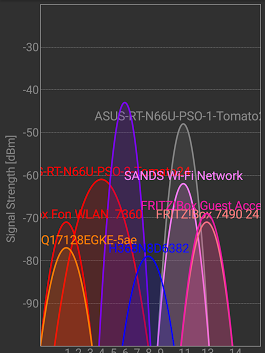
Amsterdam, 2.4 GHz. 5 GHz is only marginally better. In the city, wired connection is the only option: fiber, cable, dsl.

Posted by jpluimers on 2017/08/25

For me, too often – even at home – mobile internet is faster than WiFi over 2.4 Ghz and sometimes even faster than WiFi at 5 Ghz..

Further below is inside my home. I’ve no idea what these – relatively strong – networks are:

  • SANDS Wi-Fi Network (it has a MAC in the OUI list of Apple and is configured as GB device)
  • venus-HQ17128EGKE-5ae (it has a MAC in the local private range)
  • H368N8D6382 (and a network HZN242961585 that looks similar but is very different – the first has a MAC from ZTE corporation, the last from Samsung Electronics)

From Kristian Köhntopp near work in the city centre:

At my home:

A Google+ profile for Jeroen Wiert Pluimers

Source: at home… +Kristian Köhntopp

–jeroen

Via:


Posted in Power User, WiFi | Leave a Comment »