


Online Dutch Radio streams: some direct URLs « The Wiert Corner – irregular stream of stuff:
- Radio Veronica
- HitRadio Veronica
- Veronica Rock Radio
- Veronica Top 1000 Allertijden
- VI Radio
Radio 3:
Radio 10:
- Pages
- Stream, type=”audio/mp3″:
–jeroen
Posted by jpluimers on 2017/08/25
Online Dutch Radio streams: some direct URLs « The Wiert Corner – irregular stream of stuff:
- Radio Veronica
- HitRadio Veronica
- Veronica Rock Radio
- Veronica Top 1000 Allertijden
- VI Radio
Radio 3:
Radio 10:
–jeroen

Posted in LifeHacker, Media Streaming, Power User | Leave a Comment »
Posted by jpluimers on 2017/08/24
Many networks have DHCP Manual allocation (commonly called static allocation) handing out static/fixed IP addresses over DHCP so you can centralise IP address handout based on MAC (or other attributes).
Here are some links that should me get going making my pi-hole Raspberry Pi using DHCP instead of static IP addresses.
Yucky way to set a static IP: How do I set a static IP address in Raspbian “Jessie” using /etc/dhcpcd.conf? – Pi-Hole: A Black Hole For Internet Advertisements [WayBack]
–jeroen
Posted in Development, Hardware Development, Power User, Raspberry Pi | Leave a Comment »
Posted by jpluimers on 2017/08/23
At the recent Embedded Linux Conference and OpenIoT Summit, Mozilla Technical Evangelist Dietrich Ayala proposed a simple and affordable solution to home automation: A discarded smartphone can handle some of the most useful home automation tasks without requiring expensive hubs and sensors — or risking data security in the cloud.
I’ve been awaiting talks like this for years basically because I didn’t take the time to try myself.
Source: Repurposing Old Smartphones for Home Automation | Linux.com | The source for Linux information [WayBack]
–jeroen
Posted in Development, LifeHacker, Mobile Development, Power User | Leave a Comment »
Posted by jpluimers on 2017/08/22
The Cloud Router Switches support three types of mirroring. Port based mirroring can be applied to any of switch-chip ports, VLAN based mirroring works for all specified VLANs regardless switch-chip ports and MAC based mirroring copies traffic sent or received from specific device reachable from the port configured in Unicast Forwarding Database.
Port Based Mirroring
The first configuration sets ether5 port as a mirror0 analyzer port for both ingress and egress mirroring, mirrored traffic will be sent to this port. Port based ingress and egress mirroring is enabled from ether6 port.
/interface ethernet switch
set ingress-mirror0=ether5 egress-mirror0=ether5

/interface ethernet switch port
set ether6 ingress-mirror-to=mirror0 egress-mirror-to=mirror0
Source: Manual:CRS examples – MikroTik Wiki [WayBack]
This allows you to torch traffic from a specific port despite that port being grouped to a master-port.
Via: Torch not working with CRS226-24G-2S+ – MikroTik RouterOS [WayBack]
But, when using Bridge, all ports share a single 1 gbps link to the CPU, so your layer 2 performance will suffer horribly.
If you need to see all the traffic from a single port when using Master/slave port configuration, use port mirroring.
–jeroen
Posted in Development, Internet, MikroTik, Power User, RouterOS, routers, Scripting, Software Development | Leave a Comment »
Posted by jpluimers on 2017/08/22
Found out about this a while ago:
MAC-Telnet – Open source MAC Telnet client and server for connecting to Microtik RouterOS routers and Posix machines via MAC address.
Source: haakonnessjoen/MAC-Telnet: Open source MAC Telnet client and server for connecting to Microtik RouterOS routers and Posix machines via MAC address. [Fork]
Background:
Earlier, I wrote about a Wireshark plugin for dissecting Mac-Telnet packets. Now I have created an open source application for connecting to a RouterOS router.
Source: RouterOS Mac-Telnet application for Linux users | Håkon Nessjøen [WayBack]
My previous post was about RouterOS Mac-Telnet application for Linux users where I talked about the MAC-Telnet client I created for Linux users.
Source: MAC-address based Telnet server in Linux | Håkon Nessjøen [WayBack]
–jeroen
Posted in C, Development, Internet, MikroTik, Power User, routers, Software Development | Leave a Comment »
Posted by jpluimers on 2017/08/21
‘Volgens mij gaat het niet om gebrek aan aanbod, maar om gebrek aan kénnis van het aanbod in Nieuw-West,’ schrijft Liesbeth van der Woud in een lezersbrief aan Het Parool.
Ze heeft helemaal gelijk: [WayBack] ‘Nieuw-West heeft veel te bieden voor herhaalbezoekers’ – Opinie – PAROOL
–jeroen
Posted in LifeHacker | 2 Comments »
Posted by jpluimers on 2017/08/21
I didn’t notice this bind change for a while, but some time ago after doing an rcnamed restart it would split out this error message:
It seems harmless as BIND still starts:
Starting name server BIND ..done
Anyway, some links that helped me solve it:
The last entry provides the solution:
rcnamed stop

chown named:named /var/lib/named/ -R

rcnamed start

rcnamed status
The latter didn’t show any error message.
–jeroen
Posted in *nix, bind-named, Linux, openSuSE, Power User, SuSE Linux | Leave a Comment »
Posted by jpluimers on 2017/08/21
If you need to change the SIM code or disable it altogether on your Android device, here’s how to do just that: Android: How To Disable or Change SIM PIN Code and How to remove the PIN code from the SIM card | Table [WayBack]
Posted in Power User | Leave a Comment »
Posted by jpluimers on 2017/08/18
What directories to backup on ESXi apart from the VMs? – Server Fault [WayBack]:
You may want to look at purpose-built VMware backup tools. You will be very disappointed if you treat an ESXi host like a Linux/Unix server.
Use the VMware backup commands [WayBack] from a separate station, and you’ll be left with a nice configuration tarball. I would find another approach for the actual VM backups.
Edit: Host-based example
vim-cmd hostsvc/firmware/sync_config
vim-cmd hostsvc/firmware/backup_config
This stores the config in
/scratch/downloads:# vim-cmd hostsvc/firmware/backup_config Bundle can be downloaded at : http://ip.of.esxi.host/downloads/52fd67ba-2fdf-9876-6651-46c3da638f1a/configBundle-centaur.ewwhite.net.tgzAlso see: http://www.virtuallyghetto.com/2013/02/how-to-backup-restore-free-esxi-host.html [WayBack]
–jeroen
Posted in ESXi5, ESXi5.1, ESXi5.5, Power User, Virtualization, VMware, VMware ESXi | Leave a Comment »
Posted by jpluimers on 2017/08/17
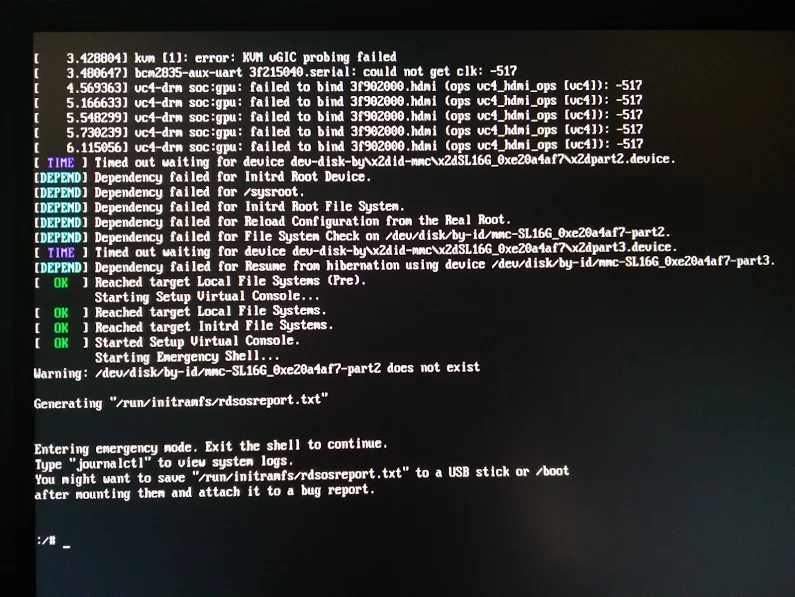
Reproduction of A start job is running for dev-disk-by... – Google Photos / Oops. Let’s see if I can reproduce it, as I think this is related: https://…
Reproducible steps below.
Related:
These are the modifications of the steps further on based on the last link above.
# rpm -qa | grep bcm43xx

bcm43xx-firmware-20170410-2.1.noarch
/etc/dracut.conf.d/raspberrypi_modules.conf, perform sudo mkinitrd without any -fAt boot time:
A start job is running for dev-disk-by\…
After waiting:
ssh root@ip-address, password linux)/etc/dracut.conf.d/raspberrypi_modules.conf and remove the sdhci-iproc from the first and # on the last line:From :
add_drivers+=" sdhci-iproc bcm2835-sdhost bcm2835_dma mmc_block dwc2 "
# Workaround for Wifi
#omit_drivers+=" sdhci-iproc"
To :
add_drivers+=" bcm2835-sdhost bcm2835_dma mmc_block dwc2 "
# Workaround for Wifi
omit_drivers+=" sdhci-iproc"mkinitrd -f
rebootYast if wlan0 exists in System -> Network Settings, then assign an SSIS plus credentials to it
BCM43430 WLAN cardEdit buttonDynamic Address then select DHCP and the kind of DHCP (in my caseboth version 4 and 6)Next buttonOperating Mode as ManagedScan Network buttonNetwork Name (ESSID) from the listAuthentication Mode from the listKey Input Type as PassphraseEncryption KeyNext buttonOK buttonYastip a that wlan0 got an IP addresszypper refresh
zypper dist-upgradeGist log until 7. is below.
<wiert>
–jeroen
Posted in *nix, Development, Hardware Development, Linux, openSuSE, Power User, Raspberry Pi, SuSE Linux, Tumbleweed | Leave a Comment »
 The Wiert Corner - irregular stream of stuff