The Wiert Corner – irregular stream of stuff

Jeroen W. Pluimers on .NET, C#, Delphi, databases, and personal interests

  • My badges

  • Twitter Updates

  • My Flickr Stream

  • Pages

  • All categories

  • Enter your email address to subscribe to this blog and receive notifications of new posts by email.

    Join 1,860 other subscribers

Archive for the ‘PDF’ Category

Some tools useful for analysing PDF documents

Posted by jpluimers on 2020/03/05

A while ago, I wanted to analyse the difference of some PDF documents: why they had suddenly grown to twice their size.

[WayBack] Jeroen Pluimers en Twitter: “dat genereren kun je overigens zien als je dezelfde downloads doet, maar dan een fikse periode uit elkaar.…”

There are quite a few tools on [WayBack] Browse Internal PDF Structure – Super User and [WayBack] Best tool for inspecting PDF files? – Stack Overflow, including:

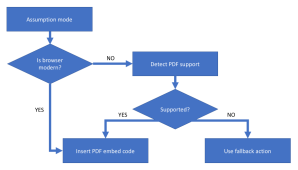
They also made me discover [WayBack] GitHub – pipwerks/PDFObject: A lightweight JavaScript utility for dynamically embedding PDFs in HTML documents documented at [WayBack] PDFObject: A JavaScript utility for embedding PDFs 
This particular case

The quickest way to analyse these for me was [WayBack] PDF Object Browser based on [WayBack] GitHub – brendandahl/pdf.js.utils: PDF.js Utility Files which is also the foundation of [WayBack] Test PDF Creator.

It runs in your web browser as local JavaScript, so it is pretty OK to load a PDF file into it: it does no “phone home”.

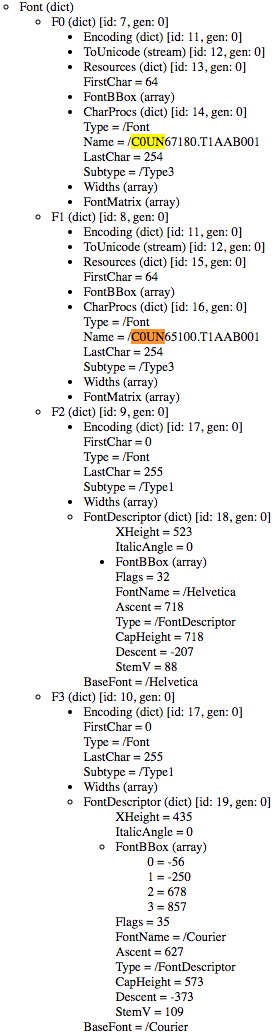
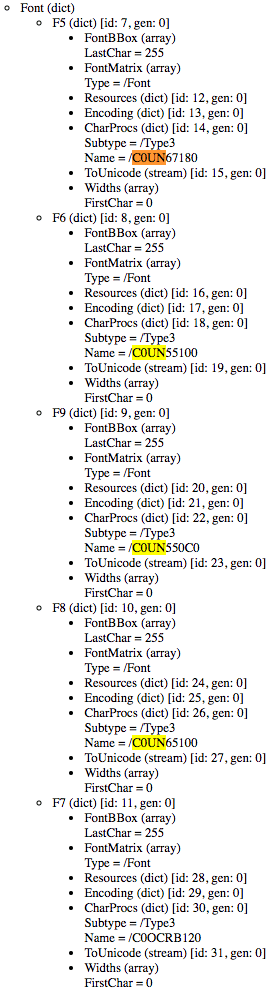
In this case, for generating PDF files with the same content, ABN AMRO added five Type 3 fonts of which one font was not used at all, and two others used to be Type 1 fonts.

Type 1 fonts (wikipedia)

Type 1 (also known as PostScriptPostScript Type 1PS1T1or Adobe Type 1) is the font format for single-byte digital fonts for use with Adobe Type Manager software and with PostScript printers. It can support font hinting.

It was originally a proprietary specification, but Adobe released the specification to third-party font manufacturers provided that all Type 1 fonts adhere to it.

Type 1 fonts are natively supported in Mac OS X, and in Windows 2000 and later via the GDI API.[2] (They are not supported in the Windows GDI+, WPF or DirectWrite APIs.)

Type 3 fonts (wikipedia)

Type 3 font (also known as PostScript Type 3 or PS3T3 or Adobe Type 3) consists of glyphs defined using the full PostScript language, rather than just a subset. Because of this, a Type 3 font can do some things that Type 1 fonts cannot do, such as specify shading, color, and fill patterns. However, it does not support hinting. Adobe Type Manager did not support Type 3 fonts, and they are not supported as native WYSIWYG fonts on any version of Mac OS or Windows.

So far for optimised PDF rendering…

Being in software development for this long, I am constantly reminded that The inmates are running the asylum – Wikipedia. I can definitely recommend reading “The Inmates Are Running the Asylum: Why High Tech Products Drive Us Crazy and How to Restore the Sanity”, by Alan Cooper:

–jeroen

Posted in Development, EPS/PostScript, PDF, Power User, Software Development | Leave a Comment »

ÜberPDF printing using a Delphi like canvas

Posted by jpluimers on 2019/11/15

For my link archive, as it has a lot of goodies in the comments, especially on how to avoid bitmaps in PDF emission: [WayBack] We took PDF to a whole new level today Load create, or editing a PDF in 2 lines of code using a simple Delphi (like) Canvas! We added a PDFPrinter and… – Joe C. Hecht – Google+

–jeroen

Posted in Delphi, Development, EPS/PostScript, PDF, Software Development | Leave a Comment »

Next up: TPDFPrinter and TPDFCanvas Expect a high paced (and easy) update cy…

Posted by jpluimers on 2019/11/05

For my link archive: [WayBack] Next up: TPDFPrinter and TPDFCanvas Expect a high paced (and easy) update cycle for Ultra, with a constant stream of new goodies! Zero hassles – it … – Joe C. Hecht – Google+

–jeroen

Posted in Delphi, Development, PDF, Power User, Software Development | Leave a Comment »

pandoc oneliner from reStructuredText to html

Posted by jpluimers on 2016/05/12

[WayBack] Pandoc is so versatile that you sometimes forget a conversion can be as simple as a one-liner:

pandoc -s README.rst -o readme.html

This converts the reStructured text in README.rst to html.

Pandoc is smart enough to recognise the conversions without you telling the formats with -f (input format) and -t (output format) explicitly.

If you do need to explicitly specify the format, it is useful to query which formats are supported as per [WayBack] Pandoc – Pandoc User’s Guide: specifying formats:

  • pandoc --list-input-formats
  • pandoc --list-output-formats

Read the rest of this entry »

Posted in Development, PDF, Power User, Scripting, Software Development | Leave a Comment »

Mac: Google Chrome Helper excessive CPU usage

Posted by jpluimers on 2016/01/29

I’m not the only one with a Mac having issues with Google Chrome Helper CPU usage, but most of the entries are for older Chrome versions. So below are the steps I performed. There are also pros and cons are after the steps.

In chrome://settings/content, under “Plugins”, I ticked “Let me choose when to run plugin content” (it was at “Detect and run important plugin content (recommended)”. That dialog doesn’t allow you to copy it’s content, so no HTML, just this screenshot:

In chrome://plugins/ I disabled this one:

Adobe Flash Player – Version: 20.0.0.267 (Disabled)

Shockwave Flash 20.0 r0
Name: Shockwave Flash
Description: Shockwave Flash 20.0 r0
Version: 20.0.0.267
Location: /Users/jeroenp/Library/Application Support/Google/Chrome/PepperFlash/20.0.0.267/PepperFlashPlayer.plugin
Type: PPAPI (out-of-process)
MIME types:
MIME type Description File extensions
application/x-shockwave-flash Shockwave Flash
.swf
application/futuresplash Shockwave Flash
.spl
Enable Always allowed to run

Pros of these settings:

  • If you have a lot of tabs open (many of them suspended using The Great Suspender), then Google Chrome Helper uses far less CPU.
  • Youtube doesn’t use the Flash Player any more. It now uses HTML5 which seems far more battery friendly and more responsive.

Cons of these settings:


–jeroen

Posted in Apple, Chrome, Google, Mac, MacBook, MacBook Retina, PDF, Power User | Leave a Comment »

De @SVB_PGB foutmelding mag kennelijk ook niet langer dan 60 karakters zijn… #neuland

Posted by jpluimers on 2015/12/21

Briljante foutmelding: “snaam, inclusief extensie, mag maximaal 60 tekens lang zijn.”

Ja: precies de laatste 60 karakters van de foutmelding.

De SVB heeft iets met 60.

Iets als “20141119 – Martijn – Zorgkantoor – AWBZ beoordeling zorgbeschrijvingen zorgovereenkomsten – SVB trekkingsrecht.pdf” mag dus niet als bestandsnaam. Een duidelijke foutmelding ook niet. Dat zou te makkelijk zijn.

Het is op een andere manier slecht dan de foutmelding “Er is een algemene fout opgetreden. Probeert u het later nog eens.”. En dat je later weer dezelfde foutmelding krijgt zodat je on-line geen PGB declaraties van urenbriefjes kunt indienen:

Beste @SVB_PGB: de online declaratie PGB WMO HH gaat fout bij het klikken van “Bewerken”: het maakt niet uit welke maand en week. 1/2

De melding @SVB_PGB is “Er is een algemene fout opgetreden. Probeert u het later nog eens.”. Helaas geen verder log of details. Wat nu? 2/2

En daarom ben ik gistervavond een paar uur bezig geweest met opnieuw proberen en daarna PDFjes van de declaraties te maken. Die ik nu weer mag renamen omdat de bestandsnamen te lang zijn.

Zucht.

–jeroen

Read the rest of this entry »

Posted in About, LifeHacker, PDF, Personal, Power User | Leave a Comment »

Books. Lots of books. In PDF.

Posted by jpluimers on 2015/10/12

Interesting: site:www.e-reading.link/bookreader.php – Google Search.

Likely highly illegal, but it has a lot of things in PDF that I already have on paper of stuff that is hard to get otherwise.

–jeroen 

Posted in LifeHacker, PDF, Power User | Leave a Comment »

PDFreaders.org – Get a Free Software PDF reader!

Posted by jpluimers on 2014/01/27

Thanks Bernd Ott for pointing me at PDFreaders.org – Get a Free Software PDF reader!.

–jeroen

Posted in PDF, Power User | Leave a Comment »

A few nice PDFs on fonts and font designer handwriting

Posted by jpluimers on 2012/08/10

In my early software developer years, I have been into scaleable fonts, PostScript and PDF very much.

Over the years, I kept an eye on that, and recently I found a few nice PDFs about fonts and designer handwriting:

–jeroen

Posted in About, PDF, Personal, Power User, Typography | Leave a Comment »

A few updates to: Google Calendar – printing multiple months or weeks to PDF

Posted by jpluimers on 2010/07/15

Thanks to Kilian Croese, I updated the Google Calendar – printing multiple months or weeks to PDF posting with this info:

  • No need to use Fiddler any more for obtaining the base printing URL.
  • Added information for these parameters:
    • pfs (font size)
    • po (page orientation)
    • pbw (black & white)
  • In addition, I improved the documentation on the parameter rand (which is a JavaScript EPOCH value)
  • Finally I dug a bit deeper into the page sources, and added information about these parameters:
    • pjs (PDF Printing Java Script)
    • pda (PDF download)

The original post is now both far easier to use, and much more complete.

–jeroen
Via: Google Calendar – printing multiple months or weeks to PDF « The Wiert Corner – Jeroen Pluimers’ irregular stream of Wiert stuff.

Posted in Font, Google, Google Apps, PDF, Power User | Leave a Comment »