The Wiert Corner – irregular stream of stuff

Jeroen W. Pluimers on .NET, C#, Delphi, databases, and personal interests

  • My badges

  • Twitter Updates

  • Pages

  • All categories

  • Enter your email address to subscribe to this blog and receive notifications of new posts by email.

    Join 1,854 other subscribers

Archive for the ‘Security’ Category

JWT authentication with Delphi

Posted by jpluimers on 2019/06/11

Nice articles on OAuth2, JWT and other authentication mechanisms:

via [WayBack] Ondrej Kelle – Google+

–jeroen

Posted in Authentication, Delphi, Development, Power User, Security, Software Development | Leave a Comment »

Time capsule opening ceremony today at MIT’s Stata Center after programmers solve MIT’s 20-year-old cryptographic puzzle | MIT CSAIL

Posted by jpluimers on 2019/05/15

[WayBack] Programmers solve MIT’s 20-year-old cryptographic puzzle | MIT CSAIL:

The capsule ceremony will happen Wednesday, May 15 at 4 p.m. at MIT’s Stata Center.

Cool work, with a very cool challenge.

Via/related:

  • a

–jeroen

Posted in Development, Power User, Security, Software Development | Leave a Comment »

Do not blur, but do randomly add noise or move pixels – Censoring image in GIMP – Graphic Design Stack Exchange

Posted by jpluimers on 2019/05/03

Blurring is like a hash function: it cannot be undone, but with enough plain text to blur examples, you can reconstruct the plain text: [WayBack] Why blurring sensitive information is a bad idea | dheera.net | Dheera Venkatraman’s web site

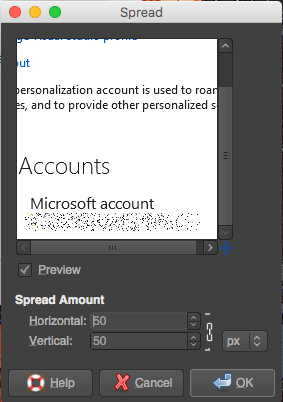
As an alternative, randomly add noise or move pixels. I used  [WayBack] Censoring image in GIMP – Graphic Design Stack Exchange. For the example on the right, I used “Filters → Noise → Spread” from the Stack Exchange answer.

With enough randomness, it is much harder to construct plain/hash combinations.

–jeroen

Posted in Image Editing, LifeHacker, Power User, Security, The Gimp | Leave a Comment »

Keep a Changelog

Posted by jpluimers on 2019/03/20

Lot’s of tips (and translations!) on how to Keep a Changelog [WayBack].

There are lots of useful tips, ranging from content (how to write, what to include) to technicalities (order of entries, unreleased, version numbering, date format) that might seem unimportant but in practice makes using the changelog.

The really cool thing: the site has a changelog of itself showing the best practices.

via:

–jeroen

Posted in Development, Documentation Development, Encryption, Let's Encrypt (letsencrypt/certbot), Security, Software Development | Leave a Comment »

openssl: checking out RSA private key files in .rsa and .pem format

Posted by jpluimers on 2019/03/19

While checking out an issue with the SSH server for ContinuaCI issue (see info below), I wanted to look at the files leading to the issue: .pem and .rsa files with the private key for the SSH server.

So I browsed through my series of openssl related articles to see if I already had made a script better explaining the cryptic openssl command-line parameters. I didn’t have it yet, but it turned out to be really simple:

C:\ProgramData\VSoft\ContinuaCI\SSHD>"C:\Program Files (x86)\Git\usr\bin\openssl.exe" rsa -in server_keypair.rsa
writing RSA key
-----BEGIN RSA PRIVATE KEY-----
...
-----END RSA PRIVATE KEY-----
C:\ProgramData\VSoft\ContinuaCI\SSHD>"C:\Program Files (x86)\Git\usr\bin\openssl.exe" rsa -in server_keypair.rsa -text
Private-Key: (1024 bit)
modulus:
    ..:..:..:.....
publicExponent: 35 (0x23)
privateExponent:
    ..:..:..:.....
prime1:
    ..:..:..:.....
prime2:
    ..:..:..:.....
exponent1:
    ..:..:..:.....
exponent2:
    ..:..:..:.....
coefficient:
    ..:..:..:.....
writing RSA key
-----BEGIN RSA PRIVATE KEY-----
...
-----END RSA PRIVATE KEY-----
C:\ProgramData\VSoft\ContinuaCI\SSHD>"C:\Program Files (x86)\Git\usr\bin\openssl.exe" rsa -in server_keypair.pem
Enter pass phrase for server_keypair.pem:
unable to load Private Key
2675996:error:06065064:digital envelope routines:EVP_DecryptFinal_ex:bad decrypt:evp_enc.c:529:
2675996:error:23077074:PKCS12 routines:PKCS12_pbe_crypt:pkcs12 cipherfinal error:p12_decr.c:108:
2675996:error:2306A075:PKCS12 routines:PKCS12_item_decrypt_d2i:pkcs12 pbe crypt error:p12_decr.c:139:
2675996:error:0907B00D:PEM routines:PEM_READ_BIO_PRIVATEKEY:ASN1 lib:pem_pkey.c:141:
C:\ProgramData\VSoft\ContinuaCI\SSHD>"C:\Program Files (x86)\Git\usr\bin\openssl.exe" rsa -in server_keypair.pem -passin pass:password
unable to load Private Key
2675996:error:06065064:digital envelope routines:EVP_DecryptFinal_ex:bad decrypt:evp_enc.c:529:
2675996:error:23077074:PKCS12 routines:PKCS12_pbe_crypt:pkcs12 cipherfinal error:p12_decr.c:108:
2675996:error:2306A075:PKCS12 routines:PKCS12_item_decrypt_d2i:pkcs12 pbe crypt error:p12_decr.c:139:
2675996:error:0907B00D:PEM routines:PEM_READ_BIO_PRIVATEKEY:ASN1 lib:pem_pkey.c:141:

The command-lines use the [WayBack]rsa tool with:

  • the -in parameter
  • (for the first file) the -text parameter to dump it into human readable form
  • (for the second file) the -passin parameter with a [WayBackpass phrase argument pass:password.

The server_keypair.pem file (having the header -----BEGIN ENCRYPTED PRIVATE KEY----- and footer -----END ENCRYPTED PRIVATE KEY-----) was a password protected RSA private key where somehow ContinuaCI had the wrong password for.

I’m not sure it’s a good idea that the server_keypair.pem file has not password at all.

Read the rest of this entry »

Posted in Continua CI, Continuous Integration, Development, OpenSSL, Power User, Security, Software Development | Leave a Comment »

{Updated} Linux server security checklist. #sysadmin 

Posted by jpluimers on 2019/03/11

Most tips are OK, but:

  1. for password related policies, please read these:
  2. If you do DNS, implement DNSSEC
  3. I think ipv6 is OK, but like ipv4 needs to be firewalled
  4. Be really careful with fail2ban and similar tools: they are easy ways to lock yourself out as well, for instance by someone doing a nice (D)DoS on you.

Tips: [WayBack40 Linux Server Hardening Security Tips [2017 edition] – nixCraft

Via:

–jeroen

Posted in *nix, *nix-tools, Encryption, Let's Encrypt (letsencrypt/certbot), Power User, Security | Leave a Comment »

Installing Let’s Encrypt Free SSL/TLS Certificate in 2 Minutes with Certbot, Spending Hours Making it Work with Cloudflare

Posted by jpluimers on 2019/03/06

If I ever need to get LetsEncrypt to work with CloudFlare, then I need to read [WayBackInstalling Let’s Encrypt Free SSL/TLS Certificate in 2 Minutes with Certbot, Spending Hours Making it Work with Cloudflare

The steps there should save me hours.

Via [WayBcack] Free Let’s Encrypt SSL/TLS certificates are even easier to install than self-signed certificates. I could do so in 2 minutes in my +Linode … – Jean-Luc Aufranc – Google+.

–jeroen

Posted in Encryption, Let's Encrypt (letsencrypt/certbot), Power User, Security | Leave a Comment »

Calls from +18553308653 might be because someone is trying to use your phone number to setup a Microsoft account two factor authentication

Posted by jpluimers on 2019/02/18

Got some calls to my phone numbers in The Netherlands from +18553308653 that I did not ask for. The below searches revealed it is likely someone trying to use those to setup Two Factor Authentication.

It was not my live account, as that was already covered by the Microsoft Authenticator app (you can set up your phone number through account.live.com/names/Manage and authentication through account.microsoft.com/security, see steps at [WayBack] Microsoft – Authy).

Read the rest of this entry »

Posted in 2FA/MFA, Authentication, Authy, Power User, Security | Leave a Comment »

Google’s Phishing Quiz shows why Google AMP (Accelerated Mobile Pages) is a bad idea

Posted by jpluimers on 2019/01/25

This week, Google introduced the [WayBack] Phishing Quiz, a series of questions to see how good you spot phishing emails.

It is a perfect example on why Google AMP is a bad idea: it makes it easier to write phishing mail targeting Google users.

One of the questions is about a password change email seemingly from Google with a link by Google.

The link is really deceptive, as it:

  1. uses Google AMP (Accelerated Mobile Pages) which are hosted directly through a root path on the Google main domain: the URL starts with https://google.com/amp
  2. Especially on mobile, Google accelerates a lot of things through Google AMP, so a link on mobile that looks like this might be legit

This will deceive a lot of people as they are trained to look at the main domain to assess authenticity: google.com

That combined with an email domain that also looks being from Google (with so many real word top-level domains, many would not be surprised getting email from no-reply@google.support)

Just look at the below screenshot to see how deceptively this trick is.

Solution

Read the rest of this entry »
Posted in Google, LifeHacker, Power User, Security | Leave a Comment »

Don’t forget your padding… playing with the APK format of a sample “Hello world” Android app

Posted by jpluimers on 2019/01/23

Don’t forget your padding: Hello,I’m playing with the APK format of a sample “Hello world” Android application.my (first) goal is to be able to rebuild an APK from a unzipped one… – Paul TOTH – Google+

References: RSA Algorithm

–jeroen

Posted in Android, Development, Encryption, Mobile Development, Power User, Security, Software Development | Leave a Comment »