Interesting stuff to play with the next few weeks:
This version of the ESXi Embedded Host Client is written purely in HTML and JavaScript, and is served directly from your ESXi host and should perform much better than any of the existing solutions.
You can specify the ESXi ciphers used to serve the vSphere Client. You can do this both ways: either extend them (make it less secure, but more compatible, for instance to server vSphere Client on Windows Server 2003 / Windows XP), or restrict them to make it more secure.
A lot of the links below have died due to link rot (sometimes even the domains have gone), but most of the WayBack machine links marked [Wayback] still work.
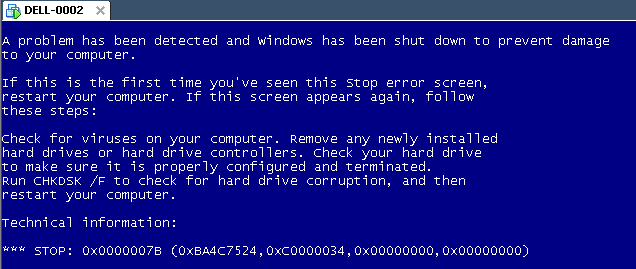
The same stop [Wayback] stop 0x0000007B can happen when converting a physical machine to VMware (I will schedule a separate post about this):
Windows XP Virtual Machine failing with stop 0x0000007B
Steps:
Put the SATA disk of the XP machine in a different one.
Disk2Vhd on the new machine to create a VHDX of the XP hard disk.
Install Hyper-V on the target Windows 8.1 machine (you need at least Pro for that).
Setup the base VM directory.
Setup a virtual network switch (decide if you want it to be internal, external or private, then bind it to a network adapter if needed).
Add a new VM.
Assign a new directory to it.
Assign memory to it.
Assign the virtual network switch to it.
Save it.
Edit the settings, then bind the DVD drive on the IDE controller 1 to C:\Windows\System32\vmguest.iso.
Connect to the VM.
Start it.
If you get a stop 0x0000007B (usually because of SATA/AHCI/IDE or other MassStorage controller driver issues), then read [Wayback] Jon’s Project Blog » disk2vhd using [Wayback] UBCD for Windows to solve the issue as there is no BIOS screen in Hyper-V that allows you to switch from AHCI to SATA and back.
I totally forgot that article also included a link to do the same on ESXi the old fashioned style. The tool you needed back then (and still works) there is vmkfstools (the ESXi version, not the vCLI version), and use it like this to extend the VMDK disk to 60 gigabyte:




 The Wiert Corner - irregular stream of stuff