Archive for the ‘ESXi6.5’ Category
Posted by jpluimers on 2024/01/10
I bumped into [Wayback/Archive] Script to rename a virtual machine in ESXi 6: gist.github.com/Gremgoll/8bd91258d71fe895c0d416e2543ca2dc.
Then I forked it with the intent to make usage more clear, as the current usage on my ESXi rig (which has mos VMs not in the root of data stores) is like the bold italic portion here:
[root@X9SRI3F-ESXi:/vmfs/volumes/608be754-f21556ad-1082-0025907d9d5c/VM] vm-rename.sh NVMe980PRO_1TB/VM X9SRI-3F-W10P-NL-OFFICE X9SRI-3F-W10P-NL X9SRI-3F-W10P-NL-OFFICE
VOLNAME=NVMe980PRO_1TB/VM
DIRNAME=X9SRI-3F-W10P-NL-OFFICE
OLDNAME=X9SRI-3F-W10P-NL
NEWNAME=X9SRI-3F-W10P-NL-OFFICE
VM_DIRPATH=/vmfs/volumes/NVMe980PRO_1TB/VM/X9SRI-3F-W10P-NL-OFFICE
NW_DIRPATH=/vmfs/volumes/NVMe980PRO_1TB/VM/X9SRI-3F-W10P-NL-OFFICE
Failed to rename './X9SRI-3F-W10P-NL-flat.vmdk' to './X9SRI-3F-W10P-NL-OFFICE-flat.vmdk': The file specified is not a virtual disk (15)
renaming ./X9SRI-3F-W10P-NL-41260b40.vmem to ./X9SRI-3F-W10P-NL-OFFICE-41260b40.vmem
renaming ./X9SRI-3F-W10P-NL-41260b40.vmss to ./X9SRI-3F-W10P-NL-OFFICE-41260b40.vmss
renaming ./X9SRI-3F-W10P-NL-6a4b8f29.hlog to ./X9SRI-3F-W10P-NL-OFFICE-6a4b8f29.hlog
renaming ./X9SRI-3F-W10P-NL.nvram to ./X9SRI-3F-W10P-NL-OFFICE.nvram
renaming ./X9SRI-3F-W10P-NL.vmsd to ./X9SRI-3F-W10P-NL-OFFICE.vmsd
renaming ./X9SRI-3F-W10P-NL.vmx to ./X9SRI-3F-W10P-NL-OFFICE.vmx
renaming ./X9SRI-3F-W10P-NL.vmx.backup to ./X9SRI-3F-W10P-NL-OFFICE.vmx.backup
renaming ./X9SRI-3F-W10P-NL.vmxf to ./X9SRI-3F-W10P-NL-OFFICE.vmxf
renaming ./vmx-X9SRI-3F-W10P-NL-1093012288-1.vswp to ./vmx-X9SRI-3F-W10P-NL-OFFICE-1093012288-1.vswp
All Done. You now need to register X9SRI-3F-W10P-NL-OFFICE to the inventory.
There also was a renaming bug (see the italic line).
I managed to fix both that and added more documentation plus output.
Repositories and code
- Original:
- Fork with added VSAN functionality (see [Wayback/Archive] Revisions · Script to rename a virtual machine in ESXi 6):
- My fork of 2:
- My fix:
Code before modifying: [Wayback/Archive] gist.githubusercontent.com/jpluimers/fcc601dd41ac89f601a5174be92c841c/raw/e3683fbb6bdf1e73d65d2b784027c70cf42a5512/vm-rename
Code after modifying: [Wayback/Archive] raw.githubusercontent.com/jpluimers/vm-rename/master/vm-rename.sh.
Yes, that is not in a gist any more (see below why), it is now part of [Wayback/Archive] jpluimers/vm-rename: Script to rename a virtual machine in ESXi 6; fork from https://gist.github.com/jpluimers/fcc601dd41ac89f601a5174be92c841c as [Wayback/Archive] vm-rename/vm-rename.sh at master · jpluimers/vm-rename.
The reason was
Yesterday I described the workaround in Fork Gist to Repo on GitHub – Stack Overflow.
Queries
I found the original via [Wayback/Archive] script esxi rename vmx vmxf and related files – Google Search.
My start was [Wayback/Archive] script esxi duplicate vm and rename vmdk – Google Search which found:
- [Wayback/Archive] Renaming a virtual machine and its files in VMware ESXi (1029513) which has a PowerCLI script (that requires Windows to run PowerCLI on)
- [Wayback/Archive] Solved: How to clone a VM on a ESXI 6.5 server? – VMware Technology Network VMTN which pointed me to the next Google Search result :
- [Wayback/Archive] VMware esxi – Script to clone a VM without vSphere or vCenter. | GrangerX which I put in this gist:
- [Wayback/Archive] Script to create Linked Clones on ESXi | RedNectar’s Blog which is great, but way to complicate for my use case. It references a few other cool scripts though, and shows how to use Resource Pools in ESXi (which the Web-UI does not seem to support):
- [Wayback/Archive] [script] Cloning VMs using ESXi shell/admin console – Virtualizing Unraid – Unraid
- [Wayback/Archive] Script to clone a VM with free VMware ESXi – Rob Pomeroy (again: PowerCLI)
–jeroen
Posted in *nix, *nix-tools, ash/dash, ash/dash development, Development, ESXi6, ESXi6.5, ESXi6.7, Power User, PowerCLI, Scripting, Software Development, Virtualization, VMware, VMware ESXi | Leave a Comment »
Posted by jpluimers on 2024/01/02
I keep forgetting this, but ESXi likes the text .vmdk file with a binary -flat.vmdk, where Fusion/ Workstation/Player like binary .vmdk file.
Most sites that mention how to solve it love the cryptic parameters like -i (software developers: when inventing command-line parameters, please use a more descriptive letter for a command) in stead of --clonevirtualdisk), so for instance Migrate VMware Workstation / Fusion VM to ESXi | Ming’s Blog comes up with
[root...] mv Windows-10-64-Enterprise-disk1.vmdk Windows-10-64-Enterprise-disk1.vmdk.fusion
[root...] vmkfstools -i Windows-10-64-Enterprise-disk1.vmdk.fusion Windows-10-64-Enterprise-disk1.vmdk
Destination disk format: VMFS zeroedthick
Cloning disk 'Windows-10-64-Enterprise-disk1.vmdk.fusion'...
Clone: 100% done.
is more readable as
[root...] vmkfstools --clonevirtualdisk Windows-10-64-Enterprise-disk1.vmdk.fusion Windows-10-64-Enterprise-disk1.vmdk
And yes, I wrote about this before, but keep forgetting it applies :
–jeroen
Posted in ESXi6, ESXi6.5, ESXi6.7, Fusion, Power User, Virtualization, VMware, VMware ESXi, VMware Workstation | Leave a Comment »
Posted by jpluimers on 2023/12/28
This is a sort of follow-up on ESXi: listing virtual machines with their IP addresses where we ended with this:
I modified the above script to become this:
#!/bin/sh
vmids=`vim-cmd vmsvc/getallvms | sed -n -E -e "s/^([[:digit:]]+)s+((S.+S)?)s+([S+])s+(.+.vmx)s+(S+)s+(vmx-[[:digit:]]+)s*?((S.+)?)$/1/p"`
for vmid in ${vmids} ; do
    # powerState values:
    #   Powered off
    #   Powered on
    #   Suspended
    powerState=`vim-cmd vmsvc/power.getstate ${vmid} | sed '1d'`
    name=`vim-cmd vmsvc/get.config ${vmid} | sed -n -E -e '/(vim.vm.ConfigInfo) {/,/files = (vim.vm.FileInfo) {/ s/^ +name = "(.*)",.*?/1/p'`
    vmPathName=`vim-cmd vmsvc/get.config ${vmid} | sed -n -E -e '/files = (vim.vm.FileInfo) {/,/tools = (vim.vm.ToolsConfigInfo) {/ s/^ +vmPathName = "(.*)",.*?/1/p'`
    # For now, I choose to use only the IPv4 main address from ipAddress, which is in between (vim.vm.GuestInfo) { and net = (vim.vm.GuestInfo.NicInfo) [.
    ipAddress=`vim-cmd vmsvc/get.guest ${vmid} | sed -n -E -e '/(vim.vm.GuestInfo) {/,/net = (vim.vm.GuestInfo.NicInfo) [/ s/^ +ipAddress = "(.*)",.*?/1/p'`
    printf "VM with id %3s has power state %-11s and IPv4=%-15s (name = ${name}; vmPathName = ${vmPathName}).n" "${vmid}" "${powerState}" "${ipAddress}"
done
Now the script grew even larger in to vim-cmd-list-all-VMs-with-IPv4-MAC-uuid.sh:
Read the rest of this entry »
Posted in *nix, *nix-tools, ash/dash, ash/dash development, Development, ESXi6, ESXi6.5, ESXi6.7, Power User, Scripting, Software Development, Virtualization, VMware, VMware ESXi | Leave a Comment »
Posted by jpluimers on 2023/02/04
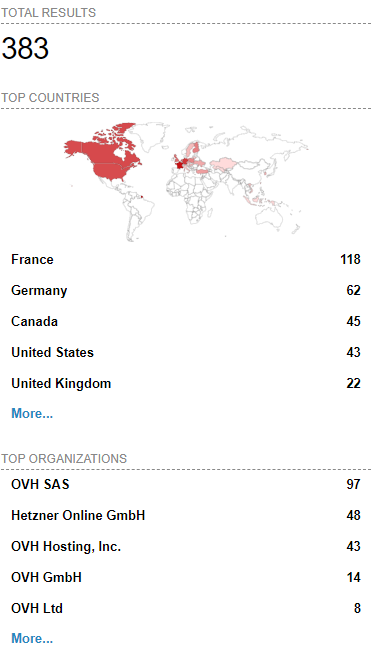 [Wayback/Archive] Massive ESXiArgs ransomware attack targets VMware ESXi servers worldwide
Admins, hosting providers, and the French Computer Emergency Response Team (CERT-FR) warn that attackers actively target VMware ESXi servers unpatched against a two-year-old remote code execution vulnerability to deploy ransomware.
Tracked as
CVE-2021-21974, the security flaw is caused by a heap overflow issue in the OpenSLP service that can be exploited by unauthenticated threat actors in low-complexity attacks.
“As current investigations, these attack campaigns appear to be exploiting the vulnerability CVE-2021-21974, for which a patch has been available since 23 February 2021,” CERT-FR said.
“The systems currently targeted would be ESXi hypervisors in version 6.x and prior to 6.7.”
To block incoming attacks, admins have to disable the vulnerable Service Location Protocol (SLP) service on ESXi hypervisors that haven’t yet been updated.
CERT-FR strongly recommends applying the patch as soon as possible but adds that systems left unpatched should also be scanned to look for signs of compromise.
CVE-2021-21974 affects the following systems:
- ESXi versions 7.x prior to ESXi70U1c-17325551
- ESXi versions 6.7.x prior to ESXi670-202102401-SG
- ESXi versions 6.5.x prior to ESXi650-202102101-SG
[Wayback/Archive] Esxi Ransomware Help and Support Topic (ESXiArgs / .args extension) – Page 2 – Ransomware Help & Tech Support (there are now 4 pages, most victims OVH, likely many more pages to follow)
[Wayback/Archive] How to Disable/Enable the SLP Service on VMware ESXi (76372)
[Wayback/Archive] html:”We hacked your company successfully” title:”How to Restore Your Files” – Shodan Search which resulted in the above image (I tweeted it at [Wayback/Archive] Jeroen Wiert Pluimers @wiert@mastodon.social on Twitter: “@vmiss33”)
Commands used in [Wayback/Archive] Jeroen Wiert Pluimers @wiert@mastodon.social on Twitter: “@vmiss33 I did forget to disable SLP on a patched system, but doing that is easy as per kb.vmware.com/s/article/76372“:
/etc/init.d/slpd status
/etc/init.d/slpd stop
esxcli system slp stats get
esxcli network firewall ruleset set -r CIMSLP -e 0
chkconfig slpd off
chkconfig --list | grep slpd
More links to follow, but I’m away from keyboard for most of the day.
–jeroen
Read the rest of this entry »
Posted in ESXi6, ESXi6.5, ESXi6.7, Power User, Ransomware, Security, Virtualization, VMware, VMware ESXi | Leave a Comment »
Posted by jpluimers on 2022/12/30
For my memory to create a 40 GiB (gibibytes, i.e. sizes in powers of 2 bytes):
# vmkfstools --createvirtualdisk 40G --diskformat eagerzeroedthick ./X9SRI-3F-W10P-EN-MEDIA-DATA.vmdk
Creating disk './X9SRI-3F-W10P-EN-MEDIA-DATA.vmdk' and zeroing it out...
Create: 100% done.
People tend to abbreviate it into what for me reads gibberish:
# vmkfstools -c 40G -d eagerzeroedthick ./X9SRI-3F-W10P-EN-MEDIA-DATA.vmdk
Creating disk './X9SRI-3F-W10P-EN-MEDIA-DATA.vmdk' and zeroing it out...
Create: 100% done.
It will create a descriptor file and flat data file, of which the last is exactly 40 gibibytes size (as 42949672960 / (1024 * 1024 * 1024) == 40):
# ls -l X9SRI-3F-W10P-EN-MEDIA-DATA*.vmdk
-rw-------    1 root     root     42949672960 Nov 16 16:54 X9SRI-3F-W10P-EN-MEDIA-DATA-flat.vmdk
-rw-------    1 root     root           471 Nov 16 16:54 X9SRI-3F-W10P-EN-MEDIA-DATA.vmdk
–jeroen
Posted in ESXi6, ESXi6.5, ESXi6.7, Power User, Virtualization, VMware, VMware ESXi | Leave a Comment »
Posted by jpluimers on 2022/05/02
A while ago I wrote about Stop 0x0000007B after converting an existing XP machine to a Virtual Machine (ESXi, Hyper-V, or other).
After this, the machine still had boot issues (a grey or black screen after boot, unless booted via Grub from a rescue CD).
The solution in retrospect was simple, but I only figured out after the fact what the solution had done.
Of course this gave me a facepalm moment, as back in the days, this was exactly the warning I gave everyone when installing Windows XP on ESXi anyway: use a SCSI buslogic based virtual disk, not an IDE or SATA virtual disk.
The reason is that Windows XP does not like the IDE/SATA disk that VMware provides. Windows Vista and up are less of a problem.
This is indeed what my practical solution did:
- VMware Converter 4.x creates a VM with an IDE/SATA disk (as it cannot talk to the more recent ESXi versions at all because of API changes)
- VMware Converter 6.x creates a VM with a buslogic SCSI base disk (and it can create it directly on your ESXi rig, though it will use a directory in the root of your data store, even if you prefer it somewhere deeper in the directory tree)
References:
–jeroen
Posted in ESXi6, ESXi6.5, ESXi6.7, Hardware, Power User, SAS/SATA, SCSI, Virtualization, VMware, VMware Converter, VMware ESXi, Windows, Windows XP | Leave a Comment »
Posted by jpluimers on 2022/04/21
For my link archive: [Wayback] VMware ESXi: How to Kill an Unresponsive (Stuck) Virtual Machine | Windows OS Hub
Commands covered:
esxcli vm process listesxcli vm process kill --type=[soft,hard,force] --world-id=WorldNumberesxtoppskill
–jeroen
Posted in ESXi5, ESXi5.1, ESXi5.5, ESXi6, ESXi6.5, ESXi6.7, ESXi7, Power User, Virtualization, VMware, VMware ESXi | Leave a Comment »
Posted by jpluimers on 2022/04/13
Guessing the [Wayback] Run ESXi from a USB Flash Drive: A How-To-Guide by just the abstract does not show the value enough:
A USB flash drive can be used not only for installation media – you can also run ESXi from USB flash drives or SD flash cards and boot from these devices.
In fact, the article shows way more, including:
- how the partitions on USB/SD devices are built as compared to HDD devices, and how they even differ depending on USB/SD sizes
- how to backup/restore the USB/SD boot devices (so you can stock them in case of failure)
This is very important, because every now and then, these USB and SD devices fail (see for instance [Wayback] Solved: Remount boot filesystem on a running system. – VMware Technology Network VMTN), so knowing what to do then is key and helps handling errors like this one:
Lost connectivity to the device mpx.vmhba32:C0:T0:L0 backing the boot filesystem /vmfs/devices/disks/mpx.vmhba32:C0:T0:L0. As a result, host configuration changes will not be saved to persistent storage.
A every useful article for my link archive!
Related: ESXi: storing an ISO 8601 time-stamped backup tarball locally
Read the rest of this entry »
Posted in ESXi5, ESXi5.1, ESXi5.5, ESXi6, ESXi6.5, ESXi6.7, ESXi7, Power User, Virtualization, VMware, VMware ESXi | Leave a Comment »


 The Wiert Corner - irregular stream of stuff