Interesting for vSphere clusters: [WayBack] HOW TO: Configure Shared Diagnostic Partition on VMware ESX host | vStrong.info
–jeroen
Posted by jpluimers on 2020/08/31
Interesting for vSphere clusters: [WayBack] HOW TO: Configure Shared Diagnostic Partition on VMware ESX host | vStrong.info
–jeroen
Posted in Power User, Virtualization, VMware, VMware ESXi | Leave a Comment »
Posted by jpluimers on 2020/08/10
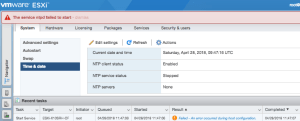
I tried repeating VMware KB: Configuring Network Time Protocol (NTP) on ESX/ESXi hosts using the vSphere Client in ESXi 6.5 using the web-client (the steps are very similar, see [WayBack] How to configure ESXi 6.5 Network Time Protocol (NTP) via Host Client? | ESX Virtualization).
It failed with the non-descriptive “Failed – An error occurred during host configuration.”:
Viewing the details isn’t of much help as you do not get extra information:
Posted in ESXi6.5, Power User, Virtualization, VMware, VMware ESXi | Leave a Comment »
Posted by jpluimers on 2020/08/03
When rearranging storage locations, I had to move a few VMs to different data stores.
So I removed them from the inventory, moved them to another datastore, then re-added them as a set.
Besides getting new VM IDs (which I expected), ESXi 6.5 U1 also managed to change the below fields (which I did not expect) without a warning like “did you move or copy” which you get when moving VMs around on VMware Fusion (Mac OS X) and VMware Workstation/Player (Windows).
The bold values were changed from:
uuid.location = "56 4d 6f 23 aa 92 bf 2b-16 d9 9a 4b 95 4d e7 8e"
uuid.bios = "56 4d 02 3c ea 9e dc 12-18 4f a4 64 c1 f7 f0 fe"
ethernet0.generatedAddress = "00:0c:29:f7:f0:fe"
To:
uuid.location = "56 4d 4c e8 a3 81 c6 db-d6 f2 7f 32 0d fe 2e 29"
uuid.bios = "56 4d 4c e8 a3 81 c6 db-d6 f2 7f 32 0d fe 2e 29"
ethernet0.generatedAddress = "00:0c:29:fe:2e:29"
The bold-italic values correspond to the changed MAC address.
This caused the VMs (which were suspended before the move) to loose their MAC bound static DHCP addresses after the lease time expired: since the new MAC addresses were not statically bound, they got fresh ones causing all sorts of connection problems.
Trying to assign back the original MAC address in the Web UI by hand gets you this error when the virtual machine starts (not when you save the MAC address):
Invalid MAC address specified.
xx:xx:xx:xx:xx:xx is not a valid static Ethernet address. It conflicts with VMware reserved MACs for other usage.
What I did was

For this particular machine, the uuid.location was still changed, but now uuid.bios and ethernet0.generatedAddress were now left in tact:
uuid.location = "56 4d 4c e8 a3 81 c6 db-d6 f2 7f 32 0d fe 2e 29"
uuid.bios = "56 4d 02 3c ea 9e dc 12-18 4f a4 64 c1 f7 f0 fe"
ethernet0.generatedAddress = "00:0c:29:f7:f0:fe"
On another VM that I moved between data stores, after confirming the “I Moved It”, the migration went OK, so I am not sure about the cause. In that case the before/after situation were these (only the bold values were changed):
uuid.location = "56 4d d5 e2 79 b4 a6 76-aa 13 3d 18 e5 4d c0 00"
uuid.bios = "56 4d 38 d7 9c a0 98 24-3c e4 79 00 54 5d 35 ef"
vc.uuid = "52 91 00 37 03 ed 87 34-ec 06 ba 28 f6 85 b4 29"
uuid.location = "56 4d 88 e6 a0 17 bb 01-cb 8c e3 ce fa e8 05 61"
uuid.bios = "56 4d 38 d7 9c a0 98 24-3c e4 79 00 54 5d 35 ef"
vc.uuid = "52 91 00 37 03 ed 87 34-ec 06 ba 28 f6 85 b4 29"
The uuid.bios directly affects the generatedAddress of the network adapters. Initially it is related to the uuid.location, but does not need to be.
When migrating, keep the old data for comparison: compare the .vmx files after starting the migrated machine, and correct the uuid.bios and various ethernet#.generatedAddress values when needed.
Besides the well known 00:50:56:XX:YY:ZZ MAC address range there is also 00:0c:29:XX:YY:ZZ.
–jeroen
Posted in ESXi6.5, Power User, Virtualization, VMware, VMware ESXi | Leave a Comment »
Posted by jpluimers on 2020/08/03
The short answer is: you can’t use telnet. But you can use alternatives, obviously. For instance, to troubleshoot some iSCSI connectivity problems, you would be used to doing something as this. ~ # telnet 10.0.2.3 3260 -ash: telnet: not found Instead, you can use netcat to test the connectivity. ~ # nc -z 10.0.2.3 3260 […]
Source: [Archive.is/WayBack] Using telnet from the VMware 5.x ESXi shell
The VMware knowledgebase mentions a few other alternatives as well (of which telnet obviously does not work):
–jeroen
Posted in ESXi5.1, ESXi5.5, ESXi6, ESXi6.5, Power User, Virtualization, VMware, VMware ESXi | Leave a Comment »
Posted by jpluimers on 2020/04/03
With virtual disks, at least these three levels are involved:
When talking about shrinking disks, they usually explain about below steps, assuming there is a 1:1:1 mapping of the above and backing store of the disk is dynamically growing:
For various reasons, virtualisation environments can have pre-allocated virtual disks ensuring the space on the backing store is firmly reserved.
One such occasion can be in VMware (often required for instance with vSphere/ESXi/ESX based infrastructure, but can also be used in Workstation/Fusion/Player) or Virtual Box in fixed disk mode (default there is dynamic).
Here are some links that should me help shrink in those situations:
--variant Standard but ESX/ESXi/vSphere requires --variant Fixed,ESX (see [WayBack] Import VirtualBox VMs in VMware ESXi)More on conversion:
--variant Streamed)–jeroen
PS: a useful tip by Joe C. Hecht on shrinking:
Oh… On shrinking VM Disks, I make a new growable disk, then use a utility to “smart copy” the partions to the new disk (then replace the disk files in the VM). The “smart copy” just copies the file system – IE what is used (I use an old copy of Paragon Hard Drive Manager). It works out a lot better than writing “zeros”. I then make a compressed image of the whole VM using rar5 compression with a 1GB dictionary size. I then have batch files that can unrar the VM’s on a moments notice (from a collection of over 300).
Posted in Fusion, Power User, VirtualBox, Virtualization, VMware, VMware ESXi, VMware Workstation | Leave a Comment »
Posted by jpluimers on 2020/02/21
Failed to reconfigure virtual machine W81Entx64-vs2017. There are insufficient licenses to complete this operation.
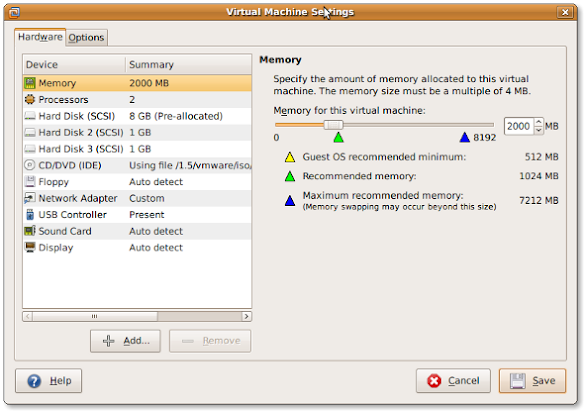
Searching for “There are insufficient licenses to complete this operation.” memory did not reveal much, so at first I thought I had a memory issue.
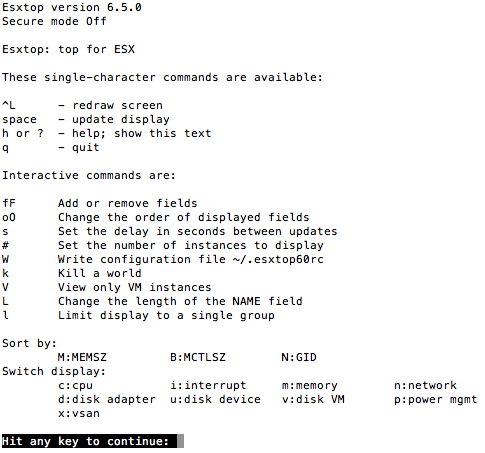
A quick look at esxtop in memory (m) mode indicated that was totally fine:


BTW: esxtop is a fantascit tool, with truckloads of information, so you should definitely read these:
- [WayBack] ESXTOP – Yellow Bricks
- [WayBack] Interpreting esxtop 4.1 Statistics |VMware Communities (still very relevant)
Then something occurred to me:
The cause was that I tried to update the memory of an ESXi Windows VM which I thought I had shut-down from within Windows, but actually bumped an error message during the shutdown.
Shutting down properly (shutdown -s -t 0 in Windows), then increasing the memory worked fine:
Virtual machine W81Ent64-vs2017 was successfully reconfigured.
ESXi cannot increase the memory of a live system, hence the license error as per [WayBack] VMware Hot-Add: How and When to Use it:
One of the most common questions I receive on the daily management of virtual machines is if you should turn on hot-add features and why doesn’t VMware turn them on by default. The answer is very clear.
What are the requirements for Hot-add/Hot-plug:
- Your virtual machines need to run at minimum hardware version 7.
- Hot-add/Hot-Plug is not compatible with Fault Tolerance
- vSphere Advanced, Enterprise or Enterprise plus.
- Only hot-add is possible. You cannot “hot-remove” RAM or vCPUs.
- Hot-Add/Hot-plug must be supported by the VM operating system!
- Guest-OS licensing limitations need to be monitored and taken into consideration. You are changing the number of vCPUs/RAM!
–jeroen
Posted in ESXi6.5, Power User, Virtualization, VMware, VMware ESXi | Leave a Comment »
Posted by jpluimers on 2020/01/20
Rephrased from [WayBack] Jeroen Wiert Pluimers – Google+:
If you install a virtual machine, ensure the disk controller and disks are SCSI based.
This has many advantages, including:
It holds for virtually any virtualization platform including all non-ancient (less than ~10 year old) versions of:
Based on my notes in the above link and the links below:
Note this isn’t just for Linux guests/hosts: Most guests (including Windows) can do a SCSI bus re-scan and detect new SCSI devices.
The trick here is that the guest must already have a virtual SCSI controller (adding that will require a reboot of the guest).
Then adding a new SCSI disk on that controller from any host (Windows, Mac, ESXi, vSphere) should work fine.
–jeroen
Posted in ESXi4, ESXi5, ESXi5.1, ESXi5.5, ESXi6, ESXi6.5, Fusion, Hyper-V, KVM Kernel-based Virtual Machine, Power User, Proxmox, View, VirtualBox, Virtualization, VMware, VMware ESXi, VMware Workstation | Leave a Comment »
Posted by jpluimers on 2019/07/29
Since “esxi write entry to syslog” didn’t return results on how to add new syslog entries, only how to configure syslog.
It was much easier than I hoped for:
logger TEST
With a default configuration this then ends up in /var/log/syslog.log:
grep TEST /var/log/syslog.log
2019-07-29T10:48:31Z root: TEST
Now I know the command, I found
–jeroen
Posted in Power User, Virtualization, VMware, VMware ESXi | Leave a Comment »
Posted by jpluimers on 2019/07/15
This version of the ESXi Embedded Host Client is written purely in HTML and JavaScript, and is served directly from your ESXi host and should perform much better than any of the existing solutions.
Installing went smooth:
# esxcli software vib install -v https://download3.vmware.com/software/vmw-tools/esxui/esxui-signed-6360286.vib -f
Installation Result
Message: Operation finished successfully.
Reboot Required: false
VIBs Installed: VMware_bootbank_esx-ui_1.23.0-6360286
VIBs Removed: VMware_bootbank_esx-ui_1.21.0-5724747
VIBs Skipped:
Source: ESXi Embedded Host Client
–jeroen
Posted in ESXi6.5, Power User, Virtualization, VMware, VMware ESXi | Leave a Comment »
Posted by jpluimers on 2019/07/10
Searching for esxi list usb devices on host console did not return meaningful results, but after a few more deeper tries I found that ESXi has lsusb at
Here the difference when connecting another USB hub with devices to an existing ESXi machine:
[root@ESXi-X10SRH-CF:~] lsusb Bus 001 Device 005: ID 0781:5583 SanDisk Corp. Ultra Fit Bus 001 Device 004: ID 0557:2419 ATEN International Co., Ltd Bus 001 Device 003: ID 0557:7000 ATEN International Co., Ltd Hub Bus 003 Device 002: ID 8087:8002 Intel Corp. Bus 002 Device 002: ID 8087:800a Intel Corp. Bus 001 Device 002: ID 0557:2221 ATEN International Co., Ltd Winbond Hermon Bus 003 Device 001: ID 0e0f:8002 VMware, Inc. Bus 002 Device 001: ID 0e0f:8002 VMware, Inc. Bus 001 Device 001: ID 0e0f:8003 VMware, Inc. [root@ESXi-X10SRH-CF:~] lsusb Bus 001 Device 010: ID 0409:005a NEC Corp. HighSpeed Hub Bus 001 Device 009: ID 0922:0019 Dymo-CoStar Corp. LabelWriter 400 Bus 001 Device 008: ID 06bc:0324 Oki Data Corp. Bus 001 Device 007: ID 0409:005a NEC Corp. HighSpeed Hub Bus 001 Device 006: ID 1a40:0101 Terminus Technology Inc. Hub Bus 001 Device 005: ID 0781:5583 SanDisk Corp. Ultra Fit Bus 001 Device 004: ID 0557:2419 ATEN International Co., Ltd Bus 001 Device 003: ID 0557:7000 ATEN International Co., Ltd Hub Bus 003 Device 002: ID 8087:8002 Intel Corp. Bus 002 Device 002: ID 8087:800a Intel Corp. Bus 001 Device 002: ID 0557:2221 ATEN International Co., Ltd Winbond Hermon Bus 003 Device 001: ID 0e0f:8002 VMware, Inc. Bus 002 Device 001: ID 0e0f:8002 VMware, Inc. Bus 001 Device 001: ID 0e0f:8003 VMware, Inc.
A few odd things about the devices listed above:
/var/log/* files when searching for Oki, Dymo or NEC06bc:0324 Oki Data Corp. as a “Composite device” with a few sub-devices “MC5(3)x2/ES5(3)4×2” and “USB Printing Support”0922:0019 Dymo-CoStar Corp. LabelWriter 400 as “USB Printing Support” with a subdevice “DYMO LabelWriter 400”Two indispensable tools on Windows for dealing with USB devices are:
They give a much easier to read view than devmgmt.msc, this despite the “hidden devices” trick at [WayBack] Tweak Device Manager for a more Complete View of Devices
Related:
–jeroen
Posted in Power User, Virtualization, VMware, VMware ESXi | Leave a Comment »