Archive for the ‘VMware ESXi’ Category
Posted by jpluimers on 2022/02/25
When downloading Windows 10 builds, I usually want them as ISO files because I test them out as Virtual Machines before running on real hardware.
Downloading can be done from [WayBack] www.microsoft.com/en-us/software-download/windows10, however what you get depends on what machine you start browsing.
The above WayBack link, because it got archived from a non-Windows machine redirects from https://web.archive.org/web/20210321163339/https://www.microsoft.com/en-us/software-download/windows10 to https://web.archive.org/web/20210321143203/https://www.microsoft.com/en-us/software-download/windows10ISO.
On Windows systems the redirect goes from https://web.archive.org/web/20210321143203/https://www.microsoft.com/en-us/software-download/windows10ISO to https://web.archive.org/web/20210321163339/https://www.microsoft.com/en-us/software-download/windows10
By default, when you are on a Windows machine, the download link only provides the Media Creation tool. This forces an extra step into getting the ISO file on the virtual machine host.
When downloading from a non-Windows machine, you get a possibility to download the ISO file directly after selecting which kind of build and language you need. This provides you with a time limited https link to download the ISO (in practice this seems to last at least an hour).
I didn’t dig into this before, but luckily others did, and the difference is as easy as changing the User-Agent in your browser, as these posts describe:
Luckily, since ESXi 6.7, VMware ESXi added https as protocol to wget, so now you can download the https link you get via the above trick without hassle.
Oh, this answers my question from a few years back too: How can I get Win10_1511_1_English_x64.iso or Win10_1511_1_EnglishInternational_x64.iso ?
––jeroen
Posted in Chrome, ESXi6.7, Power User, Virtualization, VMware, VMware ESXi, Web Browsers, Windows, Windows 10 | Leave a Comment »
Posted by jpluimers on 2022/02/23
Earlier this month, I ended ESXi: editing /etc/vmware/hostd/vmInventory.xml to fix the datastore UUID for unavailable VMs part 2 with this:
A final note: I need to check out if .vswp files need to be there at all, as my ESXi servers have plenty of physical memory in order not to swap out to disk. More on that in a future blog post.
Browsing back through my blog posts, I mentioned .vswp files before, but never really dug into them:
Read the rest of this entry »
Posted in ArchiveTeamWarrior, ESXi6, ESXi6.5, ESXi6.7, ESXi7, Internet, InternetArchive, Power User, Virtualization, VMware, VMware ESXi, WayBack machine | Leave a Comment »
Posted by jpluimers on 2022/02/22
Note: the below holds for sure for ESXi 5.x and 6.5; as of ESXi 7.x, the VMKlinux stack is supposed to be gone for good. I still need to verify that as I’m still on ESXi 6.7.
I wrote about ESXi VMKlinux and native drivers before:
Back then, I knew that VMKlinux based drivers were being slowly phased out as of ESXi 5.5. But I didn’t really understand the actual difference.
VMKlinux is a bit like NDISwrapper – Wikipedia: it allows drivers basically written for a different platform to run on your platform. For NDISwrapper, it is about running Windows NDIS drivers on both i386 (née, x86-32, née IA-32) and x86-64 architectures. For VMKLinux, it allows drivers originally written for the Linux Kernel to be run on ESXi through an intermediate wrapper layer.
Usually having both native and wrapped code means that not all functionality is yet available natively. That was indeed the solution for my smartinfo trouble: the native drivers were having latency problems where the VMKlinux drivers were not.
Sometimes it means that hardware is only supported by the VMKlinux drivers, which (since native drives have a higher priority than VMKlinux drivers) means disabling the native driver.
This does not work in the early upgrade/install boot process: there the settings cannot be read from the configuration files yet. ESXi solves this by having a global boot option preferVmklinux=True that you can store in the boot configuration.
Most of the issues this solves are around USB boot sticks and USB disks, but not all of them, see the below links and summaries for more information.
I like the solution by temporarily using preferVmklinux=True, then just disabling the vmkusb best.
–jeroen
Posted in ESXi6, ESXi6.5, ESXi6.7, ESXi7, Power User, Virtualization, VMware, VMware ESXi | Leave a Comment »
Posted by jpluimers on 2022/02/17
I wrote about Creating a bootable USB installer for ESXi and use it to create a bootable ESXi installation.
Just in case I ever need to do this on a non-Windows system, some links:
–jeroen
Posted in *nix, Apple, ESXi6, ESXi6.5, ESXi6.7, ESXi7, Linux, Mac OS X / OS X / MacOS, Power User, Virtualization, VMware, VMware ESXi, Windows | Leave a Comment »
Posted by jpluimers on 2022/02/16
Posted in ESXi4, ESXi5, ESXi5.1, ESXi5.5, ESXi6, ESXi6.5, ESXi6.7, ESXi7, Power User, Virtualization, VMware, VMware ESXi | Leave a Comment »
Posted by jpluimers on 2022/02/15
This post amends the post last week on rsync backup of your ESXi box: How to make a statically linked rsync binary « The Wiert Corner – irregular stream of stuff.
Two weeks ago, I posted about Source: ESXi: searching for “vim-cmd vmsvc/message” lead me to the “Managing ESXi Without VI Client” series of blog posts.
It got me looking more deeply in the VM-Help site, and I found [Wayback] Developing for VMware ESXi – Virtual Machine and VPS Tutorials, for which I have materialised the links below and checked their WayBack machine status.
Compiling Utilities for ESXi
Given that ESXi is not based on Linux you won’t find any installer which you could use to install any Linux components that you might want to add to ESXi. However, ESXi does make use of a number of Open Source packages such as OpenSSL, Python, and Openwsman (WS-Management). The key to compiling a utility for ESXi is creating a statically linked version of the tool. With a statically linked version, there are no dependencies on other libraries that may not be present on ESXi. The downside to this method of compiling is that the utility may be larger than a dynamically linked version. With a dynamically linked version the utility assumes that other libraries are present and can rely on subroutines within those libraries.
Compiling rsync – [Wayback] How to compile a statically linked rsync binary for ESXi
Compiling Busybox – [Wayback] How to compile Busybox for ESXi … kind of Part 1
Discussion of compiling UNFS – http://www.vm-help.com/forum/viewtopic.php?f=16&t=2280&p=10185&e=10185 (not archived in the WayBack machine nor available on-line)
Notes on compling binaries – [Wayback] Stjepan Groš – Homepage
Compiling Drivers for ESXi
Given the common misunderstanding that ESXi is Linux based, a new user often inquires about the process of copying a Linux driver to their ESXi install. This is not possible. ESXi includes a Linux driver compatibility module. This allows for Linux source code to be used to compile drivers for ESXi, but the drivers are still specific to ESXi. The following links provides some samples and notes for compiling drivers for ESXi.
Compiling a Silicon Image 3132 driver – [Archive.is] Wayback: Adding Driver Support to VMware ESXi 4 | Tip’s Notebook
Compiling a Marvell sky2 driver – [Wayback] Using a Marvell LAN card with ESXi 4 – KernelCrash
(Note: This post was initially written when ESXi 4.0 was available. As of late 2010, ESXi 4.1 has been released, and it does actually include a sky2 driver that may or may not work with various Marvell LAN chipsets. The post is still relevant (especially the comments) if your particular Marvell chipset does not work with the sky2 driver in ESXI 4.1. Also, the post is relevant if you’re interested in porting other network drivers to ESXi)
Open Virtualization Drivers development notes
Being from the ESXi 4 and 5 era, the links seem to hold up remarkably well. Despite ESXi 3 being Linux based (see [Archive.is] VMware ESX Server – Wikipedia, the free encyclopedia), as opposed to ESXi 4 and up that run a microkernel, Linux based tools still can be used to develop tooling and drivers.
–jeroen
Posted in ESXi4, ESXi5, ESXi5.1, ESXi5.5, ESXi6, ESXi6.5, ESXi6.7, ESXi7, Power User, Virtualization, VMware, VMware ESXi | Leave a Comment »
Posted by jpluimers on 2022/02/10
Not sure how I bumped into the below info, as it was in one of the open tabs of a VM that I had not accessed for a long time.
Tracing back, the links can be found via Wikipedia.
Here is the post content from the 2005 thread [Archive.is] Wayback “Abbreviation ESX”:
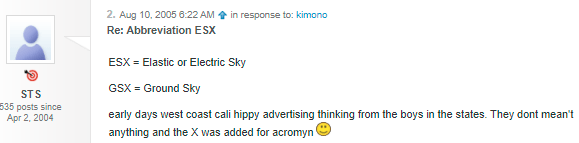
VMware: Origin of ESX and GSX names
 
535 posts since
Apr 2, 2004
|
ESX = Elastic or Electric Sky
GSX = Ground Sky
early days west coast cali hippy advertising thinking from the boys in the states. They dont mean’t anything and the X was added for acromyn 
|
Related:
–jeroen
Posted in Power User, Virtualization, VMware, VMware ESXi, VMware Server (GSX) | Leave a Comment »
Posted by jpluimers on 2022/02/08
On my research list: [Wayback] ESXi Host with No vCenter Server · VMware vSphere Integrated Containers 1.4 Documentation: Deploy a Virtual Container Host to an ESXi Host with No vCenter Server.
It is a small guide on [Wayback] vmware/vic: vSphere Integrated Containers Engine is a container runtime for vSphere.
vSphere Integrated Containers Engine (VIC Engine) is a container runtime for vSphere, allowing developers familiar with Docker to develop in containers and deploy them alongside traditional VM-based workloads on vSphere clusters, and allowing for these workloads to be managed through the vSphere UI in a way familiar to existing vSphere admins.
Given my virtualisation infrastructure is ESXi based, I need to contemplate on this, as there are basically two choices for me:
- Install a docker host as a VM on the ESXi host and go all the way docker (which needs a very good thought on how many resources to allocate to the docker host)
- Go the VIC way
Food for thought!
–jeroen
Posted in ESXi6, ESXi6.5, ESXi6.7, ESXi7, Power User, Virtualization, VMware, VMware ESXi | Leave a Comment »
Posted by jpluimers on 2022/02/03
I installed three Samsung 980 Pro NVMe SSD devices in various ESXi rigs.
This is the serial numbers that ESXi came up with:
- Local NVMe Disk (t10.NVMe____Samsung_SSD_980_PRO_1TB_________________E824B311B1382500)
- Local NVMe Disk (t10.NVMe____Samsung_SSD_980_PRO_1TB_________________782DB311B1382500)
- Local NVMe Disk (t10.NVMe____Samsung_SSD_980_PRO_1TB_________________6F2DB311B1382500)
ESXi presents the serial number (actually the EUI64) in reverse byte order of what is on the device labels.
I had to look up what EUI64 was, and it is a kind of UUID (see Universally unique identifier – Wikipedia), but for hardware devices:
- World Wide Name – WikipediaEach WWN is an 8- or 16-byte number, the length and format of which is determined by the most significant four bits, which are referred to as an NAA (Network Address Authority). The remainder of the value is derived from an IEEE OUI (or from Company Id (CID)) and vendor-supplied information. Each format defines a different way to arrange and/or interpret these components. OUIs are used with the U/L and multicast bits zeroed, or sometimes even omitted (and assumed zero). Though CID has U/L set to 1.The WWN formats include:…
- “Mapped EUI-64” formats manage to fit an EUI-64 address into an 8-byte WWN. Since the NAA is mandatory, and takes up a nibble, this represents a four-bit deficit. These four bits are recouped through the following tricks: First, two bits are stolen from the NAA by allocating NAAs 12, 13, 14, and 15 to all refer to the same format. Second, the remaining two bits are recouped by omitting the U/L and multicast bits from the EUI-64’s OUI. When reconstructing the embedded EUI-64 value, the U/L and multicast bits are assumed to have carried zero values.
…
- [Wayback] Base NVM Express – Part One – NVM Express
A namespace ID (NSID) is an identifier used by a controller to provide access to a namespace (handle to a namespace). An NVMe controller may support multiple namespaces that are referenced using NSID. EUI64 (8 bytes), NGUID (16 bytes) and UUID (128-bit) are globally unique namespace identifiers defined in the Base Specification.
- [Wayback] VMware Docs: NVMe Devices with NGUID Device Identifiers
For NVMe devices, ESXi generates device identifiers based on the information it retrieves from the devices. Generally, the NVMe devices support identifiers in EUI64 or NGUID formats, or use both formats. NGUID is a Namespace Globally Unique Identifier that uses the EUI64 16-byte designator format.
- [Wayback] ESXI6.7 nvme ssd issue – VMware Technology Network VMTN
Being a software engineer, I am disturbing by the way this software create the disk ID.
According to the following table from VMware Docs we have some case that the software will not recognize the disk or lost disks.
| ID Formats Supported by Device |
Device Identifier Generated by Host |
| EUI64 ID Format |
NGUID ID Format |
ESXi 6.7 and earlier |
ESXi 6.7 Update 2 |
| yes |
yes |
t10.xxx_EUI64 |
t10.xxx_EUI64 |
| yes |
no |
t10.xxx_EUI64 |
t10.xxx_EUI64 |
| no |
yes |
t10.xxx_controller_serial_number |
eui.xxx (NGUID) as primary ID
t10.xxx_controller_serial_number as alternative primary ID
|
so what if
- The NVMe SSD from the same company may use the same EUI64 for every NVMe SSD on the same interface (say using an ASUS Hyper M.2 X16 PCIe 3.0×4 Expansion card with 4 identical NVMe SSD). It is possible because of bad design from the SSD manufacturer, the EUI64 are all the same for the 4 NVMe SSD, under this case, the ESXI will only recognized one of the 4 disks (since the disk will be t10.xxx_EUI64, and EUI64 are the same for all 4 NVMe SSD, The “storage” “adapters” tab did show there are 4 interfaces (adapters), but the “stroage” “devices” will only show 1 disks.
- Why there is no “no, no” options?
I understand that the NVMe standard 1.3 (for ESXi 6.7) is the base of how the NVMe SSD should be designed, but I think the software should be smart enough to cover the mistakes the hardware company may make and so it can recognized most of the NVMe SSD that is available from the market.
…
I have the same issue in V7.0! Whatever happened to using something you know is unique like serial numbers or something based off the serial number!
My two identical NVMe drives show up as one! Very odd how this one got through testing!
…
Having same issue with the Asus hyper x16 m. 2 pcie card. I have 4 Intel 660p in it and it’s only showing 1. Even when I changed the bifurcation to x4x4x4x4 for that pcie slot. It actually show nothing. When in auto it shows 1. I’m using esxi 7 though. Trying to test out VMware horizon but esxi not detecting all the nvme in the Asus adapter.
- [Wayback/Archive.is] linux.kernel: [PATCH 0/7] Implement NVMe Namespace Descriptor Identification
This patchset implemets NVMe Namespace Descriptor Identification as of
NVMe 1.3. The Namespace Descriptor Identification allows a NVMe host
to query several Namespace Identification mechanisms, such as EUI-64,
NGUID and UUID from the target. If more than one value is set by the
target, it can transmit all set values to the host.
- [Wayback] OS-6042: Need to handle NVMe devices with EUI64 values (SmartOS + ZFS)
NVMe devices with namespaces with an EUI64 value do not attach to the system. It’d be good if these did.
- [Wayback] ⚙ D19905 bhyve: Add EUI64 to NVMe device (FreeBSD)
Add the EUI64 field (part of the Identify Namespace data) to NVMe devices to support UEFI drivers.
The implementation will accept an IEEE Extended Unique Identifier (EUI-64) from the command line. If one isn’t provided, it will create one based on
- [Wayback] nvme-scsi: Use correct byte ordering for eui64 in Dev ID VPD – Patchwork
NVME specifies an EUI64/NGUID in little-endian format, while SCSI
specifies that the Device Identification VPD use big-endian for EUI
formats. The current code copies this bytestream directly from the
Identification Namespace page, meaning we just need to reverse the
bytestream when passing it on to the VPD.
…
This seems to hold true for NGUID devices, but Keith just pointed out to
me that it may not hold true for EUI64 devices. It seems like that case
needs byte swiveling within each field. So I'll NAK for now until I can
figure out if that's the case.
…
This will break existing setups that rely on VPD 0x83 for device
identification (which I think includes older SuSE distros).

And once you change the setup anyway please stop using this buggy
SCSI emulation.
…
- [Wayback] A Quick Tour of NVM Express (NVMe)
…
- nguid, Namespace Globally Unique Identifier (NGUID) and, eui64, IEEE Extended Unique Identifier (EUI64) are assigned when the namespace is created and preserved across namespace and controller operations (e.g. reset, format).
…
These are pictures of the devices in the same order:
Read the rest of this entry »
Posted in ESXi6.5, ESXi6.7, Hardware, NVMe, Power User, SSD, Virtualization, VMware, VMware ESXi | Leave a Comment »
Posted by jpluimers on 2022/02/02
Posted in ESXi4, ESXi5, ESXi5.1, ESXi5.5, ESXi6, ESXi6.5, ESXi6.7, ESXi7, Power User, Virtualization, VMware, VMware ESXi | Leave a Comment »


 The Wiert Corner - irregular stream of stuff