Archive for the ‘Web Browsers’ Category
Posted by jpluimers on 2019/04/24
A few years ago, Firefox changed the default “network.http.response.timeout” value from zero to 300 seconds (5 minutes).
Display style systems that show refreshing web pages, this can be a problem as when the connection to the web-server is unavailable for more than 5 minutes, then the page will show “The connection has timed out” and stop refreshing.
The solution – apart from fixing each and every connection problem – is to either restore the value or make it very long:
network.http.response.timeout=0network.http.response.timeout=30000
Changing this works similarly like in A way to skip the Firefox “Well, this is embarrassing” during a sudden reboot « The Wiert Corner – irregular stream of stuff:
- Open Firefox
- Type
about:config in the addressbar
 Confirm the
This might void your warranty!
by clicking
I accept the risk!- Search for
network.http.response.timeout
- Double click it so the value changes from the
default value 0 to the user set value 0
–jeroen
Via:
Posted in Development, Firefox, Power User, Scripting, Software Development, Web Browsers, Web Development | Leave a Comment »
Posted by jpluimers on 2019/04/15
Just when I thought I made a note of a password I hardly ever use, I didn’t, luckily this open source tools understands how to recover many kinds of passwords: AlessandroZ/LaZagne: Credentials recovery project.
–jeroen
Posted in *nix, *nix-tools, Chrome, Development, DVCS - Distributed Version Control, Firefox, git, Internet Explorer, Office, Opera, Outlook, Power User, Python, Scripting, Skype, Software Development, Source Code Management, Web Browsers, WiFi, Windows | Leave a Comment »
Posted by jpluimers on 2019/04/11
I wrote about bookmarklets before, but more from a usage perspective, not from a programmers one.
From what I understand now is that:
- bookmarklets are basically a special form of URI
- you can use JavaScript in them, but must make sure you do not interfere with existing JavaScript on the page
javascript:(function(){ window.open('https://wiert.me/'); })();
- the URI has limits so,
- browsers can have length restrictions (some around 500 characters) forcing you to put the actual script on-line as externalised bookmarklet (which won’t work on body-less pages)
- you will have to encode special characters (and URI decode them before beautifying existing JavaScript bookmarklets)
My first tries will likely be:
Read the rest of this entry »
Posted in Bookmarklet, Development, JavaScript/ECMAScript, jQuery, Power User, Scripting, Software Development, Web Browsers | Leave a Comment »
Posted by jpluimers on 2019/03/04
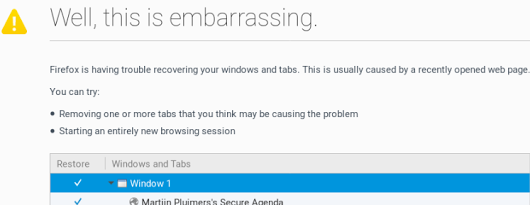 A while ago, I asked about [WayBack] “Is there a way to skip the Firefox “Well, this is embarrassing” during a sudden reboot and just continue with the loading of the default pages? – Jeroen Wiert Pluimers – Google+
Later I found the workaround at both and [WayBack] Well this is embarrassing message | Firefox Support Forum | Mozilla Support with more elaboration at [WayBack] Don’t give Chance for Firefox to Show ‘Well, this is embarrassing” message next time again | Techdows:
- Open Firefox
- Type
about:config in the addressbar
- Confirm the
This might void your warranty!
by clicking
I accept the risk!
- Search for
browser.sessionstore.resume_from_crash
- Double click it so the value changes from the
default value true to the user set value false


Now after a sudden reboot of the machine, a start of Firefox just loads the default page.
–jeroen
Posted in Firefox, Power User, Web Browsers | Leave a Comment »
Posted by jpluimers on 2018/11/02
Too bad, as it was fun while it lasted:
Even worse: the change was not announced, so people find out after the fact. A similar thing happened back in the “Press This” removal process (which got restored).
Some notes on “The WordPress bookmarklet was deprecated. Please delete it from your web browser.” because the `/wp-admin/press-this.php` based URLs look very similar.
The cool things about the “Request Feedback” were these:
Read the rest of this entry »
Posted in Bookmarklet, Power User, SocialMedia, Web Browsers, WordPress | Leave a Comment »
Posted by jpluimers on 2018/10/16
tl;dr: Finding event handlers registered using jQuery can be tricky. findHandlersJS makes finding them easy, all you need is the event type and a jQuery selector for the elements where the events might originate.
I need to invest some time in using this: [WayBack] Quickly finding and debugging jQuery event handlers with findHandlersJS – The Blinking Caret
Sourcecode: [WayBack] raw.githubusercontent.com/ruidfigueiredo/findHandlersJS/master/findEventHandlers.js
References:
Via: [WayBack] javascript – Chrome Dev Tools : view all event listeners used in the page – Stack Overflow
–jeroen
Posted in Chrome, Development, Google, JavaScript/ECMAScript, jQuery, Power User, Scripting, Software Development, Web Browsers, Web Development | Leave a Comment »
Posted by jpluimers on 2018/09/15
[WayBack] Google Chrome Web Browser 69 changes: most are not talked about (like excess whitespace, address bar search algorithm changes).
–jeroen
Posted in Chrome, Chrome, Google, Power User, Web Browsers | Leave a Comment »


 The Wiert Corner - irregular stream of stuff