The Wiert Corner – irregular stream of stuff

Jeroen W. Pluimers on .NET, C#, Delphi, databases, and personal interests

  • My badges

  • Twitter Updates

  • Pages

  • All categories

  • Enter your email address to subscribe to this blog and receive notifications of new posts by email.

    Join 1,839 other subscribers

Archive for the ‘Web Browsers’ Category

debugging – Find what javascript changes the DOM? – Stack Overflow

Posted by jpluimers on 2019/04/01

I know I’m going to need this one day: [WayBackdebugging – Find what javascript changes the DOM? – Stack Overflow

Via: [WayBack] Javascript “Why”: Wenn ich eine fertig geladene Webseite sehe und wissen möchte, warum “dieses Element da” (Bild, Script, div) geladen worden ist, wie… – Kristian Köhntopp – Google+

–jeroen

Posted in Chrome, Development, JavaScript/ECMAScript, Power User, Scripting, Software Development, Web Browsers, Web Development | Leave a Comment »

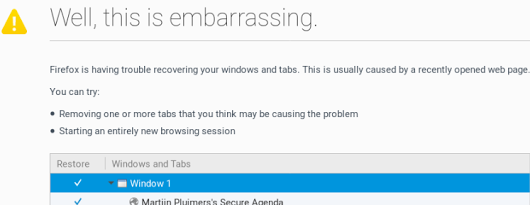
A way to skip the Firefox “Well, this is embarrassing” during a sudden reboot

Posted by jpluimers on 2019/03/04

A while ago, I asked about [WayBack] “Is there a way to skip the Firefox “Well, this is embarrassing” during a sudden reboot and just continue with the loading of the default pages? – Jeroen Wiert Pluimers – Google+

Later I found the workaround at both and [WayBackWell this is embarrassing message | Firefox Support Forum | Mozilla Support with more elaboration at [WayBackDon’t give Chance for Firefox to Show ‘Well, this is embarrassing” message next time again | Techdows:

  1. Open Firefox
  2. Type about:config in the addressbar
  3. Confirm the
    This might void your warranty!
    by clicking
    I accept the risk!
  4. Search for browser.sessionstore.resume_from_crash
  5. Double click it so the value changes from the default value true to the user set value false

Now after a sudden reboot of the machine, a start of Firefox just loads the default page.

–jeroen

Posted in Firefox, Power User, Web Browsers | Leave a Comment »

The [WayBack] and [Archive.is] links in my blog and G+ stream

Posted by jpluimers on 2018/12/13

Answering a good question on [WayBack] Jeroen Wiert Pluimers – Google+:

Read the rest of this entry »

Posted in Blogging, Bookmarklet, InternetArchive, Power User, SocialMedia, WayBack machine, Web Browsers | Leave a Comment »

Printing WordPress receipts in Chrome resulting in strangely accented text turned out to be a Chrome issue

Posted by jpluimers on 2018/12/02

This appeared to be a Chrome thing: [WayBack] Jeroen Pluimers at Twitter: “@wordpressdotcom not sure what goes wrong with billing, but the printed html has odd domain characters. The viewed HTML is OK, but I cannot print that because printing garbles it. I can DM you the receipt links. Similar for the date which becomes unreadable (the IRS dislikes it).…”

–jeroen
Read the rest of this entry »

Posted in Chrome, LifeHacker, Power User, SocialMedia, Web Browsers, WordPress | Leave a Comment »

Topic: “Request Feedback” button vanished | WordPress.com Forums

Posted by jpluimers on 2018/11/02

Too bad, as it was fun while it lasted:

Even worse: the change was not announced, so people find out after the fact. A similar thing happened back in the “Press This” removal process (which got restored).

Some notes on “The WordPress bookmarklet was deprecated. Please delete it from your web browser.” because the `/wp-admin/press-this.php` based URLs look very similar.

The cool things about the “Request Feedback” were these:

Read the rest of this entry »

Posted in Bookmarklet, Power User, SocialMedia, Web Browsers, WordPress | Leave a Comment »

Quickly finding and debugging jQuery event handlers with findHandlersJS – The Blinking Caret

Posted by jpluimers on 2018/10/16

tl;dr: Finding event handlers registered using jQuery can be tricky. findHandlersJS makes finding them easy, all you need is the event type and a jQuery selector for the elements where the events might originate.

I need to invest some time in using this: [WayBackQuickly finding and debugging jQuery event handlers with findHandlersJS – The Blinking Caret

Sourcecode: [WayBackraw.githubusercontent.com/ruidfigueiredo/findHandlersJS/master/findEventHandlers.js

References:

Via: [WayBackjavascript – Chrome Dev Tools : view all event listeners used in the page – Stack Overflow

–jeroen

Posted in Chrome, Development, Google, JavaScript/ECMAScript, jQuery, Power User, Scripting, Software Development, Web Browsers, Web Development | Leave a Comment »

Google Chrome Web Browser 69 changes

Posted by jpluimers on 2018/09/15

[WayBack] Google Chrome Web Browser 69 changes: most are not talked about (like excess whitespace, address bar search algorithm changes).

–jeroen

Posted in Chrome, Chrome, Google, Power User, Web Browsers | Leave a Comment »

Privacy badger: blocks spying ads and invisible trackers. Not just for Facebook, but for every site.

Posted by jpluimers on 2018/03/29

[WayBackPrivacy Badger | Electronic Frontier Foundation: Privacy Badger blocks spying ads and invisible trackers.

Chrome first run settings are at

chrome-extension://pkehgijcmpdhfbdbbnkijodmdjhbjlgp/skin/firstRun.html

Via: [WayBack] Arjen Lentz on Twitter: “EFF’s Privacy Badger does this for any site. Also available for Chrome/Chromium.… “

There is a really interesting Y-combinator thread at [WayBack] Facebook Container Extension: Take control of how you’re being tracked | Hacker News which goes way deeper in how various browsers and extension combinations can help you getting more hold of your privacy.

A few links via that hacker news link:

–jeroen

Posted in Chrome, Firefox, Google, Power User, Privacy | Leave a Comment »

Yay! The WordPress.com Press-This bookmarklet now works again!

Posted by jpluimers on 2017/11/29

Good news the Press-This bookmarklet on WordPress.com has been reinstated.

See https://github.com/WordPress/press-this/pull/29 and the discussions in these below threads and sources.

Solves issues:

  • #12 – Add text domains
  • #15 – Restore Bookmarklet Functionality
  • #17 – Needs better documentation
  • #32 – The Press This bookmarklet itself on the tools page does not have the code

Some relevant sources:

Read the rest of this entry »

Posted in Bookmarklet, Development, Power User, SocialMedia, Software Development, Web Browsers, Web Development, WordPress, WordPress | Leave a Comment »

Chrome Store Foxified: Enables the Google Chrome Store and Opera Addons Website for Firefox.

Posted by jpluimers on 2017/11/27

Most of my browser life is in Chrome, but the memory consumption and CPU usage has increased so much over time so it, err, become less than optimal.

Given the new FireFox is supposed to use far less memory and CPU than previous FireFox versions, I want to try it, but since so much of my Chrome life is about Chrome Extensions, I was glad to discover [WayBackChrome Store Foxified

by Nicolas AragoneNoitidart
Enables the Google Chrome Store and Opera Addons Website for Firefox. Point and click to install Opera/Chrome extensions straight into Firefox.

via:

–jeroen

Read the rest of this entry »

Posted in Chrome, Chrome, Firefox, Google, Power User, Web Browsers | Leave a Comment »