The Wiert Corner – irregular stream of stuff

Jeroen W. Pluimers on .NET, C#, Delphi, databases, and personal interests

  • My badges

  • Twitter Updates

  • Pages

  • All categories

  • Enter your email address to subscribe to this blog and receive notifications of new posts by email.

    Join 1,839 other subscribers

Archive for the ‘Web Browsers’ Category

When http:://Feedly.com doesn’t start with any more: start it through https://Feedly.com (via: @feedly your news. delivered.)

Posted by jpluimers on 2014/03/16

Recently when starting Feedly through http://feedly.com, I got this message in Chrome on my Retina MacBook Pro:

Is feedly blocked?

Feedly is not able to load. It is probably because one of your extensions is blocking it. If you run Adblock, HTTPSEverywhere, Awesome screenshot etc.. please make sure that feedly.com is white listed.

Ask a question

I paused AdBlock: same thing. I don’t use HTTPSEverywhere or the other tools mentioned.

Solution: start using https://feedly.com. Since I prefer https anyway, I can live with that (: Read the rest of this entry »

Posted in Blogging, Chrome, Feedly, Power User, SocialMedia | Tagged: | Leave a Comment »

Speedup Youtube Playback: Watch Lectures In Half The Time with YouTube’s HTML5 Player

Posted by jpluimers on 2013/09/13

I wish I had kept an eye on it after it was announced (which was 3.5 years ago, but not very stable): The Youtube HTML5 viewer trial.

It has come a long way since thenFull screen it is still not as good as the official one, but the main attraction introduced since is: configurable playback speed!

Yes, you can choose playback at 25%, 50%, 100%, 150% or 200% of the original speed. Ideal for lectures or watching replays of conference sessions.

Quote from the life hacker post LifeHacker on this:

Read the rest of this entry »

Posted in Apple, Chrome, Firefox, Internet Explorer, Mac, Mac OS X / OS X / MacOS, Mac OS X 10.7 Lion, Opera, OS X 10.8 Mountain Lion, Power User, Web Browsers, Windows, Windows 7, Windows 8 | Leave a Comment »

Google Chromecast Review – The race is on to wirelessly throw video to your TV – Scott Hanselman

Posted by jpluimers on 2013/08/23

Google Chromecast Review – The race is on to wirelessly throw video to your TV – Scott Hanselman.

Posted in Chrome, Chrome, Google, LifeHacker, Power User, Web Browsers | Leave a Comment »

▶ How to pair a desktop or laptop to youtube.com/pair (via: YouTube; uses Opera Mobile Emulator)

Posted by jpluimers on 2013/08/04

Trick via: ▶ How to pair a desktop or laptop to youtube.com/pair – YouTube.

This trick uses the Opera Mobile Emulator.

Note that not all settings work. The Asus Nexus 7 emulator worked, but custom didn’t always work (that would open m.youtube.com as www.youtube.com/?nomobile=1 hence switching off the mobile client).

When following the steps at Pair your mobile device to your TV – YouTube Help, you are directed to m.youtube.com/select_site to select your TV and enter a pairing code.

Usually you need to retry playing a video a few times: my Philips 42PFI7676H-12 didn’t always work at first (maybe playing back streamed video inside the emulator is not supported, but telling Youtube to pass the play request to your TV is), whereas with my Google Nexus 4 it always works.

You can even pair one computer to another: on the computer that emulates the TV, browse to www.youtube.com/leanback.

–jeroen

Posted in Android Devices, Opera, Opera Mobile, Power User, Web Browsers | Leave a Comment »

30 april 1993: the free and open WWW started…

Posted by jpluimers on 2013/05/03

This year, the Dutch Queens day this year had a special nature. On the nation level: the abdication by former Queen, now Princess Beatrix, and the succession and inauguration of King Willem-Alexander. On the marching band level: Adest Musica had their Dutch premiere of the new show Mother Earth which will be their entry during the quadrennial Word Music Concours this summer. On the personal level, my best friend visiting The Netherlands for just a few days, so finally a chance to catch up in person.

So I totally missed another important historic event: the 20th birthday of the releasing the WWW source code in the public domain.

On the 30st of April 1993, CERN: Read the rest of this entry »

Posted in About, Adest Musica, Personal, Power User, Web Browsers | Tagged: , | Leave a Comment »

Google Chrome funny error message: trueAre you sure you want to leave this page?

Posted by jpluimers on 2013/02/21

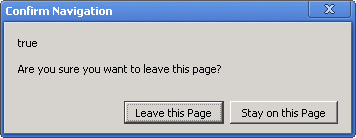
Got a nice error message from Google Chrome today and wonder what the “true” means (:

true

The text is this:

[Confirm Navigation]

true

Are you sure you want to leave this page?

[Leave this Page]    [Stay on this page]

You can use Ctrl-C to copy, then you get the text below:

trueAre you sure you want to leave this page

That means it is not a standard Windows MessageBox, as pressing Ctrl-C there would copy the title and buttons as well.

–jeroen

via: 20130221-funny-google-chrome-error-message-true–Are-you-sure-you-want-to-leave-this-page | Flickr – Photo Sharing!.

Posted in Chrome, Power User, Web Browsers, Windows | Leave a Comment »

Zero day vulnerability in mshtml.dll used by Internet Explorer 6, 7, 8 and 9, and many other products.

Posted by jpluimers on 2012/09/20

Summary:

  • Zero day vulnerability in mshtml.dll used by Internet Explorer 6, 7, 8 and 9, and many other products.
  • Resolution: Deploy EMET or stop using IE and other products using mshtml.dll until Microsoft delivers a patch.

Earlier this week a zero-day vulnerability in the mshtml.dll was made public. This DLL is used by almost all Internet Explorer versions (6-9 are vulnerable) and many other software products (almost anything from Microsoft and a lot of 3rd party software that displays a web page on Windows).

While Microsoft is building a fix that is to be released very soon now (probably tomorrow, Friday September 21st 2010), the official resolutions are not to use the mshtml.dll at all (impractical for many people), or deploy EMET (impractical too as it requires administrative privileges).

If you can, switch to a browser that uses a different layout engine than mshtml.dll (for instance browsers based on WebKit will do).

These pages are good starting points for more information:

Particularly interesting posts:

–jeroen

Posted in Internet Explorer, Power User, Web Browsers, Windows, Windows 7, Windows Server 2000, Windows Server 2003, Windows Server 2003 R2, Windows Server 2008, Windows Server 2008 R2, Windows Vista, Windows XP | Tagged: , , , , , , , , | 8 Comments »

Gif Stopper – Chrome Web Store

Posted by jpluimers on 2011/09/09

Quote:

Gif Stopper will stop animated gif images with using the escape key.

We all love animated gifs but some times they are too distracting, that’s with Gif Stopper comes in. Hit the escape key and the image stops. Most browsers have this build-in and now Google Chrome has it also.

Most importantly: it WORKS with Google+ Plus!!

–jeroen

via: Gif Stopper – Chrome Web Store.

Posted in Chrome, Power User, Web Browsers | Leave a Comment »

Extensions to force HTTPS in your browser

Posted by jpluimers on 2011/07/22

About 9 months ago I posted about HTTPS Everywhere | Electronic Frontier Foundation hoping someone would port the HTTPS Everywhere extension for Firefox to force HTTPS in other browsers like Google Chrome, Microsoft Internet Explorer et cetera.

In the mean time, I found out about HSTS (HTTP Strict Transport Security), which is supported by FireFox 4, and Chrome 12.

Also in the mean time I found about a few HTTPS enforcer extensions for other browsers.

For instance, there are two similar Google Chrome Extensions to HTTPS Everywhere:

Internet Explorer does not have such an extension.

Opera has the Security Enhancer extension.

Next to HTTPS Everywhere, there are the ForceHTTPS and NoScript extension for FireFox (NoScript also supports HSTS).
FireFox 4 supports HSTS out of the box.

So now you have a choice!

–jeroen

Posted in Chrome, Firefox, Internet Explorer, Power User, Web Browsers | Leave a Comment »

Chrome 12 brought back Issue 47714 – chromium – maximize bug while loading webpage on windows 7 – An open-source browser project to help move the web forward. – Google Project Hosting

Posted by jpluimers on 2011/06/27

Regression tests are useful, especially before release.

Clearly someone forgot to regression test the Issue 47714 – chromium – maximize bug while loading webpage on windows 7, as after a while of absence, Chrome 12 reintroduced this issue (it is present in all versions of Chrome 12 I tested, until at least 12.0.742.100).

Workarounds:

  1. Maximize the window, then enter a URL
  2. Wait for Chrome to fully load the URL, then maximize.

–jeroen

Posted in Chrome, Power User, Web Browsers, Windows, Windows 7 | Leave a Comment »