The Wiert Corner – irregular stream of stuff

Jeroen W. Pluimers on .NET, C#, Delphi, databases, and personal interests

  • My badges

  • Twitter Updates

  • My Flickr Stream

  • Pages

  • All categories

  • Enter your email address to subscribe to this blog and receive notifications of new posts by email.

    Join 1,860 other subscribers

Archive for the ‘Microsoft Store’ Category

Microsoft Store: update all apps from the command-line

Posted by jpluimers on 2023/09/12

TL;DR

I have converted the below PowerShell one-liner into this batch file (the ^| syntax is to ensure the pipe runs within PowerShell, not within the batch file):

PowerShell 'Get-CimInstance -Namespace "Root\cimv2\mdm\dmmap" -ClassName "MDM_EnterpriseModernAppManagement_AppManagement01" ^| Invoke-CimMethod
 -MethodName UpdateScanMethod'

The why and how

Since I am a CLI person, and some Windows applications are only available on the Microsoft Store, I wanted to be able to initiate an update cycle from the command-line interface.

So I searched for [Wayback/Archive] microsoft store update all apps from the command-line – Google Search and found these to be valuable:

Read the rest of this entry »

Posted in Batch-Files, Development, Microsoft Store, Power User, PowerShell, Scripting, Software Development, Windows, Windows 10, Windows 11 | Leave a Comment »

Installing the Microsoft To Do app from the Microsoft Store on Windows via the CLI was impossible at first, and requires GUI configuration

Posted by jpluimers on 2023/09/07

I prefer installing applications through the CLI (command-line interface). This way, things can be scripted and installation parameters be stored under version control.

A few months back I published Different ways for installing Windows features on the command line – Peter Hahndorf which wrote way earlier and amended with a few highlights I learned from unsuccessfully trying to Microsoft To Do. Of course that is possible from the GUI by following these links:

  1. [Wayback/Archive] To Do List and Task Management App | Microsoft To Do
  2. [Wayback/Archive] Get Microsoft To Do: Lists, Tasks & Reminders – Microsoft Store

But I don’t want GUI, I want CLI as that is way easier to automate than GUI. I knew this should theoretically be possible from my the above winget post.

Putting this to practice however at first failed. Later I found a GUI-based workaround. So this was not possible purely on the CLI.

This post is both a summary of the most important bits and a reminder for myself to check if installing Microsoft Store via [Wayback/Archive] Winget without a Microsoft Store account is still impossible (as when downloading via the GUI from the Microsoft Store site an account is not needed).

winget

First however on how I ended up at winget for anyway were these posts:

Read the rest of this entry »

Posted in Chocolatey, Microsoft Store, Power User, Windows, Windows 10, Windows 11, winget | Leave a Comment »

Different ways for installing Windows features on the command line – Peter Hahndorf

Posted by jpluimers on 2023/06/02

If course you can configure Windows Optional Features using the GUI as for instance explained at [Wayback/Archive] How to manage Windows 10’s many ‘optional features | Windows Central.

However, I prefer command-line management.

About the only post doing the comparison of command-line mangement options I could find about is [Wayback/Archive] Different ways for installing Windows features on the command line – Peter Hahndorf and hopefully will be further updated in the future. It is dated 2015, but has been updated until at least Windows Server Nano.

I added one, and then rewrote the tool-set availability table in the post into this:

Read the rest of this entry »

Posted in Communications Development, Development, Internet protocol suite, Microsoft Store, OpenSSH, Power User, SSH, TCP, Windows, Windows 10, Windows 11, Windows 7, Windows 8, Windows 8.1, Windows Server 2008, Windows Server 2008 R2, Windows Server 2012, Windows Server 2012 R2, Windows Server 2016, Windows Vista | Leave a Comment »

Installing the Microsoft Store version of Windows Terminal via the winget command-line

Posted by jpluimers on 2023/05/26

In the continuing series of Chocolatey/Scoop/winget related posts, this one is about Windows Terminal.

There are basically two ultimate sources you can install it from:

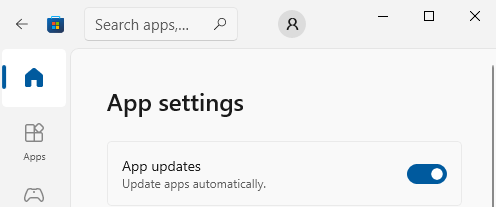
You can configure the Microsoft Store to automatically install updates as per [Wayback/Archive] Turn on automatic app updates (on my system this was the default):

Microsoft Store - Auto-Updates is turned on by default

Microsoft Store – Auto-Updates is turned on by default

  1. Select the Start ⊞ screen, then select Microsoft Store.
  2. In Microsoft Store at the upper right, select the account menu (the three dots) and then select Settings.
  3. Under App updates, set Update apps automatically to On.

As a backgrounder, here some articles on Windows Terminal, ConPTY and the Windows Console from the [Wayback/Archive] DevBlogs – Microsoft Developer Blogs:

  1. [Wayback/Archive] Windows Command-Line: Backgrounder | Windows Command Line Tools For Developers
  2. [Wayback/Archive] Windows Command-Line: The Evolution of the Windows Command-Line | Windows Command Line
  3. [Wayback/Archive] Windows Command-Line: Inside the Windows Console | Windows Command Line
  4. [Wayback/Archive] Windows Command-Line: Introducing the Windows Pseudo Console (ConPTY) | Windows Command Line
  5. [Wayback/Archive] Windows Command-Line: Unicode and UTF-8 Output Text Buffer | Windows Command Line

More on (pseudo)terminals in general containing [Wayback/Archive] “ConPTY” – Search results – Wikipedia:

More on using the Windows Terminal:

My related blog posts:

–jeroen

Posted in Chocolatey, ConPTY, Microsoft Store, Power User, Scoop, Windows, Windows Terminal, winget | Leave a Comment »