Archive for the ‘Windows’ Category
Posted by jpluimers on 2017/05/19
[Archive.is] Working Windows XP & 7 demos. #FRENCHMAFIA: WannaCry — Decrypting files with WanaKiwi + Demos – Comae Technologies:
TL;DR;
DO NOT REBOOT your infected machines and TRY wanakiwi ASAP*!
*ASAP because prime numbers may be over written in memory after a while.
Via:[WayBack] A French researcher says he’s found a tool that could help some fraction of victims running that older Windows version. Just don’t reboot! WannaCry Ransomware Victims Might Have Some Hope–If They’re on Windows XP | WIRED
–jeroen
Posted in Power User, Windows, Windows 7, Windows Server 2003, Windows Server 2003 R2, Windows Server 2008, Windows Server 2008 R2, Windows Vista, Windows XP | Leave a Comment »
Posted by jpluimers on 2017/05/15
PatchCleaner just cleaned out 10-20 gigabyte per VM for most of my Windows 7-8.x VMs. After that, the updates still worked fine.
So it indeed does:
Safely remove all orphaned patch and installer files from your windows installer directory in one easy click
–jeroen
Download: https://sourceforge.net/projects/patchcleaner/
Posted in Power User, Windows, Windows 7, Windows 8, Windows 8.1, Windows 9 | Leave a Comment »
Posted by jpluimers on 2017/05/01
In addition to the two methods mentioned at Two Quick Methods for Finding Shared Folders in Windows (use net share or compmgmt.msc) I like this one:
fsmgmt.msc
It directly gets you to the “Shared Folders” inside compmgmt.msc
–jeroen
Posted in Power User, Windows, Windows 7, Windows 8, Windows 8.1, Windows Server 2000, Windows Server 2003, Windows Server 2003 R2, Windows Server 2008, Windows Server 2008 R2, Windows Server 2012, Windows Server 2012 R2, Windows Vista, Windows XP | Leave a Comment »
Posted by jpluimers on 2017/04/14
A while ago I had some intermittent network issues resulting in these Windows Update error numbers:
- 80244019 (some traffic made it through)
- 80072EE2 (no traffic made it through)
- 8??????? (DNS traffic didn’t make it through)
–jeroen
Posted in Power User, Windows, Windows 10, Windows 7, Windows 8, Windows 8.1 | Leave a Comment »
Posted by jpluimers on 2017/03/27
Nice html report of your battery state in Windows 8 and 10 where 14 is the number of days:
powercfg /batteryreport /output "%temp%\battery_report.html" /Duration 14

start "View Report" "%temp%\battery_report.html"
Source: Battery history on Windows 10 (and maybe older versions?) I was wondering if I…
–jeroen
Posted in Power User, Windows, Windows 10, Windows 8, Windows 8.1 | Leave a Comment »
Posted by jpluimers on 2017/03/17
If you use everything search from VoidTools, then don’t be surprised that pressing Ctrl-T makes it “Always On Top”:
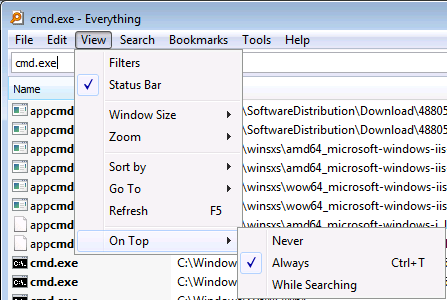
Ctrl-T sets “Always On Top”
Of course this is not defined in “Tools” -> “Options”.
I forgot in which version this was introduced, as in the past I never stumbled over it on keyboards that have Ctrl and Alt reversed.
–jeroen
via: www.voidtools.com • View topic – Everything window is ‘Always On Top’
Posted in Everything by VoidTools, Keyboards and Keyboard Shortcuts, Power User, Windows | Leave a Comment »
Posted by jpluimers on 2017/03/15
One day I write some scripts based on:
Some starting materials are at:
A thing I learned is that the Microsoft Remote Desktop 8 is basically a rebranded iTap RDP (it looks like Microsoft bought iTap RDP for Mac, as iTap RDP for Mac is now discontinued)
–jeroen
Posted in Apple, Development, Mac OS X / OS X / MacOS, OS X 10.10 Yosemite, OS X 10.11 El Capitan, OS X 10.8 Mountain Lion, OS X 10.9 Mavericks, Power User, Remote Desktop Protocol/MSTSC/Terminal Services, Scripting, Software Development, Windows, XML, XML/XSD | Leave a Comment »
Posted by jpluimers on 2017/03/13
[WayBack] Microsoft Is Spamming Windows 10 File Explorer With Ads For OneDrive Storage – Slashdot… – Joe C. Hecht – Google+ has steps to find and remove the packages you do not want to:
Powershell

Get-AppxPackage > List.txt

...

Get-AppxPackage Advertising | Remove-AppxPackage

Get-AppxPackage bingfinance | Remove-AppxPackage

Get-AppxPackage bingnews | Remove-AppxPackage

Get-AppxPackage bingsports | Remove-AppxPackage

Get-AppxPackage bingweather | Remove-AppxPackage
Background info at [WayBack] Microsoft Is Spamming Windows 10 File Explorer With Ads For OneDrive Storage – Slashdot
–jeroen
Posted in Power User, Windows, Windows 10 | 2 Comments »


 The Wiert Corner - irregular stream of stuff