


[WayBack] Exit Vim 2 Win shows the use of vim.js for a challenge.
Source code at [WayBack] GitHub – idoco/exit-vim-2-win: Exiting vim eventually
–jeroen
Posted by jpluimers on 2021/04/01
[WayBack] Exit Vim 2 Win shows the use of vim.js for a challenge.
Source code at [WayBack] GitHub – idoco/exit-vim-2-win: Exiting vim eventually
–jeroen

Posted in Apri1st, Development, Fun, JavaScript/ECMAScript, Software Development | Leave a Comment »
Posted by jpluimers on 2021/04/01
If you’re out of prank ideas: [WayBack] Ship Your Enemies Glitter
Prank your Friends and Enemies. Let us send them some stupid glitter that is guaranteed to go everywhere. You don’t have to move a muscle. Just tell us their address, write a funny note, and leave the rest up to the pros. Prank on Demand!<
Via:
–jeroen

Posted in Apri1st, Fun, LifeHacker, Power User, Prank | Leave a Comment »
Posted by jpluimers on 2021/03/31
Based on [WayBack] linux – How can I execute a series of commands in a bash subshell as another user using sudo? – Stack Overflow:
alias restart-spotlight-service-as-root="sudo bash -c 'echo stop;launchctl stop com.apple.metadata.mds;echo start;launchctl start com.apple.metadata.mds;echo started'"
The bold bits above sudo bash -c 'echo stop;launchctl stop com.apple.metadata.mds;echo start;launchctl start com.apple.metadata.mds;echo started' allow the commands between single quotes to executed in one new bash shell under sudo.
–jeroen
Posted in *nix, *nix-tools, Apple, bash, bash, Development, Mac OS X / OS X / MacOS, Power User, Scripting, Software Development | Leave a Comment »
Posted by jpluimers on 2021/03/31
Passing verbosity levels to msbuild on the one hand can help to quickly locate issues that go otherwise unnoticed, but also make your output so large that it is hard to search through.
Some build targets (Delphi!) do not pass the verbosity to their underlying tools, so for those cases you have to find other means to increase underlying verbosity.
You can always pass msbuild options by using the commandline (even abbreviate them as described in [WayBack] MSBuild Command-Line Reference – Visual Studio | Microsoft Docs: You can specify the following verbosity levels: q[uiet], m[inimal], n[ormal], d[etailed], and diag[nostic]).
Often you also can use your IDE can also specify verbosity levels, for instance:
Under Tools – Options – Projects and Solutions – Build and Run, there’s the MSBuild project build output verbosity combo box.
To control the level of output from MSBuild, use the Verbosity field on the Tools
-> Options ->
The currently specified verbosity values in ascending order according to [WayBack] LoggerVerbosity Enum (Microsoft.Build.Framework) | Microsoft Docs:
Quiet0 Quiet verbosity, which displays a build summary. Minimal1 Minimal verbosity, which displays errors, warnings, messages with MessageImportance values of High, and a build summary. Normal2 Normal verbosity, which displays errors, warnings, messages with MessageImportance values of High, some status events, and a build summary. Detailed3 Detailed verbosity, which displays errors, warnings, messages with MessageImportance values of High or Normal, all status events, and a build summary. Diagnostic4 Diagnostic verbosity, which displays all errors, warnings, messages, status events, and a build summary.
Note that in the past, Detailed was called Details:
[WayBack] visual studio 2010 – What is output at the different MSBuild output verbosity levels? – Stack Overflow:
- Quiet: only shows the result of your build.
- Minimal: shows some configurations of your msbuild, and the CSC task.
- Normal: This will show all the targets and its mainly steps.
- Details: In addition to normal, this flag shows the task and it’s implementation within the each target.
- Diagnostic: Contains all the information that a MSBuild need and produce, it’s switches, parameteres, prerequisites and etc. The input parameter of the target and task, and also contains the value of the input and output parameter, the detail steps of the task execution. The time execution for each task.
In matrix form, as per [WayBack] Obtaining Build Logs with MSBuild – Visual Studio | Microsoft Docs:
The following table shows how the log verbosity (column values) affects which types of message (row values) are logged.
Quiet Minimal Normal Detailed Diagnostic Errors ✅ ✅ ✅ ✅ ✅ Warnings ✅ ✅ ✅ ✅ ✅ High-importance Messages ✅ ✅ ✅ ✅ Normal-importance Messages ✅ ✅ ✅ Low-importance Messages ✅ ✅ Additional MSBuild-engine information ✅
–jeroen

Posted in Continuous Integration, Delphi, Development, msbuild, Software Development | 1 Comment »
Posted by jpluimers on 2021/03/31
Did you ever get this run-time error in a console or test project?
EOleException with message 'Microsoft MSXML is not installed'
It means that CoInitialize or CoInitializeEx needs to be called in the thread that uses MSXML.
Then an easy workaround is to:
System.Win.ComObj in any unit that (indirectly) uses Xml.XMLDoc (for instance any unit using an XML Data Binding generated unit),TProcedure used below)initialization section (which is what VCL TApplication.Initialize does):
if InitProc <> nil then TProcedure(InitProc); // Calls CoInitialize for the main thread and prevents "EOleException with message 'Microsoft MSXML is not installed'"
The initialization section of System.Win.ComObj sets up InitProc to cals CoInitialize for the main thread, which usually suffices for these simple VCL projects, but not for most console or test projects.
Based on ideas I got after reading [WayBack] 为什么LoadXMLDocument在线程类中使用会报错?-CSDN论坛 (for which Google Translate actually does a goot job [Archive.is])
–jeroen
Posted in Conference Topics, Conferences, Delphi, Development, Event, Software Development, Undocumented Delphi | Leave a Comment »
Posted by jpluimers on 2021/03/30
Well known in the software development bubble: Adapter pattern – Wikipedia.
If you ever are going to apply the below ones at the hardware level, please warn me in advance when and where you are going to.
~0.5 Ampère over an almost zero sized contact surface is for sure going to result in some burns eventually.
Juha is an irresponsible father of two, Nikita reckless, and it’s not just Julien’s tweets that have a life expectancy.

Posted in Development, LifeHacker, Power User, Software Development | Leave a Comment »
Posted by jpluimers on 2021/03/30
For my research list: [WayBack] flyover-reverse-engineering/README.md at master · retroplasma/flyover-reverse-engineering · GitHub
–jeroen
Posted in Apple, Development, Go (golang), Mac OS X / OS X / MacOS, Power User, Software Development | Leave a Comment »
Posted by jpluimers on 2021/03/30
For my link archive: [WayBack] How to Convert a Mercurial Repository to Git on Windows.
Let’s see how this maps to MacOS or Linux…
It is based on hg-git:
Other solutions are based on [WayBack]fast-export or [WayBack] gitifyhg.
If I am going to do this beyond a one-off conversion, I need to figure out their differences.
Related:
–jeroen
Posted in Development, DVCS - Distributed Version Control, git, Mercurial/Hg, Software Development, Source Code Management | Leave a Comment »
Posted by jpluimers on 2021/03/29
Google translate is so useful.
The thread below is [WayBack] Thread by @shanselman: “Anytime I’m traveling I use Google Translate to check translations in real time on signage. You have to see it to belis real and LIVE while you move your camera. @ Paris Sorry, your browser doesn’t support embedded videos Folk […]”
But first one via [WayBack] Hadi Hariri on Twitter: “This is pretty damn cool.… “
[WayBack] Leon Fayer on Twitter: “Another point for Google docs… “
Live translate (Via Danny Thorpe and Mark Miller):
Posted in Google, GoogleTranslate, Power User | Leave a Comment »
Posted by jpluimers on 2021/03/29
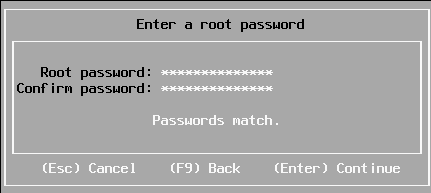
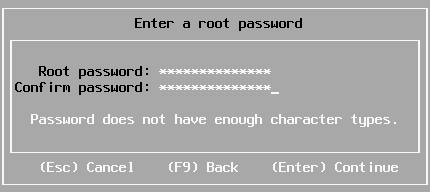
Sometimes you have a long enough password, that matches with the confirmation, but pressing “Enter” to continue gives “Password does not have enough character types”:
From [WayBack] Disable ESXi Password Complexity – Perfect Cloud:
A part of my job as a VMware Certified Instructor is to update our lab systems whenever new vSphere versions come out. After upgrading from 5.5 to 6.0 I decided we should change passwords, h…
This is the workflow:
/etc/pam.d/passwd.vi to edit /etc/pam.d/passwd, and:
# in front of the lines starting with password requisiteuse_authtok bit of the line starting with password sufficient# in front of the line starting with password requiredvi while saving (press Esc, then enter :wq on the prompt)/etc/pam.d/passwd.Via: esxi 6 force short password – Google Search
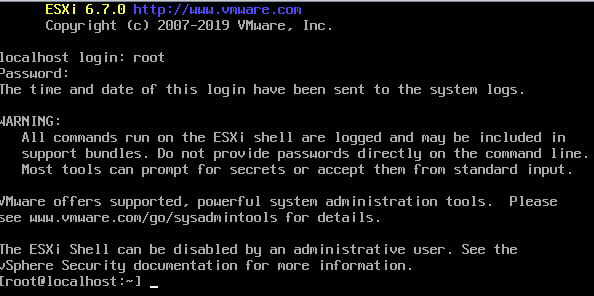
I tried this:
/etc/pam.d/passwd editing steps aboveThe password requirements stayed.
(more screenshots at [WayBack] ESXi 6.7 installation Guide – Let We-i Go)
The default required password complexity changed between 6.5 and 6.7.
In addition to needing to be at least seven characters, the password must include at least three of the four character classes:
Upper case – exception: the first character being upper case does not count towards the class requirement
Lower case
Numbers – exception: the last character being a number does not count towards the class requirement
Symbols
Also, no dictionary words (whether spelt forwards or backwards).
For ESXi hosts, you have to use a password with predefined requirements. You can change the required length and character class requirement or allow pass phrases using the
Security.PasswordQualityControladvanced option.
Example: Editing
/etc/pam.d/passwdpassword requisite /lib/security/$ISA/pam_passwdqc.so retry=N min=N0,N1,N2,N3,N4values
password requisite /lib/security/$ISA/pam_passwdqc.so retry=3 min=12,9,8,7,6With this setting in effect, the password requirements are:
- retry=3: A user is allowed 3 attempts to enter a sufficient password.
- N0=12: Passwords containing characters from one character class must be at least 12 characters long.
- N1=9: Passwords containing characters from two character classes must be at least nine characters long.
- N2=8: Passphrases must contain words that are each at least eight characters long.
- N3=7: Passwords containing characters from three character classes must be at least seven characters long.
- N4=6: Passwords containing characters from all four character classes must be at least six characters long.
Passwortklassen sind schlicht
Grossbuchstaben
Kleinbuchstaben
Zahlen
Sonderzeichen
wobei das erste Zeichen nicht zählt. Also gilt
dumpfbacke     : 1 Passwortklasse
Dumpfbacke      : 1 Passwortklasse
DumpfBacke      : 2 Passwortklassen
DumpfBacke1     : 3 Passwortklassen
DumpfBacke1%            : 4 Passwortklassen
Indem man alle Werte auf 0 setzt, also
password requisite /lib/security/$ISA/pam_passwdqc.so retry=3 min=0,0,0,0,0schaltet man alle Anforderungen aus.
Alternativ geht das auch mitpassword requisite /lib/security/$ISA/pam_passwdqc.so retry=3 min=8,8,8,7,6 enforce=none
On my ESXI 6.5 system where the italic bit is removed, besides the two lines being commented out:
/etc/pam.d/passwd:#%PAM-1.0 # Change only through host advanced option "Security.PasswordQualityControl". password requisite /lib/security/$ISA/pam_passwdqc.so retry=3 min=disabled,disabled,disabled,7,7 password sufficient /lib/security/$ISA/pam_unix.so use_authtok nullok shadow sha512 password required /lib/security/$ISA/pam_deny.so
/etc/pam.d/passwd:#%PAM-1.0 # Change only through host advanced option "Security.PasswordQualityControl". #password requisite /lib/security/$ISA/pam_passwdqc.so retry=3 min=disabled,disabled,disabled,7,7 password sufficient /lib/security/$ISA/pam_unix.so nullok shadow sha512 #password required /lib/security/$ISA/pam_deny.so
On my ESXI 6.7 system (which adds the bold lines below):
/etc/pam.d/passwd:#%PAM-1.0 # Change only through host advanced option "Security.PasswordQualityControl". password requisite /lib/security/$ISA/pam_passwdqc.so retry=3 min=disabled,disabled,disabled,7,7 # Change only through host advanced option "Security.PasswordHistory" password requisite /lib/security/$ISA/pam_pwhistory.so use_authtok enforce_for_root retry=2 remember=0 password sufficient /lib/security/$ISA/pam_unix.so use_authtok nullok shadow sha512 password required /lib/security/$ISA/pam_deny.so
/etc/pam.d/passwd:#%PAM-1.0 # Change only through host advanced option "Security.PasswordQualityControl". #password requisite /lib/security/$ISA/pam_passwdqc.so retry=3 min=disabled,disabled,disabled,7,7 # Change only through host advanced option "Security.PasswordHistory" #password requisite /lib/security/$ISA/pam_pwhistory.so use_authtok enforce_for_root retry=2 remember=0 password sufficient /lib/security/$ISA/pam_unix.so nullok shadow sha512 #password required /lib/security/$ISA/pam_deny.so
–jeroen

Posted in *nix, ESXi6, ESXi6.5, ESXi6.7, Power User, Virtualization, VMware, VMware ESXi | Leave a Comment »




 The Wiert Corner - irregular stream of stuff