


 Recursion explained visually.
Via [WayBack] Wenn mehrere Generationen in den Feiertag / Vatertag starten.
[WayBack] Original picture at [WayBack] Bug Life | Chickie’s Rides | Pinterest | Vw, Volkswagen and Cars.
–jeroen
Posted by jpluimers on 2020/09/09
Recursion explained visually.
Via [WayBack] Wenn mehrere Generationen in den Feiertag / Vatertag starten.
[WayBack] Original picture at [WayBack] Bug Life | Chickie’s Rides | Pinterest | Vw, Volkswagen and Cars.
–jeroen

Posted in Conference Topics, Conferences, Development, Event, Fun, Software Development | Leave a Comment »
Posted by jpluimers on 2020/09/09
Cool presentation on avoiding data races and race conditions when doing file system operations. It includes lots of conceptual and API suggestions on many operating systems (explaining what works where and why not), plus locking tips.
Biggest takeaway for me: always use handles to any object, and avoid static paths like a bad flue.
Well worth watching!
The slides are at [WayBack] CppCon2015/Racing the Filesystem – Niall Douglas – CppCon 2015.pdf at master · CppCon/CppCon2015 · GitHub
More talks from the same conference at [WayBack] GitHub – CppCon/CppCon2015: Presentation Materials from CppCon 2015
Via [WayBack] I asked this in the ADUG list, but didn’t think to ask here … CppCon 2015: Niall Douglas “Racing The File System” – Paul McGee – Google+
–jeroen

Posted in Development, Software Development | Leave a Comment »
Posted by jpluimers on 2020/09/09
I know ModelMaker Tools could do this: [WayBack] Quick Question … are there any good tools available to generate class diagrams / hierarchy from existing code? Or doesn’t anyone do that anymore ? – Stefaan Lesage – Google+
But I didn’t know the other tools from the thread had options as well:
–jeroen
Posted in Delphi, Development, Diagram, PlantUML, Software Development, UML | 1 Comment »
Posted by jpluimers on 2020/09/08
Via [WayBack] Obtaining Build Logs with MSBuild – Visual Studio | Microsoft Docs:
If you need full debug output from msbuild, then append the -verbosity diagnostic parameter.
–jeroen
Posted in Continuous Integration, Development, msbuild, Software Development | Leave a Comment »
Posted by jpluimers on 2020/09/08
Despite the year, this page still got updates long after the initial edit [WayBack] 19 Best Git clients for Windows as of 2018 – Slant.
–jeroen
Posted in Development, DVCS - Distributed Version Control, git, Software Development | Leave a Comment »
Posted by jpluimers on 2020/09/08
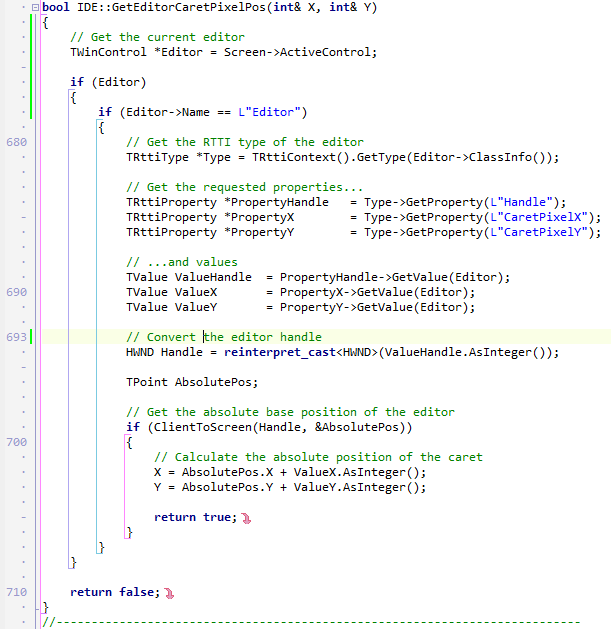
Since WayBack cannot save G+ photos, here is one from [WayBack] So, now I’m in front of a problem similar to a former one: I need to get the pixel position of the current editor cursor position for my OTA wizard. I’… – Fl Ko – Google+:
Related:
–jeroen

Posted in C++, C++ Builder, Delphi, Development, Software Development | Leave a Comment »
Posted by jpluimers on 2020/09/07
It looks like I need to learn about IPP and driverless based on [WayBack] TIL that your Linux desktop can probably use your somewhat recently made printer, efficiently, with all major features exposed, without needing to download a ton of vendor shitware, without needing to find a PPD file in the depths of hell, without needing to pay extra for explicit PostScript 3 support, and without needing to accept that it will do 0.2 instead of 20 pages per minute because the in-printer PostScript rasterizer runs on a Z80…. – Maik Zumstrull – Google+.
So here are some links:
Via: [WayBack] TIL that your Linux desktop can probably use your somewhat recently made prin… – Kristian Köhntopp – G+
When adding my printer in the Chrome tool, it can properly detect it:
OKI MC342
http://192.168.71.52:631Printer informationPrinter make/model: OKI-MC342-36855D
Printer state: idle
Accepting jobs: true
IPP server version: 1.1
Supports PDF natively: true
Supports PWG raster: false
Supports Postscript: true
Supports Unirast: true
Supports application/octet-stream: true
CUPS server: No
Compatability report: PASS Printer should be compatible – try printing
–jeroen

Posted in *nix, *nix-tools, Hardware, OKI C332, OKI Printers, Power User, Printers | 2 Comments »
Posted by jpluimers on 2020/09/07
For a simple comma separated list (no quotes), I was expecting a sed script (and indeed it is possible), but tr is more elegant:
Use
trto change , into newlines:
tr , "\n" < list.txt
Source: [WayBack] bash – convert comma separated values into a list of values using shell script – Stack Overflow.
–jeroen
Posted in *nix, *nix-tools, bash, bash, Development, Power User, Scripting, Software Development | Leave a Comment »
Posted by jpluimers on 2020/09/07
In addition to ESXi: shrinking a Windows disk, you can shrink any ESXi thin provisioned disk by first exploding it with zero content, then shrinking it like described by [WayBack] How to Shrink a Thin VMDK on ESXi 5.0 | Boerlowie’s Blog.
It comes down to using this command:
vmkfstools --punchzero myVirtualMachineDisk.vmdkYou can replace
--punchzerowith-Kif you like more cryptic arguments.
This works because thin provisioned vmdk disk files are sparse files where zero content can be non-allocated.
The trick requires all empty space to be zeroed out (which usually comes down using a tool like sdelete on Windows or shred on Linux), hence the “exploding” in the post title.
For a good explanation on thin, versus thick versus eagerlyZeroedThick, read [WayBack] Thin Provisioning – What’s the scoop? – VMware vSphere Blog.
A few remarks:
du command will show the actual storage size (including the savings from think provisioned disks)ls command will show then “virtual” storage size (excluding any thin provisioning gains)ls and du output is the thin provisioning gain–jeroen
Posted in Power User, Virtualization, VMware, VMware ESXi | Leave a Comment »
Posted by jpluimers on 2020/09/04
Somehow, every now and then, a 2015 Retina MacBook Pro will eject the SD Card during sleep.
I’m not sure about the cause, just about the message that a drive got unmounted in an unexpected way.
This fails to rescan for the drive on Mac OS Sierra:
sudo kextunload -b com.apple.driver.AppleSDXC

sudo kextload -b com.apple.driver.AppleSDXC
As per [WayBack] external disk – Problem with kextunload SD card remount – Ask Different, I tried the kextstat below, however, before the unload/load statements, kextstat | grep -e SDXC returns nothing.
After them, it returns something like
156 0 0xffffff7f841f3000 0x12000 0x12000 com.apple.driver.AppleSDXC (1.7.6) 0F6F5025-A1C4-3E77-9ECD-4D4410E684C5 <16 15 12 5 4 3 1>
When it happens again, I will likely need to read these:
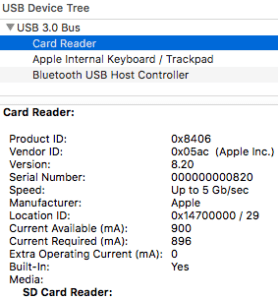
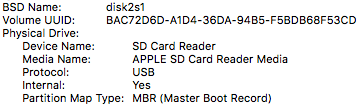
It might be that somewhere along the line, SDSX is not started by default any more or not applicable to MicroSD to SDXC card converters. These screenshots at least show that this disk is connected via a USB path:
The screenshots are from the stock “System Information.app” tool, and I really wish it showed the kext drivers used for each device. That would make debugging these issues a lot easier!
A solution then could be as easy as this:
Unmount all USB connected devices (for instance with a command like
diskutil eject disk1);
sudo kextunload -b com.apple.driver.AppleUSBCardReader

sudo kextload -b com.apple.driver.AppleUSBCardReader
However my first try got me an error similar to the one result [WayBack] External USB disk sometimes requires a reboot to be recognized after eject – Ars Technica OpenForum I found after searching for “class com_apple_driver_AppleUSBCardReaderDriverNub has” “instances.”:
7/28/16 10:05:54.000 AM kernel[0]: Can't unload kext com.apple.driver.AppleUSBCardReader; classes have instances:

7/28/16 10:05:54.000 AM kernel[0]: Kext com.apple.driver.AppleUSBCardReader class com_apple_driver_AppleUSBCardReaderDriverNub has 2 instances.
–jeroen

Posted in Apple, Mac, MacBook, MacBook Retina, Power User | Leave a Comment »


 The Wiert Corner - irregular stream of stuff