The Wiert Corner – irregular stream of stuff

Jeroen W. Pluimers on .NET, C#, Delphi, databases, and personal interests

  • My badges

  • Twitter Updates

  • My Flickr Stream

  • Pages

  • All categories

  • Enter your email address to subscribe to this blog and receive notifications of new posts by email.

    Join 1,862 other subscribers

Archive for 2011

Excel CSV: watch and set your delimiters (and the #NSBusinessCard – Digitale specificatie #fail)

Posted by jpluimers on 2011/10/19

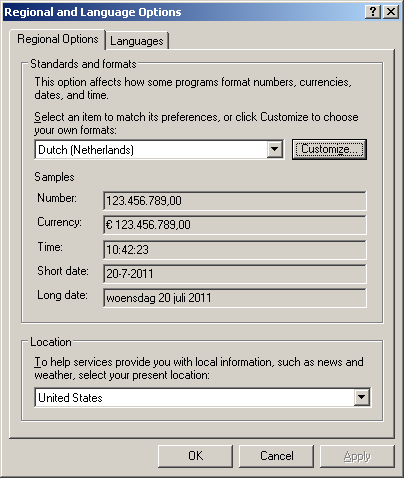
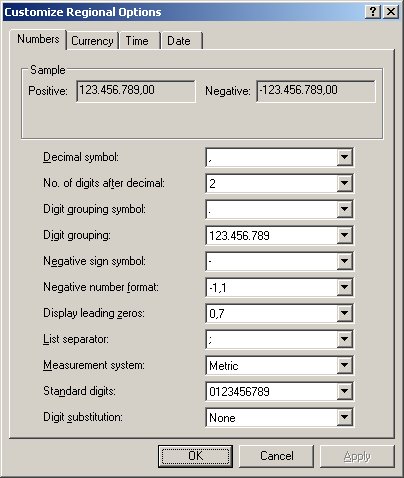
A while ago, a friend asked my why Excel sometimes doesn’t import CSV files correctly. Recently, I was reminded because NB Business Card sends their invoice as Excel CSV. And expected CSV to be universal. Which it isn’t. Besides pople doing all sorts of crazy things with CSV (like What would happen if you defined your system CSV delimiter being a Quotation), Excel CSV isn’t universal either, as it depends on a crucial entry your Windows regional settings: the “List Delimiter”. Two series of screeen shots show this: The first for Windows XP and systems like it:
 

And for Windows 7 and similar systems:
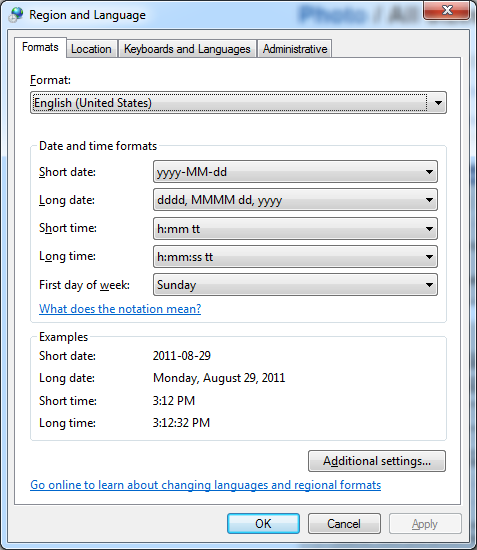
  A few tips: When you export CSV, be sure to use this setting from the registry. Or at least allow your users to specify it in your application, because: when you are not using Windows, you might be out of luck as there is no operating system neutral way of querying this value. And when you get some CSV and cannot import it in Excel, make sure you change your list delimiter to match it. And don’t forget to restore it to the original setting when you are done: it is a user session wide setting, so it applies to all applications (including the ones that do watch it). –jeroen

Posted in CSV, Database Development, Development, Power User, Software Development | 3 Comments »

process – How to check if a program is using .NET? – Stack Overflow

Posted by jpluimers on 2011/10/18

Many processes use or host the .NET run-time.

For Microsoft implementations of the CLR, this is a quick trick of listing them:

tasklist /m "mscor*"
tasklist /m "clr.dll"

The first statement lists all processes that use or host .NET 1.x through 3.x.
The last statement lists all processes that user or host .NET 4.0

On my system, this is the output:

C:\Users\jeroenp>tasklist /m “mscor*”

Image Name PID Modules
========================= ======== ============================================
explorer.exe 1696 mscoree.dll, mscoreei.dll
PrivacyIconClient.exe 7256 MSCOREE.DLL, mscoreei.dll, mscorwks.dll,
mscorlib.ni.dll, mscorjit.dll
PaintDotNet.exe 459736 MSCOREE.DLL, mscoreei.dll, mscorwks.dll,
mscorlib.ni.dll, mscorjit.dll

C:\Users\jeroenp>tasklist /m “clr.dll”

Image Name PID Modules
========================= ======== ============================================
explorer.exe 1696 clr.dll
[/sourecode]

–jeroen

via: process – How to check if a program is using .NET? – Stack Overflow.

Posted in .NET, C#, Development, Power User, Software Development | 1 Comment »

#tzdb back up: ICANN to Manage Time Zone Database

Posted by jpluimers on 2011/10/17

Good news on the TimeZone database front (after the original database went down because of a lawsuit): last friday, it was announced that it is now managed by ICANN.

Actually, it got hosted as of last monday: time to update your download locations and for someone to update the Wikipedia tzdb article.

The ICAN press release:

ICANN to Manage Time Zone Database

The Internet Corporation for Assigned Names and Numbers (ICANN) today took over operation of an Internet Time Zone Database that is used by a number of major computer systems.

ICANN agreed to manage the database after receiving a request from the Internet Engineering Task Force (IETF).

The database contains time zone code and data that computer programs and operating systems such as Unix, Linux, Java, and Oracle rely on to determine the correct time for a given location.  Modifications to the database occur frequently throughout the year.

“The time zone database is used by a large number of commercial operating systems and the software applications,” said Russ Housely, chairman of the IETF. “Incorrect time zone information will impact many everyday activities, including meeting and conference call coordination, airplane and train schedules, physical package delivery notices, and astronomical observatories.”

For nearly three decades, the TZ Database had been maintained by a group of dedicated volunteers, in particular, Arthur David Olson at the US National Institutes of Health.  Olson coordinated the group, managed the data, and created a platform for their release.  Olson’s announced retirement prompted the IETF to turn to ICANN to ensure continued operation of the database.

“The Time Zone Database provides an essential service on the Internet and keeping it operational falls within ICANN’s mission of maintaining a stable and dependable Internet,” said Akram Atallah, ICANN’s Chief Operating Officer.

–jeroen

via: ICANN press release

Posted in Development, Power User, Software Development | Leave a Comment »

HTC Help Center

Posted by jpluimers on 2011/10/17

Keeping the screen on while charging HTC Sensation

You can keep the screen from turning off while you’re charging HTC Sensation:

  1. go to the Home screen
  2. press the menu button
  3. tap Settings
  4. tap Applications
  5. tap Development
  6. select the “Stay awake check box”

Note: don’t forget to turn this off when not charging: somehow this setting will rapidly deplete your battery even if the screen is off.

–jeroen

via HTC Help Center.

Posted in HTC, HTC Sensation, Power User | Leave a Comment »

SVN 1.7, TortoiseSVN and CollabNet 2.1.0 released earlier this week

Posted by jpluimers on 2011/10/14

Right after the Subversion SVN 1.7 release earlier this week, 3rd party providers announced new versions of their products too.

These are the updates of the ones I use most often:

Two major improvements for me:

  1. Improved meta data (read: only one .svn directory in the root of a working copy)
  2. Faster HTTP speed

Please also read Uwe Schuster‘s (the guy that implemented the version control integration for SVN and Git in the Delphi IDE) blog post on a few things you need to watch when upgrading to Tortoise SVN 1.7.

–jeroen

Posted in Delphi, Development, Software Development, Source Code Management, Subversion/SVN | Leave a Comment »

Running OS X Lion 10.7 on VMware Workstation 7.1.4 and 8.0 (via: How to Install Retail OS X 10.6 under VMware Workstation or Player – InsanelyMac Forum)

Posted by jpluimers on 2011/10/14

This might not be strictly legal, but it is supposed to be possible to run the retail OS X Lion 10.7 under VMware Workstation 8 (or VMware Fusion 4) and VMware Workstation 7.1.4 (or VMware Player 3.1.4) on a regular PC (if that PC Supports VT) running Windows 7 x64.

Since Apple MacBook still don’t come with a TrackPoint (and having suffered from RSI, that is about the only pointing device I can use) there are only two options for me:

  1. Go the route described above
  2. Use an external USB TrackPoint keyboard with a Mac
    (traveling with a huge external USB keyboard, I’d look like my long time friend Mark Miller from DevExpress, who also suffered from RSI)
    (boy I wish there was a wireless ThinkPad TrackPoint keyboard)

–jeroen

Via: How to Install Retail OS X 10.6 under VMware Workstation or Player – InsanelyMac Forum and 
How to Install Retail OS X 10.6 “Snow” and OS X 10.7 “Lion” under VMware Workstation 8 and Fusion 4, A simple set of instructions – InsanelyMac Forum

Posted in Apple, Keyboards and Keyboard Shortcuts, Power User, RSI, UltraNav keyboards, VMware, Windows, Windows 7 | 1 Comment »

MonoTouch 5.0 released: iOS 5 support for Mono on the iOS 5 release day

Posted by jpluimers on 2011/10/13

With the and iOS 5 release today and the MonoDevelop 2.8 release last week, there is also a new MonoTouch 5.0 released that binds the two and allows you to develop iOS 5 using Mono.

Almost like a mirracle: on the iOS 5 release day, MonoTouch 5 gets released. Lot’s of new stuff to play with, just read the announcement :)

Quote: “If you already have MonoTouch, simply launch MonoDevelop and you will be prompted to update – it’s that easy!

Be sure to also read the new MonoTouch 5 documentation on new iOS  5 features and the comprehensive API diff between MonoTouch 4.2 and 5.0.

–jeroen

via: MonoTouch 5.0 – MonoTouch.

Posted in .NET, C#, Development, Mobile Development, MonoTouch, Software Development, xCode/Mac/iPad/iPhone/iOS/cocoa | Leave a Comment »

Last weekend, Dennis Ritchie, passed away at age 70.

Posted by jpluimers on 2011/10/13

Another pioneer in the IT passed away: at age 70, Dennis Ritchie (aka dmr), pioneer, creator of the C programming language and key developer of Unix died this weekend.

Within a week, two pioneering IT people went. Let’s remember them for what they were and wish the people left behind all the best.

–jeroen

via: Dennis Ritchie, 1941-2011: Computer scientist, Unix co-creator, C programming language designer – Boing Boing.

Posted in About, Development, Opinions, Personal | Leave a Comment »

batch files: getting information from your Windows AD

Posted by jpluimers on 2011/10/13

If you have the Windows Server Resource Kit tools installed, then dsget and dsquery can get you some valuable information about the current user and computer.

Below is a sample batch file that shows that dsquery gets you [Wayback/Archive] DNs, and dsget gets you detailed information for a certain type of DN.

You can use pipes (and sometimes you need to [Wayback/Archive] escape the pipes) to pass information from dsquery to dsget.
dsget will happily accept multiple DNs (each on a new line), so you can use text-files with DNs too.

@echo on
    :: this assumes that dsquery, dsget, etc are in the same directory as the batch file
    ::escape pipe with caret
    for /f "tokens=* delims= " %%a in ('%~dp0dsquery user -samid %USERNAME% ^| %~dp0dsget user -desc ^| find /V "dsget succeeded"') do (
    set description=%%a
    )
    ::trim last two spaces
    if "%description:~-2%"=="  " set description=%description:~0,-2%
    echo !%description%!

–jeroen

Posted in Batch-Files, Development, Scripting, Software Development | 1 Comment »

MonoDevelop 2.8 is Here! via: Xamarin blog

Posted by jpluimers on 2011/10/12

Last week, Xamarin released version 2.8 of the MonoDevelop development environment.

Biggest feature is xCode 4 support (which integrated the Interface Builder therefore broke MonoDevelop 2.6).

Since it is hard to run xCode 3 on Mac OS X Lion (Mac OS X Lion more than prefers xCode 4), and you need at least xCode 4.2 beta to develop for iOS 5, this welcome upgrade when you are staying current on Mac OS X.

You can use MonoDevelop to create .NET applications for:

  • iOS (iPhone/iPad/iPod-touch)
  • Mac OS X
  • Android
  • Windows
  • ASP.NET

Be sure to read the MonoDevelop 2.8 release notes, as even the list of Major Highlights is long:

  • C# 4.0
  • Defaults to the 4.0 profile.
  • New Garbage Collection engine
  • New Frameworks:
    • Parallel Framework
    • System.XAML
  • Threadpool exception behavior has changed to match .NET 2.0
    • potentially a breaking change for a lot of Mono-only software
    • See information below in the “Runtime” section.
  • New Microsoft open sourced frameworks bundled:
    • System.Dynamic
    • Managed Extensibility Framework
    • ASP.NET MVC 2
    • System.Data.Services.Client (OData client framework)
  • Performance
    • Large performance improvements
    • LLVM support has graduated to stable
      • Use mono-llvm command to run your server loads with the LLVM backend
  • Preview of the Generational Garbage Collector
  • Version 2.0 of the embedding API
  • WCF Routing
  • .NET 4.0’s CodeContracts
  • Removed the 1.1 profile and various deprecated libraries.
  • OpenBSD support integrated
  • ASP.NET 4.0
  • Mono no longer depends on GLIB

–jeroen

via: MonoDevelop 2.8 is Here! « Xamarin.

Posted in .NET, C#, Development, Mono for Android, MonoTouch, Software Development, xCode/Mac/iPad/iPhone/iOS/cocoa | 1 Comment »