The Wiert Corner – irregular stream of stuff

Jeroen W. Pluimers on .NET, C#, Delphi, databases, and personal interests

  • My badges

  • Twitter Updates

  • My Flickr Stream

  • Pages

  • All categories

  • Enter your email address to subscribe to this blog and receive notifications of new posts by email.

    Join 1,860 other subscribers

Archive for 2015

Any ideas for a good text to direct anonymous and blocked numbers too?

Posted by jpluimers on 2015/12/31

Any ideas for a good text to direct anonymous and blocked numbers too?

I’m thinking along these lines:

You are calling with a blocked, or anonymous number. We get too many of those, mostly from marketing or sales persons. Call back with your real number and you might get to talk to a real person.

–jeroen

via:

Posted in LifeHacker, Power User | 1 Comment »

45 Jokes Only Programmers Will Get

Posted by jpluimers on 2015/12/31

Some great ideas for T-shirt prints: 45 Jokes Only Programmers Will Get.

Happy new year!

–jeroen

Posted in Fun, Quotes, T-Shirt quotes | Leave a Comment »

Disable screensaver using registry settings

Posted by jpluimers on 2015/12/30

This is what I needed:

:: http://www.windows-commandline.com/disable-screensaver-registry-settings/
reg add "HKEY_CURRENT_USER\Control Panel\Desktop" /v ScreenSaveActive /t REG_SZ /d 0 /f

And this one to verify the current settings:

:: http://www.windows-commandline.com/disable-screensaver-registry-settings/
:: possible names
:: ScreenSaveActive
:: ScreenSaveTimeOut
:: ScreenSaverIsSecure
reg query "HKEY_CURRENT_USER\Control Panel\Desktop" | findstr /I /C:"ScreenSave"

–jeroen

via:

Posted in Batch-Files, Development, Scripting, Software Development | Leave a Comment »

{} + [] vs. [] + {} – BECAUSE JavaScript: funny shirt for #JavaScript programmers or the ones poking fun of them

Posted by jpluimers on 2015/12/29

{} + [] vs. [] + {} – BECAUSE JavaScript: funny shirt for #JavaScript programmers➥ http://www.redbubble.com/people/ramiro/works/19808814-wat-because-javascript-funny-design-for-web-developers?p=t-shirt&style=womens&body_color=white&print_location=front #wat

–jeroen

Source: {} + [] vs. [] + {} – BECAUSE JavaScript: funny shirt for #JavaScript program…

Posted in Fun, Quotes, T-Shirt quotes | Leave a Comment »

Command Line Kung Fu: Episode #43: Users & Groups

Posted by jpluimers on 2015/12/29

I needed to compare the local group memberships on a few systems.

I knew there is the distinction between

  • net group (which despite documentation requires /domain as it does not support local groups: you get a nice NET HELPMSG 3515 error) and
  • net localgroup (which can either run locally or with /domain).

So I came up with this batch file thanks to Command Line Kung Fu:

:: http://blog.commandlinekungfu.com/2009/06/episode-43-users-groups.html
for /F "skip=4 delims=*" %%g in ('net localgroup ^| find /v "The command completed successfully"') do @net localgroup "%%g"

It can be done in PowerShell too, but is more work.

Based on that and Beyond Compare I created some diff scripts.

–jeroen

via:

Posted in Batch-Files, Development, Scripting, Software Development | 1 Comment »

Mac OS X: integrating Beyond Compare 4 into SourceTree 2.x

Posted by jpluimers on 2015/12/28

Unlike SourceTree for Windows, SourceTree for Mac still doesn’t automagically detect Beyond Compare even though that has been available for Mac OS X since :  [SRCTREE-2092] Add built-in support for Beyond Compare version 4 – Atlassian JIRA.

Even modifying my ~/.gitconfig didn’t work, but manual configuration did. Here are the steps:

  1. Start the UI version of Beyond Compare
  2. Select the Beyond Compare menu, install the command-line tools
    Read the rest of this entry »

Posted in Apple, Beyond Compare, Development, DVCS - Distributed Version Control, Keyboards and Keyboard Shortcuts, Mac, Mac OS X / OS X / MacOS, MacBook, MacBook Retina, MacBook-Air, MacBook-Pro, OS X 10.10 Yosemite, OS X 10.8 Mountain Lion, OS X 10.9 Mavericks, Power User, Source Code Management, SourceTree | 3 Comments »

Steps for adjusting a whiteboard photo in Gimp

Posted by jpluimers on 2015/12/28

A long time ago, I wrote about Steps for adjusting a whiteboard photo in Paint.NET.

GIMP does an even better job with these steps:

Once: install the clean-whiteboard-photo script

  1. Visit https://github.com/kyleburton/sandbox/blob/master/gimp/clean-whiteboard-photo.scm
  2. Click “raw”
  3. Hit “Ctrl-S” to save the file as file-type “*.txt” and file-name  “%temp%\clean-whiteboard-photo_scm.txt”
  4. Go to the folder “%temp%”
  5. In there,
    1. select the firle  “clean-whiteboard-photo_scm.txt”,
    2. change it into  “clean-whiteboard-photo.scm”,
    3. copy the file
  6. Go to the folder  “C:\Program Files\GIMP 2\share\gimp\2.0\scripts”
  7. Paste the file (you need to confirm Administrator rights through UAC)

The above steps will add this menu option to GIMP: menu “Filters” -> “Whiteboard” -> “Clean whiteboard photo”

For every picture: make it less ugly

  1. Start GIMP 2
  2. Open the picture
  3. With the “Rectangle Select” Tool (R), select the area of the whiteboard that you want to enhance
    1. If the area is not completely rectangular, make the selection large enough to cover everything needed in the final picture
  4. Only when the selection needs adjustment to make it rectangular:
    1. Choose the “Perspective” Tool (Shift-P)
    2. Drag the incorrect corners until the selection is rectangular
    3. In the “Perspective” tool window, click “Transform” to confirm
    4. The selection now is not rectangular any more, so deselect everything:
      1. In the menu, choose “Select” -> “None” (Shift-Ctrl-A)
  5. With the “Rectangle Select” Tool (R), select the area of the whiteboard that you want to enhance
  6. In the menu, choose “Image” -> “Fit canvas to selection”
  7. In the menu, choose “Filters” -> “Whiteboard” -> “Clean whiteboard photo”
  8. Click next to the selection to confirm the cleanup
  9. In the menu, choose “File” -> “Export”
    1. Save the file under a new name (often a PNG extension will give better compression than JPEG, and has less artifacts as well)

–jeroen

via: Steps for adjusting a whiteboard photo in Paint.NET « The Wiert Corner – irregular stream of stuff.

Posted in Image Editing, Power User | Leave a Comment »

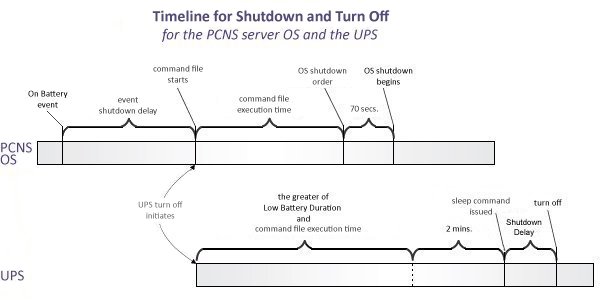
HowTo: Configure Low Battery Duration and PCNS to Shut Down with an APC SmartUPS

Posted by jpluimers on 2015/12/27

Great post: HowTo: Configure Low Battery Duration and PCNS to Shut Down with an APC SmartUPS

It explains how to configure automatic shutdown of machines upon UPS battery low events.

Posted in LifeHacker, Power User | Leave a Comment »

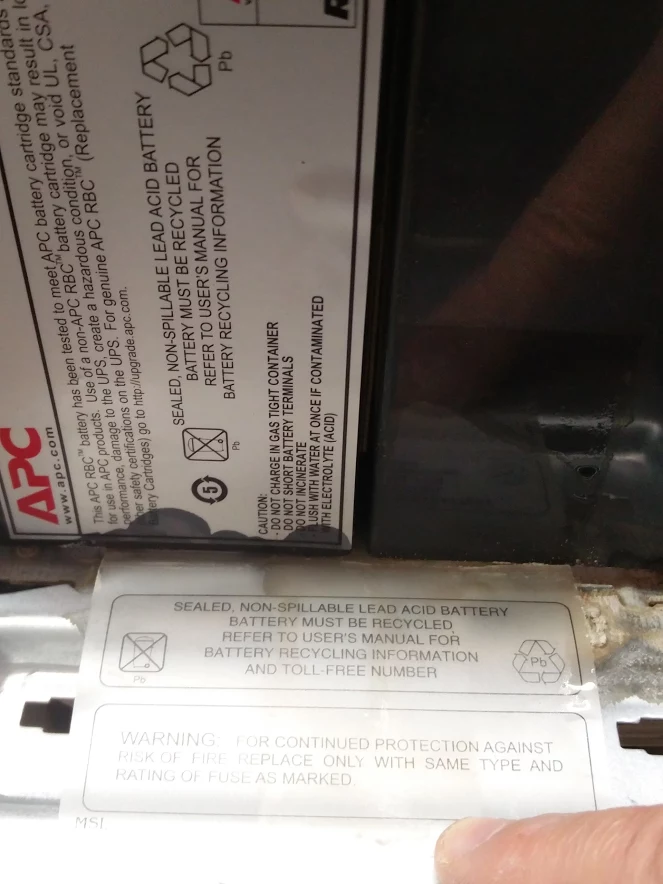
“Sealed, non-spillable”. Yeah right: @APCbySchneider batteries do leak. How to clean lead acid battery leaking residue.

Posted by jpluimers on 2015/12/26

I found out the hard way that the so called APC “Sealed, non-spillable” lead acid batteries inside their UPS systems do leak when used normally.

So I head to clean up before the damage would get bigger.

A few links on how to clean:

This is what you need:

  • Gloves
  • Goggles
  • Baking Soda (Sodium bicarbonate, in Dutch Zuiveringszout*)
  • Water
  • Wrench
  • Wire brush
  • Steel wool
  • Soft cloth(s)
  • Petroleum jelly (or in Dutch: vaseline** that is acid and fragrance-free)

Baking soda paste: 3 parts baking soda and 1 part water.

Baking soda solution: 1 parts baking soda in 10 parts water.

* ZuiveringszoutNatriumwaterstofcarbonaat (natriumbicarbonaat, dubbelkoolzure soda): E-nummer E 500 (ii).

In The Netherlands, you can get it expensively as “bakpoeder” ingredient (baking powder) or cheaply as cleaning agent called Zuiveringszout.

** Vaseline usually is petroleum jelly with extra ingredients, be sure to get the pure white one that is acid and fragrance free.

–jeroen

Source: “Sealed, non-spillable”. Yeah right +ApcbySchneider : How do I clean up this …

Follow-up: The details of one of my UPS-es. There is no such thing as leak free lead acid batteries, despite APC saying so…

Posted in APC Smart-UPS, Power User, UPS | 1 Comment »

Interactive Frequency Chart – Independent Recording Network

Posted by jpluimers on 2015/12/26

Source: Interactive Frequency Chart – Independent Recording Network

via The only eq chart one will ever need?!? and many others:

The only eq chart one will ever need?!? – Svein Idar Hansen – Google+


Posted in Audio, Power User | Leave a Comment »