Archive for September, 2015
Posted by jpluimers on 2015/09/30
ReSharper has a whole set of nice keyboard shortcuts, which includes Ctrl + Shift + , for View Recent Edits.
This overwrites the Zoom Out half of the default Visual Studio zoom keyboard shortcuts (thanks Carlos Muñoz):
Ctrl + Shift + . to zoom in and Ctrl + Shift + , to zoom out.
They don’t keep an alternative for Zoom Out, and unlike most tools I know that allow for zooming, there is no keyboard accessible menu entry for Zoom Out in Visual Studio.
So you have to use your mouse to go in the lower left of your editor window in order to Zoom Out (thanks ashteele for putting that in an SO question):

Or you can reconfigure the old shortcut (thanks Aaron Ransley):
through Tools -> Options -> Environment -> Keyboard and map “View.ZoomIn” and “View.ZoomOut“
–jeroen
Posted in .NET, Development, Software Development, Visual Studio 11, Visual Studio 2010, Visual Studio 2013, Visual Studio 2014, Visual Studio and tools | Leave a Comment »
Posted by jpluimers on 2015/09/29
Below are the captions, read the full article as it is very well written.
Why your code is hard to understand
- Problem #1, Overly Complex Mental Models
- Problem #2, Poor Translation of Semantic Models into Code
- Class Structure and Names
- Variable, Parameter and Method Names
- Single Responsibility Principle (SRP)
- Appropriate Comments
- Problem #3, Not Enough Chunking
- Problem #4, Obscured Usage
- Problem #5, No Clear Path Between the Different Models
- Problem #6, Inventing Algorithms
–jeroen
via: Why Your Code Is So Hard to Understand – CodeProject.
Posted in .NET, Delphi, Development, Software Development, Web Development | 5 Comments »
Posted by jpluimers on 2015/09/28
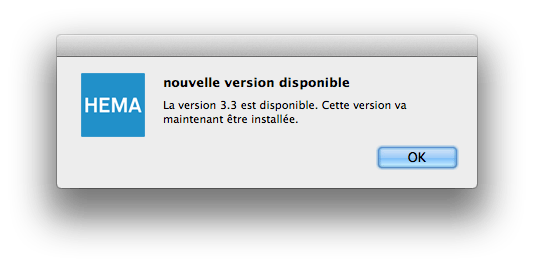
Ken jij Frans? Ja, die ken ik wel.
Geen idee wat het betekent, maar toch bij de installatie van de HEMA foto-album software op je Mac gedownload vanaf de Nederlandse HEMA site en ook vrolijk een Nederlandstalige link opent dat het gelukt is:
nouvelle version disponible
Le version 3.3 est disponible. Cetter version va maintnenant être installée.
Het vervolg is niet veel beter: zie hieronder.
Exit HEMA App.
–jeroen
Read the rest of this entry »
Posted in Fun, Power User | 4 Comments »
Posted by jpluimers on 2015/09/28
Don’t forget to superlogout.com when you need a digital break. Curious how fast it is?
–jeroen
Read the rest of this entry »
Posted in Fun, Power User | Leave a Comment »
Posted by jpluimers on 2015/09/28
I’ve seen this question coming up a few times, and bumped into this at a client recently: the UAC dialog coming up when debugging a 32-bit executable.
This is caused (more details below) by Installer Detection Technology introduced in Windows Vista (with UAC) and tightened in more modern Windows versions.
The solution is to either:
- not include Installer, Patch, Update, Upgrade, Setup, … in your EXE name
- provide a correct manifest to your EXE (getting this right can be hard)
- don’t use x86 as platform target
For software you don’t have source code for, you can alter the manifest with a requestedExecutionLevel element: Fixing the way Vista Auto-detects Installers – Ben’s Writing.
A few links on Installer Detection Technology in Windows:
Read the rest of this entry »
Posted in .NET, .NET 1.x, .NET 2.0, .NET 3.0, .NET 3.5, .NET 4.0, .NET 4.5, .NET CF, C#, C# 1.0, C# 2.0, C# 3.0, C# 4.0, C# 5.0, C# 6 (Roslyn), Delphi, Delphi 10 Seattle, Delphi 2, Delphi 2005, Delphi 2006, Delphi 2007, Delphi 2009, Delphi 2010, Delphi 3, Delphi 4, Delphi 5, Delphi 6, Delphi 7, Delphi XE, Delphi XE2, Delphi XE3, Delphi XE4, Delphi XE5, Delphi XE6, Delphi XE7, Delphi XE8, Development, RemObjects C#, Software Development | 1 Comment »
Posted by jpluimers on 2015/09/25
I missed this last May, but revisiting some old G+ posts I saw Allen Bauer commenting:
Current working theory of Nullable<T>.
Nullable<T> = record

...

property Value: T read FValue; default;

...

end;
Using the default directive to “hoist” the operators of “T”. Currently the default directive only works for array properties by “hoisting” the ‘[]’ operator. Marking a non-array property with default will make the containing type behave as that type.
This, coupled with some intrinsic compiler knowledge of the Nullable<T> type will make Nullable<T> work without any addition of keywords or other standard functions or procedures.
Using the “default” directive on a non-array property will work for any type, except for having the null-propagation semantics.
When considering language features, I try and not only make it work for the intended purpose, but also broaden reach of any supporting feature. In the above scenario, even user-defined operators on “T” will be properly hoisted and used.
So hopefully, one day there will me more than Nullable<T> in Spring.pas which has been around for quite a while now..
–jeroen
Source: Delphi’s New Feature Desired: Nullable Types and Null Propagation Nullable…
Posted in Delphi, Development, Software Development | 5 Comments »
Posted by jpluimers on 2015/09/25
It drives me nuts as the below “content preparation progress” solution fails for me on a Windows 8 system having Adobe Reader XI.
Anyone that has a proper solution?
Solution
- Go to Edit > Preferences > Reading.
- Under “Screen Reader Options” select “Only read the currently visible pages”.
–jeroen
Source: Message “content preparation progress” when opening a PDF file
Posted in Adobe, Adobe Reader, Power User | 1 Comment »
Posted by jpluimers on 2015/09/24
Often in Delphi 2010, you can get an error like this:
C:\Program Files (x86)\Embarcadero\RAD Studio\7.0\Bin\CodeGear.Delphi.Targets(136,3): error : C:\Users\Developer\Versioned\Spring4D\Source\Base\Reflection\Spring.Reflection.pas(1647) Fatal
: F2084 Internal Error: AV00434055-RA37CCB72-0
There is a very simple workaround:
- If you are in the IDE: quit the IDE
- Delete all .dcu files the project generates
- If you were in the IDE: restart the IDE and reload the project
- Compile the project again
Note:
Sometimes it pays off back-porting to Delphi 2010: the generated executables are a lot smaller than more recent Delphi versions which can make a huge differenec when uploading many versions of bootstrap binaries to a version control system.
–jeroen
Posted in Delphi, Delphi 2010, Development, F2084, Software Development | Leave a Comment »
Posted by jpluimers on 2015/09/23
Visual Studio 2013 syntax highlighting: watch the closing curly brace.
Console.WriteLine(“URL IS : http://localhost/:{0}”, portnumber);
–jeroen

Posted in .NET, C#, C# 2.0, C# 3.0, C# 4.0, C# 5.0, Development, Software Development, Visual Studio 2013, Visual Studio and tools | Leave a Comment »


 The Wiert Corner - irregular stream of stuff