The Wiert Corner – irregular stream of stuff

Jeroen W. Pluimers on .NET, C#, Delphi, databases, and personal interests

  • My badges

  • Twitter Updates

  • My Flickr Stream

  • Pages

  • All categories

  • Enter your email address to subscribe to this blog and receive notifications of new posts by email.

    Join 1,860 other subscribers

Archive for January, 2017

Coding width – via “Is it common to print out code on paper?” – Programmers Stack Exchange

Posted by jpluimers on 2017/01/25

I don't often read code, but when I do, I print it.

I don’t often read code, but when I do, I print it.

For I a very long time, I’ve been formatting code until about 130 characters width and recently remembered out why:

… remember printing in landscape allowed 132 characters.At Uni, I used to regularly print my code on green bar paper…

Source: Is it common to print out code on paper? – Programmers Stack Exchange

It got back memories of working on VT102 terminals and Hercules Graphics Cards adapters doing VAX-VMS (FORTRAN and Pascal) and DOS (Turbo Pascal) programming. The VT102 could do 132 columns (the VT52 only 80) and it was no coincidence that most HGC could do 132 columns as well.

Printing was usually on green-bar paper (in Dutch “zebra-papier”) which was 132 columns wide in landscape form on most line printers.

–jeroen

via: #dailygadellaa – Jeroen Wiert Pluimers – Google+

Read the rest of this entry »

Posted in Development, Power User, Software Development | 1 Comment »

Some notes and links on hacking a Philips TVs TCP ports

Posted by jpluimers on 2017/01/25

In my case this is about a Philips 42PFL7676H TV, but this likely applies to many Philips TVs from the 2009-2012 era.

According to nmap, these ports are open:

PORT STATE SERVICE REASON VERSION
1925/tcp open unknown syn-ack
2323/tcp open 3d-nfsd? syn-ack
49153/tcp open upnp syn-ack Philips Intel UPnP SDK 1.4 (Philips Smart TV; UPnP 1.0; DLNADOC 1.50)

TCP port 1925 is actually implementing the jointSPACE REST API over HTTP which has some nice documentation (also locally on your TV).

PCremote implements this and is easy to install: just download (or git clone) the html locally or to a web-server and try it, or even easier: browse to the www.netdata.be/tv site. You can even use it on your Raspberry Pi. There is also support for jointSPACE it in agocontrol.

Two nice threads about it from the Philips support forum:

TCP port 2323 seems to be the voodooport which should enable you to do DirectFB Voodoo.

Jean-Marc Harvengt (software engineer at Philips) showed a nice demo (see video below) on using VooDoo. I wish he had published the source code.

TCP port 49153 also hosts an HTTP server. The base URL I could find information about is 192.168.71.115:49153/nmrDescription.xml It seems that nmrDescription.xml has to do with DLNA and upnp.

Later on I found that my brothers 32PFL7675H TV should also support JointSPACE, but that it had to be activated:

AFTER upgrading to the new firmware, jointSPACE NEEDS TO BE ACTIVATED by entering the following digits sequence while watching TV (WatchTV activity): “5646877223

Source: jointSPACE TVs Developers

Before activation, only port was open 49153. After that, port 2323 was open as well. But the www.netdata.be/tv app doesn’t work on this TV. This does work however: Philips MyRemote – Android Apps on Google Play

–jeroen

Read the rest of this entry »

Posted in Communications Development, Development, Hardware Interfacing, HTTP, Internet protocol suite, REST, TCP | Leave a Comment »

Using the github version of certbot (formerly letsencrypt) to get Let’s Encrypt certificates

Posted by jpluimers on 2017/01/24

The Let’s Encrypt certbot (formerly letsencrypt) had some trouble on my machinery.

When trying to test if Apache default default · Issue #3307 · certbot/certbot and opensuse Tumbleweed: Each time I run certbot, a line with Listen 443 gets added to /etc/apache2/httpd.conf · Issue #3364 · certbot/certbot were fixed, I had to run certbot directly using specific github branches.

Normally certbot queries https://pypi.python.org/pypi/certbot/json to install the latest sanctioned version of itself. Which means this won’t work to run the version from github:

git clone https://github.com/certbot/certbot.git
cd certbot
./cerbot-auto <<command-line-parameters>>

But the below does:

git clone https://github.com/certbot/certbot.git
cd certbot
git checkout -b <<branch-name>>
./letsencrypt-auto-source/letsencrypt-auto --os-packages-only
./tools/venv.sh
source venv/bin/activate
cerbot <<command-line-parameters>>

The last statement will run ./venv/bin/certbot but you can also hard-code that (or perform which certbot to verify the directory is on the pat).

I used it to test with this branch:

git checkout -b origin/osrelease_like

The above are basically steps to setup a virtualenv as mentioned in Developer Guide — Certbot 0.9.0.dev0 documentation.

To undo, just run this from the certbot directory:

deactivate
rm -rf venv

The first statement will adjust your path and the second get rid of the virtual environment including all packages that were downloaded in it.

If you forgot to remove the venv directory, there might be old versions hanging around named like venv.1470590779.bak where the number in the middle is the number of seconds since unix epoch (1970-01-01 00:00:00 UTC) which you might want to remove as well.

Inside the venv environment you can use all kinds of Python tools, for instance:

  • Perform pip install ipdb after which you can add import ipdb;ipdb.set_trace() to any source line to break right into the Python debugger. There, it will drop you into debug console, which is pretty much fully fledged Python interpreter.
  • Run pip freeze to show all installed Python packages.

While testing, you can use the --test-cert or --staging command-line-options to use the Let’s Encrypt staging-environment this prevent running into the live environment rate limits (the main ones at time of writing are a Duplicate Certificate limit of 5 certificates per week and a Certificates per Registered Domain limit of 20 per week, whichever limit is lower).

–jeroen

Posted in *nix, Encryption, Let's Encrypt (letsencrypt/certbot), Linux, openSuSE, Power User, Security, SuSE Linux | Leave a Comment »

Interactive Rebase with SourceTree – via: Atlassian Blogs

Posted by jpluimers on 2017/01/24

Interesting read:

SourceTree is the middleman between you and Git, making it really easy to change your commit history through a simple user interface. You can drag and drop commits to reorder them or squash them, you can delete commits, reword the commit messages, edit them, or just leave them be.

More details at Atlassian Blogs: Interactive Rebase with SourceTree

Posted in Development, DVCS - Distributed Version Control, git, Software Development, Source Code Management, SourceTree | Leave a Comment »

Convert FRITZ!Box 7360 to Managed Switch (or even Access Point) having it’s own IP address: Setting up the FRITZ!Box as an IP client – via AVM International

Posted by jpluimers on 2017/01/23

This was a tad difficult to find as I searched for “Convert Fritz!Box to Switch” instead of “Convert Fritz!Box to Access Point”.

Since I had an old Fritz!Box 7360 lying around (from my ADSL era) and wanted to extend the cabled LAN for my brothers Fritz!Box 7490 with some low-bandwidth devices (max 100 megabit/second) I searched for Switch. My bad.

Oh I had to factory reset it as well as I forgot the management credentials. The AVM help on this is cumbersome: Loading the FRITZ!Box factory settings | FRITZ!Box 7360 | AVM International but the xs4all help includes a web-reset procedure as part of Internet: Reset procedures van mijn FRITZ!Box 7360 which translates to:

  1. Switch off the Fritz!Box (as this procedure needs to be done within 10 minutes of switching it on)
  2. Connect LAN2 to your computer
  3. Switch on the Fritz!Box
  4. Wait for a DHCP IP or (if you know the IP addresses) configure IP manually
  5. Go to the web-interface URL
  6. Indicate you forgot your password:

    Forgot your password?

    Forgot your password?

  7. Indicate you want a factory reset:

    Restore Factory Settings

    Restore Factory Settings

Anyway: with the above steps it becomes a Managed Switch (and if you don’t disable WiFi: Access Point too) that uses the primary internet connection as DHCP server (so it gets an IP address itself as well which means you can manage it).

Read the rest of this entry »

Posted in ADSL, Fritz!, Fritz!Box, Internet, Power User | Leave a Comment »

configure SourceTree to perform git rebase by default

Posted by jpluimers on 2017/01/23

There is a great description for Windows users at: the urban canuk, eh: Configure SourceTree to Rebase by default

Note that this is a global setting for git (which you can override each time you do a pull). So there is no way to differentiate this by repository.

The screenshots for Mac OS X users to configure SourceTree to perform git rebase by default are these:

Read the rest of this entry »

Posted in Development, DVCS - Distributed Version Control, git, Source Code Management, SourceTree | Leave a Comment »

Lots of new Apple related scans at BitSavers

Posted by jpluimers on 2017/01/22

New scans at BitSavers

Sun Remarketing MFM controller:

Sony disk drive OA-D34V-22 pictures

Service documentation:


–jeroen

Posted in Apple, Apple ][, Classic Macintosh, History, Power User | Leave a Comment »

Reminder to self – did “Clear App Data” get me any Google Opinion Rewards surveys?

Posted by jpluimers on 2017/01/20

Somehow I didn’t get Google Opinion Rewards surveys for more than half a year. As per below post, I’ve cleared the app data a week ago.

This is a reminder to myself to check if I got any surveys since…

(Yes, I’ve location on, battery saving off and the app runs).

–jeroen

via: [WayBack] Ik ga nu bijna denken dat Google weet wat ik op Google+ post…En: €0.19 ct voor het beantwoorden van deze vraag. Daar kan ik dus net geen sigaret van… – Roderick Gadellaa – Google+


Posted in Google, Power User | Leave a Comment »

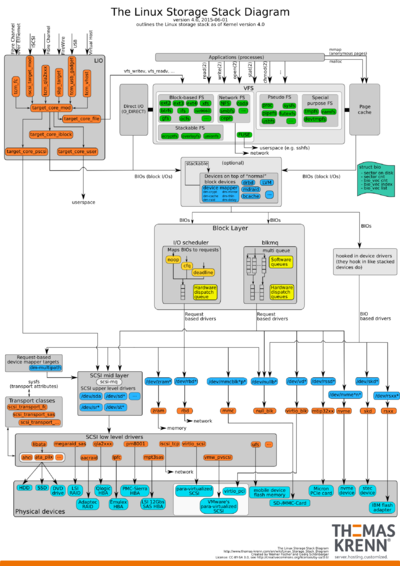
Linux Storage Stack Diagram – Thomas-Krenn-Wiki

Posted by jpluimers on 2017/01/20

There are lots of old copies floating around from the Linux Storage Stack Diagram – Thomas-Krenn-Wiki.

The above link has the up-to-date version and larger versions in PNG, SVG and PDF so be sure to check it out.

The old URL was http://www.thomas-krenn.com/en/oss/linux-io-stack-diagram.html – it now redirects to the above one.

Some older copies that got me looking for the new one:

–jeroen


Posted in *nix, Linux, Power User | Leave a Comment »

linux port forwarding to external ip – Google Search

Posted by jpluimers on 2017/01/20

For my Link Archive via linux port forwarding to external ip – Google Search:

Need to look at this more closely, but it looks like you need PREROUTING, FORWARD and POSTROUTING and two NATs (DNAT and SNAT), as this graph from Port Forwarding Using iptables – SysTutorials shows:

PACKET IN
    |
PREROUTING--[routing]-->--FORWARD-->--POSTROUTING-->--OUT
 - nat (dst)   |           - filter      - nat (src)
               |                            |
               |                            |
              INPUT                       OUTPUT
              - filter                    - nat (dst)
               |                          - filter
               |                            |
               `----->-----[app]----->------'

–jeroen

Posted in *nix, *nix-tools, Internet, Internet protocol suite, iptables, Linux, openSuSE, Power User, routers, SuSE Linux, TCP | Leave a Comment »