The Wiert Corner – irregular stream of stuff

Jeroen W. Pluimers on .NET, C#, Delphi, databases, and personal interests

  • My badges

  • Twitter Updates

  • My Flickr Stream

  • Pages

  • All categories

  • Enter your email address to subscribe to this blog and receive notifications of new posts by email.

    Join 1,862 other subscribers

Archive for January, 2017

How I remember the German word “Urheberrecht”

Posted by jpluimers on 2017/01/09

Los, heb die Uhr auf. Habe ich das Urheberrecht oder du?

Los, heb die Uhr auf. Habe ich das Urheberrecht oder du?

I’m partially word-blind and an learn by association.

So thanks to the below links, I can now remember Urheberrecht:

It’s about Ur, Heber and Recht.

–jeroen

Posted in LifeHacker, Power User | Leave a Comment »

Convert a text value into a date in Excel. Learn Microsoft Excel | Five Minute Lessons

Posted by jpluimers on 2017/01/09

To match dd/mm/yyyy and mm/dd/yyyy column values in columns C (Date1) and N (Date2), I used these formulas in row 2:

Meaning: Column: Formula: Explanation:
Date1Text I =TEXT(C2,”dd/mm/yyyy”) Interpret date text of the original text no matter the Excel settings
Date1Value J =DATE(RIGHT(I2,4),MID(I2,4,2),LEFT(I2,2)) Encode the date text to an actual date: dd#mm#yyyy format where # is any separator
DatesEqual K =J2=L2 Are the encoded dates equal?
Date2Value L =DATE(RIGHT(M2,4),LEFT(M2,2),MID(M2,4,2)) Encode the date text to an actual date: mm#dd#yyyy format where # is any separator
Date2Text M =TEXT(N2,”mm/dd/yyyy”) Interpret date text of the original text no matter the Excel settings


Learn how to convert text values into dates in Excel. This lesson covers a range of different scenarios to help you. The comments have even more examples.

Source: Convert a text value into a date in Excel. Learn Microsoft Excel | Five Minute Lessons

Posted in Excel, Office, Office 2007, Office 2010, Office 2013, Power User | 1 Comment »

How to prevent Google Hangouts Chrome extension from popping up for other users of the same Chrome installation? – Web Applications Stack Exchange

Posted by jpluimers on 2017/01/06

Sign out of your Hangout session on your laptop.

  1. Open Hangouts from the Hangouts Chrome extension
  2. The small triangle on the right side.

    The small downward pointing triangle on the right side.

    Click the dropdown menu (the small triangle on the right, just below of the X that close the Hangouts Conversation List window).

  3. Click Sign out of Hangouts

Source: How to prevent Google Hangouts Chrome extension from popping up for other users of the same Chrome installation? – Web Applications Stack Exchange

–jeroen

Posted in Uncategorized | Leave a Comment »

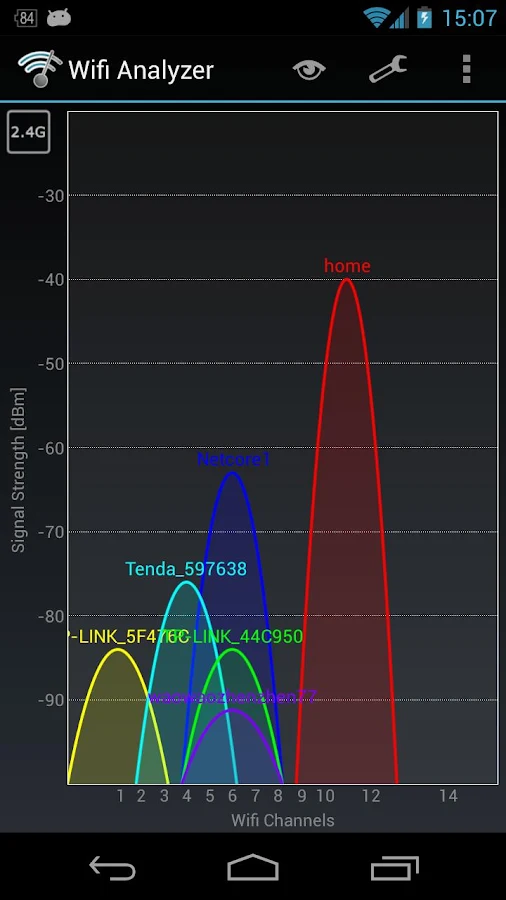
Wifi Analyzer – helped me analyse why an original Chromecast failed to see a Buffalo WLAE-AG300N

Posted by jpluimers on 2017/01/06

Brilliant! Helped me to track down why an original 1st generation Chromecast didn’t want to connect to a Buffalo WLAE-AG300N.

The problem there is that the original Chromecast does only 2.4Ghz WiFi and the WLAE-AG300N favours 5Ghz WiFi over 2.4Ghz when set to auto.

The solution is in the last picture: basically force the WLAE-AG300N to use 11n/g/b only which limits it to 2.4Ghz (it cannot use both frequencies at the same time).

Yes, I know the Microwaves drawback, but as the original Chromecast only does 2.4Ghz. I’d rather get the Chromecast Ethernet adapter but Google refuses to ship these outside the USA.

Source: Wifi Analyzer – Android Apps on Google Play


Force the WLAE-AG300N to use only 2.4Ghz

Force the WLAE-AG300N to use only 2.4Ghz

Posted in Chromecast, Google, Power User, WiFi | Leave a Comment »

Delphi and Xcode scary thought

Posted by jpluimers on 2017/01/05

With Xcode updating frequently and Delphi about yearly and often taking more than 1 go at fixing things, you get this scary thought:

Scott Pinkham

I’ve learned to not update Xcode, OSX or iOS until absolutely necessary, and even then I usually stick with an older version of Xcode that is known to be compatible with Delphi. It takes a while for Embaradero/Idera to fix issues every time Apple makes some breaking change. I recommend rolling back to an earlier version if you can.

via: [WayBackHello, I upgraded my Xcode to the latest version 8.2.1 and ios SDK 10.2 Now…

–jeroen

Posted in Delphi, Development, Software Development | 3 Comments »

Delphi To Go: Include resource files in your Delphi build process

Posted by jpluimers on 2017/01/05

Something to remember: Delphi To Go: Include resource files in your Delphi build process

Note it’s not enough to add a line like this to your .dpr file:

{$R 'New1.res' 'New1.rc'}

The resources actually needs to be part of your .dproj file (which basically is an XML msbuild file adhering to the MSBuild Project File Schema Reference).

That way, the BrccCompile target in $(BDS)\bin\CodeGear.Delphi.Targets will automatically pick it up during build.

I just checked and these target files support BrccCompile:

  • ...\Embarcadero\RAD Studio\7.0\bin\CodeGear.Delphi.Targets 
  • ...\Embarcadero\RAD Studio\8.0\bin\CodeGear.Delphi.Targets 
  • ...\Embarcadero\RAD Studio\9.0\bin\CodeGear.Delphi.Targets 
  • ...\Embarcadero\RAD Studio\10.0\bin\CodeGear.Delphi.Targets
  • ...\Embarcadero\RAD Studio\11.0\bin\CodeGear.Delphi.Targets
  • ...\Embarcadero\RAD Studio\12.0\bin\CodeGear.Delphi.Targets
  • ...\Embarcadero\Appmethod\13.0\bin\CodeGear.Delphi.Targets
  • ...\Embarcadero\Studio\14.0\bin\CodeGear.Delphi.Targets 
  • ...\Embarcadero\Studio\15.0\bin\CodeGear.Delphi.Targets 
  • ...\Embarcadero\Studio\16.0\bin\CodeGear.Delphi.Targets 
  • ...\Embarcadero\Studio\17.0\bin\CodeGear.Delphi.Targets 
  • ...\Embarcadero\Studio\18.0\bin\CodeGear.Delphi.Targets

Which means it’s available as of Delphi 2007 until at least Delphi 10.1 Berlin and might even work in Delphi 2006

It could be a little bit flakey in Delphi 2007 (I’ve had many msbuild issues there) but more recent versions should be fine.

–jeroen

Related: I have a big file to add +’ at the beginning of a line and ‘ at the end…- shlomo abuisak – Google+


Posted in Delphi, Delphi 10 Seattle, Delphi 10.1 Berlin (BigBen), Delphi 2006, Delphi 2007, Delphi 2009, Delphi 2010, Delphi XE, Delphi XE2, Delphi XE3, Delphi XE4, Delphi XE5, Delphi XE6, Delphi XE7, Delphi XE8, Development, Resource Files and Scripts (.res/.rc), Software Development | Leave a Comment »

Arduino controlled automated blinds with Web UI

Posted by jpluimers on 2017/01/05

Interesting idea [WayBackArduino controlled automated blinds with Web UI

Via:

–jeroen


Posted in Arduino, Development, ESP8266, ESP8266X, Hardware Development, LifeHacker, Power User | Leave a Comment »

Java is not slow – Programmer’s Life : Programmer’s Life

Posted by jpluimers on 2017/01/05

(:

string sender;
sender = "Duda Nogueira";
Programmer: Come on, stop that crap that Java is slow...
Programmer: Wait, I’ll show you my code to prove that Java is not slow. You’ll see it...
Programmer: Wait, the IDE is starting...
Programmer: Just a moment... It’s almost done...
Programmer: Just a little bit... You’ll see how fast it is...
Alex: zzzzzzzz—
T-shirt: Just wait and get a coffee

Source: Java is not slow – Programmer’s Life : Programmer’s Life

Posted in Development, Fun, Java, Java Platform, Software Development | Leave a Comment »

Delphi Berlin version numbers: Release/Update1/Update2

Posted by jpluimers on 2017/01/04

Vendors should post these, but alas Embarcadero is not the only one failing here, so here are build/version numbers of the various Delphi Berlin releases until now:

Sébastien Paradis:

  • Berlin initial release -> 24.0.22858.6822

Horácio Filho:

  • Berlin Update 1 -> 24.0.24468.8770
  • Berlin Update 2 -> 24.0.25048.9432

Via: [WayBackHi everyone How to know wheter my installed Berlin instance includes update 2?. … G+

If you need the ISO images: Positive: Delphi 10.1 Berlin Update 2 is out – ISO links.

–jeroen

Posted in Delphi, Delphi 10.1 Berlin (BigBen), Development, Software Development | 1 Comment »

History on line: Client Access/400 API Planning Guide Document Number GG24-4422-00 October 1994

Posted by jpluimers on 2017/01/04

About 12 years ago, I did some Client Access/400 work. When cleaning up “the attic”, I bumped into a paper copy of the below manual. To my surprise that document is still available on-line: http://www.redbooks.ibm.com/redbooks/pdfs/gg244422.pdf

Client Access/400 API Planning Guide

Document Number GG24-4422-00 October 1994

International Technical Support Organization Rochester Center

Then there is ” This table lists the AS/400 Version 3, Release 7 books that are available in Portable Document Format (PDF).”: http://publib.boulder.ibm.com/html/as400/online/V3R7PDF.HTM which contains a link to SC41-3513-01 “AS/400 Client Access for Windows 95/NT API and Technical Reference V3” which I also used: http://publib.boulder.ibm.com/pubs/pdfs/as400/V3R7PDF/QBKACO01.PDF

These were (for me back then) the most important chapters of the first book:

12.2 Typical Usage of the API

An application using the Remote Command/Distributed Program Call function will make use of two objects. Each of these objects are identified to the application through a handle. The objects are:

  • System object – This represents the AS/400 system. Commands can be run and programs can be called on this object.
  • Program object – This represents the AS/400 program. Parameters can be added and the program sent to the system to run the program.

There is not a separate object for commands. The command string is sent directly to the system object.

Table 16 shows how these API functions would be typically used.

Table 16. Remote Command / Distributed Program Call – Typical Usage Examples

Action

Start the host server and program.

Create a program object.

Add parameter 1 (input) to the program object.

Add parameter 2 (input/output) to the program object.

Add parameter 3 (output) to the program object.

Call the program with parameters in the same order that they were added to the program object with the cwbRC_AddParameter() calls.

API Function Call an AS/400 program

cwbRC_StartSys(′′SYS01′′, &hSystemHandle)

cwbRC_CreatePgm(′′PROG01′′, ′′LIB01′′,

&hPgmHandle)

cwbRC_AddParm(hPgmHandle, CWBRC_INPUT ,

uParm1Length, pchBuffer1)

cwbRC_AddParm(hPgmHandle, CWBRC_INOUT,

uParm2Length, pchBuffer2)

cwbRC_AddParm(hPgmHandle, CWBRC_OUTPUT,

uParm3Length, pchBuffer3)

cwbRC_CallPgm(hSystemHandle, hPgmHandle,

&hMsgHandle)

Run a CL command on the AS/400

cwbRC_RunCmd(hSystemHandle, pszCommandString,

&hMsgHandle)

Clean up at the end

cwbRC_DeletePgm(hPgmHandle) cwbRC_StopSys(hSystemHandle)

Run a command.

Delete the program object.

Terminate the conversation with the AS/400 server.

12.3 Remote Command / Distributed Program Call API Functions

Table 17 lists the API functions. For a complete list with parameters see the Client Access/400 Optimized for OS/2 API and Technical Reference, SC41-3511.

Table 17. Remote Command / Distributed Program Call – List of API Functions

API Function

cwbRC_StartSys()

cwbRC_GetSysName()

cwbRC_StopSys()

cwbRC_RunCmd()

cwbRC_CreatePgm() cwbRC_AddParm()

cwbRC_CallPgm()

cwbRC_GetParmCount()

cwbRC_GetParm()

cwbRC_GetPgmName()

cwbRC_GetLibName()

cwbRC_DeletePgm()

Description Original API

Starts a conversation with the – specified system.

Gets the name of the system for this – conversation.

Stops the current conversation with EHNSRSTC() the AS/400 system.

Issues the command on the system EHNSRSBM() identified by the handle.

Creates a program object. –

Adds a parameter to the program – object identified by the handle.

Calls the program identified by the – handle.

Gets the number of parameters for – this program object.

Retrieves the parameter identified by – the index (index value for the first parameter is 1).

Gets the name of the program that – was used when creating this program object.

Gets the name of the library that was – used when creating this program
object.

Deletes the program object identified – by the supplied handle (the AS/400
program object is NOT deleted).

–jeroen

Posted in Development, History, Software Development | Leave a Comment »