The Wiert Corner – irregular stream of stuff

Jeroen W. Pluimers on .NET, C#, Delphi, databases, and personal interests

  • My badges

  • Twitter Updates

  • My Flickr Stream

  • Pages

  • All categories

  • Enter your email address to subscribe to this blog and receive notifications of new posts by email.

    Join 1,860 other subscribers

Archive for August, 2018

cool solution for precise point positioning (PPP) GPS/GLONASS navigation on Raspberry Pi…

Posted by jpluimers on 2018/08/31

cool solution for precise point positioning (PPP) GPS navigation.The RasPiGNSS “Aldebaran” expansion board fits onto the Pi’s expansion connector (named P1).

Source: Hi all, I found this cool solution for precise point positioning (PPP) GPS na…

Device: Dr. Franz Fasching » Products » GNSS » RasPiGNSS [WayBack]

–jeroen

Posted in Development, Hardware Development, IoT Internet of Things, Network-and-equipment, Power User, Raspberry Pi | Leave a Comment »

Solution when xs4all keeps sending non-billing letters to the address where the internet connection is: change contact address

Posted by jpluimers on 2018/08/31

When applying for an internet connection with xs4all and specifying a different billing address, other letters still arrive at the address where the internet connection resides.

I had that, and didn’t want it: [WayBackTwitter / Notifications. You might not want it for different reasons.

After contacting the web care, both sides learned there are three addresses:

  • billing address (bills)
  • contact address (all other post than bills)
  • service address (where your internet connection – like fiber, ADSL – is connected)

according to the webcare person, it looked like you can only change the “contact address” through the service desk. You can, so that information is still below.

But contacting the service desk revealed that you can also perform two address changes on-line after logging in to https://mijn.xs4all.nl.

Of course you cannot change the service address as it is where your physical internet connection resides.

xs4all service desk:

[WayBackhttps://www.xs4all.nl/contact/

Klantenservice phone +31203987666

Opening hours:

  • 08:00 – 20:00 Monday through Friday
  • 10:00-17:00 Saturday

–jeroen

Read the rest of this entry »

Posted in LifeHacker, Power User | Leave a Comment »

It doesn’t have to be crazy at work

Posted by jpluimers on 2018/08/31

Reminder to check out if this book about “the calm company” has been released yet: [WayBack] It doesn’t have to be crazy at work.

Basecamp is an interesting company that has put action there there mouth is:

Trusted by millions, Basecamp puts everything you need to get work done in one place. It’s the calm, organized way to manage projects, work with clients, and communicate company-wide.

We’ve designed our company differently. We’re here to tell you about it, and show you how you can do it. There’s a path. You’ve got to want it, but if you do you’ll realize it’s much nicer over here. You can have a calm company too.

No, it is not The Little Book Of Calm, or another one of that series (;

If it is not yet out, you can still pre-order from Amazon in the USA and Europe:

–jeroen

Via: [WayBack] It Doesn’t Have to Be Crazy at Work https://basecamp.com/books/calm – Adrian Marius Popa – Google+

No it is not the book of calm (:

Read the rest of this entry »

Posted in LifeHacker, Power User | Leave a Comment »

Delphi: delete temporary file after response dispatched – Stack Overflow

Posted by jpluimers on 2018/08/30

A while ago, Marjan Venema was in need for [Archive.isDelphi SOAP: delete temporary file after response dispatched – Stack Overflow.

The solution there is a truly temporary file: a file stream that when the handle closes will have Windows delete the file by setting the correct flags.

The construct is functionally identical to the JclFileUtils.TJclTempFileStream [Archive.is].

It passes these [Archive.isfile attribute constant flags to the [Archive.isCreateFileW Windows API function:

  • FILE_ATTRIBUTE_TEMPORARY
  • FILE_FLAG_DELETE_ON_CLOSE

I was glad she asked, though I wanted a temporary file to last after debugging, so I wrote code like this because internally the same FileGetTempName method is used by the JCL:

var
// ...
  TempPath: string;
  TempStream: TFileStream;
  TempStreamWriter: TStreamWriter;
begin
// ...
  TempPath := FileGetTempName('Prefix');
  TempStream := TFile.Open(TempPath, TFileMode.fmOpenOrCreate, TFileAccess.faReadWrite, TFileShare.fsRead);
  try
    TempStreamWriter := TStreamWriter.Create(TempStream);
    try
      TempStreamWriter.WriteLine('Debug starts:');
      MyStringList.SaveToStream(TempStream);
      TempStreamWriter.WriteLine();
// ...
      TempStreamWriter.WriteLine('Debug finishes.');
    finally
      TempStreamWriter.Free();
    end;
  finally
    TempStream.Free();
  end;

–jeroen

Posted in Conference Topics, Conferences, Delphi, Development, Event, Software Development | Leave a Comment »

TwistedDoodles • The truth about Eureka. (I say bollocks… A lot!)

Posted by jpluimers on 2018/08/30

The truth about Eureka.(I say bollocks… A lot!)

I bumped into this a while ago, but since I’ve been doing quite a bit of research lately, it’s worth repeating.

–jeroen

Source: TwistedDoodles • The truth about Eureka. (I say bollocks… A lot!)

Read the rest of this entry »

Posted in Development, Fun, LifeHacker, Power User, science, Software Development | Leave a Comment »

How to read data from old delphi application Paradox databases without BDE?

Posted by jpluimers on 2018/08/30

Interesting question that raise some good tips: [WayBack] How to read data from old delphi application Paradox databases without BDE? I search for freeware or open source solution. – Jacek Laskowski – Google+

–jeroen

Posted in Database Development, Delphi, Development, Paradox, Software Development | Leave a Comment »

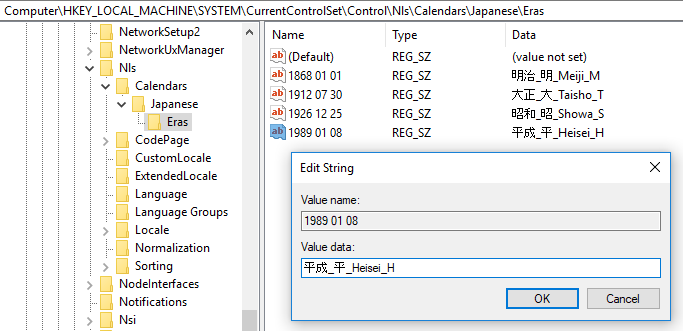
Handling a new era in the Japanese calendar in .NET | .NET Blog

Posted by jpluimers on 2018/08/30

A first-hand look from the .NET engineering teams: [WayBack] Handling a new era in the Japanese calendar in .NET | .NET Blog

Very important if your software has to do anything with Japan, which – for global software and web applications – can be a lot.

Via: [WayBack] If you thought Y2K, leap years, easter and lent were complex, take a look at the Japanese era challenge… – Lars Fosdal – Google+

–jeroen

Posted in .NET, Development, Software Development | Leave a Comment »

DUnitX: now has a WillRaiseAttribute to ease defining tests around code that should throw exceptions

Posted by jpluimers on 2018/08/29

I stumbled over this commit message in [WayBack] “extended the TestAttribute with “Expected” property (#181)” which isn’t phrased correctly, but adds a very nice feature.

The feature is about WillRaiseAttribute:

constructor WillRaiseAttribute.Create(AExpectedException: ExceptClass; const AInheritance: TExceptionInheritance);

This allows tests like these:

    [WillRaise(EOutOfMemory)]
    procedure FailMe;

    [WillRaise(EHeapException, exDescendant)]
    procedure FailMeToo;

    [WillRaise(Exception, exDescendant)]
    procedure FailAny;

    [WillRaise(EOutOfMemory)]
    [Ignore('I am not behaving as I should')]
    procedure IgnoreMeCauseImWrong;

–jeroen

Posted in Delphi, Development, Software Development | Leave a Comment »

Enum values in their own namespaces/scopes: Scoped Enums (Delphi)

Posted by jpluimers on 2018/08/29

A while ago, I needed several enum types in the same unit with overlapping enumeration values.

Putting each in an encompassing type wasn’t possible and I didn’t want to put each in their own unit.

Luckily, Delphi 2009 introduced the “scoped enum” feature effectively promoting the enumeration type into a scope or namespace.

It is only available at the source code level, as – at least up until Delphi 10.1 Berlin – it is not part of the compiler settings in the project options (see screenshot below).

Since the below was hard to find combined with the word “namespace” I’ve quoted it in full (note an earlier version of the post had a typo here as it was copied from the Delphi 2009 documentation which had SCOPEDEUNMS wrong):

Type
Switch
Syntax
{$SCOPEDENUMS ON}, or {$SCOPEDENUMS OFF}
Default
{$SCOPEDENUMS OFF}
Scope
Local

Remarks

The $SCOPEDENUMS directive enables or disables the use of scoped enumerations in Delphi code. More specifically, $SCOPEDENUMS affects only definitions of new enumerations, and only controls the addition of the enumeration’s value symbols to the global scope.

In the {$SCOPEDENUMS ON} state, enumerations are scoped, and enum values are not added to the global scope. To specify a member of a scoped enum, you must include the type of the enum. For example:

type
  TFoo = (A, B, Foo);
  {$SCOPEDENUMS ON}
  TBar = (A, B, Bar);
  {$SCOPEDENUMS OFF}

begin
  WriteLn(Integer(Foo)); 
  WriteLn(Integer(A)); // TFoo.A
  WriteLn(Integer(TBar.B));
  WriteLn(Integer(TBar.Bar));
  WriteLn(Integer(Bar)); // Error
end;

Note that this is also valid:

 Writeln(Integer(TFoo.A));

Even though TFoo was not declared with $SCOPEDENUMS ON, the A value can still be explicitly resolved using the enumeration name.

Read the rest of this entry »

Posted in Delphi, Development, Software Development | 4 Comments »

.net – How to generate service reference with only physical wsdl file – Stack Overflow

Posted by jpluimers on 2018/08/28

Since I always forget that you can add a service reference by hand-pasting the full path to a local WSDL file, then hit Go: [WayBack] .net – How to generate service reference with only physical wsdl file – Stack Overflow

–jeroen

Read the rest of this entry »

Posted in .NET, Development, Software Development, Visual Studio 2015, Visual Studio and tools | Leave a Comment »