


PlasticSCM Workaround for “Can’t perform a checkout in an edited xlink.”
Posted by jpluimers on 2018/11/01
Error message during a commit (checkin) or shelve of some changes:
---------------------------

Error

---------------------------

Can't perform a checkout in an edited xlink.

---------------------------

OK

---------------------------
In this case it is during a shelve:
---------------------------

Wait a moment, please...

---------------------------

In progress...

Shelving pending changes

---------------------------

OK

---------------------------
I cannot show all changes, but the third one is an xlink:
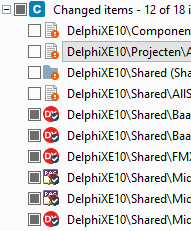
The error did not return any meaningful results when I searched for it, but the developers on the team indicated “Errors like these happen every now and then; there is no information in Google. Sit down, cry a little, then restart with a fresh repository”.
Workaround
The workaround for this undocumented behaviour is tedious, but works:
- Create a new workspace for the same repository, but using a different on disk path
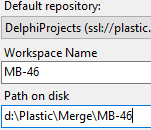
- In the new workspace, switch to the same branch, then perform a “Switch workspace to this branch”
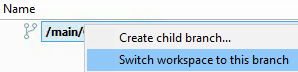
- Use a good recursive comparison tool ([WayBack] Download Beyond Compare is great for this; it is free for 30 nonconsecutive days and has very reasonable [WayBack] Beyond Compare pricing) to compare the old and new workspace, then sync the changes into the new repository
- Commit the new repository in PlasticSCM
- Delete the old repository
- Re-create the old repository
Cause?
I think this is how I ended up in this situation in the first place:
- Make some changes (additions/modifications/deletions) including changes inside the xlink
- Shelve those changes
- Perform some other checkins
- Unshelve the changes
The problem with a shelve/unshelve operation isn’t a symmetric operation. For instance, when unshelving an addition, it is not shown under “Added and private items” any more (like before the shelve operation), but under “Changed items” marked as “Copied (new) / Checked-out” – no matter if it is inside the xlinked subtree or not (the xlink is “Checked-out”, the rest are additions):
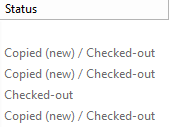
The “Copied (new)” entries now show up as “Added and private items” (there was already one):
….

Xlinks
I will need to do some more reading on xlinks, as – comming from a git background into an existing PlasticSCM environment – I think it is very similar to git submodules which also are not without pain.
- [WayBack] Plastic SCM version control · Xlinks guide: This guide describes what are and how to use Xlinks
- [Archive.is] Plastic SCM blog: How to link repositories using Xlinks:
- [Archive.is] Plastic SCM blog: How to share an engine repository between different video games
–jeroen

 The Wiert Corner - irregular stream of stuff
Leave a comment