


Passing the `–symbol-report` to the Delphi compiler gives you a nice XML overview with all symbols used
Posted by jpluimers on 2019/01/31
Cool undocumented parameter --symbol-report at the [WayBack/Archive] Hatena Diary mid 2017:
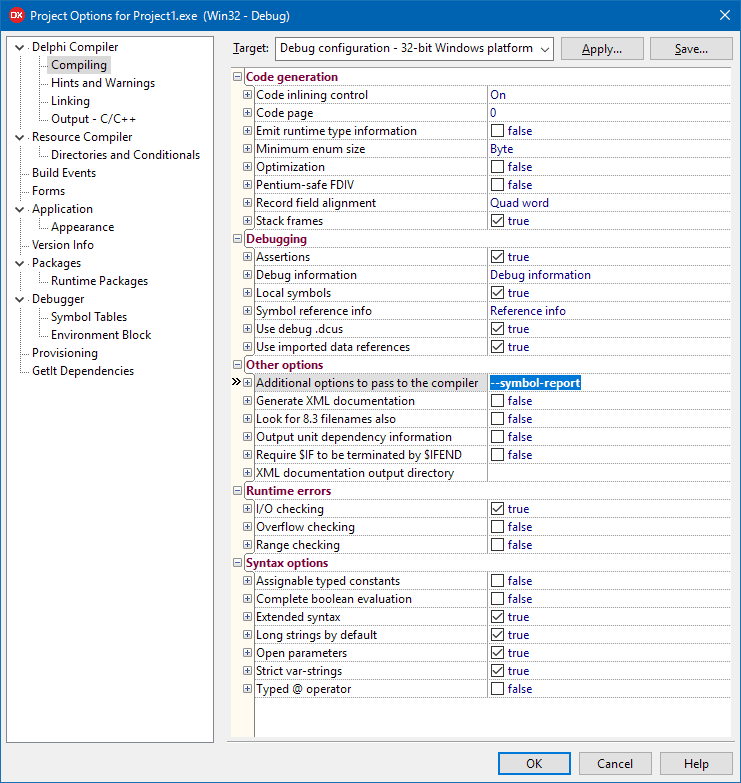
Edit 20250112: This is ideal for uses-list analysis because you do not need an extra Delphi language parser (which is a pain given the Delphi language is still undocumented) plus translation of the original Japanese blog-post:
overview
By using the “
--symbol-report” option, you can output a list of symbols used by each unit as a.symbol_reportfile.method
Specify “
--symbol-report” in “Additional options to pass to the compiler ” in “Project Options”.…
sample
If you create a new form and build it, a file like this will be generated.<?xml version="1.0" encoding="UTF-8"?> <unit name="Unit1"> <uses name="Vcl.Dialogs"> </uses> <uses name="Vcl.Forms"> <symbol name="TForm"/> <symbol name="TCustomForm.AlignControls"/> <symbol name="TCustomForm.ClientWndProc"/> <symbol name="TCustomForm.CreateParams"/> <symbol name="TCustomForm.CreateWindowHandle"/> <symbol name="TCustomForm.CreateWnd"/> <symbol name="TCustomForm.DefineProperties"/> <symbol name="TCustomForm.DestroyHandle"/> <symbol name="TCustomForm.DestroyWindowHandle"/> <symbol name="TCustomForm.DoCreate"/> <symbol name="TCustomForm.DoDestroy"/> <symbol name="TCustomForm.DoThumbButtonNotify"/> <symbol name="TCustomForm.DoWindowPreviewRequest"/> <symbol name="TCustomForm.DoThumbPreviewRequest"/> <symbol name="TCustomForm.GetClientRect"/> <symbol name="TCustomForm.GetFloating"/> <symbol name="TCustomForm.Loaded"/> <symbol name="TCustomForm.Notification"/> <symbol name="TCustomForm.PaintWindow"/> <symbol name="TCustomForm.GetDesignDpi"/> <symbol name="TCustomForm.ScaleForCurrentDpi"/> <symbol name="TCustomForm.ReadState"/> <symbol name="TCustomForm.RequestAlign"/> <symbol name="TCustomForm.SetParentBiDiMode"/> <symbol name="TCustomForm.SetParent"/> <symbol name="TCustomForm.UpdateActions"/> <symbol name="TCustomForm.ValidateRename"/> <symbol name="TCustomForm.WndProc"/> <symbol name="TCustomForm.Resizing"/> <symbol name="TCustomForm.QueryInterface"/> <symbol name="TCustomForm.Create"/> <symbol name="TCustomForm.CreateNew"/> <symbol name="TCustomForm.Destroy"/> <symbol name="TCustomForm.ScaleForPPI"/> <symbol name="TCustomForm.CloseQuery"/> <symbol name="TCustomForm.DefaultHandler"/> <symbol name="TCustomForm.SetFocus"/> <symbol name="TCustomForm.SetFocusedControl"/> <symbol name="TCustomForm.ShowModal"/> <symbol name="TCustomForm.WantChildKey"/> <symbol name="TCustomForm.AfterConstruction"/> <symbol name="TCustomForm.BeforeDestruction"/> <symbol name="TScrollingWinControl.AdjustClientRect"/> <symbol name="TScrollingWinControl.AutoScrollEnabled"/> <symbol name="TScrollingWinControl.AutoScrollInView"/> <symbol name="TScrollingWinControl.DoGesture"/> <symbol name="TScrollingWinControl.DoGetGestureOptions"/> <symbol name=".TForm"/> </uses> <uses name="Vcl.Controls"> <symbol name="TWinControl.UpdateStyleElements"/> <symbol name="TWinControl.AsyncSchedule"/> <symbol name="TWinControl.AssignTo"/> <symbol name="TWinControl.CanAutoSize"/> <symbol name="TWinControl.CanResize"/> <symbol name="TWinControl.ConstrainedResize"/> <symbol name="TWinControl.CreateHandle"/> <symbol name="TWinControl.CustomAlignInsertBefore"/> <symbol name="TWinControl.CustomAlignPosition"/> <symbol name="TWinControl.DestroyWnd"/> <symbol name="TWinControl.DockReplaceDockClient"/> <symbol name="TWinControl.GetClientOrigin"/> <symbol name="TWinControl.GetControlExtents"/> <symbol name="TWinControl.GetDeviceContext"/> <symbol name="TWinControl.ResetIme"/> <symbol name="TWinControl.ScaleControlsForDpi"/> <symbol name="TWinControl.SetIme"/> <symbol name="TWinControl.SetParentBackground"/> <symbol name="TWinControl.SetParentDoubleBuffered"/> <symbol name="TWinControl.ShowControl"/> <symbol name="TWinControl.UpdateControlOriginalParentSize"/> <symbol name="TWinControl.UpdateTIPStatus"/> <symbol name="TWinControl.Invalidate"/> <symbol name="TWinControl.Repaint"/> <symbol name="TWinControl.SetBounds"/> <symbol name="TWinControl.Update"/> <symbol name="TControl.GetParentCurrentDpi"/> <symbol name="TControl.CreateTouchManager"/> <symbol name="TControl.GetAction"/> <symbol name="TControl.GetEnabled"/> <symbol name="TControl.GetFloatingDockSiteClass"/> <symbol name="TControl.DefaultScalingFlags"/> <symbol name="TControl.SetAutoSize"/> <symbol name="TControl.SetDragMode"/> <symbol name="TControl.SetEnabled"/> <symbol name="TControl.SetName"/> <symbol name="TControl.SetBiDiMode"/> <symbol name="TControl.SetStyleElements"/> <symbol name="TControl.GetDragImages"/> <symbol name="TControl.InitiateAction"/> </uses> <uses name="Vcl.Graphics"> </uses> <uses name="System.Classes"> <symbol name="TComponent.CanObserve"/> <symbol name="TComponent.ObserverAdded"/> <symbol name="TComponent.GetObservers"/> <symbol name="TComponent.UpdateRegistry"/> <symbol name="TComponent.WriteState"/> <symbol name="TComponent.SafeCallException"/> <symbol name="TComponent.UpdateAction"/> <symbol name="TPersistent.Assign"/> </uses> <uses name="System.Variants"> </uses> <uses name="System.SysUtils"> </uses> <uses name="Winapi.Messages"> </uses> <uses name="Winapi.Windows"> </uses> <uses name="SysInit"> </uses> <uses name="System"> <symbol name="TObject.Equals"/> <symbol name="TObject.GetHashCode"/> <symbol name="TObject.ToString"/> <symbol name="TObject.Dispatch"/> <symbol name="TObject.NewInstance"/> <symbol name="TObject.FreeInstance"/> </uses> </unit>

Query: [Wayback/Archive] “–symbol-report” “Delphi” – Sök på Google
--jeroen

 The Wiert Corner - irregular stream of stuff
HeartWare said
Where does it put the XML file, and what is it called? I can’t find it (10.2.2)
HeartWare said
Okay – found them. They’re called .symbol_report and not .xml and are located in the standard output directory (where your .EXE file ends up).
Andrew Sachs said
I found mine in “Options -> Delphi Compiler -> Unit output directory”.
HeartWare said
Okay – that might be so. My .DCU and .EXE file go to the same directory, so which one it is that controls it was a 50/50 chance to get it right for me :-).
Andrew Sachs said
Wow! This is new to me. And I started with Turbo Pascal 3.01…
Are these “secret” options documented anywhere?
rvelthuis said
FWIW, an excellent way to quickly see from which units no symbols are imported at all. They might be obsolete, if they don’t have any relevent initialization or finalization sections.
rvelthuis said
Cool finding! I tried it and indeed, it seems to work.