Yesterday I did a short presentation at the Norway Delphi Club[1] meetup, covering some fun and interesting uses of the “new” language features introduced after Delphi 7.
The main purpose of the talk was to try to be inspirational, and give a sense of what kind of stuff you can do with the language these days. So it’s not very in-depth, but rather tries to showcase several interesting features and tricks.
Anyway, in case it might be useful to others I thought I’d publish the slides and code here as well.
The examples are a nice introduction for when you want to dig deeper in the language itself, for instance when you are digging deeper into Spring4d.
Slides 35 and 36 – though hard for me to grasp initially – show a very nice concept called [WayBack] Partial Application (thanks Stefan Glienke for pointing me at this) by binding a parameter value plus parameter position to an existing function returning the bound function so it becomes easier to tall.
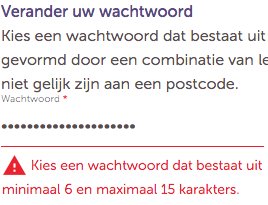
Longer passwords provide a greater combination of characters and consequently make it more difficult for an attacker to guess.
Minimum length of the passwords should be enforced by the application.
Passwords shorter than 10 characters are considered to be weak (NIST SP800-132).
While minimum length enforcement may cause problems with memorizing passwords among some users, applications should encourage them to set passphrases (sentences or combination of words) that can be much longer than typical passwords and yet much easier to remember.
Maximum password length should not be set too low, as it will prevent users from creating passphrases. Typical maximum length is 128 characters.
Passphrases shorter than 20 characters are usually considered weak if they only consist of lower case Latin characters.
Too many options, not even counting other sections on that page I did not quote, so I went for the first.
To create an external link, usually to a page at a different website, enclose the URL followed by space and the link text in single square brackets (see examples below). When you save or preview the page, you will see a link rendered slightly differently than an internal wikilink. It may be a different color and/or be followed by an arrow icon to show that it may lead to another site.
The link will be HTTP or HTTPS depending on the protocol of the page currently being viewed (which could be different for different users). This is only supported inside of square brackets [ ]. Using “//en.wikipedia.org” by itself does not result in a link.
When searching text files on Windows, often FindStr is the only tool at hand. Given the MS-DOS ancestry, it carries quite a bit of history, so here are a few links on the quirks it has:



 The Wiert Corner - irregular stream of stuff