The Wiert Corner – irregular stream of stuff

Jeroen W. Pluimers on .NET, C#, Delphi, databases, and personal interests

  • My badges

  • Twitter Updates

  • My Flickr Stream

  • Pages

  • All categories

  • Enter your email address to subscribe to this blog and receive notifications of new posts by email.

    Join 1,854 other subscribers

Archive for 2019

Delphi XE2: IDE out of memory problem? Check the library path length

Posted by jpluimers on 2019/08/06

Curious, but somehow shortening the library path solved the problem Alberto had: [WayBack] Hello Everybody, I have an application developed in XE2 (Hot Fix 2 + IDE Fix Pack installed) that has started giving me the “out of memory” error message… – Alberto Paganini – Google+:

Alberto Paganini

It turned out the length of the library path was the culprit of the IDE out of memory error messages.
I have reduced the length of the library path and the error messages have reduced dramatically.
There are still a few out of memory messages tho.

–jeroen

Posted in Delphi, Delphi XE2, Development, Software Development | Leave a Comment »

Please web-site owners (including memori.nl, sandsmedia.com, and many others): allow plus signs in email addresses when registering/contacting

Posted by jpluimers on 2019/08/05

I am quite amazed that many web-sites fail to allow email addresses of the form x+y@z.domain.

This is called subaddressing and has been in the email addressing specs since ages.

Do not validate, but send

Basically the only way to verify the validity of an email address is to send an email to it, and wait for it to be accepted or rejected.

Even the best regex will “have almost no false negatives”, which means they will reject valid email addresses.

Further reading

Please read and implement these specs before rejecting email addresses you think might be invalid:

  • [WayBack] RFC 5233 – Sieve Email Filtering: Subaddress Extension
  • [WayBack] RFC 3696 – Application Techniques for Checking and Transformation of Names
  • [WayBack] Mail::RFC822::Address

    The RFC allows comments to be arbitrarily nested. A single regular expression cannot cope with this.

  • [WayBack] Gmail address with “+” within the recipient name – Web Applications Stack Exchange

    any ASCII graphic (printing) character other than the at-sign (“@”), backslash, double quote, comma, or square brackets may appear without quoting.

  • [WayBack] [3527] Email addresses with plus sign (+)

    Sub-addressing

    Some mail services allow a user to append a +tag qualifier to their e-mail address (e.g., joeuser+tag@example.com). The text of tag can be used to apply filtering. The text of the tag can also be used to help a user figure out which organization “leaked” the user’s email address to a spammer. However, some mail servers violate RFC 5322, and the recommendations in RFC 3696, by refusing to send mail addressed to a user on another system merely because the local-part of the address contains the plus sign (+). Users of these systems cannot use plus addressing. On the other hand, most installations of the qmail and Courier Mail Server products support the use of a dash ‘-‘ as a separator within the local-part, such as joeuser-tag@example.com or joeuser-tag-sub-anything-else@example.com. This allows qmail through .qmail-default or .qmail-tag-sub-anything-else files to sort, filter, forward, or run an application based on the tagging system established. Disposable e-mail addresses of this form, using various separators between the base name and the tag are supported by several email services, including Runbox (plus and minus), Google Mail (plus), Yahoo! Mail Plus (minus), and FastMail (plus). The name sub-addressing is the generic term (used for plus-addressing and minus-addressing) found in some IETF standards-track documents, such as RFC 5233.

  • [WayBack] How to Find or Validate an Email Address

    Regexes Don’t Send Email

    Don’t go overboard in trying to eliminate invalid email addresses with your regular expression. The reason is that you don’t really know whether an address is valid until you try to send an email to it. And even that might not be enough. Even if the email arrives in a mailbox, that doesn’t mean somebody still reads that mailbox. If you really need to be sure an email address is valid, you’ll need to send an email to it that contains a code or link for the recipient to perform a second authentication step. And if you’re doing that, then there is little point in using a regex that may reject valid email addresses.

A nice overview of people trying to answer with a regular expression, and comments indicating all those attempts fail in one way or the other is at [WayBack] regex – How to validate an email address in JavaScript? – Stack Overflow

–jeroen

Posted in Conference Topics, Conferences, Event, Internet, Power User | Leave a Comment »

Fabric, Cuisine and Watchdog for server administration in Python

Posted by jpluimers on 2019/08/05

For my reading list: [WayBackFabric, Cuisine and Watchdog for server administration in Python.

It’s about these environments and tools:

–jeroen

Read the rest of this entry »

Posted in Cloud, Development, DevOps, Infrastructure, Power User | Leave a Comment »

IKEA TRÅDFRI lamps [1] when equipped with Firmware >= 1.2.217 integrate with Philips Hue and vice versa…

Posted by jpluimers on 2019/08/05

Reminder to self [WayBack] Just a small FTR. Yes, the IKEA TRÅDFRI lamps [1] when equipped with Firmware >= 1.2.217 intergrate seamlessly into the Philips Hue system, thanks to t… – Jan Wildeboer – Google+:

  • IKEA lamps integrate with Philips Hue
  • Philips Hue lamps integrate with the
  • IKEA lamps pair to the remote that you paired with the gateway before: no need to bring the lamp close to the gateway first
  • Philips tries the same
  • Remotes have a 10-decide limit

Links:

--jeroen

Posted in IKEA hacks, IoT Internet of Things, LifeHacker, Network-and-equipment, Power User | Leave a Comment »

Microsoft Windows 10 English 1903 and 1809 download links

Posted by jpluimers on 2019/08/02

Below are some download links for Windows 10 version history: Version 1903 (May 2019 Update) – Wikipedia.

Note that the MediaCreationTool usually fails (not just for 1903, prior versions have failed for me for unknown reasons far too often).

It is way better to use rufus to build a bootable USB stick from the ISO installation download.

Here are the relevant links:

Creating the USB with Rufus

Be aware that you can use two partition schemes:

  • MBR (with automatic target system “BIOS (or UEFI-CSM)”
  • GPT (with automatic target system “UEFI (non CSM)”

Many older systems to not support GPT, so then you will stare at a blinking cursor on a black screen when trying to boot from it.

Read the rest of this entry »

Posted in Power User, Windows, Windows 10 | Leave a Comment »

VMware Converter downloads

Posted by jpluimers on 2019/08/02

Since the VMware site is a maze, so below are some download and information links.

[WayBack] Upgraded to 6.1.1. build-3533064 – cannot restore from Acronis TrueImage TIB files… |VMware Communities -> you need 6.0 or earlier for that:

Support notice

VMware vCenter Converter Standalone 6.0 is the last release of the product to support third-party backup images and virtual machines as sources for conversion. This capability will be discontinued in the next release. If you use this capability, you should start planning your transition.

Interoperability

Third-party backup images and virtual machines – to be discontinued. See Support notice.

  • Acronis True Image Echo 9.1 and 9.5, and Acronis True Image Home 10 and 11 (.tib)
  • Symantec Backup Exec System Recovery (formerly LiveState Recovery) 6.5, 7.0, 8.0, and 8.5, and LiveState Recovery 3.0 and 6.0 (.sv2i format only)
  • Norton Ghost version 10.0, 12.0, and 14.0 (.sv2i format only)
  • Parallels Desktop 2.5, 3.0, and 4.0 (.pvs and .hdd). Compressed disks are not supported
  • Parallels Workstation 2.x (.pvs). Compressed disks are not supported. Parallels Virtuozzo Containers are not supported.
  • StorageCraft ShadowProtect Desktop, ShadowProtect Server, ShadowProtect Small Business Server (SBS), ShadowProtect IT Edition, versions 2.0, 2.5, 3.0, 3.1, and 3.2 (.spf)
  • The Microsoft VHD format for the following sources:
    • Microsoft Virtual PC 2004 and Microsoft Virtual PC 2007 (.vmc)
    • Microsoft Virtual Server 2005 and 2005 R2 (.vmc)

For conditions and limitations about converting Backup Exec System Recovery, ShadowProtect, and Consolidated Backup images, see the VMware vCenter Converter Standalone User’s Guide.

Edit 20210810:

–jeroen

Read the rest of this entry »

Posted in Power User, Virtualization, VMware, VMware Converter | Leave a Comment »

sebastien/sink: Swiss army knife for directory comparison and synchronization

Posted by jpluimers on 2019/08/02

If you don’t have Beyond Compare available for your platform (or cannot connect via Beyond Compare to it): sebastien/sink: Swiss army knife for directory comparison and synchronization.

The Python script in it does 3-way directory compares on the console.

It is very similar to the Beyond Compare “folder merge” functionality.

–jeroen

Posted in *nix, *nix-tools, Beyond Compare, Power User | Leave a Comment »

Some git versus PlasticSCM comparisons

Posted by jpluimers on 2019/08/01

Via a co-worker:

In my own experience, PlasticSCM needs a lot of work, especially on the usability side:

  1. PlasticSCM call themselves a DVCS, but in order to have a local full repository like all other DVCS systems, you have to run a local server (and a license for it, I still need to sort out if that is free or paid). For the DVCS definition, see Distributed version control – Wikipedia. This means you run a client, a local PlasticSCM server and a remote PlasticSCM server.
  2. Despite there being a CLI version (more on that in a future post), the GUI does not show the exact CLI syntax for commands (unlike most git tools that do). This means you need to think thrice when translating them from GUI to CLI, made even harder by most UI access paths having different ways to copy their information to the clipboard.
  3. When you run the Plastic SCM GUI client long enough, even on a small repository, you will get errors about not enough quota being available (the dreaded 0x718): [WayBack] System Error Codes (1700-3999) | Microsoft Docs ERROR_NOT_ENOUGH_QUOTA 1816 (0x718): Not enough quota is available to process this command.
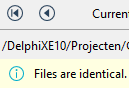
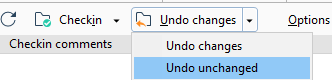
  4. Often after scanning for changes, you see a lot of changed files. If you click each file, you see  “Files are identical”

    • As a result you have to perform “Undo Unchanged”:
    • I never have this when using git.
  5. Online PlasticSCM hosting parties, especially integrated with bug tracking, are far and few between: besides [WayBackPlasticSCM cloud, I have not found any. Take the git world, or even the Mercurial world and there are far more choices (yes I know about the manual labour involved setting it up described at [WayBack] Plastic SCM version control · Task and issue tracking systems guide and [Archive.is] Plastic SCM blog: Integrating Plastic SCM with Trac Issue Tracking).

One thing that baffled me is that you can edit commit messages. Changing them does not result in another commit. This means that these are not set in stone which is very odd when you see all changes in the commit history.

[Archive.is] Are check-in comment editable?

Sure!

The commit message textbox is editable, start typing and then push save. :)

I realized that in the Branch Explorer one can edit them using the procedure you’ve described, but if you open a changset from “Changesets” or somewhere else, the comment on the top is readonly. Maybe it would be nice to be have a way to edit it there, though I guess, it would be a rarely used feature.

At the changesets view you are also able to do it by cliking in the “Show extended information” button.

I’m afraid that this are the only spots to do it.

–jeroen

Posted in Development, DVCS - Distributed Version Control, git, Source Code Management | Leave a Comment »

Cable salad is of all times: 1964 analog computers; Moog syntesizers

Posted by jpluimers on 2019/08/01

This picture on Flickr of Engineer Karen Leadlay in an analog computer lab at General Dynamics, January 1964 shows that cable salad is of all times.

Atlas Collection Image

Via:

The above threads have really nice comments, including pointers to for instance the [WayBack] Moog synthesizer – Wikipedia  (lots of you remember the songs by Keith Emerson).

–jeroen

Read the rest of this entry »

Posted in Development, Fun, Hardware Development | Leave a Comment »

.NET and PowerShell: Getting proper version info from a PE file like EXE, DLL, assembly

Posted by jpluimers on 2019/08/01

I’ve learned the hard way that both .NET and PowerShell version information isn’t always accurate or usable for two reasons which I later found in various other blog and forum posts:

The easiest is to use these numbers to create a [WayBack] Version Class (System) instance using the [WayBack] Version Constructor (Int32, Int32, Int32, Int32) constructor. This has the added benefit that you directly compare versions with each other.

Sometimes it makes even sense to take the highest version from Product and File.

In PowerShell, this is the way to do that, assuming $imagePath points to a [WayBack] Portable Executable:

try {
  $VersionInfo = (Get-Item $imagePath).VersionInfo
  $FileVersion = [version]("{0}.{1}.{2}.{3}" -f $VersionInfo.FileMajorPart, $VersionInfo.FileMinorPart, $VersionInfo.FileBuildPart, $VersionInfo.FilePrivatePart)
  $ProductVersion = [version]("{0}.{1}.{2}.{3}" -f $VersionInfo.ProductMajorPart, $VersionInfo.ProductMinorPart, $VersionInfo.ProductBuildPart, $VersionInfo.ProductPrivatePart)
  $ActualVersion = $(if ($ProductVersion -gt $FileVersion) { $ProductVersion } else { $FileVersion })
}
catch {
  $ActualVersion = [version]("0.0.0.0")
}

Background information:

–jeroen

Posted in CommandLine, Development, PowerShell, PowerShell, Scripting, Software Development | Leave a Comment »