


If not done yet, try to improve this: [WayBack] Optional sort by name in LogMemoryManagerStateToFile · Issue #64 · pleriche/FastMM4 · GitHub
–jeroen
Posted by jpluimers on 2020/10/27
If not done yet, try to improve this: [WayBack] Optional sort by name in LogMemoryManagerStateToFile · Issue #64 · pleriche/FastMM4 · GitHub
–jeroen

Posted in Delphi, Development, Software Development | Leave a Comment »
Posted by jpluimers on 2020/10/27
Since I keep forgetting this – especially because I cannot remember the “why”: [WayBack] shell – How do I grep for multiple patterns with pattern having a pipe character? – Unix & Linux Stack Exchange by “user unknown“.
The -E means using Regular expression: POSIX extended – Wikipedia.
egrep "foo|bar" *.txtor
grep "foo\|bar" *.txt
grep -E "foo|bar" *.txt
selectively citing the man page of gnu-grep:
   -E, --extended-regexp
          Interpret PATTERN as an extended regular expression (ERE, see below).  (-E is specified by POSIX.)

Matching Control
   -e PATTERN, --regexp=PATTERN
          Use PATTERN as the pattern.  This can be used to specify multiple search patterns, or to protect  a  pattern
          beginning with a hyphen (-).  (-e is specified by POSIX.)
(…)
   grep understands two different versions of regular expression syntax: “basic” and “extended.”  In  GNU grep,  there
   is  no  difference  in  available  functionality  using  either  syntax.   In  other implementations, basic regular
   expressions are less powerful.  The following description applies to extended regular expressions; differences  for
   basic regular expressions are summarized afterwards.
In the beginning I didn’t read further, so I didn’t recognize the subtle differences:
Basic vs Extended Regular Expressions
   In basic regular expressions the meta-characters ?, +, {, |, (, and ) lose their special meaning; instead  use  the
   backslashed versions \?, \+, \{, \|, \(, and \).
I always used egrep and needlessly parens, because I learned from examples. Now I learned something new. :)
–jeroen
Posted in Development, RegEx, Software Development | Leave a Comment »
Posted by jpluimers on 2020/10/27
From a while ago, and – being on the back-end side mostly – I sometimes forget: [WayBack] delphi – Can I use an Edit Mask to format output? (not just validate input) – Stack Overflow
You can use the TField.OnGetText event or TNumericField.DisplayFormat property to modify how the text is being displayed.
Since you have a TStringField holding numbers, you have two choices:
- use a
TNumericFieldand theDisplayFormatproperty- use the
OnGetTextevent and do your own string formattingEdit:
Sam used this approach:
I implemented
OnSetTextandOnGetTextevent handlers. I already had theEdit Mask9999 9999 9999 9999;1;_so theOnSetTextwas justTStringField(Sender).Value := Trim(Text);and
OnGetTextwas justsValue := TStringField(Sender).Value; Text := Format('%s %s %s %s', [Copy(sValue, 1, 4), Copy(sValue, 5, 4), Copy(sValue, 9, 4), Copy(sValue, 13, 4)]);It works fine. Thanks.
–jeroen
Posted in Delphi, Development, Software Development | Leave a Comment »
Posted by jpluimers on 2020/10/26
Some interesting tips at [WayBack] Linux Find Out What Process Are Using Swap Space – nixCraft
Via: [WayBack] Want to find out what process are using swap space? Useful to debug and optimize your app. … – nixCraft – Google+
–jeroen

Posted in *nix, Linux, Power User | Leave a Comment »
Posted by jpluimers on 2020/10/26
[WayBack] [Random] How to quickly view a binary’s embedded manifest? – MITHUN SHANBHAG’s blog
Cool! sigcheck -m dumps a manifest if there is one:
C:\>\\live.sysinternals.com\tools\sigcheck.exe -m C:\Windows\notepad.exe
Background information: [WayBack] Sigcheck – Windows Sysinternals | Microsoft Docs: Dump file version information and verify that images on your system are digitally signed.
[WayBack] License to Kill: Malware Hunting with the Sysinternals Tools | TechEd North America 2013 | Channel 9 This session provides an overview of several Sysinternals tools, including Process Monitor, Process Explorer, and Autoruns, focusing on the features useful for malware analysis and removal. These util
–jeroen
Posted in LifeHacker, Power User, Windows, Windows 10 | Leave a Comment »
Posted by jpluimers on 2020/10/26
For my link archive: [WayBack] Prijsdalingen – Tweakers
Via:
–jeroen
Posted in LifeHacker, Power User | Leave a Comment »
Posted by jpluimers on 2020/10/23
[WayBack] Using Permalinks « WordPress Codex:
http://example.com/?p=N
So for instance https://wiert.me/?p=35558 points to Delphi version info table: C# Builder, Delphi 8 through 10.3 Rio and Appbuilder despite the actual URL not fully matching the title (because I do not like link rot): https://wiert.me/2016/09/06/delphi-version-info-table-need-help-with-these-projectversion-for-c-builder-delphi-2005-and-2006-dllsuffix-for-c-builder-appbuilder-1-13-codename/
–jeroen
Posted in link rot, Power User, SocialMedia, WordPress, WWW - the World Wide Web of information | Leave a Comment »
Posted by jpluimers on 2020/10/23
[WayBack] Jeroen Pluimers on Twitter: “Trying to figure out the damage last nights lightning strike at 1060NP caused yesterday evening….”
and [WayBack] Thread by @jpluimers: “Trying to figure out the damage last nights lightning strike at 1060NP caused yesterday evening. @LianderNL was very quick to respond and fi […]”
Thread by @jpluimers: “Trying to figure out the damage last nights lightning strike at 1060NP caused yesterday evening. @LianderNL was very qnd and fix L3 from our 3-phase connection: the main fuse before the meter tripped. Damage so far: 1 @amazonDE […]”
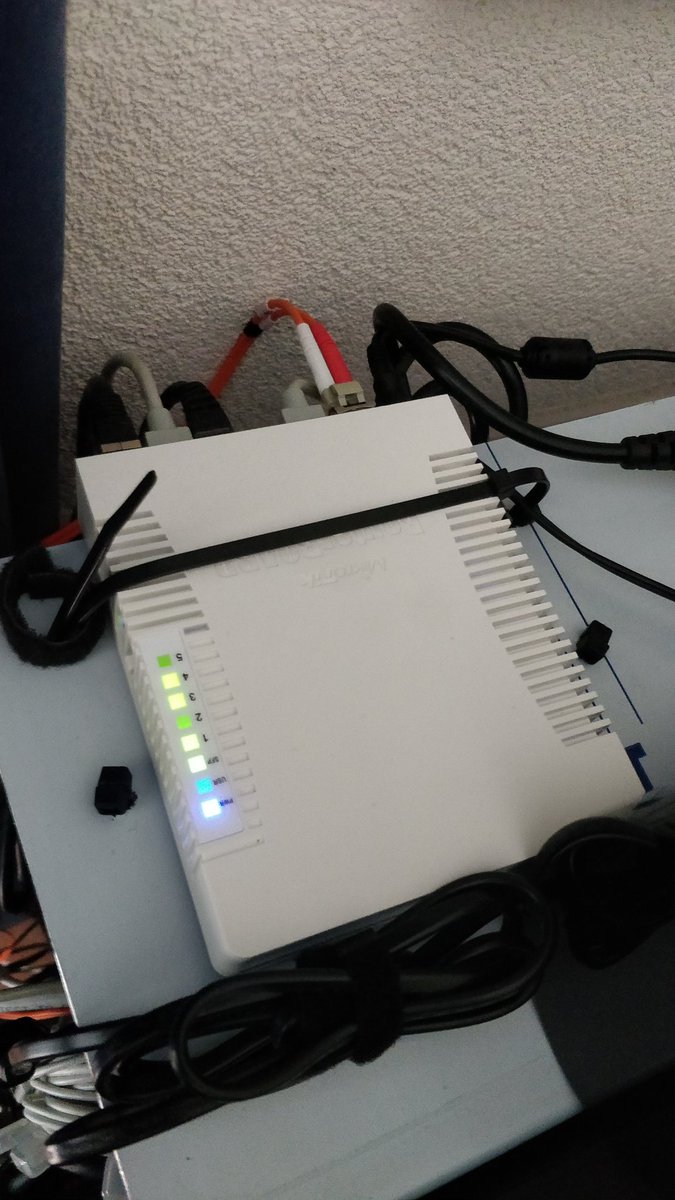
This was the first preventive measure fiber cable for galvanic isolation between the parts that can be powered by UPS and the parts that cannot be:
[WayBack] Jeroen Pluimers on Twitter: “New fiber provides galvanic isolation between the parts that are behind the master UPS and the ones I cannot get behind it. Should help contain damage during a future lightning strike.…”
–jeroen

Posted in Liander, LifeHacker, Power User | Leave a Comment »
Posted by jpluimers on 2020/10/23
Great source for cymbal bags, back-packs and hard-cases: [WayBack Thomann tas voor bekken
More choice and better prices than [Archive.is] Suchergebnis auf Amazon.de für: becken rucksack: Musikinstrumente & DJ-Equipment.
–jeroen
Posted in LifeHacker, Power User | Leave a Comment »
Posted by jpluimers on 2020/10/22
 Read these tips before playing with any kind of LED strips: [WayBack] Powering NeoPixels | Adafruit NeoPixel Überguide | Adafruit Learning System.
There are more, but these are the most important:
Via: [WayBack] Bouw je eigen ledtafel – Tot slot – Achtergrond – Tweakers
–jeroen

Posted in Arduino, Development, Hardware Development, Hardware Interfacing, Raspberry Pi | Leave a Comment »
 The Wiert Corner - irregular stream of stuff