


Interesting product: [WayBack] RugGear RG100: RugGear
The RugGear RG100 is the solid basic mobile phone for outdoor use. Tough and waterproof! The RG100 is equipped with a 1.3 megapixels camera and allows you to take pictures under water.
–jeroen
Posted by jpluimers on 2020/06/29
Interesting product: [WayBack] RugGear RG100: RugGear
The RugGear RG100 is the solid basic mobile phone for outdoor use. Tough and waterproof! The RG100 is equipped with a 1.3 megapixels camera and allows you to take pictures under water.
–jeroen

Posted in LifeHacker, Power User | Leave a Comment »
Posted by jpluimers on 2020/06/29
I put an lsof example and output in Reverse ssh tunnel between two linux boxes to allow RDP traffic over port 3389, but forgot to explain it.
Note that if you are bumping into remote tunneling issues selecting the wrong network interface, then checkout the
GatewayPortssetting in the above post first!
Inactive local tunnels on the client: find the first word ssh on lsof output.
$ lsof -i -n | grep -w '^\<ssh\>'
ssh       93548 jeroenp    3u  IPv4 0x298985ab430c8aa9      0t0  TCP 192.168.71.77:50257->80.101.239.92:30022 (ESTABLISHED)
ssh       93548 jeroenp    5u  IPv6 0x298985ab22e02df9      0t0  TCP [::1]:59124 (LISTEN)
ssh       93548 jeroenp    6u  IPv4 0x298985ab272543a1      0t0  TCP 127.0.0.1:59124 (LISTEN)
ssh       93548 jeroenp    7u  IPv6 0x298985ab22e03339      0t0  TCP [::1]:ms-wbt-server (LISTEN)
ssh       93548 jeroenp    8u  IPv4 0x298985ab4306eaa9      0t0  TCP 127.0.0.1:ms-wbt-server (LISTEN)
ssh       93548 jeroenp    9u  IPv6 0x298985ab28049339      0t0  TCP [::1]:5925 (LISTEN)
ssh       93548 jeroenp   10u  IPv4 0x298985ab25cefe89      0t0  TCP 127.0.0.1:5925 (LISTEN)
The above listens two tunnels listening to ports 59124, 3389 (ms-wbt-server) and 5925.
Remote tunnels on the server: find the first word sshd on lsof output. Needs sudo if sshd runs as daemon or to listen active connections:
$ sudo lsof -i -n | grep -w '^\<sshd\>'
sshd       1664     root    3u  IPv4   21299      0t0  TCP *:ssh (LISTEN)
sshd       1664     root    4u  IPv6   21301      0t0  TCP *:ssh (LISTEN)
sshd       5026     root    3u  IPv4  350758      0t0  TCP 192.168.124.32:ssh->192.168.171.24:52417 (ESTABLISHED)
sshd       5029  jeroenp    3u  IPv4  350758      0t0  TCP 192.168.124.32:ssh->192.168.171.24:52417 (ESTABLISHED)
sshd       5120     root    3u  IPv4 6693665      0t0  TCP 192.168.124.32:ssh->80.100.143.119:11585 (ESTABLISHED)
sshd       5123  jeroenp    3u  IPv4 6693665      0t0  TCP 192.168.124.32:ssh->80.100.143.119:11585 (ESTABLISHED)
sshd      13320     root    3u  IPv4 6319692      0t0  TCP 192.168.124.32:ssh->192.168.171.24:56801 (ESTABLISHED)
sshd      13323  jeroenp    3u  IPv4 6319692      0t0  TCP 192.168.124.32:ssh->192.168.171.24:56801 (ESTABLISHED)
sshd      16505     root    3u  IPv4 6374150      0t0  TCP 192.168.124.32:ssh->192.168.171.24:21505 (ESTABLISHED)
sshd      16508  jeroenp    3u  IPv4 6374150      0t0  TCP 192.168.124.32:ssh->192.168.171.24:21505 (ESTABLISHED)
The above does not list any tunnels, just regular connections as there were no local tunnels from the client active, which lists the server side of tunnel -L 59124:192.168.124.32:5900 (which is service rfb):
$ sudo lsof -i -n | grep -w '^\<sshd\>'

sshd       1664     root    3u  IPv4   21299      0t0  TCP *:ssh (LISTEN)
sshd       1664     root    4u  IPv6   21301      0t0  TCP *:ssh (LISTEN)
sshd       5026     root    3u  IPv4  350758      0t0  TCP 192.168.124.32:ssh->192.168.171.24:52417 (ESTABLISHED)
sshd       5029  jeroenp    3u  IPv4  350758      0t0  TCP 192.168.124.32:ssh->192.168.171.24:52417 (ESTABLISHED)
sshd       5120     root    3u  IPv4 6693665      0t0  TCP 192.168.124.32:ssh->80.100.143.119:11585 (ESTABLISHED)
sshd       5123  jeroenp    3u  IPv4 6693665      0t0  TCP 192.168.124.32:ssh->80.100.143.119:11585 (ESTABLISHED)
sshd       5123  jeroenp   13u  IPv4 6698066      0t0  TCP 192.168.124.32:51494->192.168.124.32:rfb (ESTABLISHED)
sshd      13320     root    3u  IPv4 6319692      0t0  TCP 192.168.124.32:ssh->192.168.171.24:56801 (ESTABLISHED)
sshd      13323  jeroenp    3u  IPv4 6319692      0t0  TCP 192.168.124.32:ssh->192.168.171.24:56801 (ESTABLISHED)
sshd      16505     root    3u  IPv4 6374150      0t0  TCP 192.168.124.32:ssh->192.168.171.24:21505 (ESTABLISHED)
sshd      16508  jeroenp    3u  IPv4 6374150      0t0  TCP 192.168.124.32:ssh->192.168.171.24:21505 (ESTABLISHED)
For the client side of active connections you need sudo too:
$ sudo lsof -i -n | grep -w '^\<ssh\>'
Password:
ssh 93548 jeroenp 3u IPv4 0x298985ab430c8aa9 0t0 TCP 192.168.71.77:50257->80.101.239.92:30022 (ESTABLISHED)
ssh 93548 jeroenp 5u IPv6 0x298985ab22e02df9 0t0 TCP [::1]:59124 (LISTEN)
ssh 93548 jeroenp 6u IPv4 0x298985ab272543a1 0t0 TCP 127.0.0.1:59124 (LISTEN)
ssh 93548 jeroenp 7u IPv6 0x298985ab22e03339 0t0 TCP [::1]:ms-wbt-server (LISTEN)
ssh 93548 jeroenp 8u IPv4 0x298985ab4306eaa9 0t0 TCP 127.0.0.1:ms-wbt-server (LISTEN)
ssh 93548 jeroenp 9u IPv6 0x298985ab28049339 0t0 TCP [::1]:5925 (LISTEN)
ssh 93548 jeroenp 10u IPv4 0x298985ab25cefe89 0t0 TCP 127.0.0.1:5925 (LISTEN)
ssh 93548 jeroenp 15u IPv4 0x298985ab2998de89 0t0 TCP 127.0.0.1:59124->127.0.0.1:52580 (ESTABLISHED)
Based on [WayBack] shell – List open SSH tunnels – Super User.
–jeroen
Posted in *nix, *nix-tools, Power User, ssh/sshd | Leave a Comment »
Posted by jpluimers on 2020/06/29
 For quite a while, I had the error “The application “Audacity.app” can’t be opened.” and Audacity still opening. Clicking the OK button often enough made me hunt for the solution:
This is what I did:
$ cd ~/Library/Application\ Support/audacity

$ grep Temp audacity.cfg

TempDir=/Users/jeroenp/Library/Application Support/audacity/SessionData
Then I checked if the directory existed:

Posted in *nix, *nix-tools, Apple, Audacity, Audio, Mac, Mac OS X / OS X / MacOS, MacBook, MacBook Retina, MacBook-Air, MacBook-Pro, Media, Power User, sed | Leave a Comment »
Posted by jpluimers on 2020/06/26
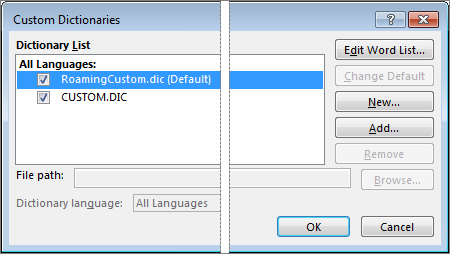
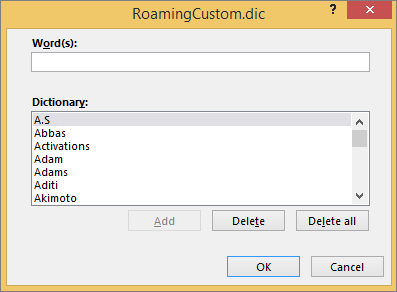
[WayBack] Add or edit words in a spell check dictionary – Office Support:
By default, the words are stored in a text file called “RoamingCustom.Dic” – Google Search.
You can get there from the menu:
–jeroen

Posted in Office, Power User | Leave a Comment »
Posted by jpluimers on 2020/06/26
Put the song in a playlist and click the check box off. All the songs in the playlist will have to be clicked off as well.Or easier still have the track as the only song in the play list.
For me, the easiest way to do this is to put all songs in a playlist, then in the playlist (can be “Playlist” view mode, but “Songs” view mode is easier). The video below shows exactly how to do this, but here are te steps:
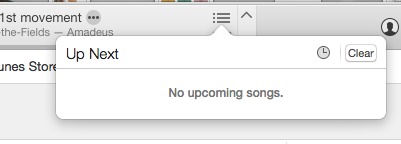 select all songs with Command-A
Via:
Finally, [WayBack] iTunes 11 for Mac: Ways to play songs shows the meaning of the shuffle and repeat buttons in the player:
Source: S0024_ProgressBar.png (350×115)
–jeroen

Posted in Apple, iTunes, Mac OS X / OS X / MacOS, Power User | Leave a Comment »
Posted by jpluimers on 2020/06/26
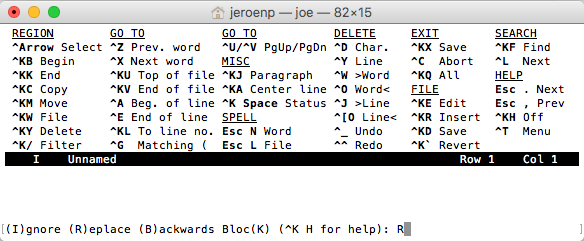
The built-in help of the Joe’s Own Editor – Wikipedia shows only a limited set of keyboard shortcuts:
What it misses is how to navigate through Windows. You use the ^KN (for Next) and ^KP (for Previous) navigation shortcuts for that.
You can even use that to navigate out of the Find or Replace line: The Find and Replace lines are single line prompts without a status line (but with a caption).

Posted in *nix, *nix-tools, joe, Power User | Leave a Comment »
Posted by jpluimers on 2020/06/25
From a while back, but still relevant as the speed of the GMail web-UI still has not improved.
[WayBack/Archive.is] Peeking under the hood of redesigned Gmail – Boris – Medium
Via:
–jeroen
Posted in CSS, Development, GMail, Google, HTML, JavaScript/ECMAScript, Power User, Scripting, Software Development, Web Development | Leave a Comment »
Posted by jpluimers on 2020/06/25
I love nameof (and wish many more languages had a similar feature), but since it got introduced so late in the C# language, there is still a lot of old idiom going around. Luckily most of that are not string literals, but you see the occasional reminder to get rid of that cruft: [WayBack] Nick Craver on Twitter: “I see a lot of MyEnum.Member.ToString() in code reviews across various projects – instead you should use: nameof(MyEnum.Member)”.
Luckily, there is a Roslyn analyser for it: [WayBack] Andy Edinborough on Twitter: “Roslynator: https://t.co/3LDUG9WRvE… “.
[WayBack] GitHub – JosefPihrt/Roslynator: A collection of 190+ analyzers and 190+ refactorings for C#, powered by Roslyn.
[WayBack] Antão Almada on Twitter: “I use Enums.NET https://t.co/YaIZWpYVxJ… “ which is a cool library that I’ve used a lot:
[WayBack] GitHub – TylerBrinkley/Enums.NET: Enums.NET is a high-performance type-safe .NET enum utility library
–jeroen
Posted in .NET, C#, Development, Software Development | Leave a Comment »
Posted by jpluimers on 2020/06/25
 [WayBack] browser – Clearing old browsing data in Chrome instead of newer data – Super User had a few possibilities, but eHistory disappeared from the Chrome store (apparently due to some unknown violation), so the way that works best now is to hack the History database which is a SQLite file as mentioned in
[WayBack] How can I delete all web history that matches a specific query in Google Chrome – Super User: For literal values of “query”…You can even query your Chrome history using SQL. (Firefox too: see below. Of course, the appropriate file path will have to be changed).
If you really want you can hack the history frame chrome://history-frame/: [WayBack] How can I delete all web history that matches a specific query in Google Chrome – Super User
–jeroen

Posted in Chrome, Database Development, Development, Google, Power User, Software Development, SQL | Leave a Comment »
Posted by jpluimers on 2020/06/24
Still a very good (Dutch) read by mentor (not only Agile, also DCI and Marching) Robby Overvliet [WayBack/Archive.is] Go pick a leaf of that tree!:
Ben jij Agile? Weet je het zeker? Tuurlijk het whiteboard hangt en de stickies schuiven vrolijk van links naar rechts. Dagelijks is daar netjes de standup en andere feedback loops doen hun ding.
Via:
One of the cool things is that he learned a lot from Charlie Anderson, that I recollect from the Borland and Quattro Pro days. What a smal world (:
On Charlie:
–jeroen
Posted in Agile, Conference Topics, Conferences, Development, Event, Software Development | Leave a Comment »


 The Wiert Corner - irregular stream of stuff