The Wiert Corner – irregular stream of stuff

Jeroen W. Pluimers on .NET, C#, Delphi, databases, and personal interests

  • My badges

  • Twitter Updates

  • My Flickr Stream

  • Pages

  • All categories

  • Enter your email address to subscribe to this blog and receive notifications of new posts by email.

    Join 1,860 other subscribers

Archive for February, 2021

Deleting the WebCache database – The IE browser cache | Apttech’s Blog

Posted by jpluimers on 2021/02/15

[WayBack] Deleting the WebCache database – The IE browser cache | Apttech’s Blog quotes from WayBack: C drive space is using up on terminal server after upgrading to IE10 or IE11 – AsiaTech: Microsoft Azure & Development:

With the new cache implementation, the cache files are saved in %LocalAppData%\Microsoft\Windows\WebCache\ folder. And, the cache files will be created when a new user logs on.

Actually, the database is a file named WebCacheV01.dat in the cache folder, and its initial size could be around 20-32MB. The size of this file will keep increasing along with you browse more and more websites.

save the below contents into ClearIECache.cmd file and try to fun this file.

echo OFF
net stop COMSysApp
taskkill /F /IM dllhost.exe
taskkill /F /IM taskhost.exe
taskkill /F /IM taskhostex.exe
del /Q %LocalAppData%\Microsoft\Windows\WebCache\*.*
net start COMSysApp
echo ON

Furthermore, you’d better deploy the batch file to a logoff script of your local GPO, here are the steps.

Related:

–jeroen

Posted in Internet Explorer, Power User, Web Browsers, Windows, Windows 10 | Leave a Comment »

Badhoevedorp, T106, Amsterdamse Baan, groot onderhoud

Posted by jpluimers on 2021/02/14

Je vindt onderstaande downloads en kaart niet via de detail pagina’s [Wayback] Verkeersoverlast door werkzaamheden Amsterdamse Baan en Lijnderbrug of [Wayback] Werkzaamheden Amsterdamse Baan en Lijnderbrug | Gemeente Haarlemmermeer.

Wel via [Wayback] Wegwerkzaamheden en wegafsluitingen | Gemeente Haarlemmermeer (klik op “Bekijk de kaart met wegwerkzaamheden en wegafsluitingen”) geleend van LTC Wegwerkzaamheden & Evenementen:

LTC Wegwerkzaamheden & Evenementen. Een overzicht van alle wegwerkzaamheden in en rond Haarlemmermeer.

Daar inzoomen op de “T106” brug tussen Lijnden en Amsterdam, en dan klikken op “Badhoevedorp, T106, Amsterdamse Baan, groot onderhoud”:

Badhoevedorp, T106, Amsterdamse Baan, groot onderhoud

Wanneer

Van 1-3-2021 tot en met 19-3-2021 (Periode 1)

Betrokken straten

Amsterdamse baan / S106

Soort

Asfaltering / wegverharding

Hinderklasse

Grote hinder (10-30 minuten)

Wegbeheerder

Gemeente Haarlemmermeer

Status

Plan afstemming gestart

Omschrijving

afsluiting voor gemotoriseerd verkeer

Contact informatie

Dhr. T. Kromwijk (KWS) 0611701477

Bijlage(n)

Omleidingen

Omleiding A

Omleiding B

Streetview

Kaart

Posted in LifeHacker, Power User | Leave a Comment »

Scribbr APA Generator – Genereer je bronvermelding volgens de APA-stijl (American Psychological Association citations of references)

Posted by jpluimers on 2021/02/12

[Archive.is] Scribbr APA Generator – Genereer je bronvermelding volgens de APA-stijl:

Selecteer het type bron, vul de invoervelden in en genereer eenvoudig de bron precies volgens de officiële APA-stijl.

Gerealteerd:

–jeroen

https://www.google.com/search?q=apa%20quoting%20style&cad=h

Posted in LifeHacker, Power User | Leave a Comment »

Word Shortcuts links

Posted by jpluimers on 2021/02/12

I was trying to get the love of my life from using a mouse into keyboard shortcuts.

They come natural to me as I learned them step by step from Word for Windows 1.0 until now as I have been a keyboard person since the early 1990s.

But she has been a mouse person all her life, struggling to become faster using word. The mouse became a hindrance, especially since so much has moved around to deeper levels in the Word user interface over time.

This is what I came up with after doing a few searches on-line:

I was amazed at how scattered out and incomplete the information in these links is.

–jeroen

Posted in Office, Power User, Word | Leave a Comment »

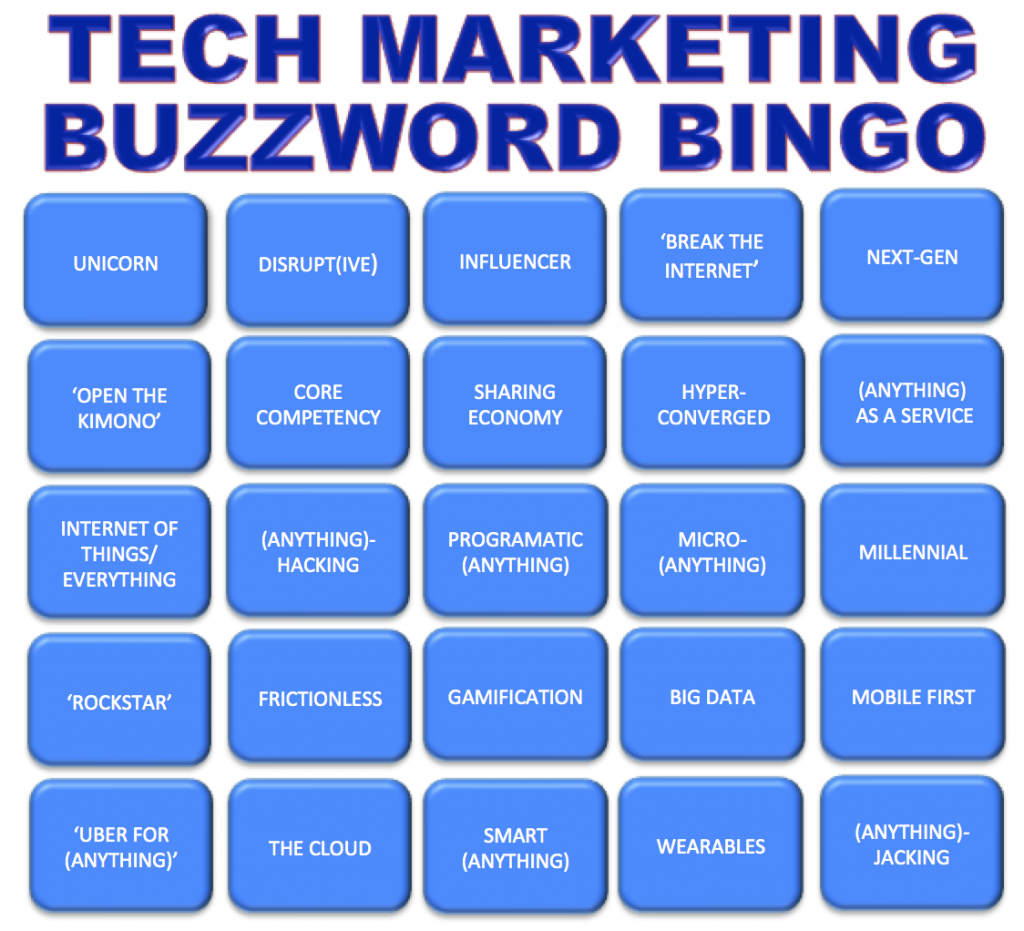
Buzzword Bingo: the words have not changed over the years.

Posted by jpluimers on 2021/02/12

Still as relevant as when introduced at [WayBack] Play Post-CES Buzzword Bingo:

Via: [WayBack] Still vaid … play-post-ces-buzzword-bing/ – Jürgen Christoffel – Google+

–jeroen

Posted in LifeHacker, Power User | Leave a Comment »

Evil environment variables….

Posted by jpluimers on 2021/02/11

I totally agree with Nick Craver “I absolutely hate environmental variables for configuration. They’re brittle, they’re ambient, they can be changed and FUBAR any known state underneath you, they’re an attack vector, just…”.

A little event in the early 1990s made me cautious whenever I see environment variables in use.

One of my clients had a network that had to be separated into three logical areas: one for workstations communicating with a certain server and some equipment, and another for a different server and other equipment, and finally a bunch of semi-local workstations that did some peer-to-peer and specialised equipment communication.

For that era, this was a LOT of stuff to manage.

Since users always were working from the same computers, and there was very little overlap between the areas, I created a bunch of login scripts. Since this was Novell NetWare 3.x era, you only had default, system and user login scripts (see [WayBack] NetWare 3 Login Script Fundamentals), of which only system+default or system+user could be combined. No groups scripts yet (:

So I introduced an environment variable NETWORK that would hold the kind of logical network.

Boy was I surprised that a few days later, the head of administration came to me with a problem: one of his administration programs – despite no documentation mentioning anything about such a feature – suddenly asked for a license!

A few hours of phone calls and trying later, we found the culprit: that software had an undocumented feature: when the NETWORK environment variable was set, it assumed a large corporate, with a very special license feature.

That was the day, I started to be wary of environment variables.

The workaround was simple: have the program being started with a batch file, temporarily clean the NETWORK environment variable, then run the application, and finally restore the environment variable.

Inspired by two tweets I got within a few days time:

–jeroen

Read the rest of this entry »

Posted in History, Power User, Security | Leave a Comment »

Still looking for base64url decoding tools, both on-line and for MacOS homebrew

Posted by jpluimers on 2021/02/11

Remember the screenshot on the right from yesterdays post Kristian Köhntopp explaining theories?

In the end, I:

  1. saved that tweet
  2. in archive.is
  3. then took the screenshot image from there (see below)
  4. cut out the grey parts, then posted the middle part

I much more would have used the screenshot functionality of Google as described here by Terence Eden:

[WayBack] twitter – How to convert a tweet to image – Stack Overflow

Google has a secret screenshot API

For example, you can use it to get a screenshot of a tweet like this

https://www.googleapis.com/pagespeedonline/v1/runPagespeed?screenshot=true&strategy=mobile&url=https%3a%2f%2ftwitter.com%2fedent%2fstatus%2f661570680253755392

At the bottom of that JSON response, you’ll see

"screenshot": {
     "data": "_9j_4AAQSkZJRgAB.....=",
     "height": 569,
     "mime_type": "image/jpeg",
     "width": 320
 }

You will need to Base64 decode it using the URL and Filename safe alphabet.

That will give you a JPG screenshot of the Tweet.

I was hoping for an on-line way, so I followed [WayBack] Google’s Secret Screenshot API – Terence Eden’s Blog.

The blog post pointed me to a Python based script ([WayBack] Python-Twitter-Hacks/websiteScreenshot.py at master · edent/Python-Twitter-Hacks · GitHub) but had no online way.

So I tried out a few on-line things myself that failed:

Then I found out the script was just a proof of concept with hard coded URL and filename.

So I forked the repository, and fixed the script basing it on Python 3.

More on that next week.

Related:

  • [WayBack] RFC 4648 – The Base16, Base32, and Base64 Data Encodings: Base 64 Encoding with URL and Filename Safe Alphabet:
       The Base 64 encoding with an URL and filename safe alphabet has been
       used in [12].
    ...
       An alternative alphabet has been suggested that would use "~" as the
       63rd character.  Since the "~" character has special meaning in some
       file system environments, the encoding described in this section is
       recommended instead.
    ...
       This encoding may be referred to as "base64url".  This encoding
       should not be regarded as the same as the "base64" encoding and
       should not be referred to as only "base64". 
    ...
       This encoding is technically identical to the previous one, except
       for the 62:nd and 63:rd alphabet character, as indicated in Table 2.
    ...
             Table 2: The "URL and Filename safe" Base 64 Alphabet
    
         Value Encoding  Value Encoding  Value Encoding  Value Encoding
             0 A            17 R            34 i            51 z
             1 B            18 S            35 j            52 0
             2 C            19 T            36 k            53 1
             3 D            20 U            37 l            54 2
             4 E            21 V            38 m            55 3
             5 F            22 W            39 n            56 4
             6 G            23 X            40 o            57 5
             7 H            24 Y            41 p            58 6
             8 I            25 Z            42 q            59 7
             9 J            26 a            43 r            60 8
            10 K            27 b            44 s            61 9
            11 L            28 c            45 t            62 - (minus)
            12 M            29 d            46 u            63 _
            13 N            30 e            47 v           (underline)
            14 O            31 f            48 w
            15 P            32 g            49 x
            16 Q            33 h            50 y         (pad) =
    

–jeroen

Read the rest of this entry »

Posted in Apple, Development, Encoding, Home brew / homebrew, Mac OS X / OS X / MacOS, Power User, Software Development, Web Browsers | Leave a Comment »

One second code: Do YOU know how much your computer can do in a second?

Posted by jpluimers on 2021/02/11

[WayBack] One second code: Do YOU know how much your computer can do in a second? is a quiz version of the [WayBack] Numbers Every Programmer Should Know By Year.

[WayBack] About this game revealed it was made by 3 people curious in the speed of their hardware which – not surprisingly – has been relatively stable over the last decade or so.

Source code is at [WayBack] GitHub – kamalmarhubi/one-second: Fun performance game!

I bumped into it via these tweets:

I like games like this (ever played the The Deadlock Empire multi-threading game?), so I played the computers-are-fast.github.io tests, and learned a lot:

Read the rest of this entry »

Posted in Conference Topics, Conferences, Development, Event, Hardware, Power User, Software Development | Leave a Comment »

F2084 Internal Error: MA1263 – no relevant results

Posted by jpluimers on 2021/02/11

I tried searching for F2084 Internal Error: MA1263 – Google Search which happened on a complete up to date Delphi 10.1 Berlin installation.

It came from a large unit testing application using truckloads of generic language constructs, and large unit uses cycles.

Could not find anything useful. The error disappeared after recompiling the same application:

–jeroen

Posted in Delphi, Delphi 10.1 Berlin (BigBen), Development, Software Development | Leave a Comment »

Kristian Köhntopp explaining theories

Posted by jpluimers on 2021/02/10

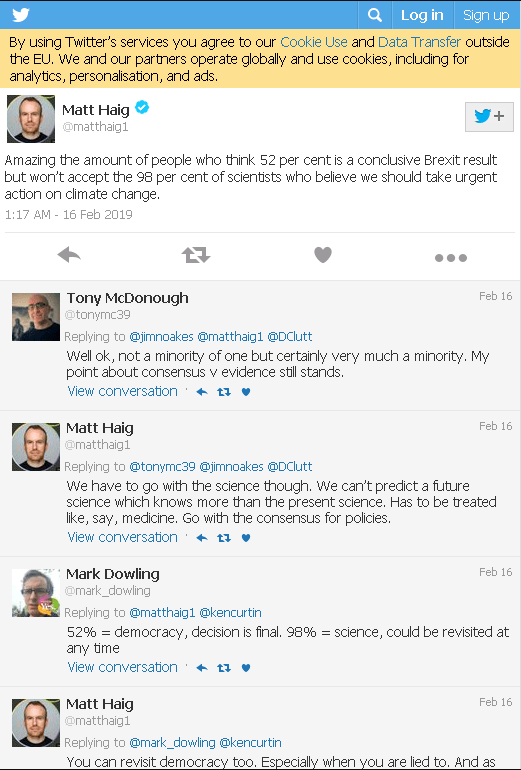
A few years back, coincidentally and funnily shortly after Matt Haig compared confidence in Brexit with science confidence, Kristian Köhntopp explained about theories, in response to this (translated from German) question:

Why is the theory of relativity and evolution theory actually still called ‘theory‘?

The essence of this question is that in everyday speak, people have different idea on theory (thinking it is not yet proven, or can be disputed with very little evidence, both more like hypothesis), than in formal or scientific usage of the word theory:

Theory:

Scientific theories are the most reliable, rigorous, and comprehensive form of scientific knowledge, in contrast to more common uses of the word “theory” that imply that something is unproven or speculative (which in formal terms is better characterized by the word hypothesis).

Theory: Ancient_uses:

The English word theory derives from a technical term in philosophy in Ancient Greek. As an everyday word, theoriaθεωρία, meant “a looking at, viewing, beholding”, but in more technical contexts it came to refer to contemplative or speculative understandings of natural things, such as those of natural philosophers, as opposed to more practical ways of knowing things, like that of skilled orators or artisans.

Theory: Definitions from scientific organizations

The formal scientific definition of “theory” is quite different from the everyday meaning of the word. It refers to a comprehensive explanation of some aspect of nature that is supported by a vast body of evidence.

So Isotopp explained:

[WayBackKristian Köhntopp auf Twitter: “Weil sie das sind. Ein System von Theoremen, die ein Modell der Realität darstellen, das es erlaubt Vorhersagen über die Welt zu machen.”

[WayBack ]Thread 1 by @isotopp:

Weil sie das sind. Ein System von Theoremen, die ein Modell der Realität darstellen, das es erlaubt Vorhersagen über die Welt zu machen.

The Quark And The Jaguar: Adventures in the Simple and the Complex amazon.de/dp/0349106495/…

Das Buch geht auf diesen Aspekt und noch viel mehr in einiger Länge ein und ist generell hilfreich um zu verstehen was Wissenschaft ist und was nicht

[WayBack] Aljoscha Rittner auf Twitter: “Ich glaube es wird noch sehr lange dauern, bis wir über den Punkt hinaus sind, nur mit Modellen unser Universum beschreiben zu können.”

[WayBack] Thread  2 by @isotopp

Äh, das tun wir seit de.wikipedia.org/wiki/Aufklärun… Es ist das Wesen des Modells, einen Scope und einen Fehler zu haben. Scope – die Newtownschen Gesetze beschreiben die Bewegung von Dingen mit Masse in Vakuum. Nicht in Atmosphäre, …
… nicht von Dingen ohne Masse und nicht bei sehr hohen Geschwindigkeiten. Fehler – wir wissen, das Newtons Theorien eine Vereinfachung sind, und Einsteins Formeln den Sachverhalt gebaut beschreiben, aber Einsteins Formeln degenerieren für v<<c zu denen von Newton.
Es ist der Sinn von Modellen, uns zu befähigen, Vorhersagen zu machen, wie sich die Welt verhält. Das Modell ist dabei oft beschränkt und ungenau, es seine Anwendbarkeit nicht einschränken muss, weil wir oft Fehler hinnehmen oder Beschränkungen im Anwendungsgebiet akzeptieren

[WayBack] Frank Hartmann auf Twitter: “Ist eine Theorie, die bewiesen wurde, nicht mehr von alleine keine Theorie mehr? Sondern vielmehr ein Fakt?… “

[WayBack] Nathaniel Bernstein auf Twitter: “Du meinst „Hypothese“, wo du „Theorie“ schreibst.… “

[WayBackFrank Hartmann auf Twitter: “Nopp. Man hat eine Hypothese. Dann stellt man eine Theorie auf, forscht und beweist diese. Oder auch nicht. Dann beantragt man mehr Forschungsgelder gg”

[WayBack] Thread 3 by @isotopp

Eine Theorie, ein System von Theoremen, ist nicht bewiesen und oft auch nicht korrekt (dh bekannt falsch, beschränkt und ungenau)

Darum mein abzielen auf Vorhersagen. Daltons Atommodell de.wikipedia.org/wiki/John_Dalt… ist beschränkt, war aber in der Lage, Dinge zu modellieren…

… die vorher nicht modellierbar waren. Wieso reagieren Wasserstoff und Sauerstoff 2:1 in der Knalleraktion?

Thompson, Rutherford, Bohr haben bessere (genauere) Modelle, die an Ende als Verfeinerungen oder Verkomplizierungen von Dalton aufgefasst werden können.

Diese Modelle leisten, was ihre Vorgänger jeweils konnten und mehr (größeres Anwendungsgebiet, bessere Genauigkeit)

Du kannst eine Theorie “beweisen” in den Du sie für Vorhersagen verwendest und dann schaust, ob die taugen.

Du kannst sie widerlegen: Die Vorhersagen sind unzutreffend oder für den Zweck zu ungenau.

Du kannst nichts tun, wenn sie Theorie keine Vorhersagen liefern kann

Das Wesen von Wissenschaft ist, das Theorien Weltmodelle liefern, die Vorhersagen machen, die sich in Experimenten prüfen lassen
Deswegen bleiben Theorien dennoch immer Theorien, Systeme von Theoremen, und sie bleiben unvollkommen (Modelle, effektiv Vereinfachungen, mit Anwendungsgebiet und Genauigkeitsgrenzen)

Via [WayBack] Frank Hartmann auf Twitter: “Wieso nennt man die Relativitätstheorie und Evolutionstheorie eigentlich immer noch ‘Theorie’? #Science”

Related:

Read the rest of this entry »

Posted in LifeHacker, Power User, science | Leave a Comment »