The Wiert Corner – irregular stream of stuff

Jeroen W. Pluimers on .NET, C#, Delphi, databases, and personal interests

  • My badges

  • Twitter Updates

  • My Flickr Stream

  • Pages

  • All categories

  • Enter your email address to subscribe to this blog and receive notifications of new posts by email.

    Join 1,839 other subscribers

Factory reset a MikroTik hEX PoE RB960PGS using the reset button

Posted by jpluimers on 2021/08/02

Edit 20260504: added link to the gist of the switch configuration and a link to a forum post I recently found.

[WayBack] Manual:Reset – MikroTik Wiki:

 unplug the device from power

2) press and hold the button right after applying power

Note: hold the button for 5 seconds (USER LED will start flashing)

3) release the button to clear configuration.

Icon-note.png Note: If you wait until LED stops flashing, and only then release the button – this will instead launch Netinstall mode, to reinstall RouterOS.

Initial configuration

(see also [WayBack] Manual:First time startup – MikroTik Wiki)

  1. Connect your machine to port 1 on the Mikrotik hEX PoE RB960PGS (after the reset, this port will have IPv4 address 192.168.88.2 with netmask 255.255.255.0)
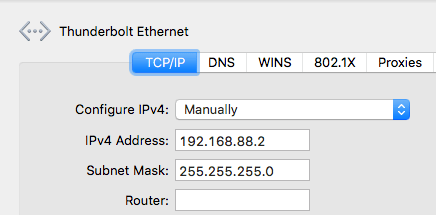
  2. Ensure your local machine to IPv4 address 192.168.88.2 with netmask 255.255.255.0 (otherwise WinBox might not see the router, not even in discovery mode):

  3. Have WinBox auto discover it:

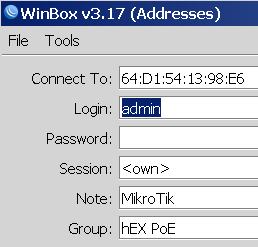
  4. Connect with user admin and no password:


  5. Configure your Mikrotik hEX PoE RB960PGS as router or switch

For switch, I prefer a setting like this (the bold portions are different from the default configuration):

/interface bridge
add admin-mac=64:D1:54:13:98:E6 auto-mac=no comment=defconf name=bridgeLocal
/interface wireless security-profiles
set [ find default=yes ] supplicant-identity=MikroTik
/ip hotspot profile
set [ find default=yes ] html-directory=flash/hotspot
/interface bridge port
add bridge=bridgeLocal comment=defconf interface=ether1
add bridge=bridgeLocal comment=defconf interface=ether2
add bridge=bridgeLocal comment=defconf interface=ether3
add bridge=bridgeLocal comment=defconf interface=ether4
add bridge=bridgeLocal comment=defconf interface=ether5
add bridge=bridgeLocal comment=defconf interface=sfp1
/ip dhcp-client
add comment=defconf dhcp-options=hostname,clientid disabled=no interface=bridgeLocal
/ip dns static
add address=192.168.88.1 name=router.lan
/system clock
set time-zone-name=Europe/Amsterdam
/system identity
set name="RB960PGS <<location-name>>"
/system ntp client
set enabled=yes server-dns-names=0.pool.ntp.org,1.pool.ntp.org,2.pool.ntp.org,3.pool.ntp.org

This script is similar to the forum post I recently found at [Wayback/Archive] How to use Mikrotik router as a “switch”? – General – MikroTik community forum

  1. depending on your model it can be a 4port or 5port switch
    Here’s a sample config:

    /interface bridge
    add name="My bridge"
    /interface ethernet
    set [ find default-name=ether1 ] name=ether1-To-modem
    set [ find default-name=ether3 ] master-port=ether2
    set [ find default-name=ether4 ] master-port=ether2
    set [ find default-name=ether5 ] master-port=ether2
    /interface bridge port
    add bridge="My bridge" interface=ether1-To-modem
    add bridge="My bridge" interface=ether2
  2. Cook-book recipe by @fbuster is good for ROS version<6.41. For newer version, the recipe would be:

    /interface bridge
    add name=bridge
    /interface bridge port
    add bridge=bridge interface=ether1
    add bridge=bridge interface=ether2
    add bridge=bridge interface=ether3
    add bridge=bridge interface=ether4
    add bridge=bridge interface=ether5
    # optionally: add bridge=bridge interface=wlan1
    # etc.
    #
    #  For static IP address:
    /ip address 
    add address=192.168.1.2/24 interface=bridge network=192.168.1.0
    # for internet access - ROS updates etc.
    /ip route
    add gateway=192.168.1.1
    /ip dns
    set servers=192.168.1.1 # or some other DNS server
    #
    # To run DHCP client, set thus instead:
    /ip dhcp-client
    add interface=bridge
  3. If device is used as router (as in your linked documentation), ether1 is not in switch (which in Mikrotik is the same as bridge) because it is used as interface to another devices/networks. If device is used as switch only (as OP), ether1 can be included in switch or left alone.

--jeroen


Embedded gist:


/interface bridge
add admin-mac=64:D1:54:13:98:E6 auto-mac=no comment=defconf name=bridgeLocal
/interface wireless security-profiles
set [ find default=yes ] supplicant-identity=MikroTik
/ip hotspot profile
set [ find default=yes ] html-directory=flash/hotspot
/interface bridge port
add bridge=bridgeLocal comment=defconf interface=ether1
add bridge=bridgeLocal comment=defconf interface=ether2
add bridge=bridgeLocal comment=defconf interface=ether3
add bridge=bridgeLocal comment=defconf interface=ether4
add bridge=bridgeLocal comment=defconf interface=ether5
add bridge=bridgeLocal comment=defconf interface=sfp1
/ip dhcp-client
add comment=defconf dhcp-options=hostname,clientid disabled=no interface=bridgeLocal
/ip dns static
add address=192.168.88.1 name=router.lan
/system clock
set time-zone-name=Europe/Amsterdam
/system identity
set name="RB960PGS-hEX-PoE-as-a-switch"
/system ntp client
set enabled=yes server-dns-names=0.pool.ntp.org,1.pool.ntp.org,2.pool.ntp.org,3.pool.ntp.org


Leave a comment

This site uses Akismet to reduce spam. Learn how your comment data is processed.