The Wiert Corner – irregular stream of stuff

Jeroen W. Pluimers on .NET, C#, Delphi, databases, and personal interests

  • My badges

  • Twitter Updates

  • My Flickr Stream

  • Pages

  • All categories

  • Enter your email address to subscribe to this blog and receive notifications of new posts by email.

    Join 1,860 other subscribers

Archive for September, 2023

At last: WireGuard VPN with FRITZ! | FRITZ!Box 7490 | AVM International

Posted by jpluimers on 2023/09/08

Early spring 2023 I posted Reminder to self: check if FritzOS 7.50 has become available for Fritz!Box 7490 because it would (likely partially) introduce WireGuard support as I knew it had been available for other Fritz!Box devices since december 2022: [Wayback/Archive] Fritzbox: AVM startet die Verteilung von FritzOS 7.50 | heise online

Das Betriebssystem FritzOS 7.50 für Fritzbox-Router ist fertig. Mit dabei sind das Wireguard-VPN und Verbesserungen im Smart-Home-Funktionsumfang.

Finally, early september 2023 my Fritz!Box 7490 devices updated from firmware version 7.29 to 7.57 so apparently it took AVM quite a while to test and stabilise the new features on Fritz!Box 7490.

The final push for 7.57 might actually be a security issue in prior versions that already looks like being exploited according to [Wayback/Archive] AVM: Fritzbox-Firmware 7.57 und 7.31 stopfen Sicherheitsleck | heise online

In Internetforen finden sich Hinweise darauf, dass die mit dem Update geschlossene Sicherheitslücke bereits angegriffen wird. Den Gerüchten zufolge können Angreifer Zugriff durch den HTTPS-Port 443 erlangen und hätten dann Zugangsdaten zur Fritzbox sowie PPP-Zugangsdaten verändert. Dadurch sei kein Internetzugang mehr möglich, und auch der Zugriff auf die Fritzbox werde verhindert. Einzig ein Werksreset helfe dann, um wieder Zugriff zu erlangen.

The odd thing of the upgrade logs is that the fiber connected 7490 mentioning a DSL settings reset, but the DSL connected 7490 didn’t:

Read the rest of this entry »

Posted in Ethernet, Fritz!, Fritz!Box, FritzOS/Fritz!OS, Hardware, Network-and-equipment, Power User | Leave a Comment »

Windows 10: whitelisting domains so updates still work

Posted by jpluimers on 2023/09/08

The internet access for my mentally retarded brother is fully based on whitelists.

It’s a simple reasoning: his mental abilities is basically a fixed box that does not grow. If he gains one part, he loses on another part.

This makes his risks assessments low and unpredictable at best, especially on the rapidly changing internet, hence whitelisting at the router level.

Whitelisting also implicates I need to update the ever changing list of domains that Windows 10 uses to keep newer versions up-to-date.

If you don’t, then you get an error [Wayback] 0xc1900223 while searching for or a applying updates. The description of that error isn’t accurate; what it actually means is that your computer cannot connect to one or more of the many update locations.

These links should help finding the ones for newer Windows versions (at the time of writing, there was no documentation for Windows 10 21H1 or newer):

Maybe one day someone makes an overview of these in one big worksheet to easily spot the differences. Until then it is a trial and error process every 6 months or so.

Related: [Archive.is] Jeroen Wiert Pluimers on Twitter: “Anyone knows when the 21H1 update of these instructions will be available?  Need to update the site of my mentally retarded brother. Maybe @shanselman or @JenMsft can help me get in touch with the right people for this?”

–jeroen

Posted in Power User, Windows, Windows 10 | Leave a Comment »

Remove unused accounts and groups (especially privileged ones) as Multiple Nation-State Threat Actors Exploit CVE-2022-47966 and CVE-2022-42475 | CISA

Posted by jpluimers on 2023/09/07

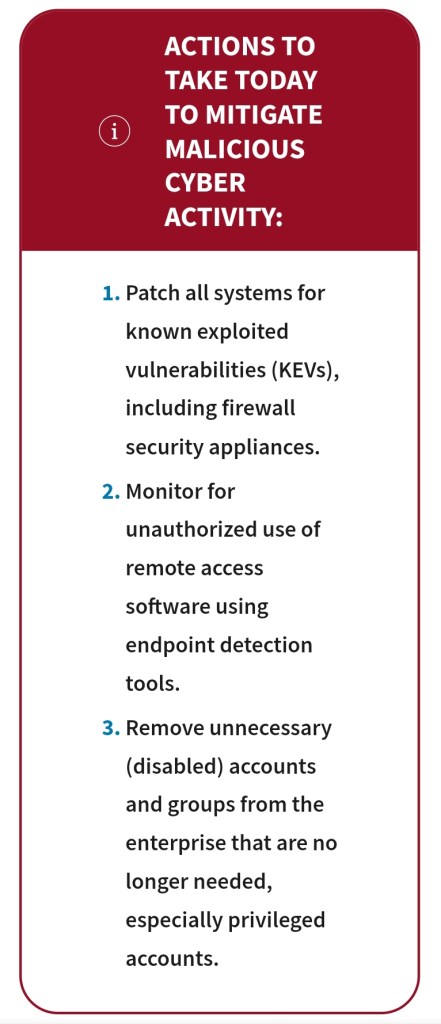
Remove unnecessary (disabled) accounts and groups from the enterprise that are no longer needed, especially privileged accounts.

https://www.cisa.gov/news-events/cybersecurity-advisories/aa23-250a

Posted in Uncategorized | Leave a Comment »

Installing the Microsoft To Do app from the Microsoft Store on Windows via the CLI was impossible at first, and requires GUI configuration

Posted by jpluimers on 2023/09/07

I prefer installing applications through the CLI (command-line interface). This way, things can be scripted and installation parameters be stored under version control.

A few months back I published Different ways for installing Windows features on the command line – Peter Hahndorf which wrote way earlier and amended with a few highlights I learned from unsuccessfully trying to Microsoft To Do. Of course that is possible from the GUI by following these links:

  1. [Wayback/Archive] To Do List and Task Management App | Microsoft To Do
  2. [Wayback/Archive] Get Microsoft To Do: Lists, Tasks & Reminders – Microsoft Store

But I don’t want GUI, I want CLI as that is way easier to automate than GUI. I knew this should theoretically be possible from my the above winget post.

Putting this to practice however at first failed. Later I found a GUI-based workaround. So this was not possible purely on the CLI.

This post is both a summary of the most important bits and a reminder for myself to check if installing Microsoft Store via [Wayback/Archive] Winget without a Microsoft Store account is still impossible (as when downloading via the GUI from the Microsoft Store site an account is not needed).

winget

First however on how I ended up at winget for anyway were these posts:

Read the rest of this entry »

Posted in Chocolatey, Microsoft Store, Power User, Windows, Windows 10, Windows 11, winget | Leave a Comment »

Help:Two-factor authentication – Wikipedia

Posted by jpluimers on 2023/09/06

For my link archive as this page contains instructions to request 2FA privileges at Wikipedia: [Wayback/Archive] Help:Two-factor authentication – Wikipedia

Checking whether 2FA is enabled

To determine whether your account has 2FA enabled, go to Special:Preferences. Under “Basic information”, check the entry for “Two-factor authentication”, which should be between “Global account” and “Global preferences”:

Viewing m:Steward requests/Global permissions#Requests for 2 Factor Auth tester permissions is possible to do without being logged on at Wikipedia, but for requesting the 2FA permission and accessing Special:Preferences you need to be logged on.

Visit [Wayback/Archive] Steward requests/Global permissions/2018-12 – Meta and look for “OATH tester” for some examples of motivations for requesting.

–jeroen

Posted in 2FA/MFA, Authentication, Power User, Security, SocialMedia, wikipedia | Leave a Comment »

How to disable Chrome’s new targeted ad tracking: visit chrome://settings/adPrivacy

Posted by jpluimers on 2023/09/06

Go to chrome://settings/adPrivacy and disable all to make it look like this:

[Wayback/Archive] 266577344-cd2613d0-f97d-46e1-bfbb-9d8c432c40c8.png (656×183)

Via these tweets: Read the rest of this entry »

Posted in Chrome, Chrome, Google, Power User, Privacy, Web Browsers | Leave a Comment »

Two Ways of Solo Programming – Seaside Testing

Posted by jpluimers on 2023/09/05

Food for thought from Stephan Kämper: [Wayback/Archive] Two Ways of Solo Programming – Seaside Testing

TL;DR:

  • it is about the time in between paid projects
  • mode 1: learning; each day ends with a working state (compiling source, passing tests)
  • mode 2: personal projects (libraries, tools); each day ends with a failing test as a guidance what to keep working on

The last one refers to [Wayback/Archive] Try ending today with a failing test for a great start tomorrow – DEV Community by [Archive] Nick Holden (@NickyHolden) / Twitter.

Via: [Wayback/Archive] Stephan Kämper on Twitter: “A new short-ish blog post about two slightly different ways of programming, when work ‘solo’ ➙ …” / Twitter

–jeroen

Posted in Agile, Awareness, Development, Software Development, TDD, Testing | Leave a Comment »

Adobe Reader (a.k.a. Adobe Acrobat Reader DC): “Access denied” might not actually mean access denied

Posted by jpluimers on 2023/09/04

Adobe Acrobat Reader DC (née Adobe Reader) has a mind of it’s own not just in names. Error handling, messages and user experience are, well, peculiar.

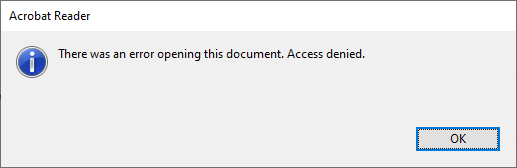
A while ago, I bumped into this error when double clicking on a PDF file:

Access denied.

Access denied.

I tried Ctrl-C to copy the text, which has been a feature of standard dialogs as of Windows 2000 (see [Wayback] Cutting Edge: Using Windows Hooks to Enhance MessageBox in .NET | Microsoft Docs) and not hard to implement.

Well, Adobe decided to not support this great user experience: no dialog data on the clipboard, so I had to manually type it:

[Adobe Reader]
There was an error opening this document. Access denied.
[OK]

and searched for [Wayback] “There was an error opening this document. Access denied.” “Reader DC” – Google Search (I will explain the Reader DC bit below) without any useful hints (apart from “reinstall, Adobe Acrobat Reader DC might be corrupted”, lowering security settings and phishing sites wanting me to download so called “repair tools”).

So I decided to open the file using the File -> Open menu with the same file and got a fresh new error:

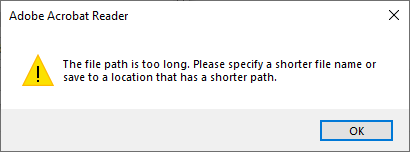
The file path is too long.

The file path is too long.

Of course, Ctrl-C here would fail too, so this is the error text:

[Adobe Acrobat Reader]
The file path is too long. Please specify a shorter file name or
save to a location that has a shorter path.
[OK]

Three things about this error message:

  1. It has a totally different message (with the actual reason the file cannot be opened)
  2. The caption is “Adobe Acrobat Reader”, where the first message had “Adobe Reader” as caption.
  3. It actually has an error icon (exclamation mark), where the first message (despite being an error) has the informational icon (encircled i).

Adobe still seems ambivalent on their product name, it is actually Adobe Acrobat Reader DC DC superseding version X, hence the Reader DC bit in the search), but they still call it Adobe Reader and Adobe acrobat Reader.

After all these years, Adobe is inconsistent at best.

–jeroen

Posted in Adobe, Adobe Reader, Power User | Leave a Comment »

Fritz!Box firewall permissions for NPO Start

Posted by jpluimers on 2023/09/01

I had to add the below to the firewall permission list of a Fritz!Box to allow watching NPO Start, the free Video on Demand service of the Dutch public broadcasting system:

npostart.nl
assets.npo-data.nl
www-assets.npo.nl
start-player.npo.nl
ccm.npo.nl
images.npo.nl
npo-drm-gateway.samgcloud.nepworldwide.nl
time.akamai.com
npo.prd.cdn.bcms.kpn.com

You can find the list on the page fritz.box/?lp=trafapp under Permitted websites edit.

–jeroen

Posted in Fritz!, Fritz!Box, Hardware, LifeHacker, Network-and-equipment, Power User | Leave a Comment »