


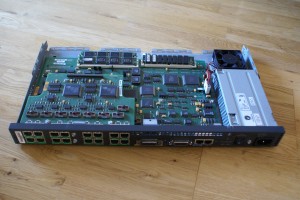
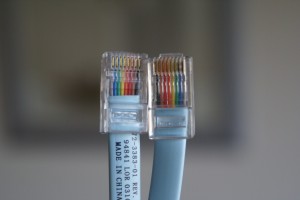
Relics from the serial communications history are still in use today: [WayBack] homecomputerlab » Cisco 2511-RJ remote access terminal server

–jeroen
Posted by jpluimers on 2020/03/02
Relics from the serial communications history are still in use today: [WayBack] homecomputerlab » Cisco 2511-RJ remote access terminal server
–jeroen

Posted in History, Network-and-equipment, Power User | Leave a Comment »
Posted by jpluimers on 2020/02/28
Every now and then, when an Apple TV falls asleep with an app running, it wakes up without the app showing actual content on HDMI.
I’ve seen this quite a lot with the NPOStart app, but other apps suffer from this as well.
It happens more often with an Apple TV 4k than with an Apple TV4.
When this happens, the TV thinks there is no HDMI device connected to that source any more.
The solution is to reboot the Apple TV without active screen output:
- [WayBack] How to force restart the new Apple TV – CNET
To force restart the new Apple TV, press and hold both the Menu and Homebuttons. (The Home button has the silhouette of a TV or monitor on it.)
After holding in both buttons for roughly 10 seconds, the white light on the Apple TV box will begin flashing. Once that happens, let go of both buttons and the Apple TV will restart.
- [WayBack] How to restart your Apple TV – Apple Support
Use your remote
- [WayBack] Siri Remote or Apple TV Remote:* Hold down the
and Menu buttons. Let go when the light on your device flashes.
- [WayBack] Apple Remote (aluminum or white): Hold down the Menu and Down buttons. Let go when the light on your device flashes.
Unplug your Apple TV
If the Settings menu and your remote don’t restart your device, unplug your Apple TV from power. Wait six seconds, then plug it back in.
If the remote refuses to connect, then you have to pull the plug and reinsert it; either the power or HDMI plug will do.
Luckily this workaround I did not have to reboot my TV, as the only two ways to do that is to pull/reinsert the power plug, or to perform a [WayBack] How do I perform a Factory Data Reset on my Smart TV? | Samsung Support Australia.
–jeroen

Posted in Apple, Apple TV, iOS, Power User | Leave a Comment »
Posted by jpluimers on 2020/02/28
Two links that help me identify the Raspberry Pi devices from my collection (which misses quite a few, but is too extensive to get them all right in the blink of an eye):
cat /proc/cpuinfo and (on modern Linuces/Linxii: cat /proc/device-tree/model) [WayBack] Checking Your Raspberry Pi Board Version & Revision Number–jeroen

Posted in *nix, Development, Hardware Development, Power User, Raspberry Pi | Leave a Comment »
Posted by jpluimers on 2020/02/28
One day I will likely need R, so here is the [WayBack] R Notes for Professionals book.
The R Notes for Professionals book is compiled from Stack Overflow Documentation, the content is written by the beautiful people at Stack Overflow. Text content is released under Creative Commons BY-SA.
It is a [WayBack] PDF download.
Via: [WayBack] R Notes for Professionals: a free 400+ pages book compiled from Stack Overflow Documentation released under Creative Commons BY-SA… – ThisIsWhyICode – Google+
–jeroen
Posted in Development, Software Development | Leave a Comment »
Posted by jpluimers on 2020/02/27
I will need thi sone day: [WayBack] GitHub – mgedmin/check-manifest: Tool to check the completeness of MANIFEST.in for Python packages
Are you a Python developer? Have you uploaded packages to the Python Package Index? Have you accidentally uploaded broken packages with some files missing? If so, check-manifest is for you.
Via: [WayBack] check-manifest: a tool to check the completeness of MANIFEST.in for Python packages – ThisIsWhyICode – Google+
–jeroen
Posted in Development, Python, Scripting, Software Development | Leave a Comment »
Posted by jpluimers on 2020/02/27
Via [WayBack] What are the size restrictions for the VCL controls like TPanel and TPaintBox.? Are they documented anywhere? I’m talking about placing these on a TScro… – Thomas Mueller (dummzeuch) – Google+:
Some Windows messages use the LPARAM to carry width and height, which allows only 16 bit for each.
So 32k-1 (or decimal 32767) is the maximum size of a GDI based visual element in Windows.
–jeroen
Posted in Development, Software Development, Windows Development | Leave a Comment »
Posted by jpluimers on 2020/02/27
 Cool tool, but be aware it does a
JavaScript:xmlhttpPost from , so your data can be logged [WayBack] Redirect Detective – A Free Tool To Trace Where Redirects End Up.
For http://www.xs4all.nl/~jp, it shows these redirects (where in bold I’ve listed the changes):
Oh and it runs this call: JavaScript:xmlhttpPost("/linkdetect.px")?word=www.xs4all.nl%2F%7Ejp from [WayBack] redirectdetective.com/ajax.js.
Note that this shows more redirects than the plain http ones, so wget from [WayBack] wget – How do I display all URLs in a redirect chain? – Unix & Linux Stack Exchange shows this:
$ wget http://www.xs4all.nl/~jp 2>&1 | grep Location:

Location: https://www.xs4all.nl/~jp [following]

Location: https://jp.home.xs4all.nl/ [following]
–jeroen

Posted in *nix, *nix-tools, Communications Development, Development, HTTP, Internet protocol suite, Power User, TCP, wget | Leave a Comment »
Posted by jpluimers on 2020/02/26
Me at [WayBack] emulation – How to safely remove/uninstall Android Virtual Device .img files added by Visual Studio Emulator for Android – Stack Overflow:
Since after uninstalling the “Visual Studio Emulator for Android” component, you cannot get to the “AVD Manager” any more, you have to manually delete this directory:
%LocalAppData%\Microsoft\VisualStudioEmulatorThis works for both Visual Studio 2017 and Visual Studio 2015.
In addition, you might want to run “AppWiz.cpl“, then remove “Android SDK Tools”, which is also not automatically removed by the Visual Studio installer (at least not in Visual Studio 2015).
This will get rid of the multi-gigabyte folder
%ProgramFiles(x86)%\Android\android-sdk\
–jeroen
Posted in .NET, Development, Software Development, Visual Studio 2015, Visual Studio 2017, Visual Studio and tools | Leave a Comment »
Posted by jpluimers on 2020/02/26
As this is still an issue with current Delphi versions: every now and then it looses which designers are needed for a frame:
[WayBack] What is the easiest way of getting Delphi to accept a newly added file as a frame and to treat it as such? – Stack Overflow (by Brian Frost)
<DCCReference Include="x\y\z\myFrame.pas">
  <Form>frameMy</Form>
  <FormType>dfm</FormType>
  <DesignClass>TFrame</DesignClass>
</DCCReference>
Then check your .dfm file to see if it starts with the correct inherited or object as per Delphi – TInterfacedDataModule revisted – use ‘inherited’ in your .dfm files when your datamodules look like forms in the designer.
Oh and at design time, be very careful embedding frames. Better not to do it at all and for certain: do not embed frames in a nested way: [WayBack] Frames in 10.2.2 Hi Has anyone else had issues with frames under 10.2.2? The project seems to have lost its links to the frames? If I went to the Too… – Vince Bartlett – Google+
–jeroen
Posted in Delphi, Development, Software Development | 1 Comment »
Posted by jpluimers on 2020/02/26
This post is a reminder to myself that not all mappings from XSD to programming languages are possible.
There are many impossible cases, so this is just a general reminder.
A Delphi specific case for instance is the mapping of enumerations: one reason is that XSD enumerations are case sensitive, but the Delphi language is not: [WayBack] Using XML Enumerations with Delphi XML Data Binding Wizard – Stack Overflow.
More generic examples from my answer to the above question:
I’ve seen horrible things with wildcards that are sort of mappable to Java, but not to C#. This could likely go on for much longer…
–jeroen
Posted in C#, Delphi, Development, Java, Java Platform, Software Development, XML, XML/XSD, XSD | 2 Comments »


 The Wiert Corner - irregular stream of stuff