The Wiert Corner – irregular stream of stuff

Jeroen W. Pluimers on .NET, C#, Delphi, databases, and personal interests

  • My badges

  • Twitter Updates

  • My Flickr Stream

  • Pages

  • All categories

  • Enter your email address to subscribe to this blog and receive notifications of new posts by email.

    Join 1,839 other subscribers

Author Archive

For my link archive: IPVoid.com

Posted by jpluimers on 2019/11/25

Nice landing page to check various aspects of IP addresses: [WayBackipvoid.com:

We offer a vast range of IP address tools to discover details about IP addresses. IP smtp blacklist check, whois lookup, dns lookup, ping, and more!

I irregularly use them to check out blacklist issues (yes, sometimes 8.8.8.8, 8.8.4.4 and even 9.9.9.9 appear on blacklists).

–jeroen

Posted in Internet, Network-and-equipment, Power User | Leave a Comment »

rpm – Suse: Restore Packages List from /var/adm/backup/rpmdb/Packages-20160323 .gz – Server Fault

Posted by jpluimers on 2019/11/25

In case I ever need to view the archived /var/adm/backup/rpmdb files again: [WayBack] rpm – Suse: Restore Packages List from /var/adm/backup/rpmdb/Packages-20160323 .gz – Server Fault

–jeroen

Posted in *nix, Power User, rpm | Leave a Comment »

macos – How can I modify the list of Applications under ‘Open With…’? – Ask Different

Posted by jpluimers on 2019/11/22

Some interesting links on the “open with” database:

Simple solution to clean the list:

# Clean up LaunchServices to remove duplicates in the “Open With” menu.
alias lscleanup="/System/Library/Frameworks/CoreServices.framework/Frameworks/LaunchServices.framework/Support/lsregister -kill -r -domain local -domain system -domain user && killall Finder"`

These were by products of what I was really searching for:

Why are some items grey when modifying the “Open with…” settings?

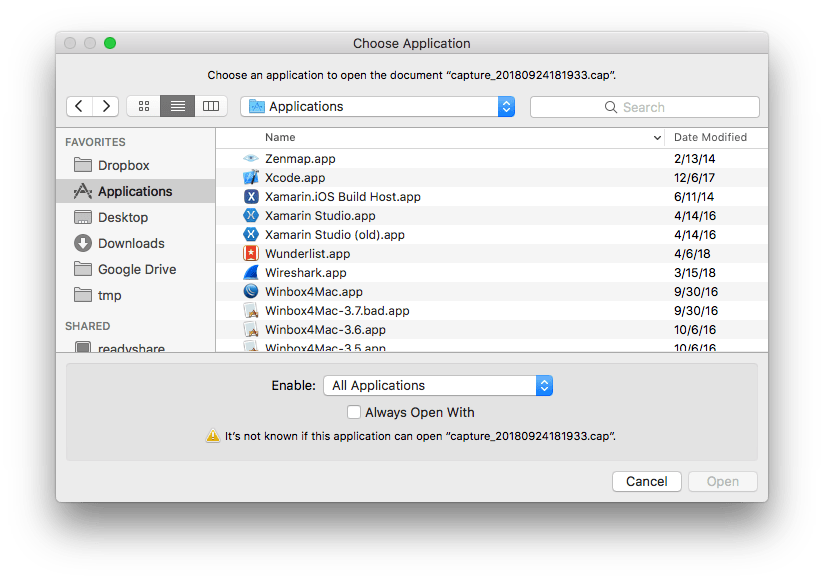
Some applications are greyed out, for instance when editing the “Open with…” for the .cap extension (which are pcap network captures that Wireshark can process).

After the steps below, sometimes the menu still does not update for all files of that extension.

This alias helped me to get that to work: alias restart-finder='killall -KILL Finder'.

Links that helped me finding out:

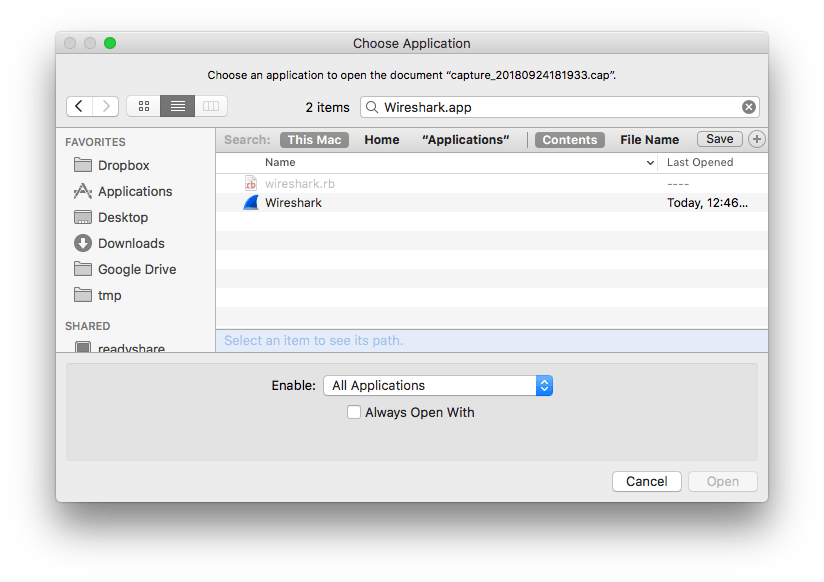
The trick is to toggle “Recommended Applications” into “All Applications”:

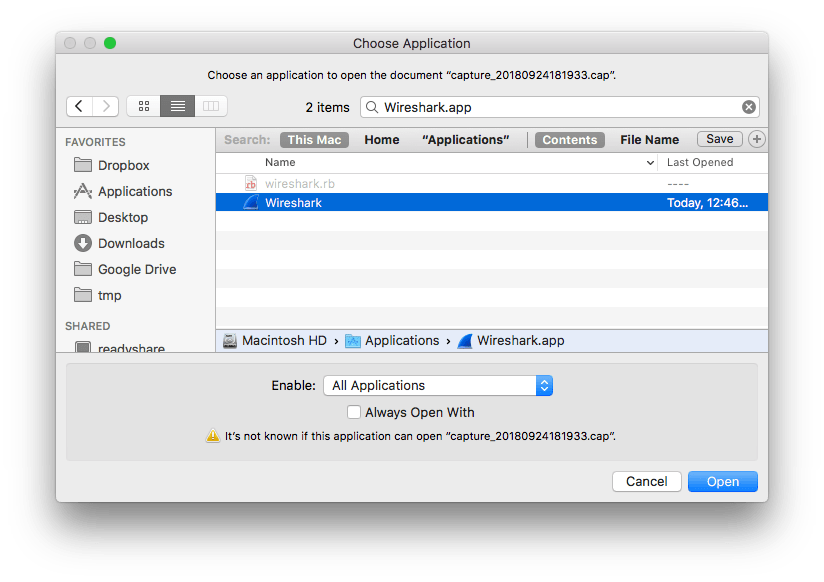
Then you can select “Wireshark.app”:


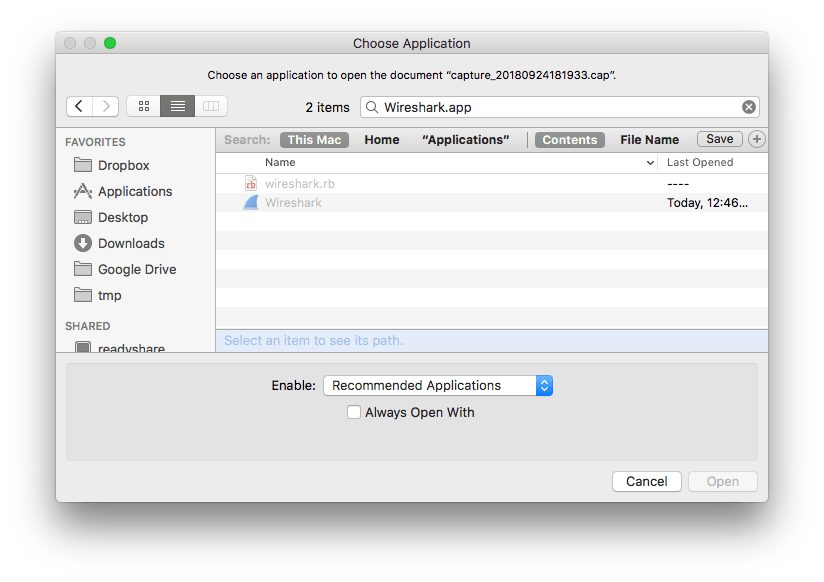
The same happens when you filter on a name (for instance because you know that Wireshark will work fine):

A final thing is that you have to check “Always Open With” so it ends up in the list.

–jeroen

Posted in Apple, Mac OS X / OS X / MacOS, Power User | Leave a Comment »

NeverSSL – helping you get online

Posted by jpluimers on 2019/11/22

most websites are now using https by default.

And that’s great, but it also means that if you’re relying on poorly-behaved wifi networks, it can be hard to get online. Secure browsers and websites using https make it impossible for those wifi networks to send you to a login or payment page. Basically, those networks can’t tap into your connection just like attackers can’t.

So to get your brain-dead hotel, airport or other WiFi connection to work:

http://neverssl.com/

[WayBackNeverSSL – helping you get online

via [WayBackRainer Sokoll – Google+ commenting on [WayBack] Achtung, Heise hat #neuland  verlassen. So geht es richtig! – Kristian Köhntopp – Google+

–jeroen

Posted in Power User, WiFi | Leave a Comment »

Removing “Workbook Contains Macros” Prompt – Free Excel\VBA Help Forum

Posted by jpluimers on 2019/11/22

This indeed was an Excel 2011 for Mac thing.

Even without macros or VBA modules, Excel 2011 for Mac shows this dialog when opening a .xls file.

The solution was simple: save as .xlsx.

–jeroen

via [WayBack] Removing “Workbook Contains Macros” Prompt – Free Excel\VBA Help Forum

Posted in Excel, Office, Office 2011 for Mac, Power User | Leave a Comment »

ALTER DATABASE Compatibility Level (Transact-SQL) | Microsoft Docs

Posted by jpluimers on 2019/11/21

Since I keep forgetting which numeric value can correspond to what kind of server: [WayBack] ALTER DATABASE Compatibility Level (Transact-SQL) | Microsoft Docs

Product Database Engine Version Compatibility Level Designation Supported Compatibility Level Values
SQL Server 2019 15 150 150, 140, 130, 120, 110, 100
SQL Server 2017 (14.x) 14 140 140, 130, 120, 110, 100
Azure SQL Database logical server 12 130 150, 140, 130, 120, 110, 100
Azure SQL Database Managed Instance 12 130 150, 140, 130, 120, 110, 100
SQL Server 2016 (13.x) 13 130 130, 120, 110, 100
SQL Server 2014 (12.x) 12 120 120, 110, 100
SQL Server 2012 (11.x) 11 110 110, 100, 90
SQL Server 2008 R2 10.5 100 100, 90, 80
SQL Server 2008 10 100 100, 90, 80
SQL Server 2005 (9.x) 9 90 90, 80
SQL Server 2000 8 80 80

–jeroen

Posted in Database Development, Development, SQL Server | Leave a Comment »

Unorthodocs: Abandon your DVCS and Return to Sanity – bitquabit

Posted by jpluimers on 2019/11/21

Some interesting thoughts on DVCS: [WayBackUnorthodocs: Abandon your DVCS and Return to Sanity – bitquabit

Besides the very good point it raises about DVCS (Git, Mercurial and most other DVCSes treat the whole state of the repository as the atom) it also indicates quite a few shortcomings:

  • most people hardly ever need the full history to be off-line
  • having the full history means repositories get huge in size, including your off-line clone
  • pseudo-solutions for huge repository sizes – like git-LFS or git-annex – are a no-go because now you loose atomicity
  • huge repositories in file or commit counts make them slow, especially when the trees are deep
  • splitting up repositories isn’t a good idea either because again: you loose atomicity
  • all DVCS are hard, not just git, because they are distributed and full of features
  • the workflow for submitting pull requests is quite a bit longer than submitting a patch, even though merging in a DVCS can be hard too (despite atomicity which does help a lot for DVCS systems)

I see many other advantages of DVCS systems (for instance that you only need to locally have the branches you are interested in, way better tooling for DVCS systems, ditto for sites hosting DVCS), but it always a good thing to know the weak spots of what you are working with.

–jeroen

Posted in Development, DVCS - Distributed Version Control, git, Mercurial/Hg, Software Development, Source Code Management | Leave a Comment »

Scopes and names can really be deceiving. A classes in a hierarchy can have members with identical names…

Posted by jpluimers on 2019/11/21

Examples like the one below from [WayBack] Scopes and names can really be deceiving. A root class and a descendant class can both have public fields, properties and methods with the same name… – Lars Fosdal – Google+ used to be part of the “language day” during my 5 day Delphi introductory courses.

Maybe I should find back more of those from the days, brush them up a little, then post them in a repository.

The thread has some nice references to tools that give better warnings and comparisons with other languages.

Anyone wanting to assist with that?

Example code

Read the rest of this entry »

Posted in Delphi, Development, Software Development | Leave a Comment »

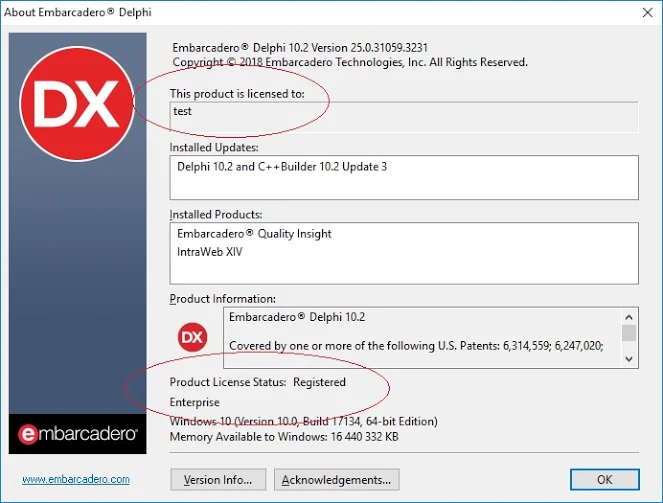
Any idea what exactly mean …licensed to test ??? My Delphi is…

Posted by jpluimers on 2019/11/20

Your Delphi “licensed to” might be totally different from what it is actually licensed to.

From [WayBack] Hello people, any idea what exactly mean …licensed to test ??? My Delphi is registered with a valid account, subscription, serial number and so on. – Dobrin Petkov – Google+, at least these sources might be used different from the actual licensee name:

  • the VLAN name
  • the Windows username of the one that installed it
  • the Windows licensee

–jeroen

Posted in Delphi, Development, Software Development | Leave a Comment »

xargs compressing lots of files using xz

Posted by jpluimers on 2019/11/20

One day, on a legacy Linux system, logrotate managed to skip some files in the middle of a sequence in /var/log.

Since I didn’t have time to sort out the cause (the system was being phased out), I used this to compress the rest of the log-files (dated in 2017):

sudo -u bash
pushd /var/log
ls | grep -vw xz | grep "\-20......$" | xargs -L 1 ls -alh

After that you can execute this in the same directory:

ls | grep -vw xz | grep "\-20......$" | xargs -L 1 time xz

It skips any xz files and includes only files in the year 2017.

I occasionally tracked progress with this:

ls -alh /var/log/ | grep -v xz | less

That got back a few gigabytes of disk space, just enough to help me migrate the system away.

–jeroen

Posted in *nix, *nix-tools, bash, logrotate, Power User | Leave a Comment »