


Want to list all iptables rules with line numbers? Try
iptables -L -n -v –line-numbers
#Linux #Sysadmin – nixCraft – Google+
Source: Want to list all iptables rules with line numbers? Try iptables -L -n -v –l…
Posted by jpluimers on 2016/01/11
Want to list all iptables rules with line numbers? Try
iptables -L -n -v –line-numbers
#Linux #Sysadmin – nixCraft – Google+
Source: Want to list all iptables rules with line numbers? Try iptables -L -n -v –l…

Posted in Uncategorized | Leave a Comment »
Posted by jpluimers on 2016/01/11
Some great blog entries to read:
And:
Finally:
All of the above are somehow related to the Superserver SYS-5028D-TNT4.
When looking at some pictures from the above posts, then an M1015 HBA should be perfect for ZFS (lots of results for ESXi M1015 HBA PCI VMDirectPath IO pass through, and they still seem to be the way to go for ZFS).
There might be a need for extra cooling; for some ideas: Cooling for m1015 Raid Card – [H]ard|Forum
Below are other ServerRAID OEM possibilities supporting 8 internal devices (chipset in parentheses) via:
12 Gbps adapters:
6 Gbps adapters:
3 Gbps adapters:
–jeroen
Posted in ESXi6, Power User, Virtualization, VMware, VMware ESXi | 2 Comments »
Posted by jpluimers on 2016/01/11
If I ever need to perform a COLD RESET of my HP CLJ9500, then these are the steps to follow, thanks sm00257 for posting them, same for the post by Kenneth Chan_2. Both quoted the service manual page 99.
You can choose to reset the HP JetDirect as well (either remove it so it won’t get reset or keep it in place to get it reset).
Cold reset
The cold reset clears all data from the printer memory and returns all of the defaults to the factory settings.
CAUTION Performing a cold reset resets the Jetdirect print server configuration. To avoid making changes to your network configuration, remove the HP Jetdirect print server before performing a cold reset.
Note The HP color LaserJet 9500mfp uses numeric buttons to accomplish the functions of the arrow and select buttons on the HP color LaserJet 9500 printer. On the MFP use the numeric button 3 as UPARROW, numeric button 5 as RETURN , numeric button 6 as TICK, and numeric button 9 as DOWNARROW on the MFP.
Note If possible, print a configuration page and menu map before performing a cold reset. This documents the current settings for later reference.
To perform a cold reset
- Turn off the printer, and then turn the printer on again.
- Press and hold TICK (the 6 button on the MFP) during the memory count.
- Continue to hold TICK (the 6 button on the MFP) until all three control panel lights illuminate steadily, and then release TICK (the 6 button on the MFP).
- When SELECT LANGUAGE appears on the control panel, press DOWNARROW (the 9 button on the MFP).
- COLD RESET appears.
- Press TICK (the 6 button on the MFP) while COLD RESET appears on the control panel. The cold reset is complete.
–jeroen
via:
Posted in Power User | Leave a Comment »
Posted by jpluimers on 2016/01/10
While researching how to record analog PSTN call recording:
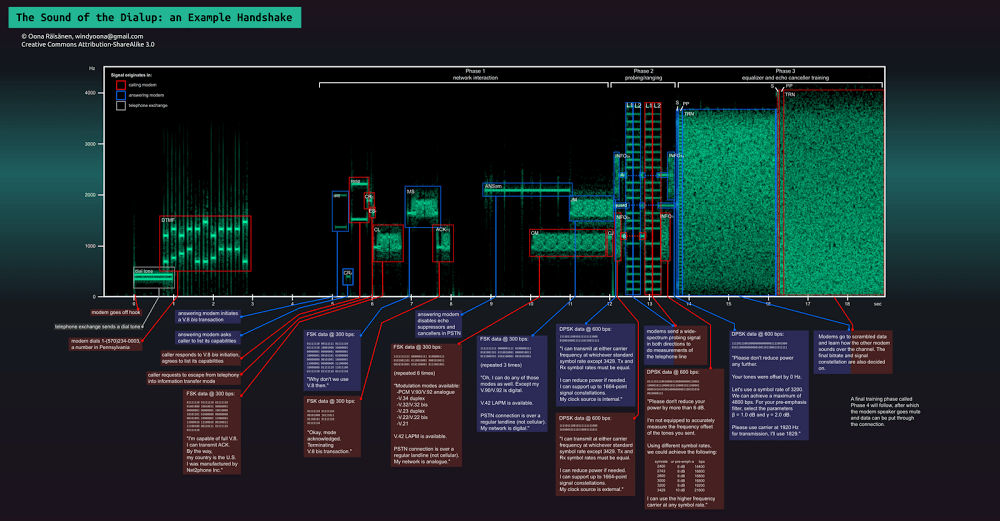
The sound of the dialup, pictured
Via:
Edit 20250318: added Wayback/Archive archived links for the first three bullets above.
--jeroen

Posted in History, Power User, PSTN, Telephony | Leave a Comment »
Posted by jpluimers on 2016/01/09
Earlier I asked “Anyone knows an easy way to record PSTN calls at the line level?I’ve a problem with a PSTN device and want to listen in on what’s happening at the line…”
A few things I’ve found so far that should get me going:
–jeroen
Sources:
Posted in Power User, PSTN, Telephony | Leave a Comment »
Posted by jpluimers on 2016/01/09
Interesting:
During the last weeks I finally got my hands dirty with IPv6. A comment on my blog and an email informed me that my server (hosting this blog) is not reachable via IPv6, albeit it has an IPv6 address. That said, I tried to get that running and fell into several holes, due to firewalls, […]
Source: Fighting with IPv6 – There and back again
Posted in *nix, *nix-tools, Apache2, iptables, Linux, Power User | Leave a Comment »
Posted by jpluimers on 2016/01/08
Too bad my TomTom XXL IQ 540SWE won’t work with a model 4V00.014 RDS/TMC FM antenna (which sits in-between the USB charger cable and the TomTom)
That would have been a really nice way to get rid of some of the cabling in the car.
Model 4UUC.001.01 does work (but has a 12V plug).
These models should work:
3. The USB version :
More recent version, but slower than the jack version. Note also that there are 2 versions available depending on your location :
– 4V00.014 or 9V00.101 which is the Europe-Australia version working on FM band.4. The combined car charger with traffic receiver :
– 9UUC.002.00 (part number on box is 9UUC.002.00 and part number on item is 4UUC.001.01) which is the part number sold in Europe-Australia.
– 9UUC.052.02 which is the part number sold in North America.7. Alternate solution, non TomTom : The GNS Traffic box.
I might resort to cutting open the 4UUC.001.01 model and get rid of the 12V plug.
See this video:
Inside the TomTom RDS-TMC Traffic Receiver
Here is information about how you can modify your TomTom RDS-TMC traffic receiver for a hardwired installation. Use this information at your own risk. Have fun.
–jeroen
Source: TomTom RDS-TMC Antennas FAQ
Posted in LifeHacker, Navigation, Power User, TomTom | Leave a Comment »
Posted by jpluimers on 2016/01/08
If my HP CLJ 9500 ever again gets the 59.A0 PRINTER ERROR the below helps by [Wayback/Archive] Seif.
For me the first half of the first step worked (remove the toner bottle, reseat the cleaning blade, put back the toner bottle).
If that fails, here are all of them:
–jeroen
Edit 20231021: updated archival links; added related and queries sections
via:
Related:
Queries:
Posted in Power User | Leave a Comment »
Posted by jpluimers on 2016/01/07
World’s #0 Programmer Mug Basic White Mug | Zazzle (and other mugs with quotes).
via: Anyone up for this mug?.

World’s #0 Programmer Mug Basic White Mug
Posted in Fun, Quotes | Leave a Comment »
Posted by jpluimers on 2016/01/06
Just learned that Peter Naur, a Danish computer scientist and 2005 recipient of the ACM A.M. Turing Award, died January 3 after a brief illness.
In memoriams:
Peter was the N in BNF; some more background info:
Posted in Development, History, Software Development | Leave a Comment »
 The Wiert Corner - irregular stream of stuff