The Wiert Corner – irregular stream of stuff

Jeroen W. Pluimers on .NET, C#, Delphi, databases, and personal interests

  • My badges

  • Twitter Updates

  • My Flickr Stream

  • Pages

  • All categories

  • Enter your email address to subscribe to this blog and receive notifications of new posts by email.

    Join 1,860 other subscribers

Archive for the ‘Scoop’ Category

Scoop buckets by Github score | scoop-directory

Posted by jpluimers on 2025/06/27

Interesting gamification of the Scoop installer buckets: [Wayback/Archive] Scoop buckets by Github score | scoop-directory

It is an overview of various buckets you could add to [Wayback/Archive] ScoopInstaller/Scoop: A command-line installer for Windows. sorted by GitHub stars.

–jeroen

Posted in Power User, Scoop, Windows, Windows 10, Windows 11 | Leave a Comment »

Installing the Microsoft Store version of Windows Terminal via the winget command-line

Posted by jpluimers on 2023/05/26

In the continuing series of Chocolatey/Scoop/winget related posts, this one is about Windows Terminal.

There are basically two ultimate sources you can install it from:

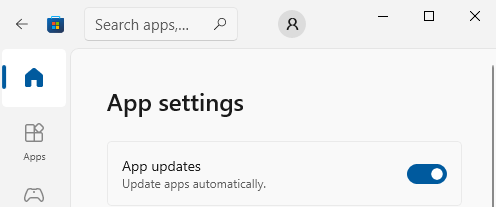
You can configure the Microsoft Store to automatically install updates as per [Wayback/Archive] Turn on automatic app updates (on my system this was the default):

Microsoft Store - Auto-Updates is turned on by default

Microsoft Store – Auto-Updates is turned on by default

  1. Select the Start ⊞ screen, then select Microsoft Store.
  2. In Microsoft Store at the upper right, select the account menu (the three dots) and then select Settings.
  3. Under App updates, set Update apps automatically to On.

As a backgrounder, here some articles on Windows Terminal, ConPTY and the Windows Console from the [Wayback/Archive] DevBlogs – Microsoft Developer Blogs:

  1. [Wayback/Archive] Windows Command-Line: Backgrounder | Windows Command Line Tools For Developers
  2. [Wayback/Archive] Windows Command-Line: The Evolution of the Windows Command-Line | Windows Command Line
  3. [Wayback/Archive] Windows Command-Line: Inside the Windows Console | Windows Command Line
  4. [Wayback/Archive] Windows Command-Line: Introducing the Windows Pseudo Console (ConPTY) | Windows Command Line
  5. [Wayback/Archive] Windows Command-Line: Unicode and UTF-8 Output Text Buffer | Windows Command Line

More on (pseudo)terminals in general containing [Wayback/Archive] “ConPTY” – Search results – Wikipedia:

More on using the Windows Terminal:

My related blog posts:

–jeroen

Posted in Chocolatey, ConPTY, Microsoft Store, Power User, Scoop, Windows, Windows Terminal, winget | Leave a Comment »

Windows 10 and 11: installing WSL2 does not require winget, Chocolatey or Scoop

Posted by jpluimers on 2023/05/18

After using Chocolatey for a long time and writing about it, I have written a few articles on other Windows package managers like winget and Scoop.

Part of the reason was that I wanted to install new systems in a semi-automatic way including WSL2 (Windows Subsystem for Linux 2).

As I have spent quite some time getting treated against metastasised rectum cancer, I missed part of the evolvement of WSL into WSL2 and of the winget evolvement.

The good news is that this simplified the scripted installation of WSL2 a lot, as over time, this got very easy, as confirmed in these posts/messages I found via [Wayback/Archive] winget wsl2 – Google Search:

I even found back this was announced when I was still in hospital: during the Build 2020 conference. A summary is at [Wayback/Archive] The Windows Subsystem for Linux BUILD 2020 Summary – Windows Command Line describing the introduction of wsl.exe --install and that it defaults to install WSL 2 as back-then already most Windows Insider build users using WSL had switched from WSL 1 to WSL 2.

Back to installing

Yesterday, in  Windows “equivalents” for bash backticks in cmd and PowerShell, I showed how to get the wsl.exe information:

C:\temp>PowerShell -Command "SigCheck "$((Get-Command -CommandType Application wsl).Path)""

Sigcheck v2.82 - File version and signature viewer
Copyright (C) 2004-2021 Mark Russinovich
Sysinternals - www.sysinternals.com

c:\windows\system32\wsl.exe:
        Verified:       Signed
        Signing date:   09:24 15/10/2021
        Publisher:      Microsoft Windows
        Company:        Microsoft Corporation
        Description:    Microsoft Windows Subsystem for Linux Launcher
        Product:        Microsoft« Windows« Operating System
        Prod version:   10.0.19041.1320
        File version:   10.0.19041.1320 (WinBuild.160101.0800)
        MachineType:    64-bit

This was on one of my Windows 10 systems with version 21H2.

The installation progress was as follows and took ome 3 minutes on a 50 Mibit/s fiber connection:

C:\temp>wsl.exe --install
Installing: Virtual Machine Platform
Virtual Machine Platform has been installed.
Installing: Windows Subsystem for Linux
Windows Subsystem for Linux has been installed.
Downloading: WSL Kernel
Installing: WSL Kernel
WSL Kernel has been installed.
Downloading: Ubuntu
The requested operation is successful. Changes will not be effective until the system is rebooted.

Time to play around (:

–jeroen

Posted in Batch-Files, Chocolatey, Development, Power User, Scoop, Scripting, Software Development, Windows, Windows Development, winget, WSL Windows Subsystem for Linux | Leave a Comment »

I dug into scoop a tiny bit: some thoughts and links

Posted by jpluimers on 2023/05/09

Last month, I wrote Need to take a look a Scoop (as a long time Chocolatey user).

So I did, and started with a list of my Chocolatey installs grouped by functionality in order to expand the table towards winget and [Wayback/ArchiveGitHub – ScoopInstaller/Scoop: A command-line installer for Windows.

This was a good way to start learning, and by already doing this, got learned this:

  • Whereas Chocolaty has a global searchable community package index at [Wayback/Archive] Chocolatey Software | Packages  which is moderated too.
  • Scoops works differently. There are many buckets you can get your applications from, and there is no Scoop maintained index of them.

Let’s focus on the latter for a bit:

From the above, I got a feeling that Scoop is way more like the Linux Package Managers than WinGet and Chocolatey are.

–jeroen

Read the rest of this entry »

Posted in Chocolatey, Development, Power User, Scoop, Software Development, Windows, Windows Development, winget | Leave a Comment »

Need to rethink which Windows package managers to use

Posted by jpluimers on 2023/04/24

Triggered by last week’s post Need to take a look a Scoop (as a long time Chocolatey user), I need to re-think which Windows package managers to use and in what order.

Basically there are two challenges:

  • User level (scoop) versus system level (winget and chocolatey) installations
  • Availability of packages in each package manager

Since I hardly used winget, I need to get started at Windows Package Manager – Wikipedia.

A good example of unavailability is at [Wayback/Archive] Scott’s Ultimate Tools via Winget – DVLUP (which has the ID values for winget or chocolatey of [Wayback/Archive] Scott Hanselman’s 2021 Ultimate Developer and Power Users Tool List for Windows – Scott Hanselman’s Blog)

–jeroen

Posted in Chocolatey, Power User, Scoop, Windows, winget | Leave a Comment »

Need to take a look a Scoop (as a long time Chocolatey user)

Posted by jpluimers on 2023/04/06

Based on

So:

Related blog posts:

–jeroen

Posted in Chocolatey, Power User, Scoop, Windows, winget | Leave a Comment »

Need to take a look a Scaleway

Posted by jpluimers on 2023/04/05

Based on

I need to take a look at Scaleway, at least at thee links via [Wayback/Archive] scaleway instance – Google Search:

Related blog post: Dave Anderson on Twitter: “Cool minor @Tailscale moment: I’m recommissioning a server that got moved from a different network, so all its network config was wrong, and generally I couldn’t get at it over the network, only IPKVM console. But then my ping over Tailscale started working?!” / Twitter

–jeroen

Posted in Cloud, Infrastructure, Power User, Scaleway, Scoop, Windows | 1 Comment »

Dave Anderson on Twitter: “Cool minor @Tailscale moment: I’m recommissioning a server that got moved from a different network, so all its network config was wrong, and generally I couldn’t get at it over the network, only IPKVM console. But then my `ping` over Tailscale started working?!” / Twitter

Posted by jpluimers on 2023/04/04

Wow, I wrote about Tailscale a few times before, and it is still on my research list, but this is a very compelling reason to use it. [Archive] Dave Anderson on Twitter: “Cool minor @Tailscale moment: I’m recommissioning a server that got moved from a different network, so all its network config was wrong, and generally I couldn’t get at it over the network, only IPKVM console. But then my ping over Tailscale started working?!” / Twitter

I archived the thread so it becomes easier to read: [Wayback/Archive] A readable Thread by @dave_universetf Says Cool minor @Tailscale moment: I’ – UnrollThread.com.

The core are these three tweets:

Turns out, IPv6 autoconfiguration is what happened. Sure, v4 configuration was entirely wrong (it was trying to connect to wifi, via a wifi dongle that was no longer installed, and wanted to talk to a DNS server that doesn’t exist any more), but eno1 had a cable plugged in!
The server noticed IPv6 router advertisements, went “I’ll have some of that”, and got global IPv6 connectivity automagically. IPv4 and DNS were still down though, so all it had at this point is the ability to send/receive IPv6 packets.
So, how did Tailscale get from there to a working setup? It still needs to contact https://t.co/hEs4S8qvTw to get a network map, and still needs to talk to DERP servers to get p2p tunnels working outside the LAN. Enter bootstrap DNS!

It means I have to re-read Source: Some links on Tailscale / Wiregard, especially the [WaybackHow Tailscale works · Tailscale bit, then decide how I want to organise my infrastructure to run parts under Tailscale (I have the impression it is a peer based set-up, not router based).

Then I have to read [Wayback/Archive] IPv4, IPv6, and a sudden change in attitude – apenwarr of which the conclusion is this:

IP mobility is what we do, in a small way, with Tailscale’s WireGuard connections. We try all your Internet links, IPv4 and IPv6, UDP and TCP, relayed and peer-to-peer. We made mobile IP a real thing, if only on your private network for now. And what do you know, the math works. Tailscale’s use of WireGuard with two networks is more reliable than with one network.

Finally I need to not just read it, but understand all it (:

Or maybe I should ask Kris, as I got here through:

I saved Kris’ message thread here at [Wayback/Archive] Thread by @isotopp on Thread Reader App – Thread Reader App.

An OK translation is at [Wayback/Archive] Thread by @isotopp on Thread Reader App – Thread Reader App.

–jeroen

Posted in Hardware, Network-and-equipment, Power User, Scoop, Tailscale, VPN, Windows, Wireguard | 1 Comment »

useful commands that can be used after clean installation of Windows 10

Posted by jpluimers on 2022/12/12

Lot’s of installation tips in [Wayback/Archive] useful commands that can be used after clean installation of Windows 10.

It includes PackageProvider installation for NuGet, Chocolatey, ChocolateyGet (Chocolatey via OneGet), and use of both winget and scoop.

–jeroen

Posted in Chocolatey, NuGet, Power User, Scoop, Windows, Windows 10, winget | Leave a Comment »

Reminder to self: check to see the state of winget and if it is possible to install Windows Store applications from the command-line

Posted by jpluimers on 2022/11/02

While undergoing many treatments against rectum cancer, I saved the below tweets with a marker “The new windows package manager: aka.ms/winget“.

[Wayback/Archive] aka.ms/winget

Well, actually the first tweet is gone, now, but archived as [Wayback/Archive] Stefan Stranger on Twitter: “New Windows Package Manager #MSBuild2020… “

Read the rest of this entry »

Posted in Chocolatey, Power User, Scoop, Windows, Windows 10, winget | Leave a Comment »