The Wiert Corner – irregular stream of stuff

Jeroen W. Pluimers on .NET, C#, Delphi, databases, and personal interests

  • My badges

  • Twitter Updates

  • My Flickr Stream

  • Pages

  • All categories

  • Enter your email address to subscribe to this blog and receive notifications of new posts by email.

    Join 1,862 other subscribers

Archive for the ‘Communications Development’ Category

Tools for TCP tunnels over HTTP/HTTPS

Posted by jpluimers on 2019/01/16

With the advent of WebSockets, it looks like TCP tunnels over HTTP/HTTPS are gaining more ground and I need to put some research time in them.

Some old to new links:

CONNECT requests are not supported by many HTTP proxies, especially in larger organisations, so chisel and crowbar have a much bigger chance there.

And of course there is SoftEtherVPN/SoftEtherVPN: A Free Cross-platform Multi-protocol VPN Software. * For support, troubleshooting and feature requests we have http://www.vpnusers.com/. For critical vulnerability please email us. (mail address is on the header.).

However, that is a VPN solution which is much broader than just a single TCP tunnel. You can so similar things with OpenVPN, but over HTTP/HTTPS, also requires CONNECT:

SoftEtherVPN seems to be more versatile though. I blogged about that before, but back then didn’t have needs for it yet. VPN over HTTPS: Ultimate Powerful VPN Connectivity – SoftEther VPN Project.

–jeroen

via: [WayBackVPN through only http – Server Fault answer by [WayBack] neutrinus

Posted in Communications Development, Development, HTTP, https, Internet protocol suite, Network-and-equipment, OpenVPN, Power User, TCP, VPN, WebSockets, Windows-Http-Proxy | Leave a Comment »

Need to put some research in Google Calendar support for EXRULE and EXDATE

Posted by jpluimers on 2019/01/15

Though the Google Calendar UI does not support EXRULE and EXDATE to exclude certain slots (via dates or rules) from recurring events.

The API supports them: [WayBackGoogle Calendar API, RRULE and EXDATE – Stack Overflow

–jeroen

Posted in Communications Development, Development, Google, GoogleCalendar, HTTP, Internet protocol suite, Power User, REST, TCP | Leave a Comment »

Testing SMTP from the console on Linux, BSD and Mac OS: swaks and smtp-cli Perl script clients

Posted by jpluimers on 2019/01/03

Testing SMTP using telnet is tedious as you have to remember the commands and responses in the SMTP protocol. It gets even harder when doing SMTP AUTH, as then you have to base encode a bunch of strings [WayBackHow to Test SMTP AUTH using Telnet [Wiki] | NDCHost

Luckily there is a Perl script swaks: [WayBackSwaks – Swiss Army Knife for SMTP which does ESMTP and LMTP as well as TLS.

The funny thing is that the repository at jetmore/swaks: Swaks – Swiss Army Knife for SMTP only has the readme, but the not the script which you can get from [WayBack] swaks.pl.

Despite that, most Linux distributions have an installation package.

[WayBackswaks for OpenSuse is in the [WayBacknetwork repository, so for Tumbleweed (actually: Factory) on Raspberry Pi you need to perform this:

zypper addrepo http://download.opensuse.org/repositories/network/openSUSE_Factory_ARM/network.repo
zypper refresh
zypper install swaks

On Mac OS X it is even easier: if you have the homebrew package manager installed, you just install the [WayBackswaks formula using the [WayBack] swaks.rb script:

brew install swaks

Note there is also the smtp-cli Perl script which I mentioned before at Fake/Mock SMTP servers and services for use during development, which also does TLS, but few environments have ready built packages for them. If you still want to try it out:

For SMTP AUTH:

swaks -tls --to jeroen.wiert.me@pluimers.com --from jeroen.wiert.me@pluimers.com --server smtp.xs4all.nl --auth-user username

Which prompts for the password, then outputs like this:

=== Trying smtp.xs4all.nl:25...
=== Connected to smtp.xs4all.nl.
<- 220 smtp-cloud3.xs4all.net ESMTP ESMTP server ready -> EHLO rmbpro1tbjwp
<-  250-smtp-cloud3.xs4all.net hello [188.206.68.219], pleased to meet you
<-  250-HELP
<-  250-AUTH LOGIN PLAIN
<-  250-SIZE 157286400
<-  250-8BITMIME
<-  250-STARTTLS
<- 250 OK -> STARTTLS
<- 220 Ready to start TLS === TLS started with cipher TLSv1:DHE-RSA-AES256-SHA:256 === TLS no local certificate set === TLS peer DN="/OU=Domain Control Validated/OU=PositiveSSL Wildcard/CN=*.xs4all.nl" ~> EHLO rmbpro1tbjwp
<~  250-smtp-cloud3.xs4all.net hello [188.206.68.219], pleased to meet you
<~  250-HELP
<~  250-AUTH LOGIN PLAIN
<~  250-SIZE 157286400
<~  250-8BITMIME
<~ 250 OK ~> AUTH LOGIN
<~ 334 ############ ~> anA=
<~ 334 ############ ~> ############################
<~ 235 ... authentication succeeded ~> MAIL FROM:<jeroen.wiert.me@pluimers.com>
<~  250 <jeroen.wiert.me@pluimers.com> sender ok
 ~> RCPT TO:<jeroen.wiert.me@pluimers.com>
<~  250 <jeroen.wiert.me@pluimers.com> recipient ok
 ~> DATA
<~ 354 enter mail, end with "." on a line by itself ~> Date: Wed, 19 Jul 2017 09:09:57 +0200
 ~> To: jeroen.wiert.me@pluimers.com
 ~> From: jeroen.wiert.me@pluimers.com
 ~> Subject: test Wed, 19 Jul 2017 09:09:57 +0200
 ~> Message-Id: <20170719090957.052207@rmbpro1tbjwp>
 ~> X-Mailer: swaks v20170101.0 jetmore.org/john/code/swaks/
 ~> 
 ~> This is a test mailing
 ~> 
 ~> .
<~ 250 smtp-cloud3.xs4all.net accepted mail mXA71v00C4jr6ac01XA9Bo for delivery ~> QUIT
<~  221 smtp-cloud3.xs4all.net ESMTP closing connection
=== Connection closed with remote host.

–jeroen

Posted in *nix, *nix-tools, Communications Development, Development, Hardware Development, Internet protocol suite, Linux, openSuSE, Power User, Raspberry Pi, SMTP, SuSE Linux, Tumbleweed | Leave a Comment »

How to Setup Chroot SFTP in Linux (Allow Only SFTP, not SSH)

Posted by jpluimers on 2018/12/24

If you want to setup an account on your system that will be used only to transfer files (and not to ssh to the system), you should setup SFTP Chroot Jail.

This explains how: [WayBack] How to Setup Chroot SFTP in Linux (Allow Only SFTP, not SSH)

Posted in *nix, *nix-tools, Communications Development, Development, Internet protocol suite, Power User, SFTP, SSH, TCP | Leave a Comment »

on my research list: autossh

Posted by jpluimers on 2018/12/12

Having mainly used ssh as a means to connect to a shell on remote machines and occasionally a manual port forward.

I never noticed autossh where you can automate the ssh logon process to keep permanent port forwards up and running. Cool!

It’s on my research list now, as this will be useful probably sooner than later:

My initial impression is that autossh is a wrapper around the regular ssh client that allows reconnection upon communication failures.

–jeroen

Posted in *nix, *nix-tools, Communications Development, Development, Internet protocol suite, Power User, SSH, TCP | Leave a Comment »

Load testing a web server on Windows using the ApacheBench benchmark tool from Apache

Posted by jpluimers on 2018/11/08

Based on:

  1. Download the most recent x64 Apache binaries for Windows from [WayBackApache VC15 binaries and modules download (at the time of writing: https://www.apachelounge.com/download/VC15/binaries/httpd-2.4.34-win64-VC15.zip )
  2. Extract recursively to D:\bin
  3. Run the UltrawareController locally
  4. Run D:\bin\httpd-2.4.34-win64-VC15\Apache24\bin\ab.exe -n 1000 -c 10 http://localhost:8000/foo

This will run the ab Apache benchmark tool with 1000 connections using 10 threads all doing the same http GET request at http://localhost:8000/foo

If you want to test TLS (https) connections, then you need to use the abs tool in the same directory as the ab tool supports http-only (when you still try, you get the message SSL not compiled in; no https support as explained in [WayBack] Add https support to Apache Bench on Windows – Stack Overflow).

Download location via [WayBack] windows – Is there any link to download ab Apache benchmark – Stack Overflow:

There are many more command-line parameters documented at [WayBack] ab – Apache HTTP server benchmarking tool – Apache HTTP Server Version 2.4, this is the summary:

Synopsis

ab [ -A auth-username:password ] [ -b windowsize ] [ -B local-address ] [ -c concurrency ] [ -Ccookie-name=value ] [ -d ] [ -e csv-file ] [ -f protocol ] [ -g gnuplot-file ] [ -h ] [ -Hcustom-header ] [ -i ] [ -k ] [ -l ] [ -m HTTP-method ] [ -n requests ] [ -p POST-file ] [ -Pproxy-auth-username:password ] [ -q ] [ -r ] [ -s timeout ] [ -S ] [ -t timelimit ] [ -Tcontent-type ] [ -u PUT-file ] [ -v verbosity] [ -V ] [ -w ] [ -x <table>-attributes ] [ -Xproxy[:port] ] [ -y <tr>-attributes ] [ -z <td>-attributes ] [ -Z ciphersuite ] [http[s]://]hostname[:port]/path

Via: [WayBack] apache – ab load testing – Stack Overflow

jeroen

Posted in Communications Development, Development, HTML, HTTP, Internet protocol suite, Software Development, Web Development | Leave a Comment »

How to Setup Chroot SFTP in Linux (Allow Only SFTP, not SSH)

Posted by jpluimers on 2018/11/07

I need to script this one day: [WayBackHow to Setup Chroot SFTP in Linux (Allow Only SFTP, not SSH)

–jeroen

Posted in *nix, Awk, bash, Communications Development, Development, Internet protocol suite, Power User, Scripting, Software Development, SSH, TCP | Leave a Comment »

How to configure Nginx SSL/TLS passthrough with TCP load balancing – nixCraft

Posted by jpluimers on 2018/10/17

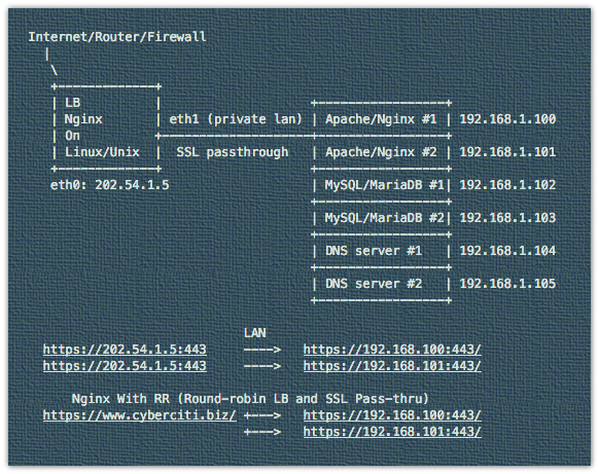
Explains how to configure Nginx with SSL Passthrough on Linux or Unix-like system to encrypt traffic on all backends.

Uses the stream module ngx_stream_core_module.

Source: [WayBackHow to configure Nginx SSL/TLS passthrough with TCP load balancing – nixCraft

via: [WayBackLearn how to setup TCP load balancing with Nginx and configure SSL Passthrough on Linux/Unix. – nixCraft – Google+

–jeroen

Read the rest of this entry »

Posted in Communications Development, Development, HTTP, Internet protocol suite, TCP, TLS | Leave a Comment »

The part before the @ in email addresses is case sensitive

Posted by jpluimers on 2018/10/16

At [WayBackError when trying to signup using an email address with uppercase letters (#27898) · Issues · GitLab.org / GitLab Community Edition · GitLab, I commented this:

Both the :e-mail and :email_confirmation fields should get the same case processing treatment.

That treatment should consist of this:

  1. The part before the @ should be treated as case sensitive
  2. The part after the @ should be treated as case insensitive

This means that:

  • Foo@Example.Org and Foo@example.org are the same
  • Foo@example.org and foo@example.org are different

The main reason is that there are email systems expecting case sensitivity in the part before the @ sign.

I think excluding those users from being able to use GitLab is a bad idea.

See especially the comments at the Stack Overflow answer to Are email addresses case sensitive?

Relevant RFC 5321: Simple Mail Transfer Protocol sections:

Important comments:

I work at a large company and there is another person with the same first and last name. I discovered today that his local-part differs from mine only in capitalization. This has been working properly, so I was surprised to see “no widely used mail systems distinguish different addresses based on case”. We use MS Exchange which I would call “widely used”. – Matthew James Briggs Nov 24 ’15 at 20:14

RFC 5321 2.4. General Syntax Principles and Transaction Model – SMTP implementations MUST take care to preserve the case of mailbox local-parts. In particular, for some hosts, the user “smith” is different from the user “Smith”. Mailbox domains follow normal DNS rules and are hence not case sensitive. – Adam111p Apr 27 ’16 at 10:02

Most important parts of the answer:

From RFC 5321, section-2.3.11:

The standard mailbox naming convention is defined to be “local-part@domaiN“; contemporary usage permits a much broader set of applications than simple “user names”. Consequently, and due to a long history of problems when intermediate hosts have attempted to optimize transport by modifying them, the local-part MUST be interpreted and assigned semantics only by the host specified in the domain part of the address.

So yes, the part before the “@” could be case-sensitive, since it is entirely under the control of the host system. In practice though, no widely used mail systems distinguish different addresses based on case.

The part after the @ sign however is the domain and according to RFC 1035, section 3.1,

“Name servers and resolvers must compare [domains] in a case-insensitive manner”

 –jeroen

Posted in Communications Development, Development, Internet protocol suite, SMTP, Software Development | Leave a Comment »

tcp – How can I trigger a script when a certain port becomes available for requests? – Unix & Linux Stack Exchange

Posted by jpluimers on 2018/10/09

Netcat to the rescue waiting for a Windows 10 upgrade to finish (which can take hours):

while ! nc -z 172.22.0.67 3389; do echo "sleeping"; sleep 10; done; echo 'The server is up!'

Via: [WayBacktcp – How can I trigger a script when a certain port becomes available for requests? – Unix & Linux Stack Exchange, quoting from the answer:

  • nc is Netcat, “the Swiss-army knife for TCP/IP”,
  • -z means: do not send any data, just check if the port is open,
  • while ! nc -z …; do sleep 0.1; done: keep checking and sleeping for one tenth of a second until the port opens up, i.e. Netcat returns with a zero (success) status.

–jeroen

Posted in *nix, *nix-tools, Communications Development, Development, Internet protocol suite, Power User, TCP, Windows | Leave a Comment »