Archive for the ‘Development’ Category
Posted by jpluimers on 2021/09/23
From a long time ago, but got a request for it a while ago is [WayBack/Archive.is] Howto create C-Header for Delphi/Free Pascal/Lazarus DLL – data types – Stack Overflow:
I have used the below construct to generate header files compatible with the C-mode compiler of Visual C++ 6 from Delphi 5 code when Delphi had the -JPH switch (see notes below).
Note that I have not used this since Delphi 5, but the switch has since then been expanded:
Somewhere along the line, the [
WayBack]
JPHNE switch has been added to the
dcc32 command-line compiler:
-JPHNE = Generate C++ .obj file, .hpp file, in namespace, export all
It generates the .hpp files to import the DLL that was written in Delphi.
Notes from the Delphi 5 era:
{ Visual C++ 6 does not like nested structs/unions the way that BC++ can handle them.
  Visual C++ 6 requires the "typedef" to be present AND the typename AFTER the struct definition.
  You will see this when defining TConversationId, TReturnKey and other types that depend on nested structs/unions

  The trick is to perform these steps each and every time this unit changes:
    - Generate this unit once with all the EXTERNALSYM disabled.
      - Then the DCC32 -JPH will generate the basic structs for them.
    - Copy all the nested struct and union definitions to this file
    - Embed the definitions with (*$HPPEMIT '' *)
    - Append the typename at the end of the struct definition
    - Enable all the EXTERNALSYM again
    - Regenerate the HPP files by using DCC32 -JPH
  To make this process easier, we have introduced two new conditional defines:
    - BCB - disable EXTERNALSYM, disable HPPEMIT
    - VC6 - enable EXTERNALSYM, enable HPPEMIT

  A similar thing is with these constructions that VC6 does not like those either:
    - short strings (BCB defines them as "SmallString<##>" which VC6 does not like).
    - short integers (BCB defines them as "Shortint" so we have included an HPPEMIT for that)
}

{$ifdef win32}
  { important! Makes sure that the all enumerated types fit in exactly one byte each! }
  {$Z1}

  { force the C/C++ HPP header files to have the C/C++ compiler pack structure elements on byte boundaries }
  {$ifdef BCB}
    {$HPPEMIT '#pragma option push -a1' }
  {$endif BCB}
{$endif win32}
And the download (hopefully I have converted it to git by then):
–
–jeroen
Posted in Delphi, Delphi 5, Development, Software Development | Leave a Comment »
Posted by jpluimers on 2021/09/23
For my future self.
Due to an issue with choco-cleaner versions [WayBack] 0.0.6 and [WayBack] 0.0.7, I needed to ensure it was installed as version [WayBack] 0.0.5.2 and keep it that version.
Not sure if this is the canonical way, but this worked:
choco uninstall --yes choco-cleaner
choco install --yes choco-cleaner --version 0.0.5.2
choco pin add --name=choco-cleaner --version 0.0.5.2
choco pin list
This worked to revert:
choco pin remove --name=choco-cleaner
choco pin list
choco upgrade --yes choco-cleaner
Aftere this upgrade, choco-cleaner version 0.0.7.1 shows a nice error message when the environment variable %ChocolateyToolsLocation% fails to exist.
In that case calling RefreshEnv.cmd will create that environment variable.
Related:
–jeroen
Read the rest of this entry »
Posted in .NET, Chocolatey, CommandLine, Development, Power User, PowerShell, PowerShell, Scripting, Software Development, Windows | Leave a Comment »
Posted by jpluimers on 2021/09/23
I bumped in the error [WayBack] “The input object cannot be bound to any parameters for the command either because the command does not take pipeline input or the input and its properties do not match any of the parameters that take pipeline input.” when using [WayBack] Write-Output where [WayBack] Select-Object worked just fine.
This happened when playing around with detecting empty Chocolatey .nupkg package files.
$LibPath = Join-Path $env:ChocolateyInstall 'lib'
$NupkgFilter = '*.nupkg'

Get-ChildItem -Path $LibPath -Recurse -Filter $NupkgFilter |
    Where-Object {($_.Length -eq 0) -and ($_.BaseName -eq "hg")} |
        Sort-Object LastWriteTime |
            Select-Object BaseName

<#
Get-ChildItem -Path $LibPath -Recurse -Filter $NupkgFilter |
    Where-Object {($_.Length -eq 0) -and ($_.BaseName -eq "hg")} |
        Sort-Object LastWriteTime |
            Write-Output BaseName
## Write-Output : The input object cannot be bound to any parameters for the command either because the command does not take pipeline input or the input and its properties do not match any of the parameters that take pipeline input.
#>

Get-ChildItem -Path $LibPath -Recurse -Filter $NupkgFilter |
    Where-Object {($_.Length -eq 0) -and ($_.BaseName -eq "hg")} |
        Sort-Object LastWriteTime |
            ForEach-Object { Write-Output $_.BaseName }
The output is also slightly different, hinting on the root cause:
BaseName
--------
hg
hg
The above shows that Select-Object selects a list of BaseName properties (italic part), whereas Write-Output shows a single BaseName property content (bold part).
Read the rest of this entry »
Posted in .NET, CommandLine, Development, PowerShell, PowerShell, Scripting, Software Development | Leave a Comment »
Posted by jpluimers on 2021/09/22
For my link archive: [WayBack] GitHub – metasfresh/metasfresh: We do Open Source ERP – Fast, Flexible & Free Software to scale your Business.
It’s mainly written in JavaScript and Java with a PostgreSQL database and elasticsearch search.
There is plenty of [WayBack] metasfresh documentation (for users, administrators and developers), all with markdown source.
The developer documentation starts with a nice diagram of the [WayBack] metasfresh Architecture:

Markdown source of the architecture page: [WayBack] metasfresh-documentation/metasfresh_architecture.md at gh-pages · metasfresh/metasfresh-documentation · GitHub: Docs and Manuals for Devs, Users, Admins.
Via:
–jeroen
Posted in Development, Java, Java Platform, JavaScript/ECMAScript, Scripting, Software Development | Leave a Comment »
Posted by jpluimers on 2021/09/22
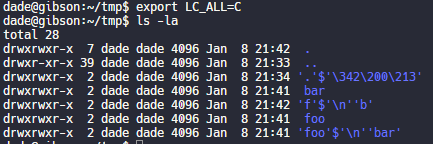
[WayBack] Thread by @0xdade: Today I learned that you can put zero width spaces in file names on Linux. Have fun. I’m playing with this because punycode/IDN is fascinati…
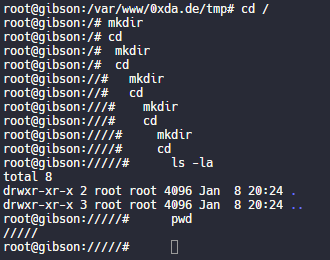
Today I learned that you can put zero width spaces in file names on Linux. Have fun.

And these tweets:
- [WayBack] dade в Twitter: “Today I learned that you can put zero width spaces in file names on Linux. Have fun.… “
- [WayBack] @zeratax (fake) Twitterissä: “newline char in filenames is also very “fun”… “
- [WayBack] healthyoutlet on Twitter: “using a zero width space and a zero width nonjoiner as the two possible states of a bit you can hide binary secrets in tweets! … “
- [WayBack] Garth “No CVEs” Mortensen on Twitter: “Quick function to get a zero width space in your clipboard (OS X, use
xsel for linux). zws () { echo -n '\u200D' | pbcopy }… “
- [WayBack] Duncan on Twitter: “Terminal escape sequences are fun too some command line tools on some operating systems will escape them, others don’t.… “

- [WayBack] aaron on Twitter: “lol when I was new at CTF and thought guessctf challenges were fun, I made a “forensics” chal where there is a tarball containing a ton of junk and a single file named a zero-width space with permissions
000. If you cat it, there were \b chars to hide the flag. Super tedious.… “
- [WayBack] َ (@Maxwellcrafter) on Twitter: “I’m pretty sure that this works with Windows too, at least folders, and it messes with stuff sometimes… “
- [WayBack] Uri Granta on Twitter: “Wait till you discover that
Variation Selectors (U+FE00..U+FE0F) are zero-width invisible modifiers with the ID_Continue property, so can be used inside variable names in languages like Python or C#. And since they’re modifiers, the cursor doesn’t stop when it passes them.… “
- [WayBack] Harri Luuppala on Twitter: “Insert an bell in a filename for your friends. In most terminals, when the Bell character (ASCII code 7,
\a in C) is printed by the program, it will cause the terminal to ring its bell.… “
- [WayBack] J. Neko on Twitter: “Zero width spaces can be very useful. Have also used them in usernames, and to avoid character length rules, and…… “
- [WayBack] ALP on Twitter: “that is nothing. one day i’ve managed to put a backspace in the name of the file! it was more than frustrating trying to delete file that had a hidden typo in its name…… “
- [WayBack] Lucky225🍀 2️⃣ 2️⃣ 5️⃣✸ on Twitter: “I put zero width characters in fucking everything. I’ve found it useful in bypassing a shit ton of shit.… “
- [WayBack] dade on Twitter: “I think it’s more entertaining to have a file that is named *only* a zero width space, but I think using them throughout a filename is better to break tab completion and not stand out too much. A filename that is just blank looks strange in ls output.… “
- [WayBack] dade on Twitter: “You could put zw spaces in config files to make it look like it’s reading one file when it’s really reading a different file.… “
- [WayBack] Dylan Katz on Twitter: “This one is my fave: ‘⁄’ (\u2044) or ‘∕’ (\u2215) Allow for this: …”
- [WayBack] dade on Twitter: “Does chrome/firefox’s IDN algorithms not punycode these for lookalike characters? or mixed script confusables? or the unicodeset blacklist?… “
- [WayBack] Dylan Katz on Twitter: “So for the first one they do, for the second one, it strips the user. Also, a lot of this is more on the platform imo. For instance, on mobile devices, users may not be checking the url bar. For instance, I was originally using that trick for QR codes urls… “
- [WayBack] Dylan Katz on Twitter: “(whoops, doubled up on “for instance” there) Basically, depends on the platform, but I feel like creating a convincing link in the app (twitter, slack, whatever) is enough… “
- [WayBack] dade on Twitter: “Well it still shows as a blank line in the ls of the parent directory, so it isn’t flawless.… “
- [WayBack] dade on Twitter: “My god, it is beautiful. I mean except all the whitespace I can’t get rid of before the command lmao.… “
- [WayBack] dade on Twitter: “Not related to the terminal fun, but related to zero width characters: You can: – Break url previews
https://0xda.de – @0xdade without tagging – Make a word like systemd not searchable “
[WayBack] Thread by @Plazmaz: @0xdade Was doing some real fucking around with urls recently: gist.github.com/Plazmaz/565a5c… (was gonna flesh it out more but didn’t find…:
mentions Was doing some real fucking around with urls recently:
[WayBack] url-screwiness.md · GitHub:
This is a list of methods for messing with urls. These are often useful for bypassing filters, SSRF, or creating convincing links that are difficult to differentiate from legitimate urls.
And a bit of documentation links:
–jeroen
Posted in *nix, .NET, C#, Development, NTFS, Power User, Python, Scripting, Software Development, Windows | Leave a Comment »
Posted by jpluimers on 2021/09/22
Since I switch a lot between languages, I tend to forget what indentation, spacing and termination to use.
So from the Indentation/Length/Spacing/Termination sections in [WayBack] Code Layout and Formatting · PowerShell Practice and Style:
Read the rest of this entry »
Posted in .NET, CommandLine, Development, PowerShell, PowerShell, Scripting, Software Development | Leave a Comment »
Posted by jpluimers on 2021/09/21
A while ago, This does not compute had a few nice videos on a Mac SE/30 and it’s repair, including the recap process of replacing the electrolytic capacitors (or condensators in some other languages), and cleaning the board (some wash it with hot water and soap, others with isopropyl-alcohol, often called rubbing alcohol).
Note the simasimac can have many causes: bad capacitors in main board are the most common, but it can also be bad memory.
White lithium grease can make the floppy work again (see also [WayBack] Lithium soap – Wikipedia and [WayBack] Grease (lubricant) – Wikipedia).
He also added some links to which I added some quotes and WayBack links:
- [WayBack] Bringing a Zebra Stripe SE/30 Back to Life from simasimac
Bringing a Zebra Stripe SE/30 Back to Life, Paul Brierley, The ‘Book Beat, 2009.02.19. The Japanese call it Simasimac, the horizontal striped pattern that indicates your Mac is terminal.

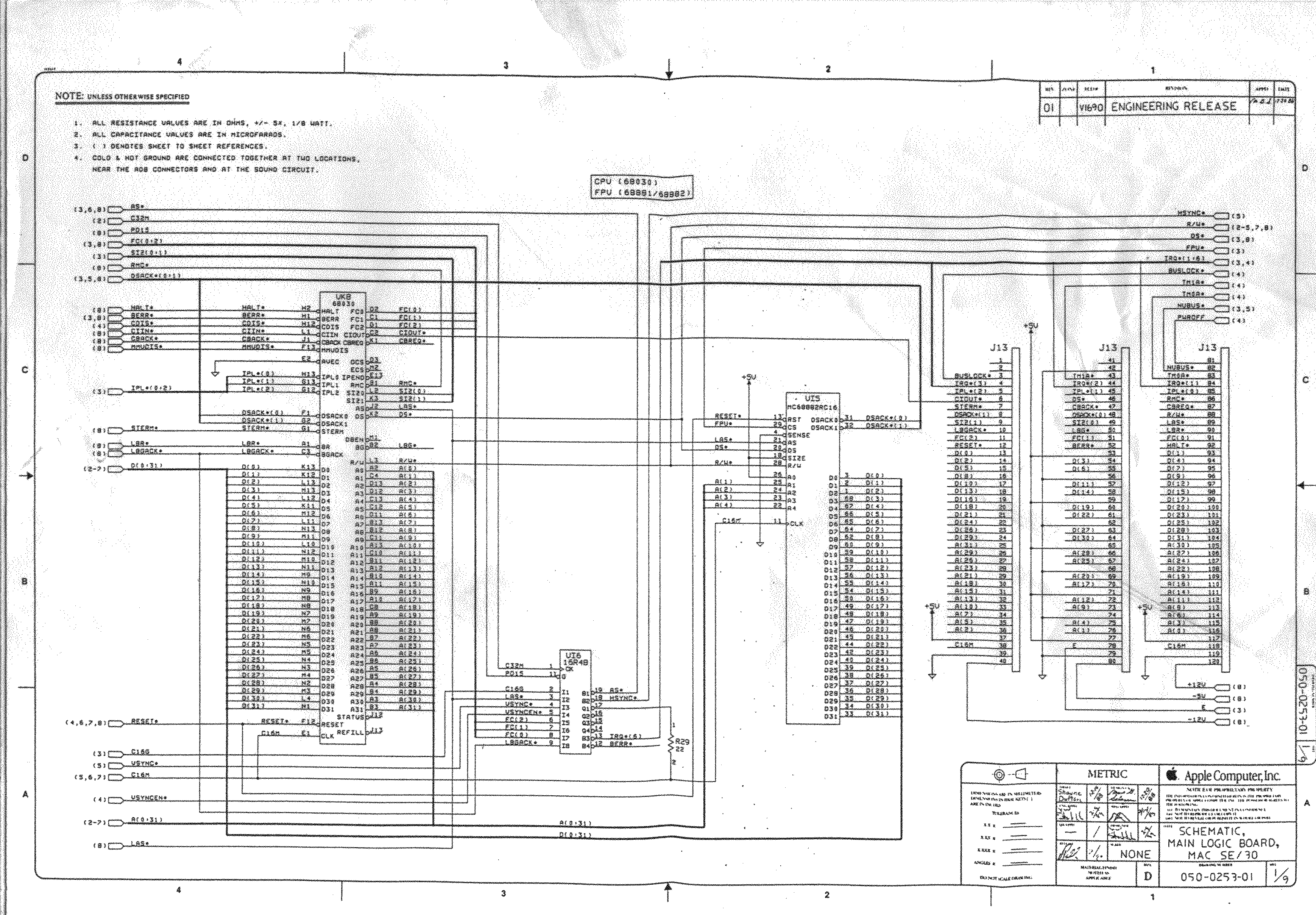
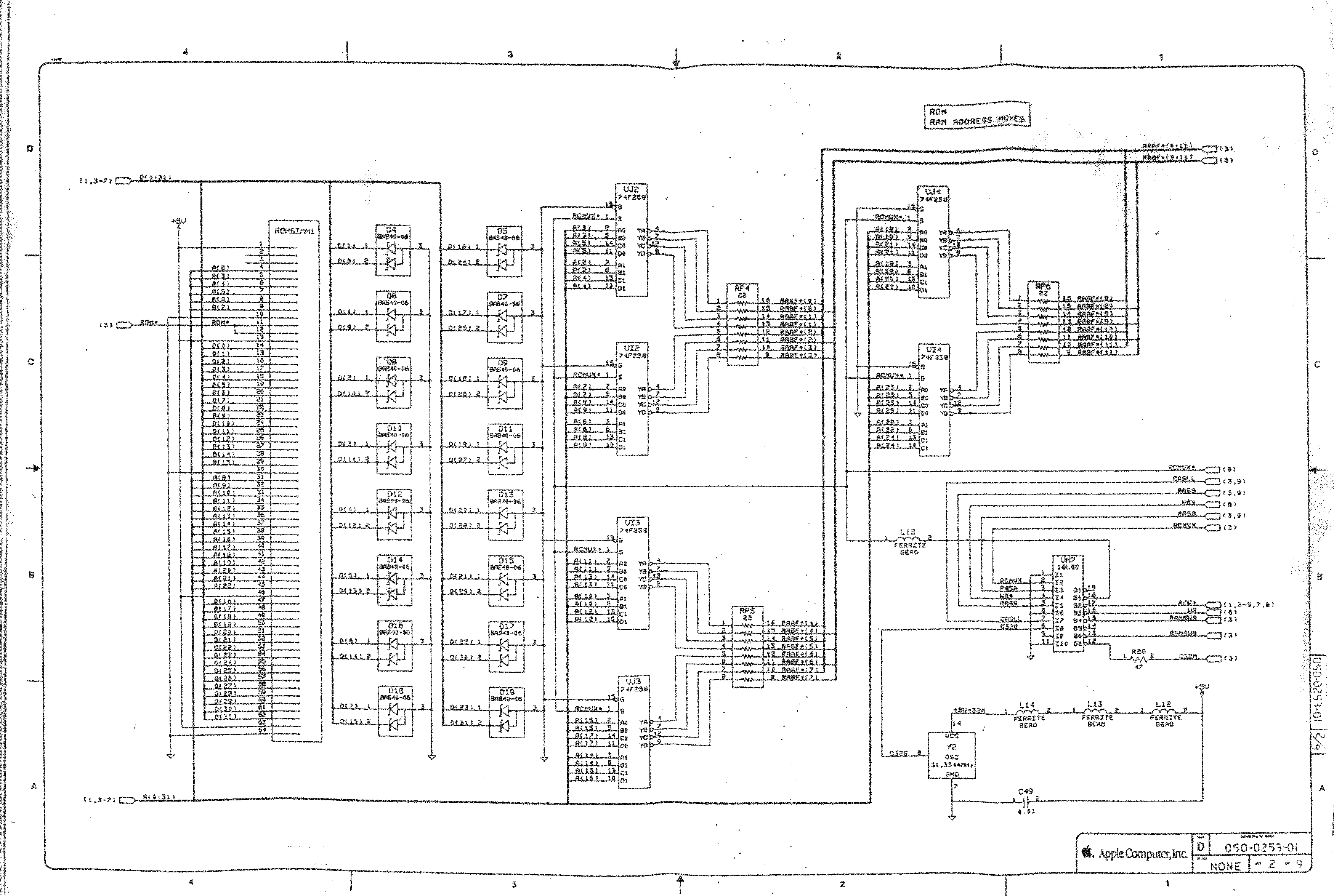
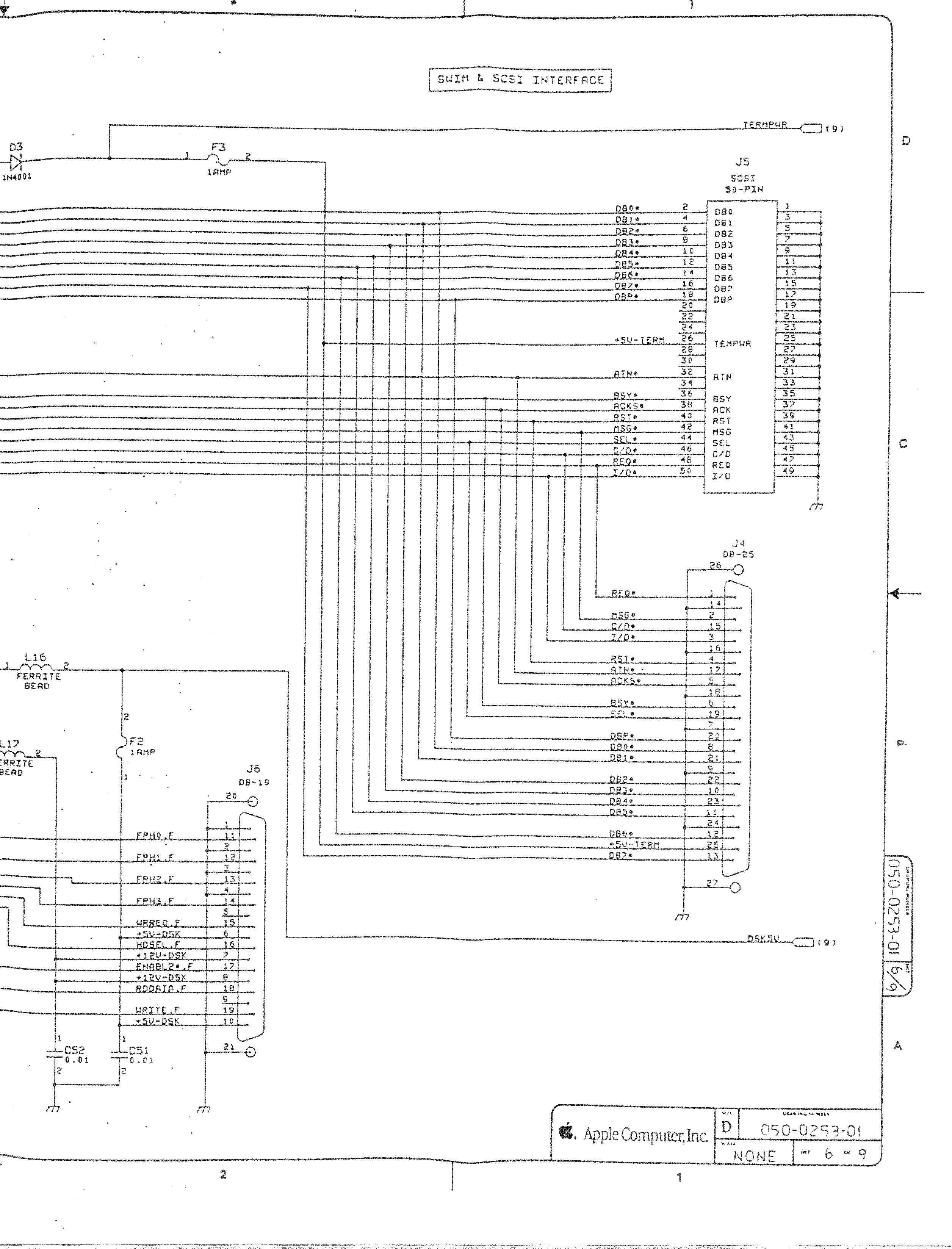
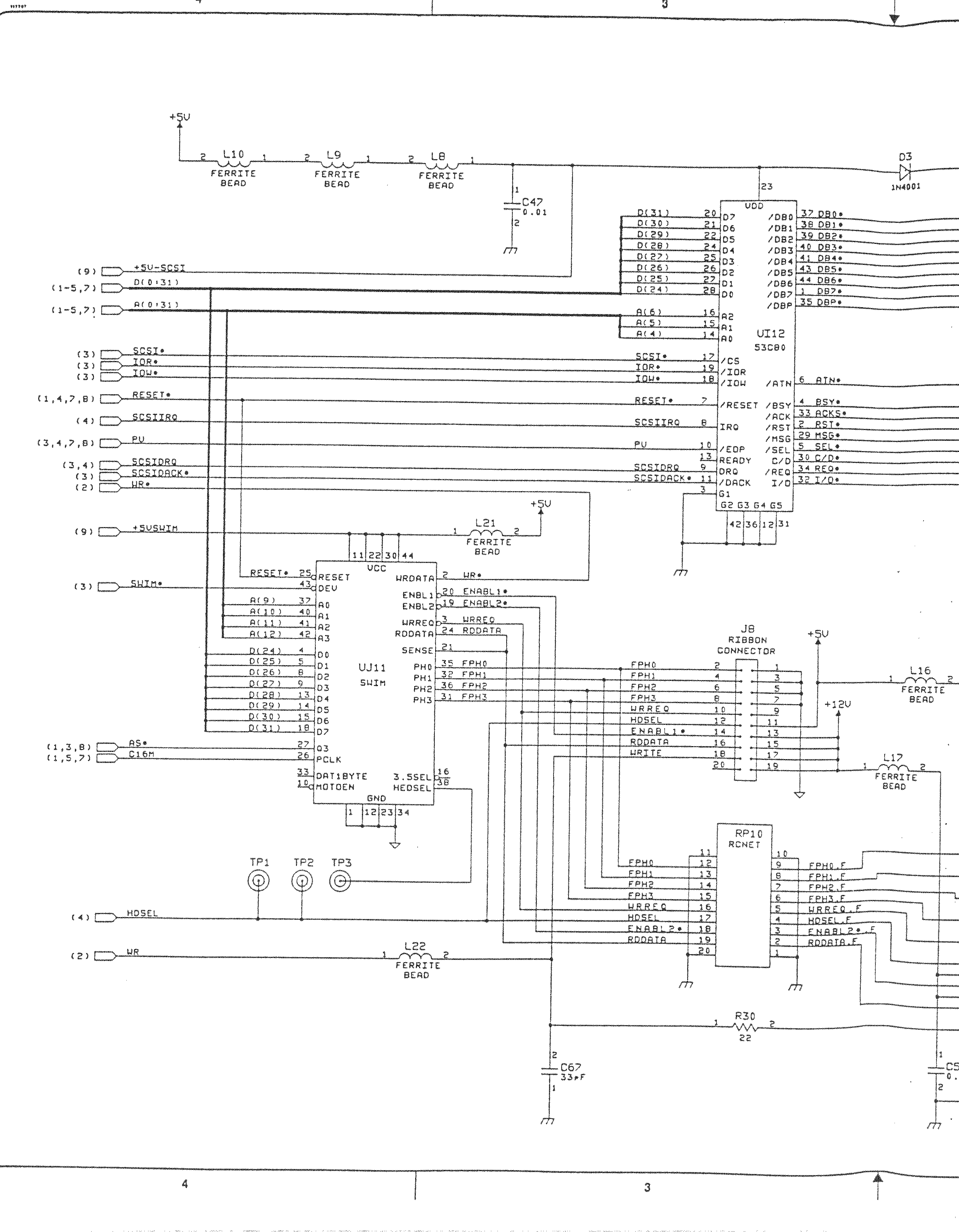
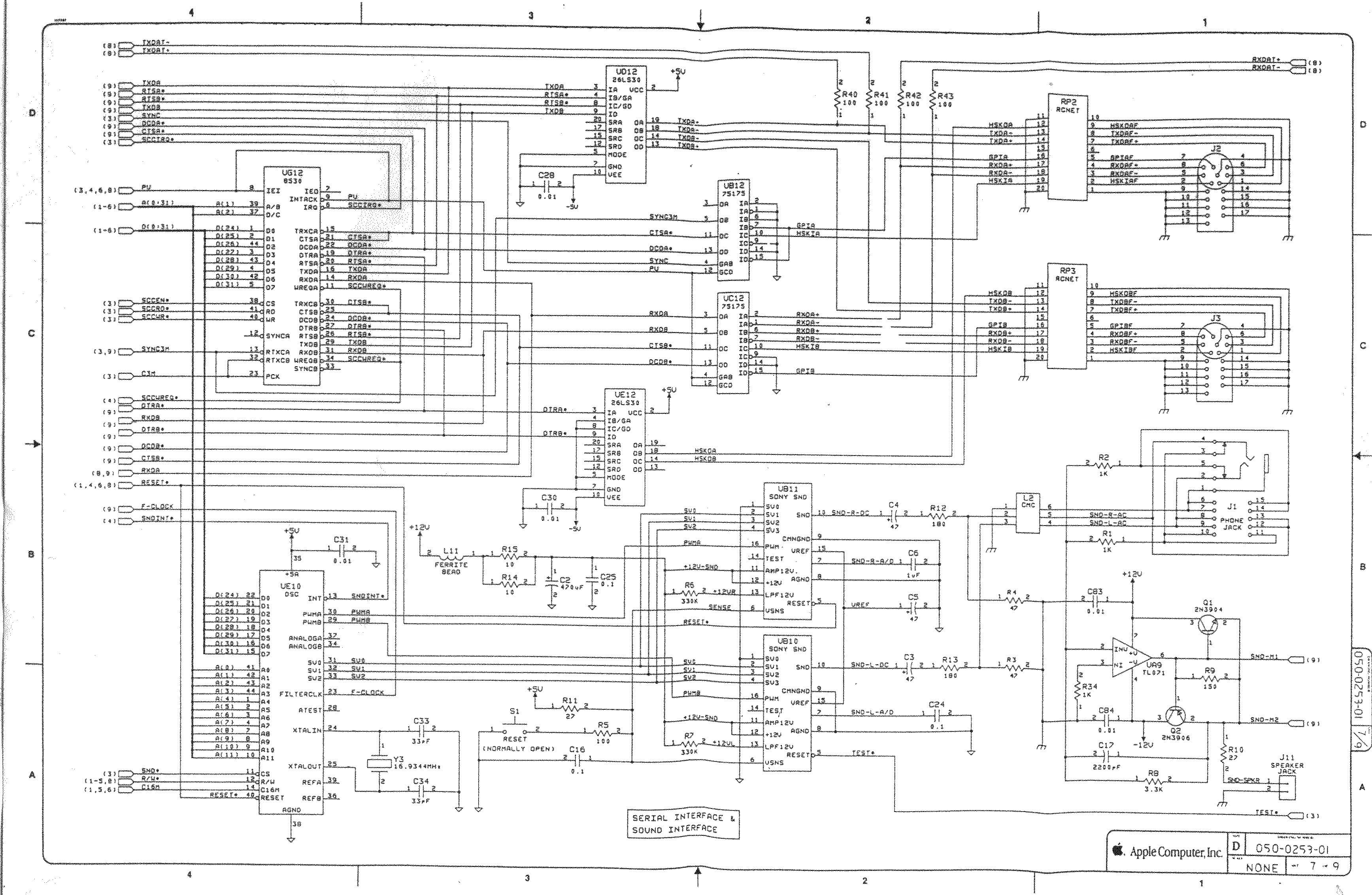
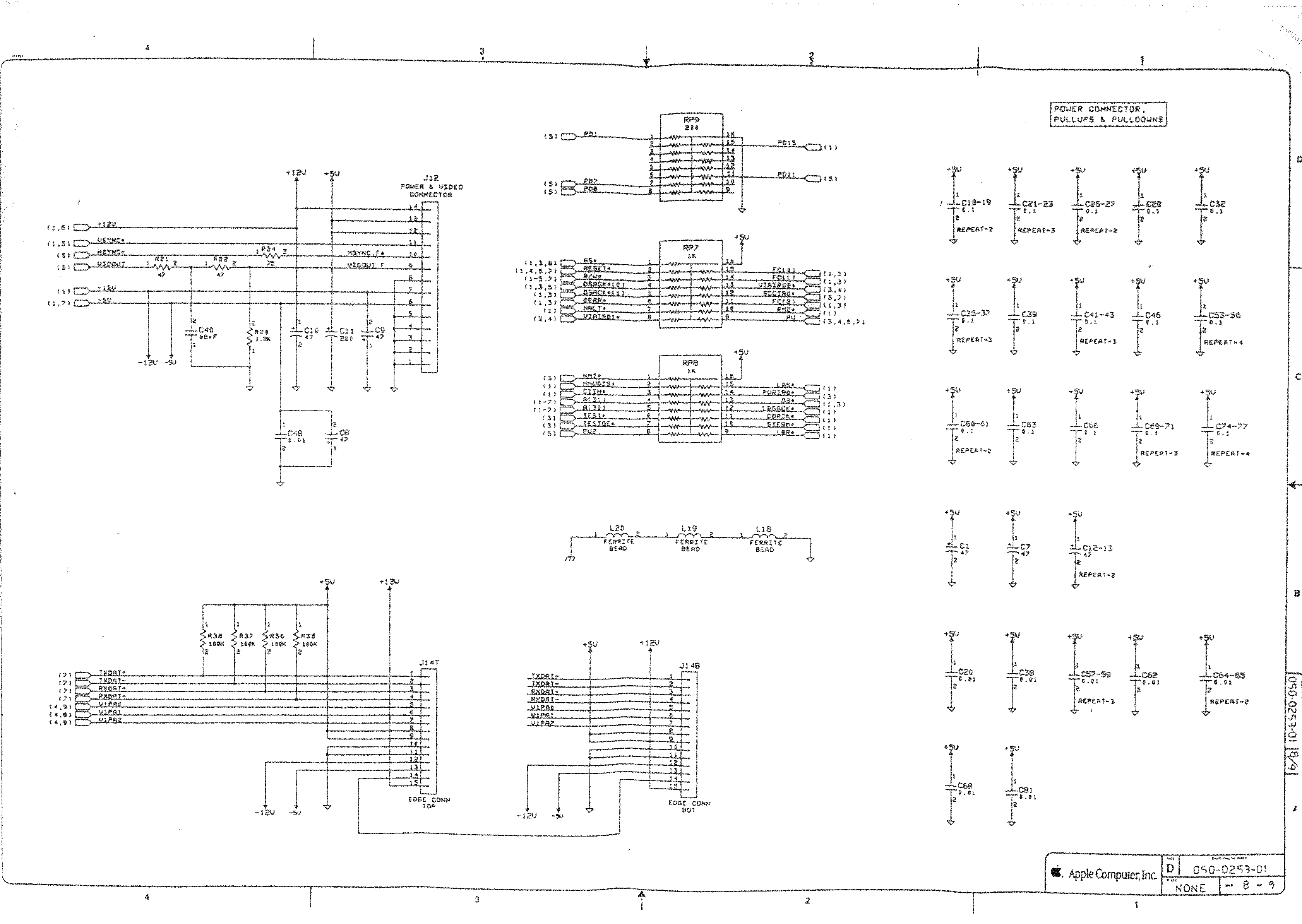
- [WayBack] Macintosh Schematics with many schematics including:
Macintosh SE/30 – IIcx (without NuBus)
- [WayBack] Page 1-> 68030, 68881/882, PDS
- [WayBack] Page 2-> ROM Simm, RAM Adr. Mux.
- [WayBack] Page 3-> GLUE Chip, RAM Simm
- [WayBack] Page 4-> VIA1, VIA2, RTC, ADB
- [WayBack] Page 5-> Video Interface
- [WayBack] Page 6-> SCSI, SWIM
- [WayBack] Page 6a-> SCSI, SWIM Page 2
- [WayBack] Page 7-> RS422, ASC, SONY Snd
- [WayBack] Page 8-> Power Conn.,
- [WayBack] Mac SE/30 | Low End Mac
- [WayBack] Mac ROM-inator II | Big Mess o’ Wires
The Mac ROM-inator II replaces the stock Macintosh ROM SIMM with a custom flash memory module. Add a bootable ROM disk, make your system 32-bit clean, gain HD20 hard disk support, and more. The Mac ROM-inator II supports the Macintosh SE/30, IIx, IIcx, IIci, IIfx, and IIsi.
The Mac ROM-inator II is fully assembled and ready to use. Just plug it in and go.
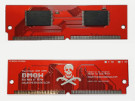 Mac ROM-inator II Atom, $42
2 MB SIMM pre-programmed with ROM Disk with System 7.1, HDSC Setup, ResEdit, and SCSI Probe. Compatible with Mac SE/30, IIx, IIcx, IIci, IIfx, IIsi. More InfoThe Mac ROM-inator II is great for breathing new life into your old SE/30 or II-series Macintosh. The ROM disk provides fast and convenient boot-ups and a collection of disk utility programs, and customized startup sounds and icons add a touch of fun. The ROM SIMM comes pre-programmed with a BMOW-made custom ROM containing the following changes:
- ROM disk provides a diskless booting option
- HD20 hard disk support built-in
- 32-bit clean – allows use of System 7.6+ and more than 8MB RAM
- Memory test is disabled for faster booting on 16MB+ systems
- Customized startup chime – major 9th arpeggio
- Happy Mac icon is replaced by a color smiling “pirate” Mac
- New startup menu screen displays installed RAM, addressing mode, and ROM disk details
The ROM-inator II is based on Doug Brown’s earlier [WayBack] Mac ROM SIMM design, used with permission.
- [WayBack] Retr0Bright (or RetroBright) treated plastics re-yellowing even with minimal light exposure?
- [WayBack] Forums – 68kMLA Forums
- [WayBack] Macintosh SE/30
The SE/30 is probably the most popular candidate for recapping. Unfortunately, it’s also one of the more difficult to revive as the leaked electrolyte easily damages traces and vias on these boards. Be sure to wash these boards very well and inspect closely for broken or rotten traces.
Capacitor List:
10 – 47µf – 16V – SMT
1 – 220µf – 16V – Axial
1 – 470µf – 16V – Axial
1 – 1µf – 50V – SMT
Click on the photo for a larger view
Notes
Desolder can be tricky, especially for surface mount. This helps:
- Add some fresh 60/40 solder to the joints with a solder gun (as modern solder is lead free, whereas past solder contained lead)
- Carefully heat up the component and surrounding area with a heat-gun
Choosing capacitors:
Soldering: always add some fresh solder on the pads before soldering surface mount (SMD) capacitors.
–jeroen
Read the rest of this entry »
Posted in 68k, Apple, Classic Macintosh, Development, Hardware Development, History, Macintosh SE/30, Power User, Soldering | Leave a Comment »
Posted by jpluimers on 2021/09/21
Lots of interesting tidbits on unix and NTFS file systems.
If you want to blow up your tooling, try creating a recursive hardlink…, which is likely one of the reasons that nx file systems do not support them.
Covered and related topics:
Read the rest of this entry »
Posted in *nix, Development, File-Systems, History, NTFS, Power User, Software Development, Windows, Windows Development | Leave a Comment »
Posted by jpluimers on 2021/09/21
“Spooky dev environment hack: add 127.0.0.1 xn--9q8h to /etc/hosts and then all your dev servers can be accessed at http://👻 It’s localghost!”
Via:
–jeroen
Posted in Communications Development, Development, HTTP, Internet protocol suite, Power User, Software Development, TCP | Leave a Comment »
Posted by jpluimers on 2021/09/16
Hopefully this becomes available on-line, as this will be a great talk, but Potsdam is out of my reach in my current physical condition.
[Wayback] AgileTD Keynote | Happiness is Quality
In Gwen Diagram’s keynote go on a journey of looking at how to improve happiness in teams for the goal of building quality systems.
How can we build teams that strive to build quality systems? By building in happiness early and often.
Each organisation has a culture which directly affects the quality of their work. Organisations with a lower level of quality; that is, systems that fail more often, longer times to fix and longer times to build often have a few things in common; frustration, apathy and cynicism.
On the other side of the coin, teams with slack, time to learn and time to reflect also have the space to improve their systems. Quality is everyone’s responsibility is an oft quoted phrase. But, how do you actually engage people to build quality systems?
Improving quality should not weigh heavy on the shoulders of the test specialist. Their main role should not be attempting to convince people that unit tests should exist, that systems should be testable and observable or that automated tests will speed up development. Instead, we should be building teams that want to find out together how to build a system that breathes quality.
The way to do this is by improving the happiness of the engineers on the team with learning, autonomy and coaching. So, how can we build teams that strive to build quality systems? By building in happiness early and often. In this talk, we will go on a journey of looking at how to improve happiness in teams for the end goal of building quality systems.
Via: [Wayback] Agile Testing Days on Twitter: “☀️ Here comes the happiness! ☀️ @gwendiagram will take us on a journey of looking at how to improve happiness in teams for the end goal of building quality systems. ➡️ Learn more about the keynote and the speaker: … “
–jeroen
Posted in Agile, Conferences, Development, Event, Power User, Software Development, Testing | Leave a Comment »





 The Wiert Corner - irregular stream of stuff