The Wiert Corner – irregular stream of stuff

Jeroen W. Pluimers on .NET, C#, Delphi, databases, and personal interests

  • My badges

  • Twitter Updates

  • Pages

  • All categories

  • Enter your email address to subscribe to this blog and receive notifications of new posts by email.

    Join 1,839 other subscribers

Archive for the ‘Development’ Category

Delphi component to show some text file at design time

Posted by jpluimers on 2019/02/19

Interesting idea: [WayBackDelphi component to show some text file at design time

Via: [WayBack] On some projects I put an invisible TMemo on the main form to keep notes about things todo…is there any extension that could attach a kind …could save to … – Paul TOTH – Google+

–jeroen

Read the rest of this entry »

Posted in Delphi, Development, Software Development | Leave a Comment »

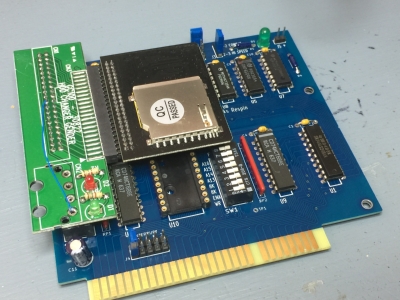
Insentricity :: Adding Solid-State Storage to an Original IBM PC ::

Posted by jpluimers on 2019/02/19

Can you imagine MS-DOS 6.2 recognising an 8 gigabyte SD card and allowing it to format it with multiple 2 gigabyte partitions?

Keeping old stuff working: [WayBackInsentricity :: Adding Solid-State Storage to an Original IBM PC :: with these nice links:

–jeroen

via: [WayBack] There was a lot of interest in how I added solid-state storage when I was tweeting about it a few weeks ago, now you can see… – Chris Osborn – Google+


Posted in Development, Hardware Development, History | Leave a Comment »

That duh moment when you cannot read an SD card: it’s SDHC/SDXC in an SD card reader; Secure Digital – Wikipedia

Posted by jpluimers on 2019/02/18

That moment you facepalm yourself because you forgot that particular machine won’t read SD cards because they are too big for the SD card reader in it: SD goes up to 4 gigabyte, anything bigger (nowadays basically everything) requires SDXC or SDHC compatible readers.

Quotes from Wikipedia:

However, older host devices do not recognize SDHC or SDXC memory cards, although some devices can do so through a firmware upgrade.[11] Older Windows operating systems released before Windows 7 require patches or service packs to support access to SDHC cards.[12][13][14]

Older host devices generally do not support newer card formats, and even when they might support the bus interface used by the card,[6]there are several factors that arise:

  • A newer card may offer greater capacity than the host device can handle (over 4 GB for SDHC, over 32 GB for SDXC).
  • A newer card may use a file system the host device cannot navigate (FAT32 for SDHC, exFAT for SDXC)
  • Use of an SDIO card requires the host device be designed for the input/output functions the card provides.
  • The hardware interface of the card was changed starting with the version 2.0 (new high-speed bus clocks, redefinition of storage capacity bits) and SDHC family (Ultra-high speed (UHS) bus)
  • UHS-II has physically more pins but is backwards compatible to UHS-I and non-UHS for both slot and card.[27]
  • Some vendors produced SDSC cards above 1GB before the SDA had standardized a method of doing so.
SD compatibility table
SDSC card SDHC card SDHC UHS card SDXC card SDXC UHS card SDIO card
SDSC slot Yes No No No No No
SDHC slot Yes Yes Yes[a] No No No
SDHC UHS slot Yes[a] Yes[a] Yes[b] No No No
SDXC slot Yes Yes Yes[a] Yes Yes[a] No
SDXC UHS slot Yes[a] Yes[a] Yes[b] Yes[a] Yes[b] No
SDIO slot Varies Varies Varies Varies Varies Yes

–jeroen

Posted in Development, Flash-memory, Hardware Interfacing, Power User, SD/miniSD/microSD/MMC, Storage, USB | Leave a Comment »

Windows <= 10: batch file to open Windows Update panel

Posted by jpluimers on 2019/02/15

Up until Widows 8.1, you could use wuapp to start the Windows Update panel.

For a while, Windows 10 needed a cumbersome language specific workaround described at Windows 10 – language neutral batch file to start Windows.

That stopped working after a few builds, but I forgot to make a note in which build exactly. Already in Windows 10 build 10122, the icon in wucltux.dll, so this might have been shortly after the initial “RTM” (retroactively named 1507).

So for a while, I had this batch file:

Since then I had to maintain too many locales running Windows 10. So here is the batch file:

for /f "delims=" %%A in ('PowerShell -Command "(Get-Culture).Name"') do explorer "%LocalAppData%\Packages\windows.immersivecontrolpanel_cw5n1h2txyewy\LocalState\Indexed\Settings\%%A\AAA_SystemSettings_MusUpdate_UpdateActionButton.settingcontent-ms"

It uses these tricks:

  1. Set output of a command as a variable (in this case a for loop variable)
  2. Execute PowerShell script in a .bat file
  3. PowerShell Get-Culture (which gets a .NET CultureInfo instance)
  4. CultureInfo.Name property (which has the nl-NL, en-US, etc codes in it)

But now I have extended it to support old and new Windows versions:

if exist %windir%\System32\wuapp.exe (
  %windir%\System32\rundll32.exe url.dll,FileProtocolHandler wuapp.exe
) else (
  %windir%\explorer ms-settings:windowsupdate
)

–jeroen

via: Windows Update Shortcut – Create in Windows 10 – Windows 10 Forums

Posted in Batch-Files, Development, Power User, Scripting, Software Development, Windows | Leave a Comment »

To celebrate his 85th birthday, some links to interviews with Niklaus Wirth interviews

Posted by jpluimers on 2019/02/15

Today, Niklaus Wirth, “father” of The Pascal Programming Language turned 85.

Happy birthday!

Almost 50 years ago, Niklaus Wirth submitted his famous paper “The Programming Language Pascal” which was published early 1971

Luckily it is archived on both the WayBack machine and Archive.is as the only PDF copy I could find on-line isn’t always on-line: http://oberoncore.ru/_media/library/wirth_the_programming_language_pascal.pdf

Originally it was published by Niklaus Wirth  in Acta Informatica, Vol. 1, Fasc. 1, 1971 pp. 35-63

He has been very active, just browse through the [WayBack] List of computer science publications by Niklaus Wirth

To celebrate his birthday, here are some interviews with him:

If you like the ones above as much as I do, then search for more: there are plenty!

–jeroen

via: Happy 80th birthday Niklaus Wirth! « The Wiert Corner – irregular stream of stuff

Read the rest of this entry »

Posted in Delphi, Development, History, Pascal, Software Development | Leave a Comment »

Anonymous method do location capturing, so when you expect value capturing you get the “Mysterious Case Of Wrong Value”

Posted by jpluimers on 2019/02/14

Interesting read [WayBack] Mysterious Case Of Wrong Value.

In order to capture by value (which in C++ you can specify), you need an intermediate function like Dalija describes:

function CreateFunction(Value: Integer): TFunc<Integer>;
begin
  Result :=
    function: Integer
    begin
      Result := Value;
    end;
end;

Via: [WayBack] Dalija Prasnikar – Google+

–jeroen

Posted in Delphi, Development, Software Development | Leave a Comment »

Ancient Unix based keyboard shortcuts

Posted by jpluimers on 2019/02/14

Somehow I’ve been doing Unix like work off and on for most of my life. So I know many ancient shell shortcuts (like Ctrl-E for end-of-line and Ctrl-A for start-of-line) by heart.

Many don’t, or even list shortcuts as if they are for the shell, but in fact aren’t.

So here are some links that distinguish between various kinds of keyboard shortcuts and give some insight in the history of these shortcuts (that go back into the 1970s, yes I’m that old).

–jeroen

via:

Posted in *nix, *nix-tools, Development, Power User, Software Development | Leave a Comment »

VCL Root units

Posted by jpluimers on 2019/02/13

Delphi VCL units that are not using any other VCL units:

  • Vcl.Bind.Consts
  • Vcl.Consts
  • Vcl.ComStrs
  • Vcl.HtmlHelpViewer
  • Vcl.IdAntiFreeze
  • Vcl.Imaging.GIFConsts
  • Vcl.Imaging.JConsts
  • Vcl.Imaging.pnglang
  • Vcl.OleConst
  • Vcl.ShellAnimations
  • Vcl.Shell.ShellConsts
  • Vcl.Touch.GestureConsts
  • Vcl.Touch.KeyboardTypes
  • Vcl.VDBConsts
  • Vcl.XPMan

–jeroen

Posted in Delphi, Development, Software Development | Leave a Comment »

Accessing storage (NAS) over the Internet via FTP | FRITZ!Box 7490 | AVM International

Posted by jpluimers on 2019/02/13

Of course you don’t want this. So by the time you read this, the connection has been closed.

For testing some Internet of Shit stuff from a client that cannot do SFTP, I needed a temporary FTP accessible connection.

These links helped:

TL;DR:

  1. Preparing the USB stick:
    1. Ensure the USB disk is FAT/FAT32/NTFS
    2. Create a directory in the root of the USB disk for the FTP user (for now: FtpDirectory)
    3. Insert the USB disk in the Fritz!Box
  2. Logon to the Fritz!Box web UI
    1. Configure a user for FTP:
      1. In the menu, go to System, then FRITZ!Box Users
      2. Click Add user
      3. Name the user (for now: MyFtpUser)
      4. Ensure that user *only* has a checkmark for `Access to NAS contents`
      5. Click the button Add directory
      6. In the popup click Select folder
      7. Choose the FtpDirectory you just made
      8. Click OK
      9. Ensure the read and write checkboxes are enabled
      10. Click OK
    2. Configure the USB stick for FPT access
      1. In the menu, go to Home Network, then USB Devices
      2. Observe if the device is visible and has the correct file system (if not: ask AVM)
      3. In the menu, go to Internet, then Permit Access
      4. Click on the FRITZ!Box Services
      5. Ensure there is a checkmark at Internet access to your storage media via FTP/FTPS enabled
      6. At TCP Port for FTP/FTPS, fill in 21 (many IoT devices cannot use a different port)
      7. Ensure there is *no* checkmark at Allow only secure FTP connections (FTPS)
      8. Make a note of the value after FTP address (something like ftp://example.org:21`)
      9. Click Apply
  3. Test

–jeroen

Posted in Communications Development, Development, Fritz!, Fritz!Box, FTP, Internet protocol suite, IoT Internet of Things, Network-and-equipment, Power User, Software Development, TCP | Leave a Comment »

web based tools to simulate electronics

Posted by jpluimers on 2019/02/13

Via seedstudio, I bumped into EasyEDA – Wikipedia. It seems there are a lot of on-line tools that allow you to draw and often simulate electronics.

Time to put them on my list of stuff to play around with:

Circuitlab also has a nice free interactive book: [WayBack] “Ultimate Electronics” Book – CircuitLab A free interactive electronics textbook, “Ultimate Electronics”

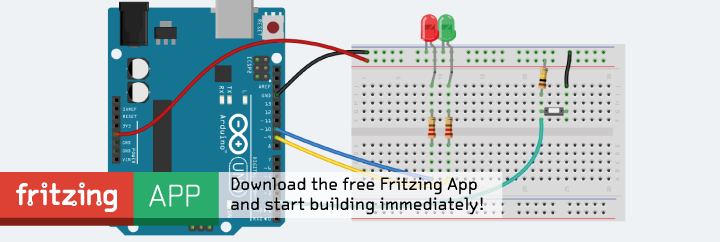
Later – via issue #1 of [WayBack] HackSpace magazine: The new magazine for the modern maker – I also found out about Fritzing which is off-line native software that I want to check out as it is open source:

[Archive.is] Fritzing

It helps a lot knowing there are various Electronic symbol – Wikipedia: Standards for symbols, covering much more than the one below:

To make it easier, power supplies have a host of different symbols for the same things. For instance, DC can have 3 or more different symbols. [WayBack] Electric Current Symbols

–jeroen

Posted in Development, Hardware Development | Leave a Comment »