The Wiert Corner – irregular stream of stuff

Jeroen W. Pluimers on .NET, C#, Delphi, databases, and personal interests

  • My badges

  • Twitter Updates

  • My Flickr Stream

  • Pages

  • All categories

  • Enter your email address to subscribe to this blog and receive notifications of new posts by email.

    Join 1,839 other subscribers

Archive for the ‘Development’ Category

Jon Skeet and Tony the Pony on Vimeo

Posted by jpluimers on 2011/10/26

This is from 2009, but still sooooo funny.

Lets use these 2 thumbs as parity bits.
I should have done this with pounds and pounds.
Why doesn’t John Skeet does never sleep.
No, you can’t have Visual Studio … yes telepathy is fine.

And more great quotes, sample code and experiences (like the Turkey Test) in this wonderful presentation by Jon Skeet and the famous Tony the Pony
[Wayback] Jon Skeet and Tony the Pony on Vimeo on Vimeo

Hilarious, and true :)

--jeroen

via Jon Skeet and Tony the Pony on Vimeo.

Posted in .NET, Development, Jon Skeet, Pingback, Software Development, Stackoverflow | Leave a Comment »

John McCarthy — Father of AI and Lisp — Dies at 84 | Wired Enterprise | Wired.com

Posted by jpluimers on 2011/10/25

So far, this month 3 important people in the computing industrie passed away.

Earler this month, Steve Jobs, and Dennis Ritchie.

Today John McArthy, aged 84, father of AI (he coined the term “Artificial Intelligence”) and LISP (in 1958, and still a very important language; I remember playing with muLISP and muMath in the 80s, modern languages like Scheme and Haskell were greatly influenced by it).

He got the fifth Turing Award in 1971, and kept being very active in the field of AI.

He was very versatile (read his views on sustainability) and some things were far ahead of its time (in 1961 he understood how important Time Sharing was, now look at Cloud Comuting 50 years later!).

Wired published a nice IM.

–jeroen

via: John McCarthy — Father of AI and Lisp — Dies at 84 | Wired Enterprise | Wired.com.

Posted in Development, LISP, Opinions, Software Development | Leave a Comment »

Delphi XE2 Hands-On Workshop met better office – beperkt aantal plaatsen beschikbaar

Posted by jpluimers on 2011/10/25

Op dinsdag 6 en woensdag 7 december 2011, organiseren Barnsten en better office benelux een 2 daagse Delphi XE2 Workshop in Hoofddorp.

Het aantal plaatsen is beperkt, aanmelden kan via de Barnsten.com site.

Het doel van deze workshop is ervaren Delphi ontwikkelaars snel productief te laten werken met Delphi XE2. De workshop is modulair opgezet: inschrijving is per dag mogelijk.

De workshop sluit aan op de workshop die vorige week door Barnsten en The Delphi Company is georganiseerd: er zit nauwelijks overlap in de onderwerpen.

Samenvatting

Dag 1 heeft de focus op nieuwe features voor Windows gebruikers.

Dag 2 gaat compleet over cross platform FireMonkey (Windows, Mac en iOS: iPad/iPhone/iPod-touch). Neem hier je eigen

Voorbereiding

Nodig voor dag 1 en dag 2:

Nodig voor dag 2:

Programma

In samenwerking met better-office organiseert Barnsten een Hands-On workshop voor de gevorderde Delphi
ontwikkelaar. Het doel van deze workshop is u, als ervaren Delphi ontwikkelaar, snel productief te laten werken met
Delphi XE2. De workshop is modulair opgezet zodat u zich per dag kunt inschrijven.
De Hands-On Workshop vindt plaats op 7 en 8 december 2011 en wordt gehouden in Hoofddorp. Kijk voor de
beschrijving onder het kopje Product info en voor de dagindeling onder het kopje Specificaties.

Inhoud Dag 1: Introductie Delphi/RAD Studio XE2

  • Wat is nieuw in XE2
  • Migreren van oude projecten
  • Introductie x64: wat is nieuw, hoe zet je projecten over naar x64. Meer over de platformen en performance
  • VCL Styles: hoe werkt het, wat kun je er mee
  • Live Binding: wat zijn de voordelen / nadelen
  • Unit Scoping: voordelen / nadelen, backward compatibility
  • TZipFile ondersteuning
  • Conditional defines
  • FireMonkey: HD en 3D software ontwikkeling met FireMonkey
  • RAD Studio XE2 Roadmap
  • Installatie XE2 op Windows en Mac OS X

Dag 2: FireMonkey

  • Basis FireMonkey en de verschillen op de platformen Windows, OS X en iOS
  • FireMonkey op iOS: het gebruik van Xcode
  • Maken van een eenvoudige FireMonkey HD applicatie: basisprincipes, animations, effects
  • Maken van een eenvoudige FireMonkey 3D applicatie: basisprincipes, animations, effects en belichting
  • Beide applicaties van Windows naar Mac OS X omzetten
  • Debuggen op Mac OS X en iOS emulator
  • Gebruik van HD en 3D in 1 applicatie
  • Een iOS versie maken van beide applicaties
  • Fundamentele verschillen tussen mobile en desktop: hoe ga je daar in je UI mee om
  • XML, data en data binding in de FireMonkey applicaties: hoe maak je dit cross-platform
  • Hoe breng ik VCL applicaties naar FireMonkey
  • Windows: mixen van VCL en FireMonkey
  • Overzicht van interessante blogs, sites en artikelen

Installatie instructies

Installatie instructies op de Windows PC

  1. Installeer RAD Studio XE2 en de on-line help (gebruik overal de default instellingen)
  2. Installeer InterBase XE Developer edition

Installatie instructies op de Mac

Voor FireMonkey Mac OS X ontwikkeling

  1. Kopieer het bestand setup_paserver.zip naar je Mac. Deze staat meestal in (X: je Windows drive):
    64-bits systeem: X:\Program Files (x86)\Embarcadero\RAD Studio\9.0\PAServer
    32-bits systeem: X:\Program Files\Embarcadero\RAD Studio\9.0\PAServer
  2. Pak de file setup_paserver.zip uit op de Mac (je krijgt dan een bestand setup_paserver)
  3. Run de setup_paserver op de Mac.
  4. InterBase Developer edition:
    volg de algemene installatie instructies op de Embarcadero site,
    gevolgd door de specifieke Mac OS X instructies op de Embarcadero site.

Voor Apple iOS (iPad, iPhone, iPod touch) ontwikkeling

  1. Download en installeer Xcode 4 van de Apple site (je moet je eerst registreren) http://developer.apple.com/xcode/
  2. Kopieer de file FireMonkey-iOS.dmg naar je Mac; deze staat meestal (X: is je Windows drive) op:
    64-bits systeem: X:\Program Files (x86)\Embarcadero\RAD Studio\9.0\FireMonkey-iOS
    32-bits systeem: X:\Program Files\Embarcadero\RAD Studio\9.0\FireMonkey-iOS
  3. De file FireMonkey-iOS.dmg is een disk image.
    Mount het DMG image op je Mac. Deze wordt dan geopend in /Volumes/FireMonkey-iOS/ en er komen 2 vensters met de installers.
  4. Installeer beide in deze volgorde:
    a. fpc-2.4.4.intel-macosx.pkg (het vertelt dat het in 2 minuten installeert; dat duurt meestal korter)
    b. FireMonkey-iOS-XE2.pkg (het vertelt dat het installeert in “less than a minute”, maar meestal duurt dit veel langer, houd rekening met een kwartier of langer)
  5. Eject in de Mac Finder de DMG die je gemount hebt

Zie ook deze twee online installatie instructies:

–jeroen

via: Delphi XE2 Hands-On Workshop met better office – Barnsten.com.

Posted in Delphi, Development, Event, FireMonkey, PowerDay, Seminar, Software Development | Leave a Comment »

Delphi XE2 installation instructions on Windows and Mac (#ekon15 conference)

Posted by jpluimers on 2011/10/24

If you are attending the EKON 15 conference and want to prepare your laptops for some hands on experience, please follow the guidelines below.

I’m looking forward meeting a lot of interesting people, and having a great conference!

And if you are not attending, the below guidelines will help you get started doing cross platform FireMonkey development in Delphi :)

Installation instructions

Installation instructions on the Windows PC

  1. Install RAD Studio XE2 and the on-line help (use the default settings in all steps)
  2. Install InterBase XE Developer edition

Installation instructions on the Mac

For FireMonkey Mac OS X development

  1. Copy the file setup_paserver.zipto your Mac. Usually you can find it in here (X: is your Windows drive):64-bits system: X:\Program Files (x86)\Embarcadero\RAD Studio\9.0\PAServer32-bits system: X:\Program Files\Embarcadero\RAD Studio\9.0\PAServer
  2. Unpack the file setup_paserver.zip on your Mac (you will get the file setup_paserver)
  3. Run the setup_paserver on the Mac.
  4. InterBase Developer edition:follow the general Installation instructions on the Embarcadero site,followed by the speficif Mac OS X instructies on the Embarcadero site.

For Apple iOS (iPad, iPhone, iPod touch) development

  1. Download and Install Xcode 4 from the Apple site (you need to register for an account first) http://developer.apple.com/xcode/
  2. Copy the file FireMonkey-iOS.dmgto your Mac; Usually you can find it in here (X: is your Windows drive):64-bits system: X:\Program Files (x86)\Embarcadero\RAD Studio\9.0\FireMonkey-iOS32-bits system: X:\Program Files\Embarcadero\RAD Studio\9.0\FireMonkey-iOS
  3. The file FireMonkey-iOS.dmgis a Mac disk image.Mount the DMG image on your Mac. It will be openend in /Volumes/FireMonkey-iOS/ and you will see 2 installers.
  4. Install both in this order:a. fpc-2.4.4.intel-macosx.pkg (it tells you that it will take 2 minutes, usually it will take less time)b. FireMonkey-iOS-XE2.pkg (it tells you it installs in “less than a minute”, usually it takes much longer, and can take more than 15 minutes)
  5. In the Mac Finder, Eject the mounted DMG

See also these two online instructions:

–jeroen

Posted in Delphi, Development, FireMonkey, Software Development | 2 Comments »

.RESX translation and tools examples based on Paint.NET Forum -> Translation and Localization

Posted by jpluimers on 2011/10/20

The process of translating RESX files is time consuming, so it is wise to study a good example before starting such a journey.

Paint.NET (driven by Rick Brewster) happens to have great (and complete!) translations serving as great )ample materia.

So below are steps that you can use to get started.

The process

Create good Base RESX files

The first step is to create good .RESX files for your base language. This alone is a tedious process in itself, as for all the strings (and potentially other resources) used in your application, you need to determine if they should be translated. If so, you should make a key for each one, put them in the appropriate .resx file, and access it. The MSDN documentation explains how.

Use version control and differencing/merging/syncing tools

When translating software, you not only have the history axis, but also a language axis. That combination makes it much harder to keep everything, so a good version control together with good differencing tools is very handy.

I’ve had good experience with Team Foundation Server, Subversion (SVN), Git, and Mercurial (Hg), but less good experience with StarTeam, Visual SourceSafe and Serena Dimensions.

Beyond Compare is my favourite tool of choice for comparing files and managing with differences, merges and syncs.

Translate the RESX files

This is the really hard part; many translation agencies are specialized in this, companies have complete teams working on it (for instance, the Microsoft Developer Devision did the Paint.NET translation for 4 years in their free time).

Often, it helps to generate Excel or Word documents from the RESX files, but often translation deportments or agencies can handle RESX files fine.

Usually, there is much more to do than just translating, you should look at the whole internationalization picture, for instance by reading Guy Smith Ferriers book on .NET internationalization.

Verify the RESX files are complete and valid using ResxCheck

A important requirement of translation is to make sure the translated resources are at least technically valid and complete.

Doing that by hand is a very tedious job. Luckiliy, Rick Brewster (yes the Paint.NET one) wrote a great Resx tool to do just that.

An example is below.

Compile the RESX files into .resource and assembly files

When your RESX files are ready to be tested, you need to generate .resource files from that and sometimes resource assemblies.

You can use ResGen to generate resource files, and the Assembly Linker to link the resource files into assemblies, or generate sattelite assemblies.

Using the resources

I won’t go into much detail here, as there are many ways to use the translated resources.

The tooling

There are many tools you can use, and the actual use highly depends on the size of your project, the number of translations, and how your process is organized.

I’ll point to a few tools that are interesting or that I have used.

The Bing Translation API

Now that the Google Translate API has been deprecated, the only online translation API is the Bing Translate API provided by the Bing Translator team. There are plenty of examples on how to do that from various environments.  You need a Bing AppID in order to use this. And you can do “only” 50 translations per minute (each at a maximum of slightly less than 64 kilobyte).

Examples

I downloaded the Dutch 3.10 translations of Paint.NET because it includes an Excel document that is a good example of how to track progress or compare multiple translations.

Then I downloaded the Paint.NET 3.5.x original strings, and the Dutch 3.5.x translations and unpacked them in the C:\TEMP directory.

Finally, I ran the ResxCheck on them:

C:\temp\PaintDotNet.Strings.3.NL>ResxCheck.exe ..\Strings\Strings.resx PaintDotNet.Strings.3.NL.resx
ResxCheck v3.30.3033.25892
Copyright (C) 2008 dotPDN LLC, http://www.dotpdn.com/

--- Start @ 13:46:01
Analyzing base Strings.resx ...
Analyzing mui PaintDotNet.Strings.3.NL.resx ...
--- End @ 13:46:02 (156.25 ms), processed 2 resx files
There were no errors

Hopefully this will save you some time, and me too when I’m working on another translation project.

–jeroen

via: Paint.NET Forum -> Translation and Localization.

PS: If you want the Paint.NET installer to be multi-lingual, follow these steps on the Paint.NET forum.

PS2: For the people wondering why the Dutch language is not called Nederlandisch or something similar, please read the Wikipedia articles on  Names for the Dutch language and Netherlands (terminology).

Posted in .NET, Development, RESX, Software Development | 2 Comments »

Excel CSV: watch and set your delimiters (and the #NSBusinessCard – Digitale specificatie #fail)

Posted by jpluimers on 2011/10/19

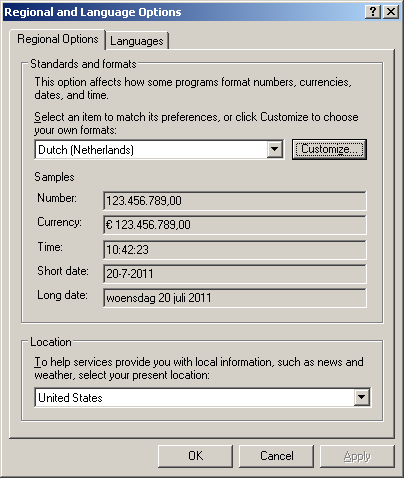
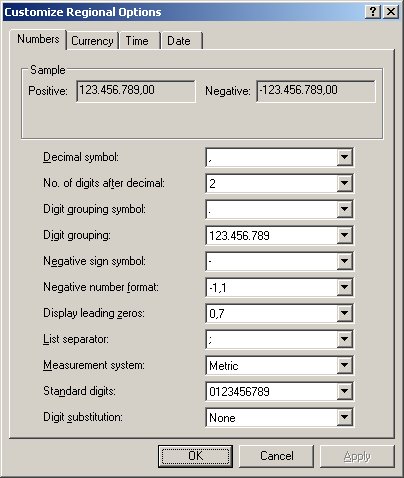
A while ago, a friend asked my why Excel sometimes doesn’t import CSV files correctly. Recently, I was reminded because NB Business Card sends their invoice as Excel CSV. And expected CSV to be universal. Which it isn’t. Besides pople doing all sorts of crazy things with CSV (like What would happen if you defined your system CSV delimiter being a Quotation), Excel CSV isn’t universal either, as it depends on a crucial entry your Windows regional settings: the “List Delimiter”. Two series of screeen shots show this: The first for Windows XP and systems like it:


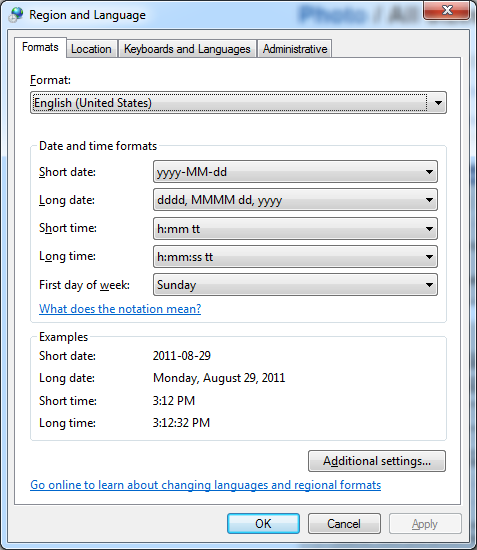
And for Windows 7 and similar systems:

  A few tips: When you export CSV, be sure to use this setting from the registry. Or at least allow your users to specify it in your application, because: when you are not using Windows, you might be out of luck as there is no operating system neutral way of querying this value. And when you get some CSV and cannot import it in Excel, make sure you change your list delimiter to match it. And don’t forget to restore it to the original setting when you are done: it is a user session wide setting, so it applies to all applications (including the ones that do watch it). –jeroen

Posted in CSV, Database Development, Development, Power User, Software Development | 3 Comments »

process – How to check if a program is using .NET? – Stack Overflow

Posted by jpluimers on 2011/10/18

Many processes use or host the .NET run-time.

For Microsoft implementations of the CLR, this is a quick trick of listing them:

tasklist /m "mscor*"
tasklist /m "clr.dll"

The first statement lists all processes that use or host .NET 1.x through 3.x.
The last statement lists all processes that user or host .NET 4.0

On my system, this is the output:

C:\Users\jeroenp>tasklist /m “mscor*”

Image Name PID Modules
========================= ======== ============================================
explorer.exe 1696 mscoree.dll, mscoreei.dll
PrivacyIconClient.exe 7256 MSCOREE.DLL, mscoreei.dll, mscorwks.dll,
mscorlib.ni.dll, mscorjit.dll
PaintDotNet.exe 459736 MSCOREE.DLL, mscoreei.dll, mscorwks.dll,
mscorlib.ni.dll, mscorjit.dll

C:\Users\jeroenp>tasklist /m “clr.dll”

Image Name PID Modules
========================= ======== ============================================
explorer.exe 1696 clr.dll
[/sourecode]

–jeroen

via: process – How to check if a program is using .NET? – Stack Overflow.

Posted in .NET, C#, Development, Power User, Software Development | 1 Comment »

#tzdb back up: ICANN to Manage Time Zone Database

Posted by jpluimers on 2011/10/17

Good news on the TimeZone database front (after the original database went down because of a lawsuit): last friday, it was announced that it is now managed by ICANN.

Actually, it got hosted as of last monday: time to update your download locations and for someone to update the Wikipedia tzdb article.

The ICAN press release:

ICANN to Manage Time Zone Database

The Internet Corporation for Assigned Names and Numbers (ICANN) today took over operation of an Internet Time Zone Database that is used by a number of major computer systems.

ICANN agreed to manage the database after receiving a request from the Internet Engineering Task Force (IETF).

The database contains time zone code and data that computer programs and operating systems such as Unix, Linux, Java, and Oracle rely on to determine the correct time for a given location.  Modifications to the database occur frequently throughout the year.

“The time zone database is used by a large number of commercial operating systems and the software applications,” said Russ Housely, chairman of the IETF. “Incorrect time zone information will impact many everyday activities, including meeting and conference call coordination, airplane and train schedules, physical package delivery notices, and astronomical observatories.”

For nearly three decades, the TZ Database had been maintained by a group of dedicated volunteers, in particular, Arthur David Olson at the US National Institutes of Health.  Olson coordinated the group, managed the data, and created a platform for their release.  Olson’s announced retirement prompted the IETF to turn to ICANN to ensure continued operation of the database.

“The Time Zone Database provides an essential service on the Internet and keeping it operational falls within ICANN’s mission of maintaining a stable and dependable Internet,” said Akram Atallah, ICANN’s Chief Operating Officer.

–jeroen

via: ICANN press release

Posted in Development, Power User, Software Development | Leave a Comment »

SVN 1.7, TortoiseSVN and CollabNet 2.1.0 released earlier this week

Posted by jpluimers on 2011/10/14

Right after the Subversion SVN 1.7 release earlier this week, 3rd party providers announced new versions of their products too.

These are the updates of the ones I use most often:

Two major improvements for me:

  1. Improved meta data (read: only one .svn directory in the root of a working copy)
  2. Faster HTTP speed

Please also read Uwe Schuster‘s (the guy that implemented the version control integration for SVN and Git in the Delphi IDE) blog post on a few things you need to watch when upgrading to Tortoise SVN 1.7.

–jeroen

Posted in Delphi, Development, Software Development, Source Code Management, Subversion/SVN | Leave a Comment »

MonoTouch 5.0 released: iOS 5 support for Mono on the iOS 5 release day

Posted by jpluimers on 2011/10/13

With the and iOS 5 release today and the MonoDevelop 2.8 release last week, there is also a new MonoTouch 5.0 released that binds the two and allows you to develop iOS 5 using Mono.

Almost like a mirracle: on the iOS 5 release day, MonoTouch 5 gets released. Lot’s of new stuff to play with, just read the announcement :)

Quote: “If you already have MonoTouch, simply launch MonoDevelop and you will be prompted to update – it’s that easy!

Be sure to also read the new MonoTouch 5 documentation on new iOS  5 features and the comprehensive API diff between MonoTouch 4.2 and 5.0.

–jeroen

via: MonoTouch 5.0 – MonoTouch.

Posted in .NET, C#, Development, Mobile Development, MonoTouch, Software Development, xCode/Mac/iPad/iPhone/iOS/cocoa | Leave a Comment »