The Wiert Corner – irregular stream of stuff

Jeroen W. Pluimers on .NET, C#, Delphi, databases, and personal interests

  • My badges

  • Twitter Updates

  • My Flickr Stream

  • Pages

  • All categories

  • Enter your email address to subscribe to this blog and receive notifications of new posts by email.

    Join 1,861 other subscribers

Archive for the ‘CommandLine’ Category

CodeRage 4: session materials are available for download« The Wiert Corner – Jeroen Pluimers’ irregular stream of Wiert stuff

Posted by jpluimers on 2009/09/09

My CodeRage 4 session materials are available for download:

CodeRage 4 is a free, virtual conference on Embarcadero technologies with a lot of Delphi sessions.
It is held from September 8 till 11, 2009, i.e. while I write this :-)
If you want to watch sessions live, be sure to register through LiveMeeting (the technology they use for making this all happen).

Let me know if you download, and what you are using the sample code for.

–jeroen

Posted in .NET, CodeRage, CommandLine, Conferences, Database Development, Debugging, Delphi, Development, Encoding, Event, Firebird, InterBase, ISO-8859, ISO8859, Prism, Software Development, Source Code Management, SQL Server, TFS (Team Foundation System), Unicode, UTF-8, UTF8, Visual Studio and tools, XML, XML/XSD, XSD | 4 Comments »

Manually call the “Safely Remove Hardware” dialog — HotSwap! – hot eject and hot insert SATA hard-drives – practical use with ICY BOX 266StUSD « The Wiert Corner – Jeroen Pluimers’ irregular stream of Wiert stuff

Posted by jpluimers on 2009/09/09

I forgot to explicitly mention that the normal “Safely Remove Hardware” icon in the system tray notification area sometimes disappears.

Today, I bumped in such a system, so I was glad I had a reference explaining how manually call the “Safely Remove Hardware” dialog to solve it.

But now I had this dumb icon:

So here are the full steps, including icon.

1. Add a shortcut with this command line:

[script sourcecode=’cscript’]
RunDll32.exe shell32.dll,Control_RunDLL hotplug.dll
[/sourcecode]

2. Change the icon to take icons from this DLL:

[script sourcecode=’cscript’]
%SystemRoot%\system32\hotplug.dll
[/sourcecode]

3. Name the shortcut “Safely Remove Hardware”

So, now you have a nice shortcut with the correct.
This shortcut works, even when it is gone from the system tray:

BTW: Rob van der Woude has a nice page with rundll32 scripts.

–jeroen

Posted in CommandLine, Development, Hardware Interfacing, Software Development, USB | Leave a Comment »

Formatting drives with FAT32 – works well with: HotSwap! – hot eject and hot insert SATA hard-drives – practical use with ICY BOX 266StUSD « The Wiert Corner – Jeroen Pluimers’ irregular stream of Wiert stuff

Posted by jpluimers on 2009/09/07

Every once in a while, you want to exchange lots of information with systems that only have FAT32 in common.

Exchanging such large amounts is easiest with an external drive, especially because you should not underrate the bandwidth of your harddrive. Especially if you can connect them with (e)SATA, and HotSwap them. But even USB usually is fast enough to compete with a gigabit network connection.

For that, it would be easy if you could format an external drive with FAT32.

However, the built-in FORMAT (using format /FS:FAT32 X:) barfs if your disk is larger than 32 gigabytes.
Since it is hard to get such small drives anymore, you seem to be stuck.

[Wayback/Archive] fat32format ([Wayback] www.ridgecrop.demon.co.uk/download/fat32format.zip) comes to the rescue!

It formats any drive, as long as it has a driveletter:

fat32format X:

You can assign driveletters to drives using diskmgmt.msc

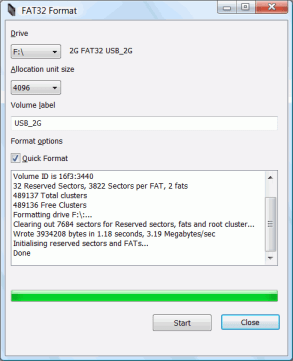
There is even a [Wayback/Archive] GUI version!

–jeroen

Posted in CommandLine, Development, Software Development | 2 Comments »

CodeRage 4: sessions recorded; Delphi 2010 migration was a beeze; samples/slides will be uploaded soon

Posted by jpluimers on 2009/09/05

I just finished recording my CodeRage 4 sessions:

  • Practical XML in Delphi
  • Reliable Communication between Applications with Delphi and ActiveMQ
  • Using Unicode and Other Encodings in your Programs

CodeRage 4 is a free, virtual conference on Embarcadero technologies with a lot of Delphi sessions.
It is held from September 8 till 11, 2009, i.e. next week :-)
If you want to watch sessions live, be sure to register through LiveMeeting (the technology they use for making this all happen).

This week, I found some time do migrate all the sample projects to the release versions of Delphi Win32 2010 and Delphi Prism 2010.

Delphi Win32 2010 works like a charm: it is much faster and has a much smaller footprint than any other Galileo based IDE.
In fact, it feels almost as fast as the pre-Galileo based IDE’s.
With the added benefit that all the new features make me much more productive, not the least because it has not yet crashed on me this week once.
Crashing has been a frequent thing on me since Delphi 4 (maybe I should not even mention that number ), for most IDE’s at least a couple of times a week, so this is good.

Delphi Prism 2010 works really nice too, it is rock solid, and the language as some great features not found in other .NET languages.
But it still needs a tiny bit more polishing on the Visual Studio IDE Integration part.
There are a few things not as smoothly integrated as I’m used to in C# and VB .NET (for instance when adding assembly references; C# and VB.NET allow you to do that from multiple places in the IDE; Delphi Prism from only one).
I know it is nitpicking (the same holds for the Team Foundation System integration in the Visual Studio IDE: ever tried to add files or folders? There is only one icon that allows you to do it. Ever tried to move files or folders around? No way you can drag & drop, in fact you can move only 1 file or folder at a time, and then the folder tree leaves you at the target).

The Embarcadero folks have worked hard on developer productivity in the Delphi Win32 2010 IDE.
(Did I mention the F6 key? It is an awesome way of directly jumping into configuration dialogs a zillion levels deep.
Did I mention the Ctrl-D key? It instantly reformats your source code to your formatting settings).
So maybe it is now time to put some of that effort into the Prism side as well.

Back to my CodeRage sessions: the recordings are done, they will soon become available as downloads together with the samples/slides.

Keep watching :-)

–jeroen

Posted in .NET, CommandLine, Database Development, Debugging, Delphi, Development, Encoding, Event, Firebird, InterBase, Java, Package Development, Prism, Software Development, Source Code Management, TFS (Team Foundation System), Unicode, Visual Studio and tools, XML, XML/XSD, XSD | Leave a Comment »

.NET – Delphi Prism – How to generate wrapper classes code from XSD file

Posted by jpluimers on 2009/09/04

I do a lot of .NET work; most in C#, but also some in Delphi Prism (which like C#, VB.NET and other languages integrate in the Visual Studio Shell).

Both Visual Studio and the .NET Framework SDK include a nifty tool called XSD.EXE.

XSD.EXE allows you you to generate the code for wrapper classes from your XSD or other schema definition file, both for regular classes (that you can use for XML Serialization) as well as for typed dataset classes.

You need to specify the Oxygene language to generate Delphi Prism code.

A sample batch-file is here:

xsd /classes /language:Oxygene /namespace:xokumClasses xokum.xsd
rename xokum.pas xokumClasses.pas

xsd /dataset /language:Oxygene /namespace:XokumDataset xokum.xsd
rename xokum.pas xokumDataset.pas

Thanks to Peter Nowotnick who posted this answer at Stackoverflow!

–jeroen

Posted in .NET, CommandLine, Delphi, Development, Pingback, Prism, Software Development, Stackoverflow, Visual Studio and tools, XML/XSD, XSD | 4 Comments »

Batch file for modifying .properties file in JAR Java ARrchive file

Posted by jpluimers on 2009/07/06

I needed to quickly edit one .properties file in multiple versions of the same JAR file.

So I write the batch-file below, that presumes

  • you have 7-zip installed in the default directory on your system.
  • the batch-file is in the same directory as the .JAR file

The batch file uses the original JAR file SEALS_Server.jar, creates a new JAR file SEALS_Server-logging.jar that contains the file logging.properties having one line with the setting level = INFO.

Read the rest of this entry »

Posted in CommandLine, Development, Java, Software Development | Leave a Comment »

Commandlines for shutdown, reboot, logoff, standby and hibernate (from: A standby shortcut? – The PC Guide Discussion Forums)

Posted by jpluimers on 2009/06/11

Being a commandline person (I prefer to think of it as ‘classic’ more than like ‘dinosaur’), I have a ton of batch-files in my %SystemDrive%BIN directory.

Recently, I needed one for hibernating, which I found in this posting: A standby shortcut? – The PC Guide Discussion Forums.

Here is the list:
Read the rest of this entry »

Posted in CommandLine, Development, Software Development | 4 Comments »