Archive for the ‘.NET’ Category
Posted by jpluimers on 2013/02/13
A couple of notes on NMQ_MQ_LIB and the WebSphere MQ aka MQSeries client libraries:
- NMQ_MQ_LIB specifies the MQ DLL to use
- Depending in your interface, the NMQ_MQ_LIB can be an environment variable, application setting, or hardcoded DLL name
- MQSeries 5.x and WebShpere MQ 6.x require you to specify the bitness in the MQIC DLL name (they don’t accept mqic.dll, but require mqic32.dll) when you access it from the C or Delphi interface.
MQM DLL does not require bitness: it is mqm.dll in all versions.
- From client applications, use mqic.dll or mqic32.dll.
And a few links:
I needed this to get some apps talking to MQ on AS/400 aka iSeries aka System i working correctly by getting the DLLs right.
–jeroen
Posted in .NET, AS/400 / iSeries / System i, Delphi, Development, MQ Message Queueing/Queuing, Software Development, WebSphere MQ | Leave a Comment »
Posted by jpluimers on 2013/02/07
The methods I described in via: Extracting MSI files didn’t work for the MSI installer for the Office 2003 Primary Interop Assemblies (which you get through here, or directly download the O2003PIA.exe installer).
I needed to extract the files, because of this problem described in by Office 2003 PIA Redistributable is available – Patrick Smith: Microsoft InfoPath – Site Home – MSDN Blogs:
Important Issues to keep in mind:
- This MSI is designed to contain all of the PIA’s which shipped with Microsoft Office System 2003. The product PIA’s will only install if the parent product is installed on the machine.
- Leave the PIA redistributable on the machine once it’s installed. Because this product is redistributable, many add-ins could ship it. The MSI will only install once and then subsequent installs would just see that it’s already on the machine. Removing it via Setup logic will remove it for everyone. The current recommendation is to leave uninstallation of the PIA Redistributable to the end user through Add/Remove Programs.
Currently I’m involved in a suite of .NET 4 applications that interface with Office. Office 2003 is the minimum required version, but:
- most users and developers have Office 2007 or better installed,
- not all people have all parts of Office installed,
- the build server does not have Office installed at all.
In none of those scenarios, the PIAs are installed.
So I needed a way to extract all the PIA binaries with the official long filenames from the O2003PIA.MSI that is inside the O2003PIA.EXE installer.
Extracting the installer was simple: just install it, and it decompresses to a directory of choice. Or use your decompression tool of choice.
Extracting the O2003PIA.MSI was a lot harder: Read the rest of this entry »
Posted in .NET, Development, Office PIA, Software Development | Leave a Comment »
Posted by jpluimers on 2013/02/05
 Clarification of the steps from via Support Beyond Compare to use Beyond Compare 3 or 2 from Visual Studio and with Team Foundation System.
First run this little batch file to show you the exact location of BComp.exe:
@echo off
  call :show "%ProgramFiles%\Beyond Compare 3\BComp.exe"
  call :show "%ProgramFiles(x86)%\Beyond Compare 3\BComp.exe"
  call :show "%ProgramFiles%\Beyond Compare 2\BComp.exe"
  call :show "%ProgramFiles(x86)%\Beyond Compare 2\BComp.exe"
  goto :eof
:show
  if not exist %1 goto :eof
  echo Beyond Compare is here:
  echo %~1
(I know that this will not find a Portable Beyond Compare installation).
 Note that
 BComp.exe (for GUI use) and BComp.com (for console use) are bootstrappers for BCompare.exe. Both will wait when ran from a GUI or console for the comparison to finish. Starting BCompare.exe will not wait. See BComp.exe vs BComp.com – Scooter Forums for more information on this.
Everywhere you see path to BComp.exe below, enter the path that the above batch file tells you.
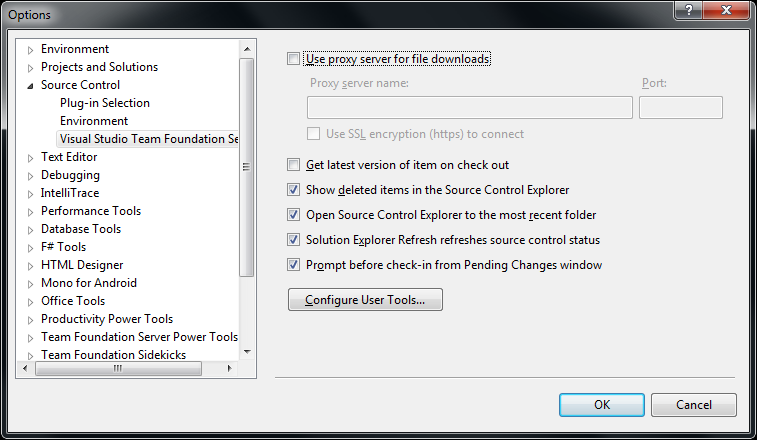
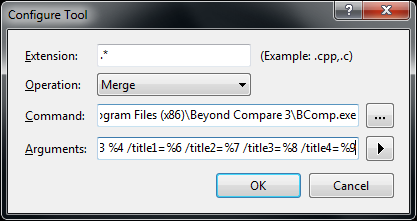
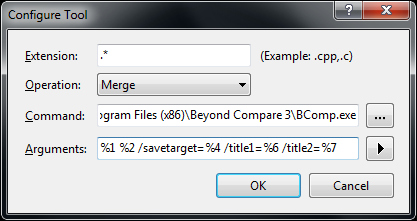
The first two pictures on the right show common steps for all three integrations. The images below are the specific ones for each integration. You can click on each image to view a larger version.
The steps work with the full version of Visual Studio and the Team Explorer edition of Visual Studio.
You can find different arguments for other tools on this excellent diff/merge configuration in Team Foundation – common Command and Argument values post by James Manning.
Adding diff/compare support to Visual Studio
 In Visual Studio Choose Options from the Tools menu.
- Expand Source Control in the treeview.
- Click Visual Studio Team Foundation Server in the treeview.
- Click the Configure User Tools button.
- Click the Add button.
- Enter “.*” in the Extension edit.
- Choose
Compare in the Operation combobox.
- Enter the
path to BComp.exe in the Command edit.
- In the Arguments edit, use:
%1 %2 /title1=%6 /title2=%7
- Then press OK, then OK, then OK
Adding 3-way Merge to Visual Studio
You need Beyond Compare version 3 Professional for this.
(note: only the steps marked with * are different from above)
 In Visual Studio Choose Options from the Tools menu.
- Expand Source Control in the treeview.
- Click Visual Studio Team Foundation Server in the treeview.
- Click the Configure User Tools button.
- Click the Add button.
- Enter “.*” in the Extension edit.
- * Choose
Merge in the Operation combobox.
- Enter the
path to BComp.exe in the Command edit.
- * In the Arguments edit, use:
%1 %2 %3 %4 /title1=%6 /title2=%7 /title3=%8 /title4=%9
- Then press OK, then OK, then OK
Adding 2-way Merge to Visual Studio
This is for Beyond Compare version 2, and Beyond Compare version 3 Standard.
(note: only the step marked with * is different from above)
 In Visual Studio Choose Options from the Tools menu.
- Expand Source Control in the treeview.
- Click Visual Studio Team Foundation Server in the treeview.
- Click the Configure User Tools button.
- Click the Add button.
- Enter “.*” in the Extension edit.
- Choose
Merge in the Operation combobox.
- Enter the
path to BComp.exe in the Command edit.
- * In the Arguments edit, use:
%1 %2 /savetarget=%4 /title1=%6 /title2=%7
- Then press OK, then OK, then OK
To summarize, the differences
Functionality
|
entry in
Operation combobox
|
content of
Arguments edit
|
Beyond Compare
version/edition |
| diff/merge |
Compare |
%1 %2 /title1=%6 /title2=%7 |
any version/edition |
| 3-ware compare |
Merge |
%1 %2 %3 %4 /title1=%6 /title2=%7 /title3=%8 /title4=%9 |
3/Professional |
| 2-way compare |
Merge |
%1 %2 /savetarget=%4 /title1=%6 /title2=%7 |
2 or 3/Standard |
Hope this helps a few people.
–jeroen
via:
Posted in .NET, Beyond Compare, Development, Power User, Software Development, Visual Studio 11, Visual Studio 2002, Visual Studio 2003, Visual Studio 2005, Visual Studio 2008, Visual Studio 2010, Visual Studio and tools | Leave a Comment »
Posted by jpluimers on 2013/01/30
Just in case you wonder about Property using Generics in Delphi, they are not possible.
Thanks David for mentioning it, Hallvard for mentioning it even earlier and Rudy for confirming it.
These are supported with Generics in Delphi:
All of the supported aspects are linked to articles from excellent authors. There is far more on the internet about Delphi and Generics, but those are a good start.
Thanks Malcolm, Phil, Barry, Hallvard, Jolyon and many others for posting all those articles!
Note that this is not possible in C# either, Julian Bucknall organized a chat and explains why, but there is a workaround which I might try to port to Delphi in the future.
–jeroen
via: Property using Generics in Delphi – Stack Overflow.
Posted in .NET, .NET 2.0, .NET 3.0, .NET 3.5, .NET 4.0, .NET 4.5, C#, C# 2.0, C# 3.0, C# 4.0, C# 5.0, Delphi, Delphi 2009, Delphi 2010, Delphi XE, Delphi XE2, Delphi XE3, Development, Software Development | 3 Comments »
Posted by jpluimers on 2013/01/28
A quick and easy way of getting the CurrentCulture and CurrentUICulture is to use the get-host cmdlet from PowerShell.
This is what PowerShell 2.0 shows on my system:
C:\Users\jeroenp>powershell get-host

Name             : ConsoleHost
Version          : 2.0
InstanceId       : 1ce173fb-70a7-403b-a2bd-3800fe740f7c
UI               : System.Management.Automation.Internal.Host.InternalHostUserInterface
CurrentCulture   : en-IE
CurrentUICulture : en-US
PrivateData      : Microsoft.PowerShell.ConsoleHost+ConsoleColorProxy
IsRunspacePushed : False
Runspace         : System.Management.Automation.Runspaces.LocalRunspace
The SeaTools from Seagate can’t cope with that because they don’t manage the Resource Fallback Process properly.
My machine is on en-IE, as it is English, and USA as location.
The main advantage for me is to use the that it is a good mix between English and Dutch settings:
- English language (so you get proper error messages that you can find back using Google)
- USA as location (to force more search engines to use .com domains)
- EUR money settings (most software in Western Europe expects EUR, but displays USD when using en-US)
- decimal dot (far easier import/export with non-Dutch stuff)
- DD/MM/YYYY date format (I tried ISO 8601 YYYYMMDD, but that breaks too much software)
- 24 hour clock format (just as it should be)
- comma list separator (too much software is not configurable to use a certain separator for CSV, especially Excel depends on the system settings for list separator and decimal)
- metric system (just as it should be)
–jeroen
via: Get-Host.
Posted in .NET, CSV, Development, Excel, ISO 8601, Office, Power User, PowerShell, Scripting, Software Development | Leave a Comment »
Posted by jpluimers on 2013/01/24
During code reviews, I often see people do things like this:
if (!Directory.Exists(directoryPath))
    Directory.CreateDirectory(directoryPath);
or this:
DirectoryInfo directoryInfo = new DirectoryInfo(directoryPath);
if (!directoryInfo.Exists)
    directoryInfo.Create();
You don’t need the if statements here. Read the rest of this entry »
Posted in .NET, .NET 1.x, .NET 2.0, .NET 3.0, .NET 3.5, .NET 4.0, .NET 4.5, C#, C# 1.0, C# 2.0, C# 3.0, C# 4.0, C# 5.0, Development, Software Development | 1 Comment »
Posted by jpluimers on 2013/01/23
A while ago I found myself in .NET Assembly hell.
I inherited a bunch of interdependent .NET projects with no clear build instructions that were halfway ported between .NET 1.x and 4.x had various binaries here and there, a mix of of imported Office COM libraries and PIAs, links to various source code and binary versions 3rd party libraries like Microsoft Enterprise Library (which is very unforgiving when you get configuration wrong, and – because it uses dynamic loading and the version used was from before MEF – is painfully hard to track down wrong types and assemblies).
Basically the right assemblies got into the wrong places, the wrong assemblies in the right places, and a version mix up all over the place.
All in all it was a mess, and I was in .NET assembly hell.
It was a tedious and painful process to solve, so below are a few tips, links to posts and tools that helped me getting this solved. Read the rest of this entry »
Posted in .NET, .NET 1.x, .NET 4.0, Development, Software Development | Leave a Comment »
Posted by jpluimers on 2013/01/22
I normally don’t do much VBScript stuff, but sometimes I have to, and these tips helped me big time:
–jeroen
This was the script in question (mimicked a bit after Prnmngr.vbs): Read the rest of this entry »
Posted in Development, Scripting, Software Development, VBScript, Visual Studio 11, Visual Studio 2005, Visual Studio 2008, Visual Studio 2010, Visual Studio and tools | Leave a Comment »
Posted by jpluimers on 2013/01/17
Too bad the new StackOverflow rules actively discourage the kind of open questions like “c# – What are your thoughts on Raven DB?“.
They are being closed as “not constructive by casperOne♦ Nov 29 ’11 at 5:25”, which is a shame as these kinds of questions often reveal very valuable and balanced answers.
Right now I’m resarching what RavenDB could mean for storing documents. And yes, I know about the RavenDB licensing model: free for open source, pay for commercial use.
–jeroen
via: c# – What are your thoughts on Raven DB? – Stack Overflow.
Posted in .NET, C#, C# 4.0, C# 5.0, Database Development, Development, Pingback, Software Development, Stackoverflow | Leave a Comment »
Posted by jpluimers on 2013/01/16
Thanks to Danny Thorpe and John Skeet, I learned something about C# initialization order.
I knew there were differences between declarations having their initial value set at the point of declaration, and inside a constructor, but not about all of them.
So I observed the initialization order while stepping through code, but the virtual method behaviour was new to me.
Thanks Blaz Art for asking this at SO.
Danny Thorpe: Read the rest of this entry »
Posted in .NET, C#, C# 1.0, C# 2.0, C# 3.0, C# 4.0, C# 5.0, Development, Jon Skeet, Software Development | Leave a Comment »





 The Wiert Corner - irregular stream of stuff